

The Mi Temperature and Humidity Monitor 2 offers a history feature that records daily, monthly, and half-year temperature and humidity data. This allows users to track trends, monitor changes, and identify potential issues in their indoor environment over time. With access to historical records, users can make informed decisions to maintain optimal comfort and health conditions, enhancing their ability to manage their indoor environment effectively.
To check the daily/monthly/half-year temperature and humidity records for Mi Temperature and Humidity Monitor 2, please follow the steps below:
1. Open [Xiaomi Home] app;
2. Select [Mi Temperature and Humidity Monitor 2];
3. Go to [History];
4. You may check the history for [Day]; [Month]; or [6 Months] by tap in to the specific selection.
Note:
1. Tapping on [Day] will display the temperature and humidity history recorded for today;
2. Tapping on [Month] will display the temperature and humidity history recorded for the current month to date;
3. Tapping on [6 Months] will display the temperature and humidity history recorded for the past six months to date.
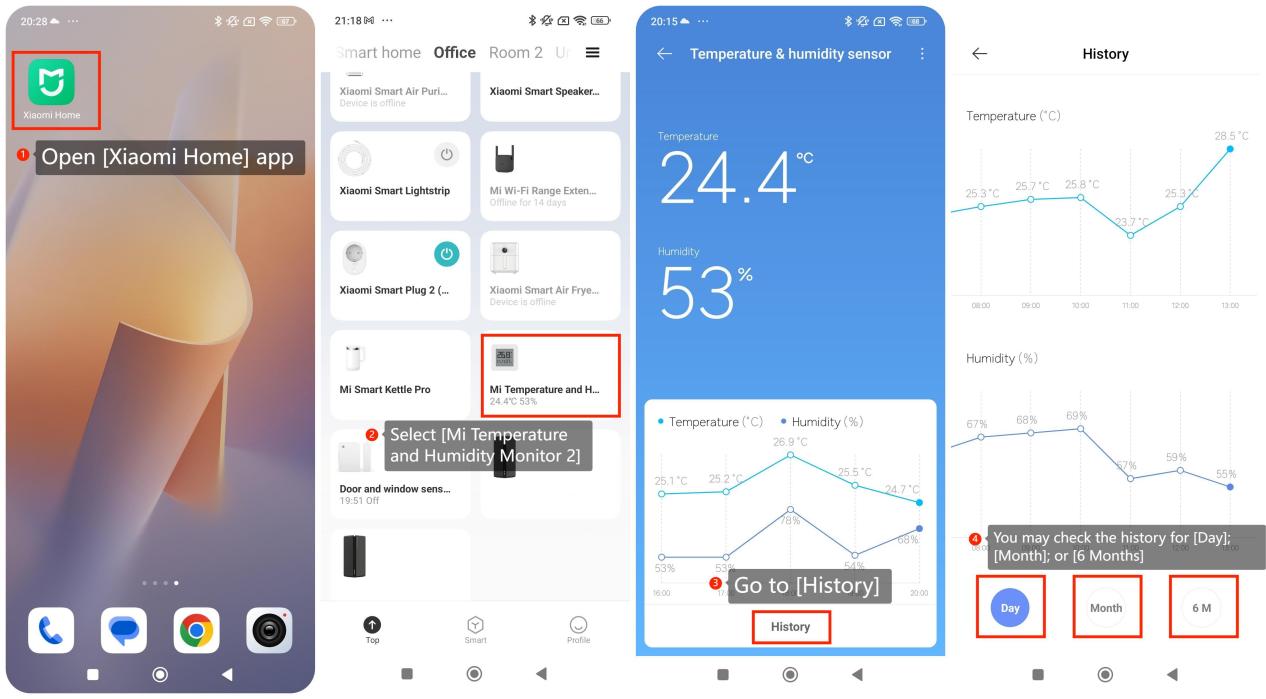
To check the daily/monthly/half-year temperature and humidity records for Mi Temperature and Humidity Monitor 2, please follow the steps below:
1. Open [Xiaomi Home] app;
2. Select [Mi Temperature and Humidity Monitor 2];
3. Go to [History];
4. You may check the history for [Day]; [Month]; or [6 Months] by tap in to the specific selection.
Note:
1. Tapping on [Day] will display the temperature and humidity history recorded for today;
2. Tapping on [Month] will display the temperature and humidity history recorded for the current month to date;
3. Tapping on [6 Months] will display the temperature and humidity history recorded for the past six months to date.