

Xiaomi 12T supports the "Connect automatically" feature for Wi-Fi networks which allows your phone to automatically connect to the network whenever it's within range and available. This is particularly useful for networks you use regularly, such as your home or workplace Wi-Fi. It eliminates the need to manually select and enter a password each time you connect.
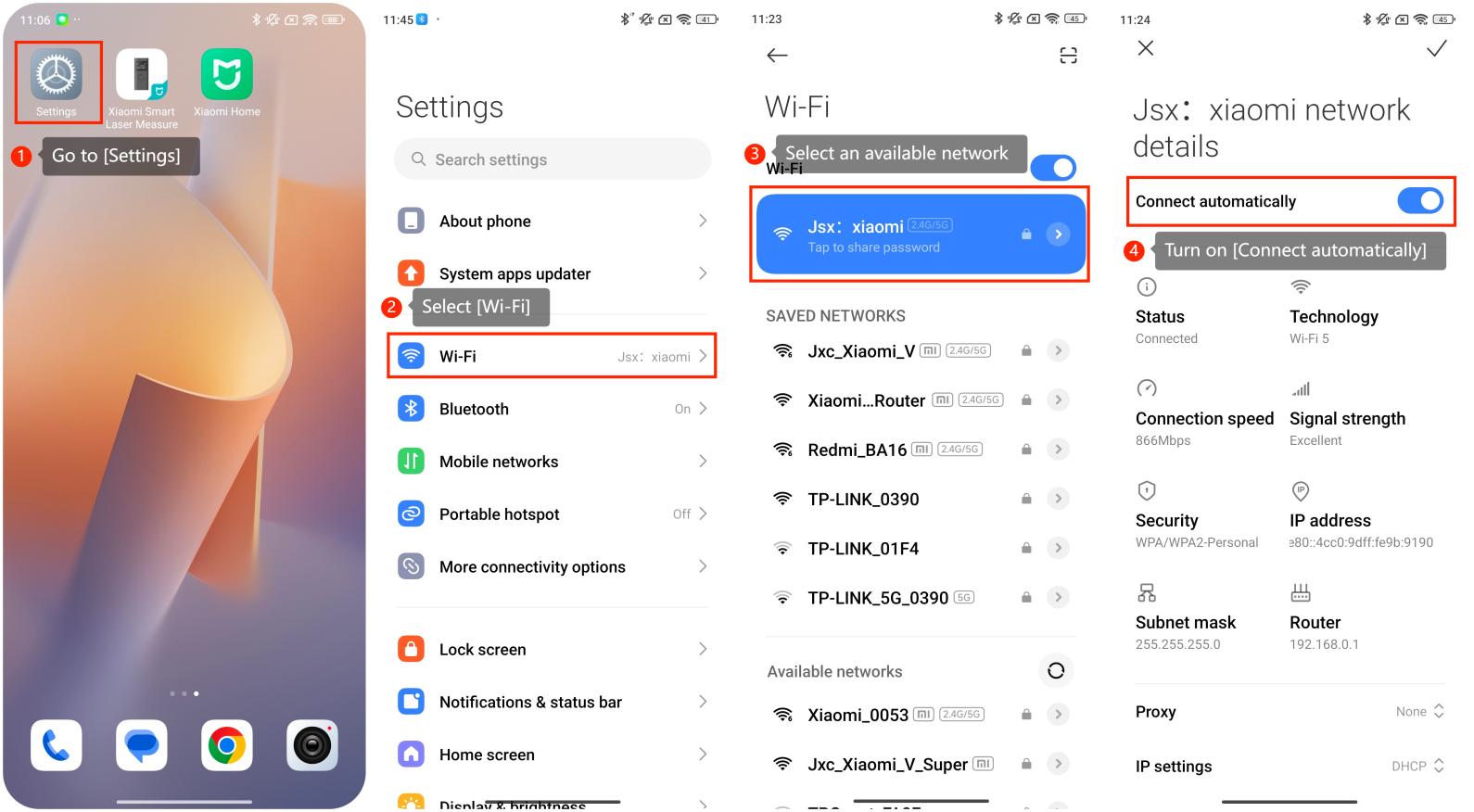
To make it convenient for you to use the Wi-Fi network, here are some steps to turn on the [Connect automatically] on your phone with Xiaomi HyperOS:
1. Go to [Settings] on your phone. You can usually find it on the home screen or in the app drawer;
2. Select [Wi-Fi];
3. You can select an available network on this interface;
4. You should see an option called [Connect automatically]. Toggle this option to enable automatic connection.
To make it convenient for you to use the Wi-Fi network, here are some steps to turn on the [Connect automatically] on your phone with Xiaomi HyperOS:
1. Go to [Settings] on your phone. You can usually find it on the home screen or in the app drawer;
2. Select [Wi-Fi];
3. You can select an available network on this interface;
4. You should see an option called [Connect automatically]. Toggle this option to enable automatic connection.