
How to set Home surveillance on the Xiaomi Smart Camera C301?
To set Home surveillance on the camera, please refer to the following steps:
1. Open the Mi Home/Xiaomi Home APP;
2. Tap on [Device Card];
3. Tap the three-dot icon at the upper right corner;
4. Select [Home surveillance settings];
5. Turn on [Home surveillance].
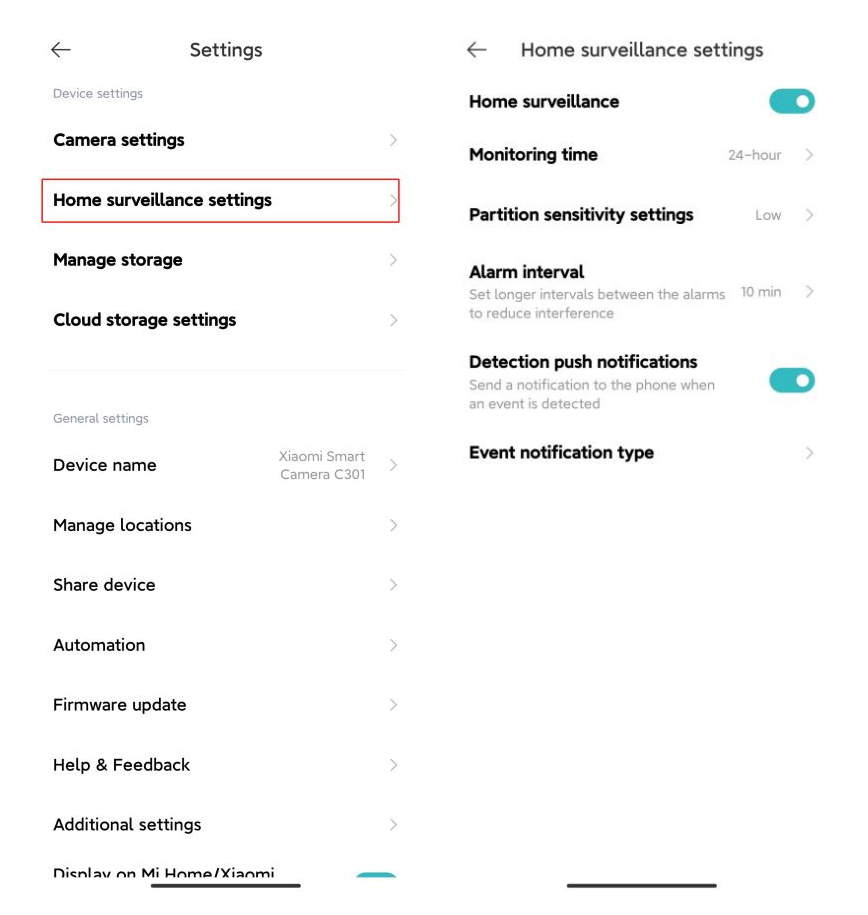
For your reference, here are the functions of each option on the interface of Home surveillance:
1. You can set up an all-day monitor or specific periods in the [Monitoring time] option;
2. You can select [High], [Medium], and [Low] in the [Partition sensitivity settings] option;
3. In the [Alarm interval] option, there are four intervals: [3 min], [5 min], [10 min], and [30 min] (You can choose the preset time interval, which cannot be customized);
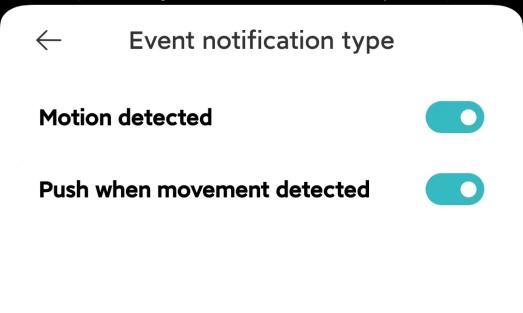
4. The [Event notification type] is divided into two types: [Motion detected] and [Push when movement detected]. If [Detection push notifications] is turned off, no relevant push message will be received.
Note:
The videos in the Home surveillance can not be deleted in batches.
1. Open the Mi Home/Xiaomi Home APP;
2. Tap on [Device Card];
3. Tap the three-dot icon at the upper right corner;
4. Select [Home surveillance settings];
5. Turn on [Home surveillance].
For your reference, here are the functions of each option on the interface of Home surveillance:
1. You can set up an all-day monitor or specific periods in the [Monitoring time] option;
2. You can select [High], [Medium], and [Low] in the [Partition sensitivity settings] option;
3. In the [Alarm interval] option, there are four intervals: [3 min], [5 min], [10 min], and [30 min] (You can choose the preset time interval, which cannot be customized);
4. The [Event notification type] is divided into two types: [Motion detected] and [Push when movement detected]. If [Detection push notifications] is turned off, no relevant push message will be received.
Note:
The videos in the Home surveillance can not be deleted in batches.
Does it help?
Yes
No