
What are the functions of the icons on the real-time monitoring interface of the Xiaomi Smart Camera C301?
The real-time monitoring interface has many functional icons, including Physical lens blocking, Mute, Definition, Full-screen, Call, Photography, Picture recording and PTZ (Pan/Tilt/Zoom, controlling the camera remotely). The icons on the real-time monitoring interface will appear when you tap the interface.
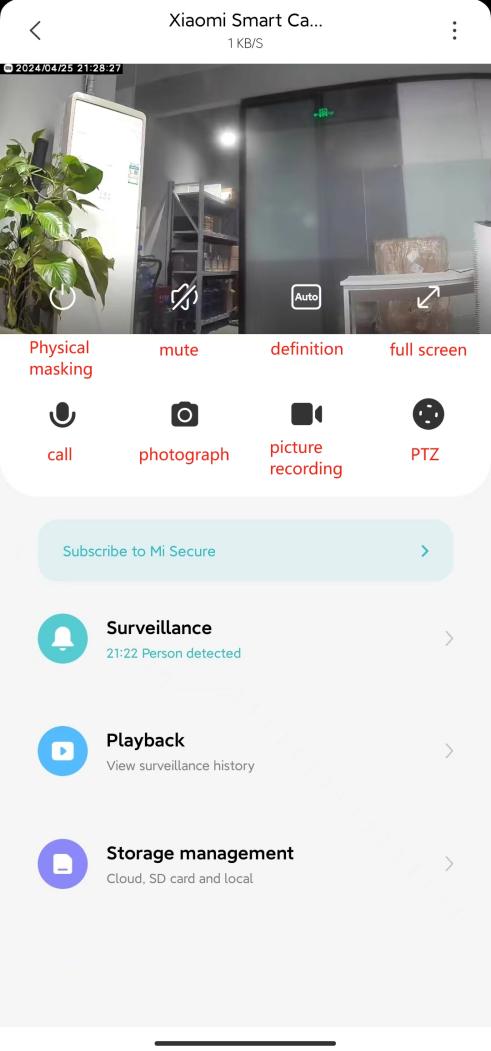
For your reference, each icon’s function is shown as follows:
1. Tap the Physical lens blocking icon, and the camera will enter the physical shielding state. After the camera enters the physical shielding state, it can not do any work of monitoring or video recording;
2. When entering the camera, the video sound is turned off by default and is in the mute state. Tap the Mute icon to turn on the video sound if you need to;
3. Video resolution can be adjusted by tapping the Definition icon with three options: [Auto], [480p], and [2K HD]. The option of Auto indicates that the camera will automatically adjust the picture definition according to the network environment;
4. Tap the Full screen icon, and the camera monitoring interface will enter the landscape screen;
5. After tapping the Call icon, you can make a remote call with the camera through the Mi Home/Xiaomi Home APP;
6. You can take a screenshot of the current monitoring interface by tapping the Photograph icon The picture will be generated and saved to the local photo album and Mi Home/Xiaomi Home APP;
7. Tap the Picture recording icon to record the current monitoring interface and save the video to the local photo album and Mi Home/Xiaomi Home APP;
8. By tapping the PTZ icon, a gimbal control interface will pop up, allowing you to control the camera's movement.
For your reference, each icon’s function is shown as follows:
1. Tap the Physical lens blocking icon, and the camera will enter the physical shielding state. After the camera enters the physical shielding state, it can not do any work of monitoring or video recording;
2. When entering the camera, the video sound is turned off by default and is in the mute state. Tap the Mute icon to turn on the video sound if you need to;
3. Video resolution can be adjusted by tapping the Definition icon with three options: [Auto], [480p], and [2K HD]. The option of Auto indicates that the camera will automatically adjust the picture definition according to the network environment;
4. Tap the Full screen icon, and the camera monitoring interface will enter the landscape screen;
5. After tapping the Call icon, you can make a remote call with the camera through the Mi Home/Xiaomi Home APP;
6. You can take a screenshot of the current monitoring interface by tapping the Photograph icon The picture will be generated and saved to the local photo album and Mi Home/Xiaomi Home APP;
7. Tap the Picture recording icon to record the current monitoring interface and save the video to the local photo album and Mi Home/Xiaomi Home APP;
8. By tapping the PTZ icon, a gimbal control interface will pop up, allowing you to control the camera's movement.
Does it help?
Yes
No