
How to reboot the Xiaomi Smart Camera C301?
If the device is unable to record videos or upload the videos to Cloud storage, or if other features like Home surveillance are malfunctioning, you can try restarting the device.
To reboot your camera, please refer to the following steps:
1. Open the Mi Home/Xiaomi Home APP;
2. Tap on [Device Card];
3. Tap the three-dot icon at the upper right corner;
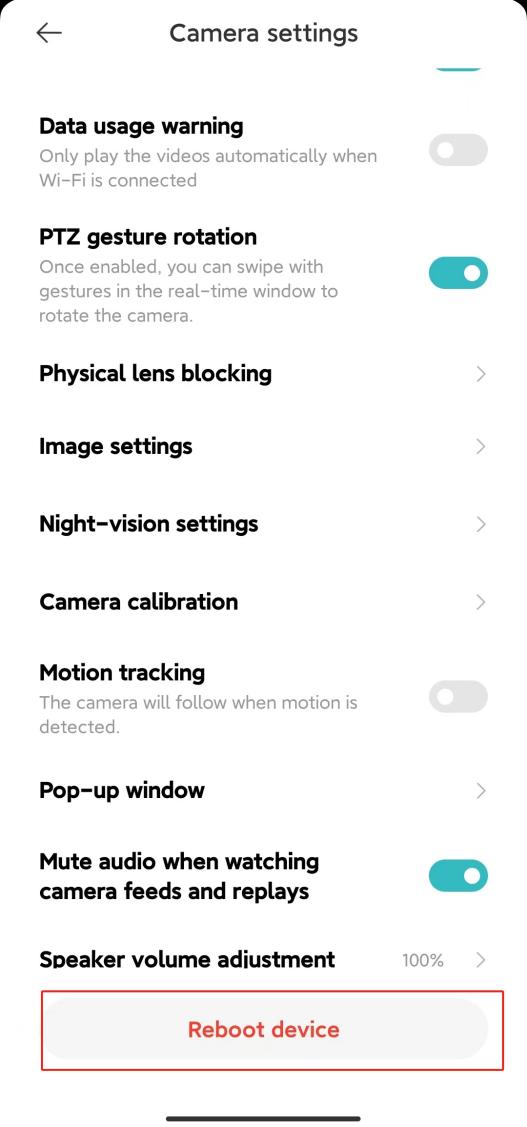
4. Select [Camera settings];
5. Tap [Reboot device].
To reboot your camera, please refer to the following steps:
1. Open the Mi Home/Xiaomi Home APP;
2. Tap on [Device Card];
3. Tap the three-dot icon at the upper right corner;
4. Select [Camera settings];
5. Tap [Reboot device].
Does it help?
Yes
No