
How to clean the dust compartment assembly of the Xiaomi Dust Mite Vacuum Cleaner?
The steps to clean the dust compartment are as follows:
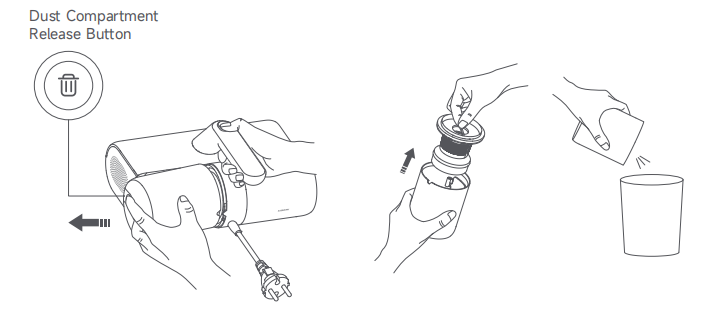
1. Press and hold the Dust Compartment Release Button and simultaneously pull it backward to remove the dust compartment assembly;
2. Above the trash can, lift the cyclone separator assembly, pour out the garbage in the dust compartment, and clean the dust on the surface of the cyclone separator assembly;
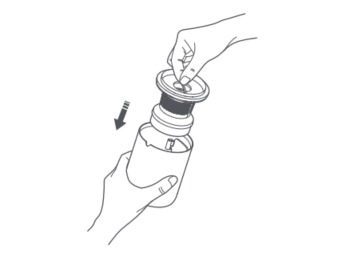
3. After cleaning the garbage, install the cyclone separator assembly back into the dust compartment;
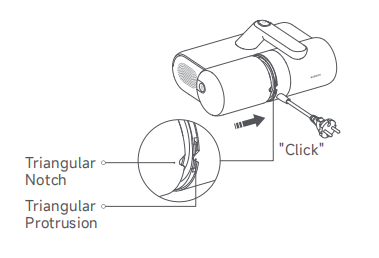
4. Align the triangular notch of the dust compartment assembly with the triangular protrusion on the dust mite vacuum cleaner, then push the dust compartment assembly into the vacuum cleaner. It is properly installed when you hear a "click".
If suction decreases, wash the dust compartment assembly promptly to regain the mite removal performance and prevent blockage from the air duct that causes the dust mite vacuum cleaner to shut down.
Here are the steps to wash the dust compartment:
1. Remove the dust compartment assembly, and take out the cyclone separator assembly. Hold the Filter Bracket and rotate the cyclone separator counterclockwise to remove it;
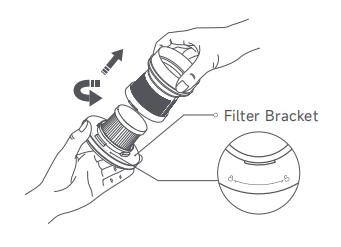
2. Rotate the filter counterclockwise to remove it;
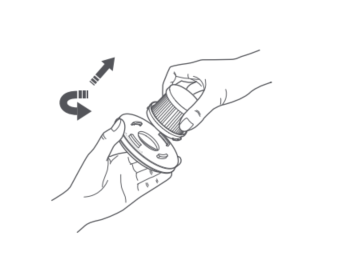
3. Clean the surfaces of the dust compartment, cyclone separator, filter, and filter bracket, rinse them with clean tap water, and then air-dry them thoroughly;
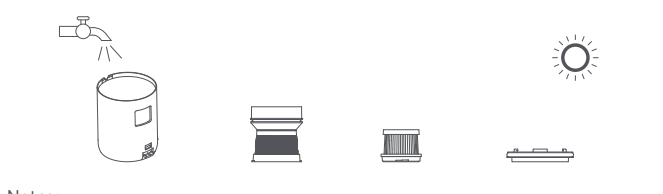
4. After cleaning and fully drying, reinstall the filter and cyclone separator into the filter bracket clockwise in order. Then place the cyclone separator assembly into the dust compartment and press it firmly;
5. Reinstall the dust compartment assembly back into the dust mite vacuum cleaner.
Note:
1. It is recommended to wash and clean the filter every 5-6 times of vacuuming, or you can change the cleaning frequency as needed;
2. It is recommended to replace the filter every 2-3 months to ensure optimal vacuuming performance;
3. Rinse the filter and the air inlet filter cotton with clean water. To prevent damage, do not rub, scrub, or wash them with your hands or any sharp objects such as brushes;
4. After rinsing, be sure to thoroughly air-dry the components (away from direct sunlight) before re-installation.
To clean the suction inlets on the device, please refer to the following steps:
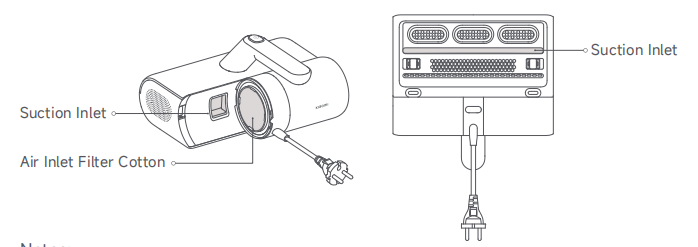
1. Remove the dust compartment assembly and flip the dust mite vacuum cleaner. There are two suction inlets: one at the bottom and the other one on the dust compartment;
2. Use a dry cloth or tissue to clean the dust from these inlets.
Note:
1. It is normal for dust and other particles to adhere to the two suction inlets. Please clean them regularly;
2. The function of the air inlet filter cotton is filtration. Please do not discard it.
1. Press and hold the Dust Compartment Release Button and simultaneously pull it backward to remove the dust compartment assembly;
2. Above the trash can, lift the cyclone separator assembly, pour out the garbage in the dust compartment, and clean the dust on the surface of the cyclone separator assembly;
3. After cleaning the garbage, install the cyclone separator assembly back into the dust compartment;
4. Align the triangular notch of the dust compartment assembly with the triangular protrusion on the dust mite vacuum cleaner, then push the dust compartment assembly into the vacuum cleaner. It is properly installed when you hear a "click".
If suction decreases, wash the dust compartment assembly promptly to regain the mite removal performance and prevent blockage from the air duct that causes the dust mite vacuum cleaner to shut down.
Here are the steps to wash the dust compartment:
1. Remove the dust compartment assembly, and take out the cyclone separator assembly. Hold the Filter Bracket and rotate the cyclone separator counterclockwise to remove it;
2. Rotate the filter counterclockwise to remove it;
3. Clean the surfaces of the dust compartment, cyclone separator, filter, and filter bracket, rinse them with clean tap water, and then air-dry them thoroughly;
4. After cleaning and fully drying, reinstall the filter and cyclone separator into the filter bracket clockwise in order. Then place the cyclone separator assembly into the dust compartment and press it firmly;
5. Reinstall the dust compartment assembly back into the dust mite vacuum cleaner.
Note:
1. It is recommended to wash and clean the filter every 5-6 times of vacuuming, or you can change the cleaning frequency as needed;
2. It is recommended to replace the filter every 2-3 months to ensure optimal vacuuming performance;
3. Rinse the filter and the air inlet filter cotton with clean water. To prevent damage, do not rub, scrub, or wash them with your hands or any sharp objects such as brushes;
4. After rinsing, be sure to thoroughly air-dry the components (away from direct sunlight) before re-installation.
To clean the suction inlets on the device, please refer to the following steps:
1. Remove the dust compartment assembly and flip the dust mite vacuum cleaner. There are two suction inlets: one at the bottom and the other one on the dust compartment;
2. Use a dry cloth or tissue to clean the dust from these inlets.
Note:
1. It is normal for dust and other particles to adhere to the two suction inlets. Please clean them regularly;
2. The function of the air inlet filter cotton is filtration. Please do not discard it.
Does it help?
Yes
No