
How to connect the Xiaomi Outdoor Camera BW500 to the Mi Home APP?
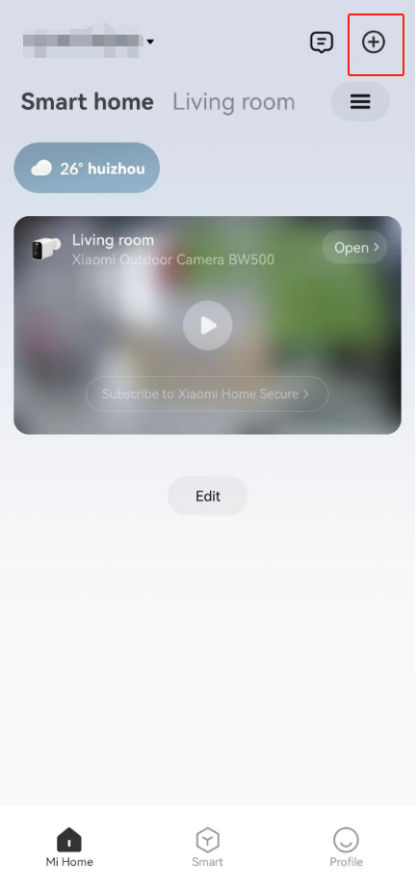
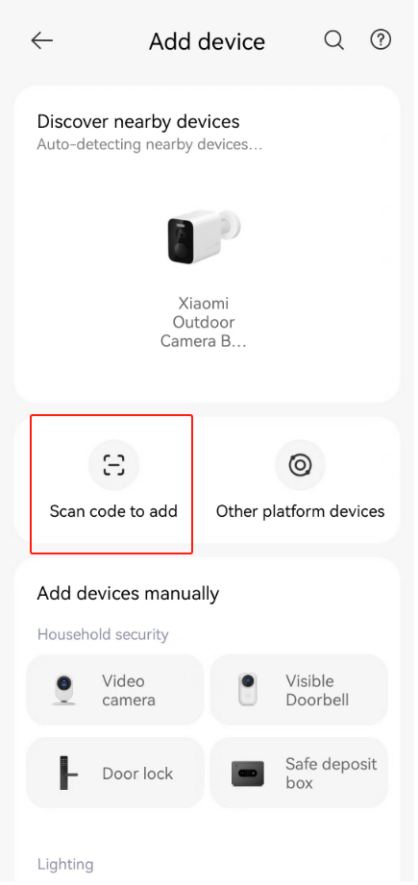
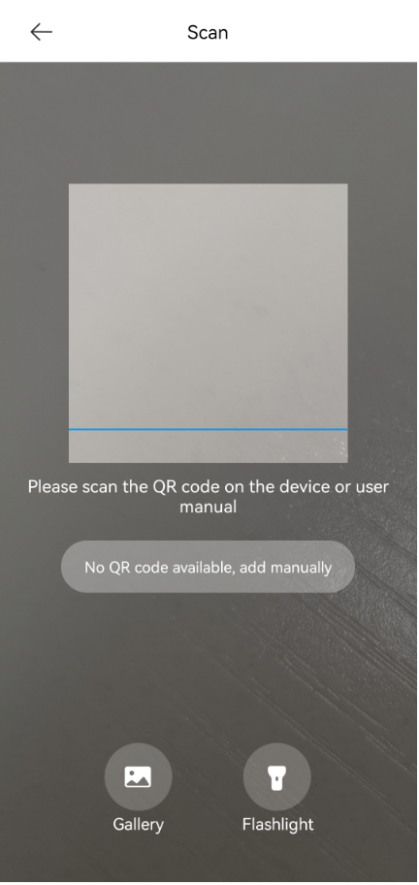
To connect the Xiaomi Outdoor Camera BW500 to the Mi Home APP, please go to the [Mi Home] APP >> tap on the [+] icon at the upper right corner >> tap [Add Device], you can search for the nearby device to bind (the camera needs to be in the state of being bound). If no nearby device is found, tap [Scan code to add] >> follow the prompts >> wait for a while until the connection process is completed.
Note:
1. It only supports the connection to 2.4GHz Wi-Fi, but not support 5GHz Wi-Fi;
2. Due to the update of the Mi Home APP, the actual operation will be slightly different from the above description. Please follow the current instructions in the Mi Home APP;
3. The Xiaomi Outdoor Camera BW500 does not support HomeKit access.
Note:
1. It only supports the connection to 2.4GHz Wi-Fi, but not support 5GHz Wi-Fi;
2. Due to the update of the Mi Home APP, the actual operation will be slightly different from the above description. Please follow the current instructions in the Mi Home APP;
3. The Xiaomi Outdoor Camera BW500 does not support HomeKit access.
Does it help?
Yes
No