
Xiaomi Robot Vacuum E10 FAQ
Overview
1. Q: What are the features of the Xiaomi Robot Vacuum E10?
A:
1.4000Pa powerful suction fan blower;
2.Multi-directional assisted cleaning;
3.Measured water discharge for controlled mopping;
4.The built-in sensors provide flexibility to handle complex home environments and ensure worry-free cleaning.
2. Q: How do I use the Xiaomi Robot Vacuum E10 keys?
A:On key:Long press for 3 seconds to turn on or off; short press to start or pause;
Recharge key: in running, short press main unit to pause; in pause, short press to start re-charge; in re-charge, short press to stop re-charge.
3.Q: What is the status of the Xiaomi Robot Vacuum E10 indicator?
A:
Yellow light is always on: WiFi is not connected
Yellow light breathing: charging (power below 15%)
Flashing yellow light: low battery / abnormal status / WiFi waiting for connection
Blue light blinking: WiFi disconnected when fully charged
White light always on: power on completed/working normally/charging completed/WiFi connected
White light breathing: charging (power above 15%) / firmware refreshing
White flashing: charging back (above 15%)
4.Q: What sensors does the Xiaomi Robot Vacuum E10 have?
A:Gyroscope ×1, wall sensor ×3, recharge receiving sensor ×3, anti-collision sensor ×2, cliff sensor ×3, 2-in-1 water tank and dust container detection sensor ×1, pad detection sensor ×1, black and white wheel detection sensor ×1, wheel speed feedback sensor ×2.
5. Q: How can I check the SN of Xiaomi Robot Vacuum E10?
A: The SN of Xiaomi Robot Vacuum E10 is at the bottom of the main unit and the bottom of the base station.
Product introduction and use
1.Q: Can I use the Xiaomi Robot Vacuum E10 directly after unpacking?
A:A: Yes. It is recommended to familiarize yourself with the Robot Vacuum and make sure the package is not missing and functions properly. For the first time use, please put the main unit against the charging stand and align the charging poles with the charging tabs. First let the sweeper fully charged from the charging base to sweep, full charge time in about 4.5 hours. Daily use, you can directly press the recharge button to start recharging.
2.Q: What mode should I select for the first time using Xiaomi Robot Vacuum E10?
A:Prefer clean mode. when there is a lot of dust and debris in the home, do not install the wipe and water tank for the first time. choose clean mode to complete the global cleaning and then install the mop and water tank to choose sweep mode.
3.Q: How does the Xiaomi Robot Vacuum E10 standby after completing a task?
A:After the task is completed, it is recommended to let the device return to Charging dock to charge and standby to make sure the battery is fully charged. If not on Charging dock standby, to avoid device power consumption, you can manually long press the power button to turn off the device and standby. (The device will automatically turn off during long standby time when it is out of the charging cradle. (It is normal that the device will automatically shut down during the standby time.)
4. Q:Why is there water stains in the water tank of the Xiaomi Robot Vacuum E10?
A:
1. water tank has a small amount of water stains in the water tank, is a normal phenomenon, does not affect the normal use of water tank. water tank in the factory will be filled with water testing, qualified before packaging factory.
2. Install the water tank mopping and cleaning can be filled with water, water tank, please do not add cleaning liquid and other items.
5. Q: What should I do if the Xiaomi Robot Vacuum E10 Side brush gets tangled?
A:If the Side brush is tangled, please clean the tangled objects and check if the Side brush is damaged. When cleaning again, you can first clean up the tangled items on the ground, such as wool, thin rope, etc.
6. Q:Why does the Xiaomi Robot Vacuum E10 not shut down on Charging dock?
A:Robot Vacuum will always be in standby mode when charging on Charging dock, if you want to turn it off, you need to leave Charging dock and press and hold the On button for 3 seconds to finish turning it off.
7. Q:What comes standard with Xiaomi Robot Vacuum E10?
A:Main unit×1
Main brush×1
(Pre-installed on main unit)
2-in-1 water tank and dust container×1(Can be used in either vacuum or mop mode)
Side brush×1,Brush cover×1(Pre-installed on main unit),Pad×1(Pre-installed on the mop frame),Mop frame ×1,Power adapter ×1,Charging dock ×1,Cleaning brush ×1(On the 2-in-1 water tank and dust container),User manual ×1
8. Q:What life scenarios can Xiaomi Robot Vacuum E10 be used in?
A:This product is only used for floor cleaning in home environment, please do not use it in outdoor, non-ground, commercial or industrial environment, it may produce Do not use in outdoor, non-floor, commercial or industrial environments as this may result in equipment failure, loss, etc.
9. Q:How to use Xiaomi Robot Vacuum E102-in-1 water tank and dust container?
A:The dust container is for clean mode; the 2-in-1 water tank is for sweeping and mopping mode. When you don't need to mop but only sweep the floor, both of them can be used. If you need to sweep and mop both floors, choose 2-in-1 water tank.
10.Q:How to place Xiaomi Robot Vacuum E10Charging dock?
A:
1、Place Charging dock against the wall and connect the power cord.
2、Do not place Charging dock in direct sunlight;
3、Make sure there is more than 1.5m in front of Charging dock and more than 0.5m space on both sides;
4, pay attention to the power cord, otherwise it may be dragged by the sweeping and dragging robot, causing Charging dock displacement or power failure.
11. Q:How to switch on and off Xiaomi Robot Vacuum E10?
A:Press and hold the power on button for 3 seconds, the indicator light will be on and the main unit will power on. When the main unit is not charging and paused, press and hold the power on button for 3 seconds to turn off the power.
Tip: main unit will turn on automatically when it is charging and cannot be turned off.
12. Q:How to charge Xiaomi Robot Vacuum E10 ?
A:Place the main unit manually against the Charging dock, with the charging pole piece aligned with the charging pop-up. In daily use, you can directly start the smart recharge with a short button.
Tips:
When the power is low, it may not turn on, please place the main unit on Charging dock to charge.
The main unit will be automatically turned on after connected to Charging dock, and cannot be turned off during charging.
13. Q:How to install Xiaomi Robot Vacuum E10’s dust containerwater tank or 2-in-1 water tank?
A:Open the cover of the unit, put the dust container into the main unit and make sure the clips are secure.
Push the water tank horizontally into the bottom of the main unit, it will make a "click" sound when it is in place.
14.Q:How do I fill the water tank or 2-in-1 water tank?
A:Open the water tank/2-in-1 water tank cover and fill the 2-in-1 water tank with water. Fasten the 2-in-1 water tank cover when finished.
Tip:
Do not use cleaning agents, disinfectants, solid cleaners, etc. Do not fill with hot water to avoid corrosion and damage to the water tank.
Please clean the filter in the water fill hole regularly.
15. Q:How to install the mop of Xiaomi Robot Vacuum E10?
A:Before each use of the sweeping and mopping function, please wet the mop cloth and wring it out before attaching it to the mop holder. Push it into the bottom of the main unit horizontally in the direction shown, and when you hear a "Ta" sound, it is installed in place.
16. Q:How do I dump the waste in the dust container?
A:1. Open the main unit cover and press and hold the dust container release button to remove the dust container.
2. Open the dust container cover and dump the garbage.
3. Take out the strainer, clean the dust container and strainer with cleaning tools, wash with water, dry and put back in.
17. Q: How to clean the Main brush?
A:1、Flip the main unit, press and hold the two release keys to remove the Main brush cover.
2、Remove the Main brush upward.
3、Use the knife on the cleaning brush to cut off the tangled hairs on the Main brush and clean the Main brush.
4、Put back the Main brush and Main brush cover, and press the Main brush cover into place.
Tip: It is recommended to replace the Main brush every 6-12 months to ensure cleaning effectiveness.
18.Q:How to clean Side brush?
A:1、Turn over the main unit and remove the Side brush fixing screw.
2、Remove and clean the Side brush.
3、Install the Side brush and lock the screws.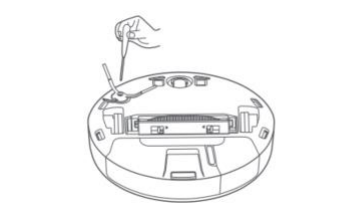
Tip: It is recommended to replace the Side brush every 3-6 months to ensure the cleaning effect.
19. Q:How to clean the gimbal?
A:1、Turn over the main unit and pull out the gimbal upward.
2、Clean the hair and dirt from the gimbal.
3、Reinstall the gimbal. 
19.Q: How do I reset the system on Xiaomi Robot Vacuum E10?
A:Press and hold the recharge button for 5 seconds, hear the "beep" sound, press and hold the recharge button again for 5 seconds, after hearing the voice prompt, the main unit will restart, and the settings related to appointment cleaning and Wi-Fi will be restored to factory settings.
21. Q:Does Xiaomi Robot Vacuum E10 have a water shortage alert or dust container full alert?
A:No.
22.Q:Do I need to remove the water tank mop when charging the Xiaomi Robot Vacuum E10?
A:When charging or not in use, please remove the water tank and mop to prevent soaking the wood floor or creating odor.
23.Q:Can I use stickers with Xiaomi Robot Vacuum E10?
A:When using stickers, please do not cover the LIDAR above the device and the obstacle avoidance sensor and infrared sensor in front of the impact plate, otherwise
Otherwise, it will affect the operation of the device.
24.Q:How does the Xiaomi Robot Vacuum E10 work better with the mopping function?
A:It is recommended to wet and wring the mop first and then use it for more even mopping and higher efficiency.
25.Q:How to create a map with Xiaomi Robot Vacuum E10?
A:1、For the first time use, according to the APP prompt, choose Quick Map or Global Clean, and the APP will automatically save the map after it is finished. map automatically.
2、When you use it in new environment (such as different floors), you can create a new map in Settings>Map List>Create Map of APP plug-in. The maps of different environments can be distinguished by different naming.
When creating a map, pay attention to the following cases:
A. main unit is triggered from Charging dock start, please do not change the position of Charging dock in map building;
B. The new map will be saved after the main unit is automatically recharged, so please do not interrupt or move the main unit during map creation;
C. The presence of highly reflective objects in the environment, such as mirrors, windows and shiny metal, will affect the map building effect.
26. Q:Does Xiaomi Robot Vacuum E10 support water rinsing after getting dirty?
A:Xiaomi Robot Vacuum does not support direct rinsing with water, otherwise it will cause water damage to the internal electronics of the device. It is recommended that after the device is dirty, the Main brush cover, Main brush, Side brush, dust container, water tank, and mop are removed. It is recommended to remove the Main brush cover, Main brush, Side brush, dust container, water tank, mop and other accessories after the device is dirty, and clean the main unit with a damp rag that is wrung until it does not drip.
Mi Home App Related
1.Q:How to reset WiFi on Xiaomi Robot Vacuum E10?
A: If you need to reset the WiFi function after changing the router or WiFi password, please press and hold the power on and recharge button at the same time for 7 seconds under the power on status. After you hear the tone "Reset WiFi, enter network configuration", WiFi reset successfully and you can reconnect.
Tip: Only support WiFi network in 2.4GHz band.Tip: Only support WiFi network in 2.4GHz band.
2. Q:How to build a map quickly with Xiaomi Robot Vacuum E10?
A:The first time you turn on the machine, there is no map in the APP, put the main unit on the Charging dock, select Quick map building in the APP, the Main unit will only build a map without cleaning, after the main unit automatically return to the Charging dock, the map building will be completed and the map will be saved automatically.
Tip: During the map building process, please do not move the sweeper and keep away from children and pets.
2.Q:How does the Xiaomi Robot Vacuum E10 go into sweeping or mopping?
A: In the power-on state, short press " ”, the main unit will automatically enter to sweep or mop the floor according to the installed accessories.
4. Q:How to pause the Xiaomi Robot Vacuum E10?
A:When Main unit is in running state, short press any key to pause and then short press "  to continue sweeping, short press "
  " key will return to the charging stand and end this cleaning.
5. Q:How to recharge Xiaomi Robot Vacuum E10?
A:In the power on state, short press“  ”,Main unit will enter back charging mode; when the main unit cleaning is over, automatically enter back charging mode, the indicator white light flashes; when the main unit cleaning power is too low, will automatically back charging, after sufficient power, automatically return to the interruption point to continue cleaning.
6. Q:How does the Xiaomi Robot Vacuum E10 continue to sweep?
A:This machine has resume from break-point function, cleaning process, low battery automatically find Charging dock charging, charging is completed after the completion of cleaning. If in the charging process artificially end cleaning, will cancel this resume from break-point.
7. Q:Why does Xiaomi Robot Vacuum E10 turn off automatically?
A:When the main unit is not charging, it will automatically enter the hibernation state if it does not run or operate for more than 5 minutes, and will automatically shut down if it is hibernated for more than 6 hours; buttons and APPs can wake up the main unit in the hibernation state.
Tip: The main unit will not enter hibernation when it is on Charging dock.
8. Q:Can Xiaomi Robot Vacuum E10 clean mop with water while cleaning?
A: If the main unit needs to add water or clean the mop during the cleaning process, short press any key to pause, then remove the water tank to add water or clean the mop, after finishing, put back the water tank and mop, short press " " key to continue working.
9.Q:How do I select modes and gears for Xiaomi Robot Vacuum E10?
A:Multiple cleaning modes and water levels can be selected in the Mi Home App
10. Q:What is Do Not Disturb mode?
A:A: During the Do Not Disturb time period, the main unit will not respond to resume from break-point, scheduled cleaning and active voice announcement. Do-not-disturb mode is enabled by factory default and the default time period is from 23:00 p.m. to 9:00 a.m. Do-not-disturb mode can be turned off via Mi Home App.
11. Q:What is the global cleaning function?
A:When the map is not saved, select global cleaning, the main unit will clean the 6m×6m square area by area; after the map is saved in APP, select global cleaning, the main unit will automatically plan the path to clean room by room, and return to Charging dock after the cleaning is finished.
12. Q:What is the Memory Map function?
A:Open the memory map in Mi Home App, and the updated map will be saved automatically after the main unit is cleaned and recharged successfully. After the map is successfully drawn, you can divide and combine areas or customize room names in the APP.
13. Q:What is the edge sweeping function?
A:The main unit automatically recognizes the cleaning area and then cleans along the edge, and the main unit automatically returns to the Charging dock after cleaning.
14. Q:What is the zoning cleaning function?
A:You can set up zoning cleaning in Mi Home App, and the main unit will clean according to the planned area.
Tip:
During cleaning, the main unit may go out of the zoned area, please pay attention to clean the obstacles around the zoned area, this area zoning does not
This area line does not play a role of safety isolation.
15. Q: What is the appointment cleaning function?
A: Using Mi Home App, you can set the appointment cleaning time, and the main unit will start cleaning automatically at the specified time and return to Charging dock automatically at the end of cleaning.
Tip:
If Do Not Disturb mode is enabled, the appointment cleaning will not be executed during the Do Not Disturb time period.
16. Q:What is the Virtual Wall Exclusion Zone feature?
A:Using the Mi Home App, you can set a virtual wall/no-go zone to prohibit the MAIN unit from entering areas that do not need to be cleaned.
Tips:
1. Before using this function, you need to save the map in the APP.
2、Movement of the main unit or significant changes in the home environment may cause the original map to be invalid and the virtual wall/no-go area to be lost.
17. Q:What is the intelligent identification function?
A:This product can automatically identify the bedroom, living room, kitchen, bathroom and other scenes, but also identify the ground material, so as to better perform
It can also recognize the floor material, so that it can perform better cleaning work. In addition, in the Mi Home App, you can also set up functions such as dirt recognition and pet recognition.
18. Q: How many cleaning appointments does Xiaomi Robot Vacuum E10 support?
A:The appointment cleaning supports up to 10 tasks. It is recommended to set a cleaning appointment with an interval of more than 2 hours to ensure that the last cleaning can be completed successfully.
If the interval is too close, the last cleaning may be terminated.
19.Q:Xiaomi Robot Vacuum E10 How many maps does it support?
A:Up to 5 maps.
20. Q:How to rename Xiaomi Robot Vacuum E10’s map?
A:Go to More Settings > Map List > Select the map you want to rename and rename it.
Common problems and troubleshooting
1.Q: Xiaomi Robot Vacuum E10 cannot connect to WiFi. How to solve the problem?
A:1. Confirm whether the WiFi password entered during connection is correct. The WiFi user name cannot contain Chinese characters or password settings contain
Special characters such as @¥%. If so, please reset the account number and password to English or with numbers and letters and try again
try;
2. Check whether the external network connection of the router is normal. You can try to open the web page through your mobile phone or a computer connected to WiFi.
whether it is smooth;
3. Confirm whether the distance between the router and the robot is too far (beyond 5 meters or there is a partition in between), you can try to connect the robot
Move the router within 1~2 meters away from the router and try to reconnect;
4. Try to connect to the mobile phone WiFi hotspot;
5. Check whether the router is connected to more smart devices, causing the network to slow down or the router to not respond. You can restart the router
try;
6. Currently does not support the company's EAP 802.1x authentication network, 5G signal network or public WiFi that requires web page authentication
Network, such as: CMCC, ChinaUnicom, etc., need to switch the network again and try to connect;
7. After the network is turned off, if the device has not been connected to the Internet for more than 1 hour, the WiFi module will turn off the network link function, and at the same time
The WiFi indicator light becomes flashing, and the connection can only be restored after restarting the device;
8. Check whether the mobile phone has restricted the permissions of the App, such as networking, positioning, etc., please allow the permissions and try again;
9. The connection failure may also be related to the mobile phone model. You can try to use other different models of mobile phones to try to connect.
2. Q:How to solve the fault of Xiaomi Robot Vacuum E10 Side brush?
A:If the Side brush does not turn, makes abnormal noise, or falls off, follow the steps below to troubleshoot:
1. Check that the Side brush is installed in place, the buckle is snapped in, and the screw is locked;
2. Check if there is any foreign matter or hair stuck in the side brush position;
3. Check if the side brush hair transplant is stuck in the gap of the battery box cover, try after checking;
4. Check whether the equipment is turning on the medium and long-haired carpet, or in the process of overcoming obstacles, the side sweeping hits the obstacle and then stops, and then it is on the right track.
Normal operation, this situation is a normal phenomenon.
3. Q:How to solve the fault of Xiaomi Robot Vacuum E10 roller brush?
A:Abnormal noise and non-rotation of the scrolling brush follow the steps below to troubleshoot:
1. Check whether the parts at both ends of the roller brush are complete and whether there is any defect.
2. Check whether the roller brush cover is fastened
3. The roller brush is entangled with debris and causes abnormal noise, please clean it in time.
4. Q:What should I do if the roller brush cover of Xiaomi Robot Vacuum E10 cannot be installed?
A:
1. Check whether there are foreign objects (sundries, paper) stuck on the roller brush cover, and remind the user to clean it and try to install it again.
2. Check whether the roller brush is normally stuck on the equipment, remove the middle sweep roller brush and try to install it again.
5. Q:How to solve the problem that the left and right wheels of Xiaomi Robot Vacuum E10 do not turn?
A:The left and right wheels make abnormal noise and do not rotate. Follow the steps below to troubleshoot:
1. Check whether the side wheel is stuck or entangled by foreign objects;
2. Check whether there are detergents or other cleaning products in the water tank, which will cause the ground to be slippery and cause the side wheels to make noise when the equipment is running. You can try to remove the water tank and put it into the dust container;
3. After changing the area of the device, restart and try to clean again.
6. Q:XWhat to do if Xiaomi Robot Vacuum E10 cannot be turned on?
A:1. Check whether the charging dock is powered on normally, whether the indicator light of the charging dock is on normally, and whether the adapter cable is properly inserted into the charging dock inlet.
2. Check whether the charging pole piece of the machine is in normal contact with the charging dock pole piece, whether there is dust or dirt covering it, causing the device to fail to charge and start, clean the pole pieces or move the machine slightly to try to charge.
3. The power of the device is too low. The device needs to be correctly placed on the Charging dock for about 5-10 minutes before it can be turned on normally.
4. The ambient temperature is lower than 0°C or higher than 35°C, return to normal temperature and try again.
7. Q:Xiaomi Robot Vacuum E10 has voice announcement but doesn't work?
A:
1. Long press to power off and then power on again and try again.
2. Put the machine into the distribution network mode. After the machine is successfully connected to the network first, check whether there is a software upgrade prompt, and click the software upgrade.
3. Click the map to reset in the APP, and try to restart the machine after the machine is turned off.
8. Q:How to solve the problem that Xiaomi Robot Vacuum E10 cannot be recharged?
A:
1. There are too many obstacles near the charging dock, please put the charging dock in an open area.
2. The main unit is too far away from the charging dock, please try to put the main unit near the charging dock.
9. Q:Why is the Xiaomi Robot Vacuum E10 grayed out?
A:
1. The dust container is full, please clear the dust container.
2. The filter screen has been blocked, please clean it.
3. The main brush is entangled by foreign matter, please clean the main brush.
10. Q:Why is Xiaomi Robot Vacuum E10 offline?
A:
1. The WiFi signal is not good, please make sure the main unit is in a good WiFi signal coverage area.
2. The WiFi connection is abnormal, reset the WiFi and download the latest APP to try to connect again.
11. Q:Why can't Xiaomi Robot Vacuum E10 resume from break-point?
A:
1. Please confirm that the main unit is not in the Do Not Disturb mode, and the scan will not continue in this mode.
2. Operate the APP to recharge, short press the recharge button, or carry the main unit back to the Charging dock will not continue to scan.
12. Q: What should I do if the Xiaomi Robot Vacuum E10 is scheduled to be cleaned but does not work?
A:
1. Please confirm that the device is connected to the Internet. If the device is not connected to the Internet, the scheduled cleaning tasks cannot be synchronized.
2. Please confirm that the main unit is not in the Do Not Disturb mode, and scheduled cleaning cannot be performed in this mode.
13. Q: Why is Xiaomi Robot Vacuum E10 often offline?
A: Please make sure that the device is configured successfully, and that the charging dock and the device are always within the WiFi coverage.
14.Q: What should I do if the map display of Xiaomi Robot Vacuum E10APP is abnormal and skewed?
A: 1. When the equipment frequently encounters obstacles, it will affect the construction of the map, try to sort out the obstacles;
2. The device is under the bed or sofa, and it is covered by sheets or sofa covers, which will cause the sensor to be blocked and cause map deformation;
3. Moving the position of the machine during the operation of the equipment will cause the misalignment of the equipment positioning and cause the map to deform;
4. Check whether the network is normal;
5. Place the equipment in the middle (not in the aisle), or use a virtual wall to distinguish the cleaning environment.
15. Q:What should I do if the Xiaomi Robot Vacuum E10 creates chaotic and distorted maps?
A:
1. In the APP plug-in Settings > Reset Map, reset the wrong map;
2. In the APP plug-in Settings > Quick Mapping, recreate the map.
Does it help?