
Mi Portable Bluetooth Speaker FAQ
FAQ
1.Q:What are the features of Mi Portable Bluetooth Speaker?
A:1、 The Mi Portable Bluetooth Speaker is small enough to carry in a bag, or hold in the palm of your hand. Each speaker weighs only as much as a Mi 9 Pro mobile phone, so you can take your music anywhere, without feeling weighed down.
2、 The compact yet powerful design of the interior incorporates dual drivers with rare-earth magnets, a Canadian long-fibre diaphragm and a passive radiator allow the Mini to reproduce music with dazzling sound quality for maximum excitement and enjoyment.
3、The Mi Portable Bluetooth Speaker is rated level 5 for dust and water resistance, meaning that the internal components are protected from sweat, rain and dust, so you can feel safe taking it anywhere.
4、 Enjoy up to 10 hours of music on a full charge with the large 2000 mAh battery. USB-C charging port supports up or down plug orientation for faster and easier charging. More power and longer battery life means your music lasts longer when you go out.
5、Enjoy wireless freedom with the integrated Bluetooth 5.0 chip, which ensures compatibility with a wide range of devices, a stable signal, fast transmission speed and powerful interference mitigation.
6、The Mi Portable Bluetooth Speaker supports true wireless stereo connection. This allows you to combine two speakers into a wireless stereo configuration, with the two speakers serving as the right and left sound channels, for a more impressive listening experience.
2.Q:Does the Mi Portable Bluetooth Speaker support indoor use?
A:Yes, it supports.
3.Q:The appearance of Mi Portable Bluetooth Speaker ?
A:
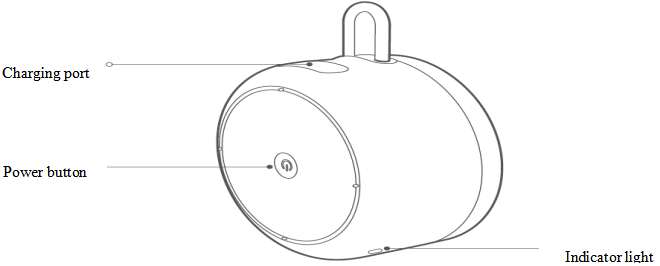
Note:
1. The power button adopts a hidden design and is designed at the bottom of the speaker.
2. The speaker does not have a volume knob, and the volume cannot be adjusted at the speaker end.
4.Q:How to charge Mi Portable Bluetooth Speaker?
A:When the speaker is turned on, when the battery power is low, the orange indicator light flashes, and it needs to be charged in time. After the speaker is connected to the adapter (open the protective cover of the speaker charging port before connecting the adapter), the speaker enters the charging state. When charging in the off state, the orange indicator light will stay on, and the orange indicator light will go out after the charging is complete. When charging in the power-on state, the charging prompt is not displayed.
Note:
1. If you use a power adapter to charge the device, please choose a power adapter that has obtained CCC certification and meets the standard requirements. When charging, the device must not be exposed to water droplets or splashes, and do not place objects filled with liquids such as vases.
Place the product on the device.
2. The speaker will not turn off when it is charging. It supports charging while using, and charging while using will extend the charging time.
3. The rated input voltage/current of the speaker is 5V/1A. It is recommended to use an adapter with a rated output above 5V/1A. Smaller current will affect the charging speed.
5.Q:How to turn on and off the Mi Portable Bluetooth Speaker?
A:The power button of the speaker adopts a hidden design and is designed at the bottom of the speaker. In the shutdown state, press and hold the power button for 2 seconds, the speaker turns on, and the blue indicator light will be on for 1 second with the power-on sound effect. After the first startup, it will automatically enter the waiting state for connection; in the power-on state, press and hold the power button for 2 seconds, the speaker turns off and the indicator light Turn off and accompanied by shutdown sound. Restarting the speaker will not clear the Bluetooth connection record.
Note: Restoring Mi Portable Bluetooth Speaker to its initial state will not delete Bluetooth connection records.
If the speaker has a connection record, press and hold the speaker power button for 2 seconds when the speaker is turned off, and the speaker will automatically reconnect to the most recently connected device after it is turned on. If it cannot reconnect to any connected device, the speaker will enter the waiting state for connection. (If the speaker cannot automatically connect back to the device, you can manually connect it on the Bluetooth interface of the device)
If the speaker has a connection record, but you don’t want the speaker to connect back to the recently connected device after turning on the speaker, but want to establish a connection with a new device, you can perform forced pairing. The steps of forced pairing: press and hold the speaker power button for 6 seconds when the speaker is off, the speaker after booting, it will skip the connection back and enter the waiting state directly, and then use the new device to search for and connect to "Mi Portable Bluetooth Speaker ".
8.Q:Introduction to Mi Portable Bluetooth Speaker's true wireless stereo interconnection function.
A:Through the true wireless stereo interconnection function, two Mi Portable Bluetooth Speakers can be connected wirelessly to realize wireless stereo playback.
connection method:
Method 1: After speaker A is connected to the device, press the power button of speaker A twice to enter the true wireless stereo interconnection pairing state, turn on speaker B (make sure speaker B is waiting for connection and is not connected to the device), speaker A and speaker B will Automatically complete the pairing.
Method 2: Turn on the two speakers, and both speakers are not connected to the device, press the power button of any speaker twice, the speakers will enter the true wireless stereo interconnection pairing state and automatically complete the pairing. After the pairing is successful, turn on the device's Bluetooth, search for and connect to the Bluetooth speaker.
Exit true wireless stereo interconnection method:
Press any speaker power button twice to exit the true wireless stereo interconnection mode.
Note:
1. After the device is successfully connected in the true wireless stereo interconnection mode, the blue indicator of the right channel speaker will be on and the blue indicator of the left channel speaker will flash. Both left and right channel speakers can perform playback and pause operations.
2. In true wireless stereo interconnection mode, only the right channel speaker is available for calls.
9.Q:Mi Portable Bluetooth Speaker power button operation instructions/function introduction.
A:The functions of the Mi Portable Bluetooth Speaker power button are as follows:
10.Q:Does Mi Portable Bluetooth Speaker support simultaneous connection of two devices?
A:It is not supported to connect two devices at the same time. If you need to connect the second device, you need to disconnect the current device and connect the second device.
11.Q:Can the Mi Portable Bluetooth Speaker be used as a call amplifier and microphone when connected to a mobile phone?
A:The Mi Portable Bluetooth Speaker has a built-in microphone and can be used as a conference call speaker. The speaker will stop audio work during a phone call.
12.Q:Why can’t I hear my own recording occasionally when Mi Portable Bluetooth Speaker is connected to the iPhone and I use WeChat to send a voice?
A:This situation is due to the problem of the compatibility between WeChat and the mobile phone. The first time you record through WeChat after a Bluetooth device is connected, you may not be able to listen to your own recording. In this case, restart WeChat and you can listen normally.
Troubleshooting
1.Q:What should I do if Mi Portable Bluetooth Speaker cannot be turned on?
A:Mi Portable Bluetooth Speaker cannot be turned on, please follow the steps below to troubleshoot:
1.Confirm whether the power-on method is correct. When the power button is off, press and hold the power button for 2 seconds to turn on the speaker. After power-on, the indicator will light up and accompanied by the power-on sound; (Long press means to keep pressing the center of the power button. Until the button feels pressed down)
2. It may be that the power of the speaker is low, please charge it for an hour and then try to turn it on; (If the battery of the speaker is completely empty, it will take about 30 minutes to charge for the indicator light to light up)
3. When the ambient temperature is too low, the discharge performance of the lithium battery will be affected, and the speaker may not be turned on. Please place the speaker in a relatively warm environment for a period of time before trying to turn it on;
4. The speaker may be dead, you can try to reset the speaker (long press the power button for 12 seconds and then release (long press on or off state), the orange indicator light will be on for 1 second, the speaker reset is completed). The speaker will restart automatically after it is reset. If the speaker does not restart, please try to reset it several times;
5. If the speaker still cannot be turned on after resetting several times, please apply for after-sales testing.
2.Q:What should I do if Mi Portable Bluetooth Speaker cannot be turned off?
A:Mi Portable Bluetooth Speaker cannot be turned off, please follow the steps below to troubleshoot:
1. The speaker may be dead. If the speaker does not turn off after pressing and holding the power button for more than 5 seconds (the indicator light is off and accompanied by the shutdown sound), you can try to reset the speaker (press and hold the power button for 12 seconds and then release it (when it is turned on or off) Long press is ok), the speaker reset is completed after the orange indicator light stays on for 1 second), the speaker will automatically restart after reset, if the speaker does not restart, please try to reset it several times;
2. If the speaker still cannot be turned off after resetting several times, please apply for after-sales testing.
3.Q:What should I do if the indicator light of Mi Portable Bluetooth Speaker does not light up?
A:First confirm whether the indicator light of Mi Portable Bluetooth Speaker does not light up when charging, or it does not light up when it is in use (non-charging state).
The indicator light does not light up when Mi Portable Bluetooth Speaker is charging, please follow the steps below to troubleshoot:
1. According to the definition of the speaker indicator status, the indicator will go out when the speaker is fully charged. Please remove the charging cable to see if the speaker can be turned on and verify that the speaker is fully charged;
2. If the speaker cannot be turned on, it may be that the power of the speaker has been exhausted. Please charge for one hour and then observe whether the indicator light is on. If the speaker battery is completely discharged, it will take about 30 minutes to charge for the indicator light to light up (Notes : Please try not to charge the speaker for a long time or plug it into the car charger for a long time. Long-term overcharging and unstable circuit input will affect the life capacity of the battery; at the same time, avoid charging in an environment with too low temperature);
3. If the indicator light still does not light up after one hour of charging, please replace the charger and charging cable and try again;
4. If the indicator does not light up after one hour of charging after replacing the charger and charging cable, please apply for after-sales testing.
The indicator light does not light up when Mi Portable Bluetooth Speaker is in use (non-charging state). Follow the steps below to troubleshoot:
1. Maybe the speaker is dead. You can press and hold the power button repeatedly to observe whether the speaker will restart and turn on the light. If the indicator does not light up, you can try to reset the speaker (press and hold the power button for 12 seconds and then release ( Press and hold on or off), the speaker reset is completed after the orange indicator light is on for 1 second), the speaker will automatically restart after reset, if the speaker does not restart, please try to reset it several times;
2. If the speaker indicator still does not light up after multiple resets, please apply for after-sales testing.
4.Q:What should I do if the mobile phone cannot search for the Bluetooth signal of the Mi Portable Bluetooth Speaker?
A:The mobile phone cannot search for the Bluetooth signal of Mi Portable Bluetooth Speaker, please follow the steps below to troubleshoot:
1. Try to search after moving the phone and speakers close;
2. Confirm that the speaker is in the status of waiting for connection. Operation steps: If the speaker has no connection record, press and hold the power button for 2 seconds when the speaker is turned off. If the speaker is not connected to the device or without any operation within 30 minutes, it will automatically shut down); if the speaker has a connection record and the connected device is nearby, the speaker will reconnect to the connected device. At this time, forced pairing can be performed.
Pairing steps: Press and hold the speaker power button for 6 seconds when the speaker is turned off, and the speaker will skip the connection back after it is turned on, and directly enter the waiting state for connection;
3. Try to reset the speaker (press and hold the power button for 12 seconds and then release it (long press on or off), and the orange indicator will stay on for 1 second to complete the speaker reset), and delete the same Bluetooth on the phone. The connection record of the name, restart the phone, and try to search again;
4. If the search is still not possible, try to search again after changing the mobile phone and changing the use environment;
5. If you still can't find it, please apply for after-sales testing.
5.Q:The mobile phone can search for the Bluetooth signal of Mi Portable Bluetooth Speaker, but what should I do if it fails to connect?
A:The mobile phone can search for the Bluetooth signal of Mi Portable Bluetooth Speaker, but cannot connect, please follow the steps below to troubleshoot:
1. Try to connect after moving the mobile phone and the speaker close;
2. Try to reset the speaker (press and hold the power button for 12 seconds and then release (long press on or off), the orange indicator will be on for 1 second, the speaker reset is completed), and delete the same Bluetooth on the phone The connection record of the name, restart the phone, and then try to connect;
3. If it still fails to connect, try to connect again after changing the phone and changing the environment;
4. If you still can't connect, please apply for after-sales testing.
6.Q:What should I do if the connection of Mi Portable Bluetooth Speaker is unstable?
A:The connection of Mi Portable Bluetooth Speaker is unstable, please follow the steps below to troubleshoot:
1. If the distance between the mobile phone and the speaker is too far or the presence of obstructions may cause instability, bring the mobile phone and the speaker close to observe whether there is still instability;
2. Try to reset the speaker (press and hold the power button for 12 seconds and then release (long press on or off), the orange indicator will be on for 1 second, the speaker reset is completed), and delete the same Bluetooth on the phone Record the connection of the name, restart the phone, and then reconnect, and observe whether there is still instability;
3. If the connection is still unstable, replace the mobile phone and change the environment before observing;
4. If the connection is still unstable, please apply for after-sales testing.
7.Q:What should I do if Mi Portable Bluetooth Speaker cannot connect back?
A:If the Mi Portable Bluetooth Speaker has a connection record, the speaker will automatically reconnect to the most recently connected device. If you cannot reconnect, please follow the steps below to troubleshoot:
1. When the distance between the mobile phone and the speaker is too far, it may not be able to connect back, please try to move the mobile phone and the speaker close;
2. When the device exceeds the speaker connection range, the connection is interrupted. If it returns to the connection range within 3 minutes, the speaker automatically reconnects to the device. If the device is not successfully reconnected after 3 minutes, the speaker will automatically enter the waiting state and cannot be reconnected;
3. If the Bluetooth of the mobile phone is turned on or the search mode of the speaker is activated while the speaker is reconnecting, the connection will not be possible. At this time, the speaker can be restarted and reconnected;
4. If there are too many Bluetooth devices connected to the mobile phone, there is logical confusion, which may cause the situation that the connection cannot be returned. At this time, the Bluetooth connection record of the mobile phone can be cleared, and then connect again. If the connection still cannot be returned, you can reconnect. Re-pair and connect after setting the speakers;
5. Most Android phones can automatically connect back, but the ios system may not be able to connect back. You need to click on the device name in the Bluetooth list to connect. If you are using an Android phone that cannot be connected back, you can change to another model of Android phone to test and verify whether there is only The current mobile phone has this problem.
8.Q:What should I do if Mi Portable Bluetooth Speaker cannot be charged?
A:Mi Portable Bluetooth Speaker cannot be charged, please follow the steps below to troubleshoot:
1. According to the definition of the speaker indicator status, the indicator will go out when the speaker is fully charged. Please remove the charging cable to see if the speaker can be turned on and verify that the speaker is fully charged;
2. If the speaker cannot be turned on, it may be that the power of the speaker has been exhausted. Please charge for one hour and then observe whether the indicator light is on. If the speaker battery is completely discharged, it will take about 30 minutes to charge for the indicator light to light up (Notes : Please try not to charge the speaker for a long time or plug it into the car charger for a long time. Long-term overcharging and unstable circuit input will affect the life capacity of the battery at the same time, avoid charging in an environment with too low temperature);
3. If the indicator light still does not light up after one hour of charging, or the indicator light is on but the charge is not full, please replace the charger and charging cable and try again;
4. If replacing the charger and charging cable is invalid, please apply for after-sales testing.
9.Q:What should I do if the buttons of Mi Portable Bluetooth Speaker do not work?
A:The Mi Portable Bluetooth Speaker button does not work, please follow the steps below to troubleshoot:
1. Maybe the speaker is dead, you can try to reset the speaker (press and hold the power button for 12 seconds and then release it (turn on or off)
Press and hold in the state), the orange indicator light will be on for 1 second, the speaker reset is completed), after the reset, the speaker will automatically reset
After restarting, confirm whether the button function is normal. If it is invalid, please try to reset it several times;
2. If the speaker button still fails after repeated attempts to reset, please apply for after-sales testing.
10.Q:What should I do if there is no sound/low sound from Mi Portable Bluetooth Speaker?
A:No sound/low sound from Mi Portable Bluetooth Speaker, please follow the steps below to troubleshoot:
1. Confirm whether the Bluetooth connection between the speaker and the device has been successfully connected. After the Bluetooth connection is successful, the blue indicator light will be on.
At the same time, avoid too far or obstruction between the device and the speaker, and keep the Bluetooth signal in good;
2. Try to increase the volume of the device;
3. Enter the Bluetooth connection interface to check whether the "Media Audio" option is turned on, if this option is not turned on, there will be silent phenomena;
4. Change the playing track, change the player, change the playing device, and verify whether it is the current track and currently in use
The reason for the player and the currently used playback device;
5. If there is still no sound/low sound, please apply for after-sales testing.
11.Q:What should I do if there is noise/intermittent sound in Mi Portable Bluetooth Speaker?
A:Mi Portable Bluetooth Speaker has noisy/intermittent sound, please follow the steps below to troubleshoot:
1. Avoid excessive distance or obstruction between the device and the speaker, and keep the Bluetooth signal in good condition;
2. When the speaker is placed on an unstable plane or connected to some objects, it will cause resonance to produce resonance sound and place the product on a hard surface before testing;
3. If it is the beginning of playback or there is a slight rustle between playback, it belongs to the bottom noise of the mobile phone, due to the Bluetooth signal when the channel is turned on, this bottom noise is amplified by the speaker, which is a normal phenomenon;
4. Change the playing track, change the player, change the playing device, and verify whether it is the current track and currently in use. The reason for the player and the currently used playback device;
5. Change to another use environment to test, if there is no noise/sound cut in other use environment
Continued phenomenon, there may be interference in the use environment;
6. If there is still noise/intermittent sound, please apply for after-sales testing.
1.Q:What are the features of Mi Portable Bluetooth Speaker?
A:1、 The Mi Portable Bluetooth Speaker is small enough to carry in a bag, or hold in the palm of your hand. Each speaker weighs only as much as a Mi 9 Pro mobile phone, so you can take your music anywhere, without feeling weighed down.
2、 The compact yet powerful design of the interior incorporates dual drivers with rare-earth magnets, a Canadian long-fibre diaphragm and a passive radiator allow the Mini to reproduce music with dazzling sound quality for maximum excitement and enjoyment.
3、The Mi Portable Bluetooth Speaker is rated level 5 for dust and water resistance, meaning that the internal components are protected from sweat, rain and dust, so you can feel safe taking it anywhere.
4、 Enjoy up to 10 hours of music on a full charge with the large 2000 mAh battery. USB-C charging port supports up or down plug orientation for faster and easier charging. More power and longer battery life means your music lasts longer when you go out.
5、Enjoy wireless freedom with the integrated Bluetooth 5.0 chip, which ensures compatibility with a wide range of devices, a stable signal, fast transmission speed and powerful interference mitigation.
6、The Mi Portable Bluetooth Speaker supports true wireless stereo connection. This allows you to combine two speakers into a wireless stereo configuration, with the two speakers serving as the right and left sound channels, for a more impressive listening experience.
2.Q:Does the Mi Portable Bluetooth Speaker support indoor use?
A:Yes, it supports.
3.Q:The appearance of Mi Portable Bluetooth Speaker ?
A:
Note:
1. The power button adopts a hidden design and is designed at the bottom of the speaker.
2. The speaker does not have a volume knob, and the volume cannot be adjusted at the speaker end.
4.Q:How to charge Mi Portable Bluetooth Speaker?
A:When the speaker is turned on, when the battery power is low, the orange indicator light flashes, and it needs to be charged in time. After the speaker is connected to the adapter (open the protective cover of the speaker charging port before connecting the adapter), the speaker enters the charging state. When charging in the off state, the orange indicator light will stay on, and the orange indicator light will go out after the charging is complete. When charging in the power-on state, the charging prompt is not displayed.
Note:
1. If you use a power adapter to charge the device, please choose a power adapter that has obtained CCC certification and meets the standard requirements. When charging, the device must not be exposed to water droplets or splashes, and do not place objects filled with liquids such as vases.
Place the product on the device.
2. The speaker will not turn off when it is charging. It supports charging while using, and charging while using will extend the charging time.
3. The rated input voltage/current of the speaker is 5V/1A. It is recommended to use an adapter with a rated output above 5V/1A. Smaller current will affect the charging speed.
5.Q:How to turn on and off the Mi Portable Bluetooth Speaker?
A:The power button of the speaker adopts a hidden design and is designed at the bottom of the speaker. In the shutdown state, press and hold the power button for 2 seconds, the speaker turns on, and the blue indicator light will be on for 1 second with the power-on sound effect. After the first startup, it will automatically enter the waiting state for connection; in the power-on state, press and hold the power button for 2 seconds, the speaker turns off and the indicator light Turn off and accompanied by shutdown sound. Restarting the speaker will not clear the Bluetooth connection record.
6. Q:How to reset Mi Portable Bluetooth Speaker?
A: If the speaker has problems with sound, Bluetooth or charging, you can press and hold the power button for 12 seconds and then release it (long press in the power on or off state), and the orange indicator will stay on for 1 second to complete the speaker reset.Note: Restoring Mi Portable Bluetooth Speaker to its initial state will not delete Bluetooth connection records.
7. Q:How to connect Mi Portable Bluetooth Speaker to devices such as mobile phones?
A:If the speaker has no connection record, press and hold the power button for 2 seconds when the speaker is turned off, and the speaker will automatically enter the wait for connection state after it is turned on (the blue indicator flashes in the wait for connection state, and if the device is not connected within 30 minutes or there is no operation, it will automatically shut down ), turn on the device's Bluetooth at this time, search for and connect to "Mi Portable Bluetooth Speaker ". If you need a connection password, please enter "0000". After the Bluetooth connection is successful, the blue indicator light will stay on.If the speaker has a connection record, press and hold the speaker power button for 2 seconds when the speaker is turned off, and the speaker will automatically reconnect to the most recently connected device after it is turned on. If it cannot reconnect to any connected device, the speaker will enter the waiting state for connection. (If the speaker cannot automatically connect back to the device, you can manually connect it on the Bluetooth interface of the device)
If the speaker has a connection record, but you don’t want the speaker to connect back to the recently connected device after turning on the speaker, but want to establish a connection with a new device, you can perform forced pairing. The steps of forced pairing: press and hold the speaker power button for 6 seconds when the speaker is off, the speaker after booting, it will skip the connection back and enter the waiting state directly, and then use the new device to search for and connect to "Mi Portable Bluetooth Speaker ".
8.Q:Introduction to Mi Portable Bluetooth Speaker's true wireless stereo interconnection function.
A:Through the true wireless stereo interconnection function, two Mi Portable Bluetooth Speakers can be connected wirelessly to realize wireless stereo playback.
connection method:
Method 1: After speaker A is connected to the device, press the power button of speaker A twice to enter the true wireless stereo interconnection pairing state, turn on speaker B (make sure speaker B is waiting for connection and is not connected to the device), speaker A and speaker B will Automatically complete the pairing.
Method 2: Turn on the two speakers, and both speakers are not connected to the device, press the power button of any speaker twice, the speakers will enter the true wireless stereo interconnection pairing state and automatically complete the pairing. After the pairing is successful, turn on the device's Bluetooth, search for and connect to the Bluetooth speaker.
Exit true wireless stereo interconnection method:
Press any speaker power button twice to exit the true wireless stereo interconnection mode.
Note:
1. After the device is successfully connected in the true wireless stereo interconnection mode, the blue indicator of the right channel speaker will be on and the blue indicator of the left channel speaker will flash. Both left and right channel speakers can perform playback and pause operations.
2. In true wireless stereo interconnection mode, only the right channel speaker is available for calls.
9.Q:Mi Portable Bluetooth Speaker power button operation instructions/function introduction.
A:The functions of the Mi Portable Bluetooth Speaker power button are as follows:
| Function | Operation | |
| Boot up | Long press the power button for 2 seconds | |
| Shut down | Long press the power button for 2 seconds | |
| Call status | answer the phone | Press the power button |
| hang up the phone | Press the power button | |
| Mute the microphone | Double-click the power button | |
| Music status | play music | Press the power button |
| Pause music | Press the power button | |
| True wireless stereo interconnection/exit mode switching | Double-click the power button |
10.Q:Does Mi Portable Bluetooth Speaker support simultaneous connection of two devices?
A:It is not supported to connect two devices at the same time. If you need to connect the second device, you need to disconnect the current device and connect the second device.
11.Q:Can the Mi Portable Bluetooth Speaker be used as a call amplifier and microphone when connected to a mobile phone?
A:The Mi Portable Bluetooth Speaker has a built-in microphone and can be used as a conference call speaker. The speaker will stop audio work during a phone call.
12.Q:Why can’t I hear my own recording occasionally when Mi Portable Bluetooth Speaker is connected to the iPhone and I use WeChat to send a voice?
A:This situation is due to the problem of the compatibility between WeChat and the mobile phone. The first time you record through WeChat after a Bluetooth device is connected, you may not be able to listen to your own recording. In this case, restart WeChat and you can listen normally.
Troubleshooting
1.Q:What should I do if Mi Portable Bluetooth Speaker cannot be turned on?
A:Mi Portable Bluetooth Speaker cannot be turned on, please follow the steps below to troubleshoot:
1.Confirm whether the power-on method is correct. When the power button is off, press and hold the power button for 2 seconds to turn on the speaker. After power-on, the indicator will light up and accompanied by the power-on sound; (Long press means to keep pressing the center of the power button. Until the button feels pressed down)
2. It may be that the power of the speaker is low, please charge it for an hour and then try to turn it on; (If the battery of the speaker is completely empty, it will take about 30 minutes to charge for the indicator light to light up)
3. When the ambient temperature is too low, the discharge performance of the lithium battery will be affected, and the speaker may not be turned on. Please place the speaker in a relatively warm environment for a period of time before trying to turn it on;
4. The speaker may be dead, you can try to reset the speaker (long press the power button for 12 seconds and then release (long press on or off state), the orange indicator light will be on for 1 second, the speaker reset is completed). The speaker will restart automatically after it is reset. If the speaker does not restart, please try to reset it several times;
5. If the speaker still cannot be turned on after resetting several times, please apply for after-sales testing.
2.Q:What should I do if Mi Portable Bluetooth Speaker cannot be turned off?
A:Mi Portable Bluetooth Speaker cannot be turned off, please follow the steps below to troubleshoot:
1. The speaker may be dead. If the speaker does not turn off after pressing and holding the power button for more than 5 seconds (the indicator light is off and accompanied by the shutdown sound), you can try to reset the speaker (press and hold the power button for 12 seconds and then release it (when it is turned on or off) Long press is ok), the speaker reset is completed after the orange indicator light stays on for 1 second), the speaker will automatically restart after reset, if the speaker does not restart, please try to reset it several times;
2. If the speaker still cannot be turned off after resetting several times, please apply for after-sales testing.
3.Q:What should I do if the indicator light of Mi Portable Bluetooth Speaker does not light up?
A:First confirm whether the indicator light of Mi Portable Bluetooth Speaker does not light up when charging, or it does not light up when it is in use (non-charging state).
The indicator light does not light up when Mi Portable Bluetooth Speaker is charging, please follow the steps below to troubleshoot:
1. According to the definition of the speaker indicator status, the indicator will go out when the speaker is fully charged. Please remove the charging cable to see if the speaker can be turned on and verify that the speaker is fully charged;
2. If the speaker cannot be turned on, it may be that the power of the speaker has been exhausted. Please charge for one hour and then observe whether the indicator light is on. If the speaker battery is completely discharged, it will take about 30 minutes to charge for the indicator light to light up (Notes : Please try not to charge the speaker for a long time or plug it into the car charger for a long time. Long-term overcharging and unstable circuit input will affect the life capacity of the battery; at the same time, avoid charging in an environment with too low temperature);
3. If the indicator light still does not light up after one hour of charging, please replace the charger and charging cable and try again;
4. If the indicator does not light up after one hour of charging after replacing the charger and charging cable, please apply for after-sales testing.
The indicator light does not light up when Mi Portable Bluetooth Speaker is in use (non-charging state). Follow the steps below to troubleshoot:
1. Maybe the speaker is dead. You can press and hold the power button repeatedly to observe whether the speaker will restart and turn on the light. If the indicator does not light up, you can try to reset the speaker (press and hold the power button for 12 seconds and then release ( Press and hold on or off), the speaker reset is completed after the orange indicator light is on for 1 second), the speaker will automatically restart after reset, if the speaker does not restart, please try to reset it several times;
2. If the speaker indicator still does not light up after multiple resets, please apply for after-sales testing.
4.Q:What should I do if the mobile phone cannot search for the Bluetooth signal of the Mi Portable Bluetooth Speaker?
A:The mobile phone cannot search for the Bluetooth signal of Mi Portable Bluetooth Speaker, please follow the steps below to troubleshoot:
1. Try to search after moving the phone and speakers close;
2. Confirm that the speaker is in the status of waiting for connection. Operation steps: If the speaker has no connection record, press and hold the power button for 2 seconds when the speaker is turned off. If the speaker is not connected to the device or without any operation within 30 minutes, it will automatically shut down); if the speaker has a connection record and the connected device is nearby, the speaker will reconnect to the connected device. At this time, forced pairing can be performed.
Pairing steps: Press and hold the speaker power button for 6 seconds when the speaker is turned off, and the speaker will skip the connection back after it is turned on, and directly enter the waiting state for connection;
3. Try to reset the speaker (press and hold the power button for 12 seconds and then release it (long press on or off), and the orange indicator will stay on for 1 second to complete the speaker reset), and delete the same Bluetooth on the phone. The connection record of the name, restart the phone, and try to search again;
4. If the search is still not possible, try to search again after changing the mobile phone and changing the use environment;
5. If you still can't find it, please apply for after-sales testing.
5.Q:The mobile phone can search for the Bluetooth signal of Mi Portable Bluetooth Speaker, but what should I do if it fails to connect?
A:The mobile phone can search for the Bluetooth signal of Mi Portable Bluetooth Speaker, but cannot connect, please follow the steps below to troubleshoot:
1. Try to connect after moving the mobile phone and the speaker close;
2. Try to reset the speaker (press and hold the power button for 12 seconds and then release (long press on or off), the orange indicator will be on for 1 second, the speaker reset is completed), and delete the same Bluetooth on the phone The connection record of the name, restart the phone, and then try to connect;
3. If it still fails to connect, try to connect again after changing the phone and changing the environment;
4. If you still can't connect, please apply for after-sales testing.
6.Q:What should I do if the connection of Mi Portable Bluetooth Speaker is unstable?
A:The connection of Mi Portable Bluetooth Speaker is unstable, please follow the steps below to troubleshoot:
1. If the distance between the mobile phone and the speaker is too far or the presence of obstructions may cause instability, bring the mobile phone and the speaker close to observe whether there is still instability;
2. Try to reset the speaker (press and hold the power button for 12 seconds and then release (long press on or off), the orange indicator will be on for 1 second, the speaker reset is completed), and delete the same Bluetooth on the phone Record the connection of the name, restart the phone, and then reconnect, and observe whether there is still instability;
3. If the connection is still unstable, replace the mobile phone and change the environment before observing;
4. If the connection is still unstable, please apply for after-sales testing.
7.Q:What should I do if Mi Portable Bluetooth Speaker cannot connect back?
A:If the Mi Portable Bluetooth Speaker has a connection record, the speaker will automatically reconnect to the most recently connected device. If you cannot reconnect, please follow the steps below to troubleshoot:
1. When the distance between the mobile phone and the speaker is too far, it may not be able to connect back, please try to move the mobile phone and the speaker close;
2. When the device exceeds the speaker connection range, the connection is interrupted. If it returns to the connection range within 3 minutes, the speaker automatically reconnects to the device. If the device is not successfully reconnected after 3 minutes, the speaker will automatically enter the waiting state and cannot be reconnected;
3. If the Bluetooth of the mobile phone is turned on or the search mode of the speaker is activated while the speaker is reconnecting, the connection will not be possible. At this time, the speaker can be restarted and reconnected;
4. If there are too many Bluetooth devices connected to the mobile phone, there is logical confusion, which may cause the situation that the connection cannot be returned. At this time, the Bluetooth connection record of the mobile phone can be cleared, and then connect again. If the connection still cannot be returned, you can reconnect. Re-pair and connect after setting the speakers;
5. Most Android phones can automatically connect back, but the ios system may not be able to connect back. You need to click on the device name in the Bluetooth list to connect. If you are using an Android phone that cannot be connected back, you can change to another model of Android phone to test and verify whether there is only The current mobile phone has this problem.
8.Q:What should I do if Mi Portable Bluetooth Speaker cannot be charged?
A:Mi Portable Bluetooth Speaker cannot be charged, please follow the steps below to troubleshoot:
1. According to the definition of the speaker indicator status, the indicator will go out when the speaker is fully charged. Please remove the charging cable to see if the speaker can be turned on and verify that the speaker is fully charged;
2. If the speaker cannot be turned on, it may be that the power of the speaker has been exhausted. Please charge for one hour and then observe whether the indicator light is on. If the speaker battery is completely discharged, it will take about 30 minutes to charge for the indicator light to light up (Notes : Please try not to charge the speaker for a long time or plug it into the car charger for a long time. Long-term overcharging and unstable circuit input will affect the life capacity of the battery at the same time, avoid charging in an environment with too low temperature);
3. If the indicator light still does not light up after one hour of charging, or the indicator light is on but the charge is not full, please replace the charger and charging cable and try again;
4. If replacing the charger and charging cable is invalid, please apply for after-sales testing.
9.Q:What should I do if the buttons of Mi Portable Bluetooth Speaker do not work?
A:The Mi Portable Bluetooth Speaker button does not work, please follow the steps below to troubleshoot:
1. Maybe the speaker is dead, you can try to reset the speaker (press and hold the power button for 12 seconds and then release it (turn on or off)
Press and hold in the state), the orange indicator light will be on for 1 second, the speaker reset is completed), after the reset, the speaker will automatically reset
After restarting, confirm whether the button function is normal. If it is invalid, please try to reset it several times;
2. If the speaker button still fails after repeated attempts to reset, please apply for after-sales testing.
10.Q:What should I do if there is no sound/low sound from Mi Portable Bluetooth Speaker?
A:No sound/low sound from Mi Portable Bluetooth Speaker, please follow the steps below to troubleshoot:
1. Confirm whether the Bluetooth connection between the speaker and the device has been successfully connected. After the Bluetooth connection is successful, the blue indicator light will be on.
At the same time, avoid too far or obstruction between the device and the speaker, and keep the Bluetooth signal in good;
2. Try to increase the volume of the device;
3. Enter the Bluetooth connection interface to check whether the "Media Audio" option is turned on, if this option is not turned on, there will be silent phenomena;
4. Change the playing track, change the player, change the playing device, and verify whether it is the current track and currently in use
The reason for the player and the currently used playback device;
5. If there is still no sound/low sound, please apply for after-sales testing.
11.Q:What should I do if there is noise/intermittent sound in Mi Portable Bluetooth Speaker?
A:Mi Portable Bluetooth Speaker has noisy/intermittent sound, please follow the steps below to troubleshoot:
1. Avoid excessive distance or obstruction between the device and the speaker, and keep the Bluetooth signal in good condition;
2. When the speaker is placed on an unstable plane or connected to some objects, it will cause resonance to produce resonance sound and place the product on a hard surface before testing;
3. If it is the beginning of playback or there is a slight rustle between playback, it belongs to the bottom noise of the mobile phone, due to the Bluetooth signal when the channel is turned on, this bottom noise is amplified by the speaker, which is a normal phenomenon;
4. Change the playing track, change the player, change the playing device, and verify whether it is the current track and currently in use. The reason for the player and the currently used playback device;
5. Change to another use environment to test, if there is no noise/sound cut in other use environment
Continued phenomenon, there may be interference in the use environment;
6. If there is still noise/intermittent sound, please apply for after-sales testing.
Does it help?
Yes
No