
Mi Smart Electric Toothbrush T500 FAQ
Overview
1. Q: What is sonic electric toothbrush?
A: Sound wave is also called high frequency vibration. High frequency vibration of sound wave will make the water in the mouth form countless small bubbles invisible to the naked eye and make them burst. This process will generate great energy. Tartar, plaque, calculus, etc. will be destroyed by the energy generated by this cavitation effect, and separated from the teeth, so as to achieve the effect of teeth cleaning.
Product instruction
1.Q:Appearance of Mi Smart Electric Toothbrush T500
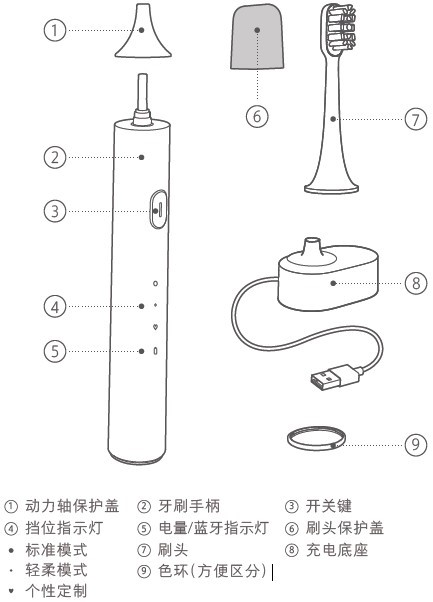
2.Q:Why need to change the brush head?
A: 1. A healthy brush head has better cleaning ability,
2, long-term use of the toothbrush cleaning ability will decline, brush bristles with the use of time will gradually wear and easy to adhere to dental plaque;
3. After three months, the bristles will be deformed, and a large number of bacteria will breed easily when the bristles are deformed and damaged.
3.Q:What is the function of the toothbrush? How does it work?
A: 1. When the machine is off, press the button to start the machine.2. When the machine is on, long press 1S to pause;
3. In the suspended state, press to continue for a short time. After the pause time is greater than 30s, shut down directly;
4. In the power-on state, press short to switch gears, and follow one gear "standard mode" → two gear "gentle mode" → three gear "personalized customization mode" → shutdown gear cycle;That is to switch to mode 3, again short press the switch gear, then directly shut down;The next boot starts from mode 1;
5. Start up time ≤10 seconds, press the switch gear and reset the 2-minute timer;Start up time > 10 seconds, short press the switch gear will directly shut down;The bit will shut down directly;
6. In case of special circumstances (e.g: The toothbrush cannot be turned off or turned on), long press 12 seconds to restore the factory Settings.
4. Q: What kinds of people are suitable for using Mi Smart Electric Toothbrush T500 ?
A: 1) It is recommended for people over 8 years old;
2) How to use:
1. Insert the brush head into the rotation shaft, leaving a certain gap, which is required for normal vibration;
2. Put a small amount of toothpaste on the brush head;
3. Wet the toothbrush and put it in the mouth before starting it;
4. Move the toothbrush slowly at a 45 degree Angle between the bristles and the gums;
5. Vibration reminder for 30 seconds to change teeth interval;
6. Rinse your mouth with water after brushing your teeth.
Toothbrush maintenance: After brushing the teeth, rinse the toothbrush under water and place it in a ventilated place to dry.
5.Q:Does the body of toothbrush support waterproof?
A: This toothbrush supports IPX7 waterproof (international general waterproof level certification system, IPX0-8 level, the higher the level, the better the waterproof performance,IPX7 waterproof can be submerged for 1 meter and soaked for 30 minutes). It can be washed by the whole body. However, the high temperature in the bath will affect the life of the toothbrush movement and battery, so it is not recommended for users to use in the bath.
6.Q:What kind of battery does the toothbrush use?
A: The battery is 700 milliampere lithium battery.
7.Q:Why is there a gap between the handle and the brush head?
A: The toothbrush is designed in this way so that the motor can transmit power to the brush head better. There will be a gap of 0.4-1mm between the brush head and the brush handle, which is not a product fault and can be used at ease.
8.Q:Can toothbrush be brought on board the plane?
A: It can be carried on the plane.
9. Q: How to reset the toothbrush?
A: If the user asks how to reset the toothbrush, press the key to start the toothbrush for 12 seconds to restore the factory Settings. After restoring the factory Settings, please continue to use the data synchronously (in order to prevent data errors, please timely synchronize the data with the mobile phone via Bluetooth).
10.Q:How many sets of data can toothbrush store?
A: The toothbrush can save 60 sets of data, but more than 60 sets of data will not be saved.3 sets of data can be saved every day, and data beyond 3 sets cannot be saved. Please timely synchronize the data to the mobile APP.
11.Q: Why does toothbrush fail to start when the Bluetooth light is on?
A: In order to ensure the connection and data reading are correct, the toothbrush cannot start when connected to the bluetooth of the mobile phone.
APP related
1.Q:What functions does toothbrush have after connecting to APP?
A: After connecting with Mi Home APP, the following operations can be carried out: check the toothbrush battery, check the historical brushing data, identify the cleaning condition of teeth, customize the tooth cleaning plan, check the remaining days of the brush head, and update the firmware, etc.
2.Q:How to check the toothbrush battery?
A:Enter Mi Home APP->select Mi Smart Electric Toothbrush T500->you can check the battery.
3.Q:How to check the details of the toothbrush brush history after binding with Mi Home APP?
A: Enter Mi Home app-> and select Mi Smart Electric Toothbrush T500->. Click the historical details to see the daily/weekly/monthly brush data.
4.Q:How to check the specific score of brush details?
A: Enter Mi Home app-> and select Mi Smart Electric Toothbrush T500-> Click the last weekly score -> you can see details and some suggestions.
5.Q:How to update the firmware?
Enter Mi Home app-> and select Mi Smart Electric Toothbrush T500->click“...”->Firmware update, if it can update,click update.
Troubleshooting
1.Q:Why I feel uncomfortable when use toothbrush?
A: The vibration frequency of toothbrush can reach up to 34,800 times/min, which has a plaque removal effect up to 7 times higher than that of manual toothbrush.
When users first use it, they may experience itchy or mild gingival bleeding. The reason is that the gingival is not used to such efficient cleaning. This phenomenon will generally stop within 1 to 2 weeks. If the symptoms persist for more than 2 weeks, it is likely that the user has gum problems. Users are advised to stop using and consult a dentist.
2. Q: How to do if toothbrush cannot be started by pressing the power button?
A: 1. The toothbrush cannot start when it is in charging state, so the toothbrush can be disconnected and charged;
2. The toothbrush has been bound to Bluetooth. In the state of bluetooth binding, it cannot start, please disconnect the bluetooth.
3. If the battery is too low, the toothbrush cannot start when the battery is insufficient, please connect the charging base to charge it.
3. Q: Why can't the brush head be inserted into the power shaft?
A:1. Foreign body in the brush head jack: remove the foreign body in the brush head jack with a tool,
2, The power shaft has adhesion foreign matter: clean the power shaft;
3. If the user asks to buy the original plug, this problem will also occur if the plug is not the original one.
4.Q:Why does battery drains fast and need to charge frequently?
A: 1. Bind the bluetooth of mobile phone for a long time: users can be advised to disconnect the Bluetooth connection at leisure time.
2, Too many times of use: connect charging base for charging, reduce the number of use.
5. Q: Why do you feel the toothbrush vibration weak?
A: 1. The brush head didn't install in place: it is recommended that the user reinstall the brush head,
2. There is a foreign body between the brush head and the brush handle: the user is advised to remove the brush head and clean up the foreign body.
6.Q:Why toothbrush can’t connect to Mi Home APP?
A:
1. The bluetooth of the mobile phone is not turned on: turn on the bluetooth of the mobile phone and control it through Mi Home APP,
2. The toothbrush is not placed close to the phone: place the phone close to the toothbrush;
3. The toothbrush is in vibration state: try to connect it after power off the toothbrush.
7.Q:What about the battery display is sometimes high and sometimes low in the Mi Home APP?
A: The data of toothbrush will be synchronized to the APP immediately after 2 minutes of use. At this time, the synchronized power will be slightly lower in the APP. After a few minutes, the data will be synchronized again. At this time, the electric charge will be slightly higher than that in the previous synchronization, which is a normal phenomenon rather than an abnormal situation.
Does it help?
Yes
No