
Bluetooth Headset Basic FAQ
1、 Q:What are the specifications of Mi Bluetooth headset Basic?
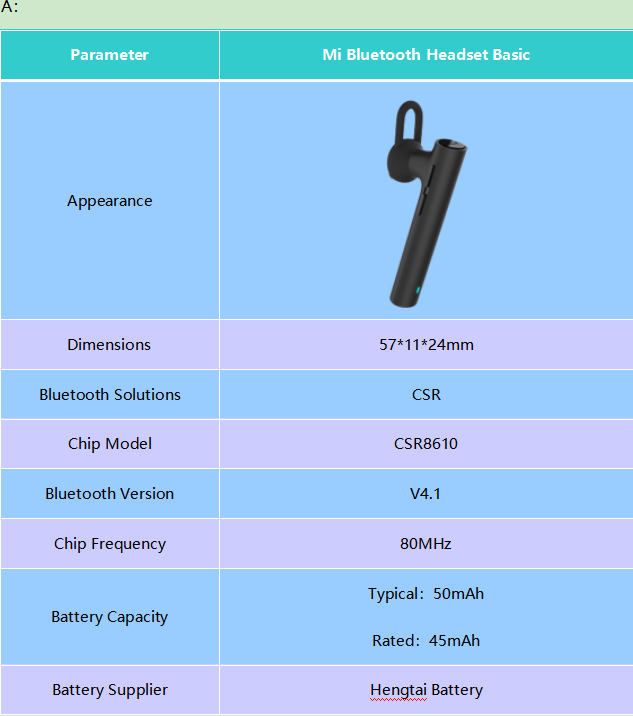
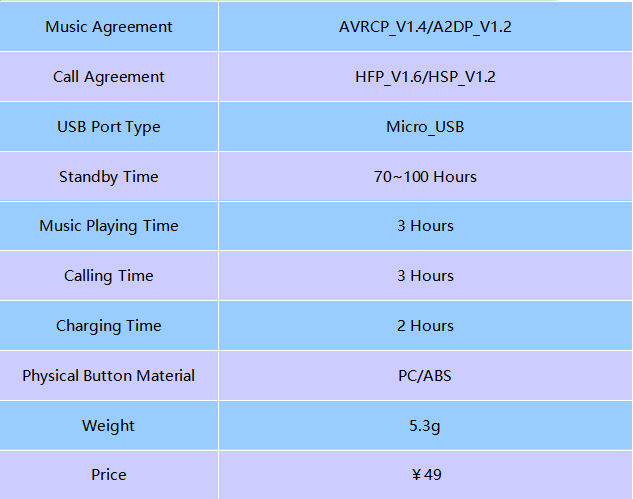
1、 Q:Why Mi Bluetooth Headset Basic cannot boot, or no light response while booting?
A:1. Headset's battery is exhausted and needs to be fully charged. It might be battery problem if there's still no light after 30mins+ charging time.
2. Button problem. Try to reset to the factory mode. If button still no response while reset process, the headset need to be repaired.
2、 Q:Why Mi Bluetooth Headset Basic cannot be searched or connected?
A: 1. The headset may only at turn-on mode, not the pairing mode. The headset can only be searched while the status light flashing in red and blue.
2. If the headset still cannot be searched while the status light flashing in red and blue, reset to the factory mode and try to connect again. If it still cannot be connected after reset, it might be signal problem of headset and needs to be repaired.
3、 Q:Why the cellphone can search Mi Bluetooth Headset Basic but cannot connect it?
A: If the device can search the headset but cannot connect with it, it might be some issue for the Bluetooth data of this device. Try clear your device's Bluetooth connection history record and reboot the device, then re-do the search-pair process.
4、 Q:Why the voice of Mi Bluetooth Headset Basic is intermittent and noisy?
A:1. The battery level of the device or the headset might be low, try fully charge the headset then try again if the sound is normal.
2. The distance between headset and device might be too far, or there's some other signals interferes the Bluetooth signal, like Wi-Fi. Try to reset the headset and re-do the pair process at a non-interference location then try again.
5、 Q:Why Mi Bluetooth Headset Basic no sound while calling or playing music?
A:First check the device's sound and media sound are not in the mute mode. If they are not muted, disconnect the headset then reboot the device, re-connect with headset and try again. If it's still not solved, reset the headset to factory mode and re-connect with your device then try again.
6、 Q:Why Mi Bluetooth Headset Basic cannot be charged?
A:1. Make sure the charging mode is correct, try switch to another mode or change the charging cable or charger to see if it works.
2. If the status light is off during charging, then the headset need to be repaired.
7、 Q:Why Mi Bluetooth Headset Basic's battery usage is inaccurate?
A:There are too many uncontrollable reasons restrict the actual usage of headset's battery, like the distance between device and headset, signal level, and volume level, etc. Therefore, the actual using time of headset needs to be depend on the personal actual usage.
8、 Q:Why Mi Bluetooth Headset Basic cannot be charged by power bank?
A:Generally, most of power banks has the feature of current protection, which will gradually reducing the output current and stop output at a certain small current value to protect charging devices won't be over-charging. Because the battery capacity of Mi Bluetooth headset Basic is too small, its required charging current value is also very small and lower than most of the power banks' certain protection current value, so the power bank will consider the headset is a fully-charged device and won't charge it.
9、 Q:How to adjust the volume level?
A:The user can adjust the volume level by the button on the headset, or through the connected cellphone.
10、 Q:What are the package contents include in Mi Bluetooth Headset Basic?
A:The whole package includes headset *1, rubber caps *1, charging cable *1, and manual and warranty card *1.
11、 Q:Why it feels pain after wearing Mi Bluetooth Headset Basic for a long time?
A:1. Try the different size of caps inside package and choose the most suitable one before using the headset;
2. Rarely adjust the volume level higher than 75%, it's easy to fatigue ear canal nerve and makes user feel painful if the volume keeps in a high level, and the sound quality can be better if the volume level no higher than 75%.
3. Take off the headset from the ear each 30mins for a rest (about 5mins), relax your ear by massage it;
4. Don't press the caps too deep while using, just keep the headset not dropping off.
12、 Q:Does Mi Bluetooth Headset Basic support water-proof feature?
A:No, it doesn't.
13、 Q:Can Mi Bluetooth Headset Basic work with PC?
A:If the PC has Bluetooth module and working with driver correctly, Mi Bluetooth headset Basic can work with PC.
14、 Q:Does Mi Bluetooth Headset Basic support auto-off feature?
A:Mi Bluetooth headset Basic will automatically turn-off itself after 20 minutes without connection.
15、 Q:Will Mi Bluetooth Headset Basic pronounce contact person's name while incoming call?
A:Currently the headset will only pronounce contact phone's number while incoming calls, not support pronounce contact person's name yet.
16、 Q:Can Mi Bluetooth Headset Basic connects PC and cellphone at same time?
A:No, the Mi Bluetooth headset Basic can connect multiple numbers of cellphones at the same time, but cannot connect PC and cellphone at same time.
17、 Q:Which kind of devices Mi Bluetooth Headset Basic can pair?
A:Most of cellphones, tablets, laptops, or other devices that support Bluetooth v4.1 standard.
18、 Q:How to control the call directly from Mi Bluetooth Headset Basic?
A:While the call incoming, press the top button to answer the call and hold the top button about a second to reject the call.
During the calling, press the Vol+/Vol- button to adjust the volume level, and press the top button to end the call.
When both of the device and headset are not at the calling mode, double-press the top button quickly to recall the most recently dialing number.
19、 Q:How to move to previous/next song in a play-list directly from Mi Bluetooth Headset Basic?
A:Depends on the app, if the app, if the app support wire-control by Bluetooth device, hold the Vol+/Vol- to switch to previous/next media source.
20、 Q:How to switch the voice from connected devices through “Connect 2 Device by 1 Headset” feature during daily using?
A:While both of the devices are not playing any sounds, headset standby and waiting for the first incoming voice source.
While one device in calling mode, the other device’s sound source (Except Incoming Call) won’t export to the headset, but the other device still in connection and won’t automatically switch the sound source playing to other modes. If the other device also have incoming call, double-press the top button to hold current call and switch to another.
While one device playing media sources, the other device’s sound source (Except Incoming Call) will in mute won’t export to the headset, but the other device still in connection and won’t automatically switch the sound source playing to other modes. If the other device has incoming call, the headset’s sound will automatically switch to the other, and the current device’s sound source (Except Incoming Call) will in mute won’t export to the headset and won’t automatically switch the sound source playing to other modes.
Does it help?
Yes
No