
Mi Smart Compact Projector FAQ
Overview
1. Q: What are the features of the Mi Smart Compact Projector?
A: Mi Smart Compact Projector uses DLP technology.It has high brightness and compact structure, it's easy to move and automatically focus. It has a compact body with custom parts and ultra-high space efficiency. Equipped with Amlogic T968-H high performance processor, super clear video and games to ensure a pleasant experience. With a resolution of up to 1080P, the image can be rendered in more detail. At the same time, under the support of HDR technology, the picture color has a new breakthrough. Video and Audio is supported by Dolby Audio and DTS double decoding, with the host unique and powerful speaker system, in the appreciation of the ultimate image at the same time you can experience better shocking sound, it is a good use and good-looking portable projector.
2. Q: What are the specifications of the Mi Smart Compact Projector?
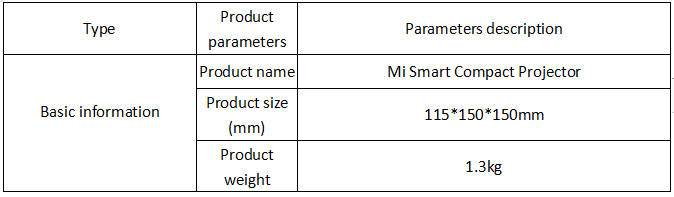
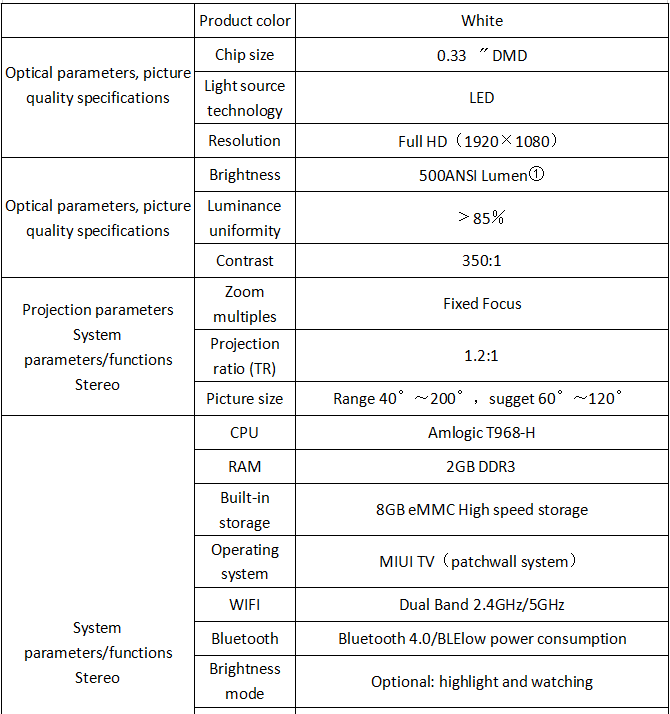
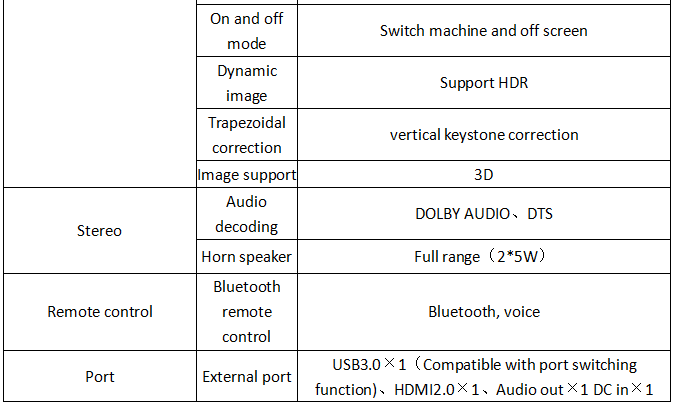
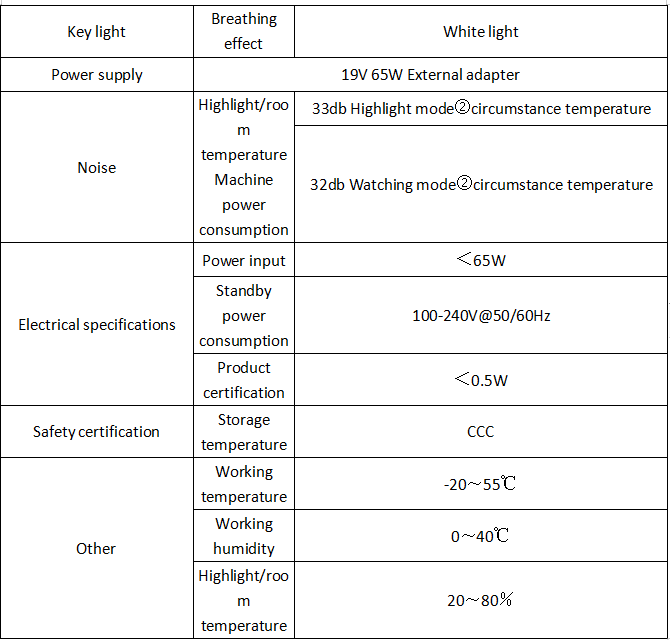
Note:
① ANSI lumens is a method developed by the American national institute for standardization to measure the luminous flux of projectors.
Specific test methods as follows:
1) Distance between the projector and the screen: 2.4 meters.
2) Screen is 60 inches long.
3) Measure the illuminance of each point on the nine intersecting points of the screen "field" glyph shape with a metering pen, multiply by the area, and get the brightness of the nine points of the projected screen.
4) Figure out the average brightness of 9 points, which is ANSI lumens.
There may be different test results due to different test conditions.500ANSI lumens are the values measured in the lab highlighting mode.
② Circumstance temperature refers to the maximum decibel value measured by lab when the temperature is 25 ℃ and the distance is 1 meter from the Mi Smart Compact Projector.
3. Q: The appearance of Mi Smart Compact Projector
A: As shown
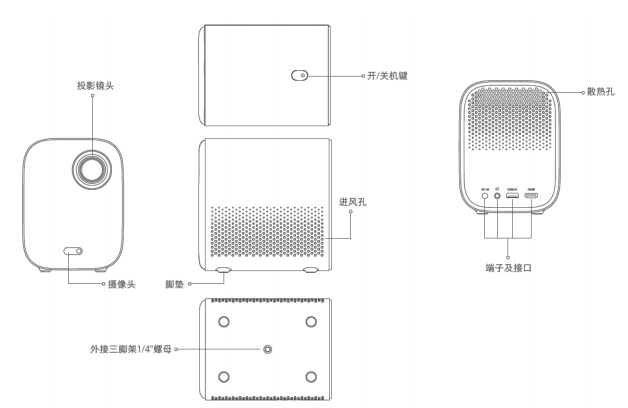
Hot air will be discharged from the cooling hole. Do not place thermosensitive objects near it.
Do not place anything around the left and right vents, or it may cause heat to build up inside the projector.
The projector gives off strong light when it is working.Do not look directly into the lens to avoid damaging your eyes.
The project does not contain the infrared human body detection function, that is: when the human body is approaching, it will not actively reduce the brightness of the light, and the warning words "please do not look directly at the light source" will not pop up.
4. Q: What is the meaning of the 4-channel LED?
A: Compared with the traditional three-way LED projection, a blue light path is added, the brightness is increased by more than 20%, and the average brightness reaches 500ANSI lumens (highlight mode). Using Osram LED, NTSC color gamut range up to more than 85%, a wider color gamut to bring more real colors.
Hardware related
1. Q: What are the interfaces behind the projector?
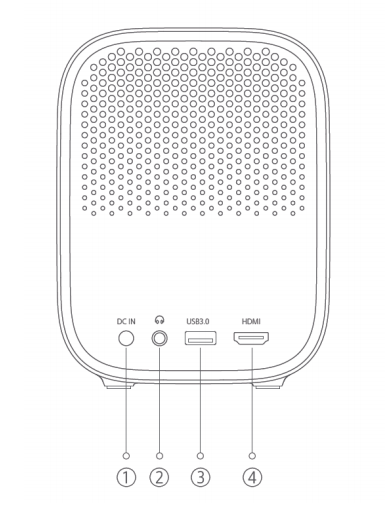
1) Power interface
2) Audio out: connect the headphones (3.5mm American standard)
3) USB interface, support USB 3.0 communication protocol
4) HDMI signal input interface (ARC is not supported)
2. Q: Does the projector standard remote control support somatosensory function?
A: No.
3. Q: Does projector support infrared remote control?
A: No.
4. Q: What is the configuration of projector speaker?
A: Full-frequency horn ×2 (total output power (2*5W)≈10W)
5. Q: What is a projection ratio?
A: The projection ratio is the ratio of the distance of the lens from the wall to the width of the projected picture.The smaller the projection ratio, the larger the picture at the same distance.For example, to get a 100-inch image, a projection ratio of 1.2 requires a distance of approximately 267cm from the lens to the wall.
6. Q: What is the brightness of the projector?
A: The projector brightness up to 500 ANSI lumens.
Note:
① ANSI lumens is a method developed by the American national institute for standardization to measure the luminous flux of projectors.
Specific test methods as follows:
1) Distance between the projector and the screen: 2.4 meters.
2) Screen is 60 inches long.
3) Measure the illuminance of each point on the nine intersecting points of the screen "field" glyph shape with a metering pen, multiply by the area, and get the brightness of the nine points of the projected screen.
4) Figure out the average brightness of 9 points, which is ANSI lumens.
There may be different test results due to different test conditions.500ANSI lumens are the values measured in the lab highlighting mode.
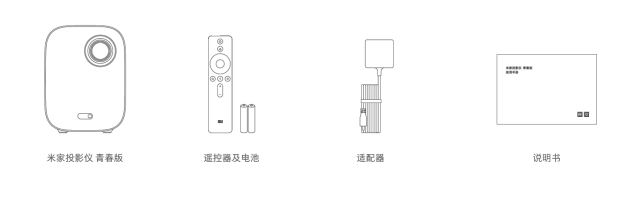
7. Q: What are the standard ?
A: Machine body, mi bluetooth voice remote control and battery (Two No. 7 batteries), adapter and instruction manual.
8. Q: How loud is the noise of the projector? Will it affect watching movie at night?
A: The maximum noise in the movie viewing mode should not exceed 32db, and the maximum noise in the highlight mode should not exceed 33db. At night, you can choose the movie viewing mode. In the movie viewing mode, the fan noise will be lower, the brightness will be lower, and the eyes can be better protected.
9. Q: Does projector have temperature control function?
A: Mi Smart Compact Projector has intelligent temperature control function, LED light source and motherboard temperature by the system monitoring, according to the LED light source and motherboard temperature sensor temperature detected automatically adjust the fan speed.When the projector temperature is too high, the warning popover will pop up automatically.
Once the temperature ceiling is reached, the popover window with abnormal temperature will automatically pop out and shut down. If the temperature is too high, the popover will automatically shut down. Check whether there are obstacles blocking the air inlet and outlet.After removing the obstacle, ensure the airflow is unimpeded. After the projector is cooled, it can be normally used after restarting.
10. Q: How about projector overheat?
A: The LED light source will generate a lot of heat when the projector is in use. By virtue of the excellent design of air duct in the body, heat dissipation will be faster, and the temperature of the chip during operation will be below 75℃ (the temperature is the highest temperature when the chip is operating, and the actual temperature perceived by the human body will be much lower than this value). When the chip temperature is close to 75 ℃, the system will shut down automatically to ensure the projector, which will be damaged due to high temperature.
Please note during use:
Ensure the heat dissipation in the right inlet and the left outlet do not have shielding, so as to avoid the machine temperature too high into the temperature protection.Please do not place any object within the distance of 20cm from the cooling port of the projector, so as not to affect the cooling effect.Please unpack the projector before use, so as not to affect the projection effect, air intake and heat dissipation.
11. Q: How much is the power consumption?
A: The power consumption of the whole machine is less than 65W.
12. Q: Can the projector be used as a bluetooth speaker?
A: Mi Smart Compact Projector built-in 2 full frequency speakers, the total output power is ≈ 10W, can be used as an independent bluetooth speaker.The default bluetooth audio mode of the device is input mode. The device name of the projector is found by bluetooth of the phone. After pairing, the projector can be used as a bluetooth speaker.
13. Q: Does the projector support wall hanging or ceiling placement?
A: It supports the installation of the suspended ceiling, there is a screw hole at the bottom of the body, the screw hole specification: 1/4 inch nut, the depth is 8mm;Do not support wall hanging, support lifting;After lifting, you need to enter the Settings - image - projection mode to adjust the projection mode.
14. Q:Does projector support bracket placement?
A: It support bracket, there is a screw hole at the bottom of the body, screw hole specification: 1/4 inch nut, depth of 8mm;The 1/4 inch camera bracket can be used together with the projector, and "ZMI projector bracket" can also be recommended to users.
Using Related
1. Q: How to turn on the Mi Smart Compact Projector?
A: Press the power button on the cover of the machine, or turn on the Mi Smart Compact Projector through the power button of the remote control (which has been paired with the bluetooth remote control).
2. Q: Do you need a curtain screen for the projector?
A: It does not have to use a curtain screen. It can present the image on any carrier.Of course, in order to better imaging effect, please choose a special curtain, the imaging effect will be significantly improved.
3. Q: Does projector support bluetooth keyboard, game pad and other devices?How many bluetooth devices can you connect to?
A: Projector support bluetooth HID protocol, can connect bluetooth keyboard, handle and other devices.It can connect up to 15 bluetooth devices at most, but only 7 different types of devices can work at the same time.
Note: Due to more interference in the 2.4GHz frequency band, problems such as control delay and accidental disconnection may occur after connecting multiple bluetooth devices. It is suggested to connect according to the actual use requirements.
4. Q: Does Mi Smart Compact Projector support PPPoE dial-up Internet access?
A: Mi Smart Compact Projector does not support PPPoE dial-up Internet access.
5. Q: Does Mi Smart Compact Projector support 3D?
A: Mi Smart Compact Projector supports active shutter 3D.
6. Q: After watching 3D video, when the user watches other 2D video again, the screen appears to be floured. What should the user do when the display is abnormal?
A. This phenomenon may be the 3D function turned on by the user, which can be solved by turning off 3D.Note:3D feature needs to be set when playing 3D video.
7.Q: How to adjust focus?How to autofocus?How to solve auto focus is not clear/can not auto focus?
A: It has the function of automatic focus. When the position of the projector changes, the automatic focus will be completed in about 10 seconds.
①、If the following situations occur, users can be guided to operate according to the following methods:
②、If the user thinks the picture is not clear after the focus is completed, he/she can choose the manual adjustment mode to fine-tune.
(2) If you cannot enter the quick focus interface after moving the position, it may be because the automatic focus function is not turned on.If the automatic focus has been turned on, it may be because the threshold value of the internal sensor was not triggered when the projector was moved. At this time, the machine can be shaken or the manual focus can be solved
Specific steps of manual focus adjustment: enter Settings - image - auto focus, and press the left and right keys on the remote control to fine-tune after the auto focus is completed.
8.Q: Do mobile phones, tablets and other devices support the connection with the projector through bluetooth, and the sound is made by the projector?
A: Support. After adjusting the bluetooth audio mode of projector to "input", connect the phone with the bluetooth of projector, and set projector as the media playing device on the mobile device.
9.Q: How to solve the problem that the projector has no sound after using HDMI to connect the laptop?
A: After the HDMI connect, both sound and video are transmitted to the projector by HDMI. If there is no sound in the projector, click the speaker in the lower right corner of the computer, right-click - sound-play - select the option of Mi ProjLED and set it to play by default.
10.Q: Why does the projector plug into the earphone and the earphone doesn't have sound?
A: Please confirm whether the sound setting is correct. By default, the output is from the built-in speaker.Specific steps: enter Settings - audio - output to confirm whether the output mode is set to "headset".
11.Q: Can the projector use USB-RJ45 to connect to the network cable?
A: Yes, you can buy your own adapter.
12.Q: When the position of the projector is fixed, can you adjust the size of the screen?
A: No, adjusting the screen can only be done by moving the distance from the projector to the wall/curtain.
13. Q: Will the quality of the picture be affected when the projector adjusts the picture through the zoom function?
A: Zoom function only works on the HDMI input device. Due to the compression of the screen, the picture quality will be affected.But the actual projected pixels are the same, only you can see that the background gray box is bigger and the original content area is compressed.
14.Q: What is the length of the power cord?Can it be separated from the power adapter?
A: The length of the power cord is 1.5 meters, which can not be disassembled with the power adapter.
15. Q: How to set the image straight after the projector is hoisted?
A: Settings - image Settings, and you can choose the corresponding projection mode.There are four projection methods for you to choose from: "desktop positive projection", "desktop negative projection", "ceiling positive projection" and "ceiling negative projection".
16. Q: Does trapezoidal correction affect image quality?
A: The picture quality will be affected due to the compression of the picture.But the actual projection pixel is unchanged, only the need to adjust the position of the screen for compression and stretching.
17. Q: Why does automatic trapezoidal correction not work?
A: Guide the user into Settings - general Settings, and confirm whether the "automatic trapezoidal correction" function is enabled.In addition, Noted that the automatic trapezoidal correction is triggered after the projector position is moved.If the projector position is unchanged and the trapezoid correction is manually adjusted, automatic trapezoid correction will not be triggered.
18. Q: Why are there shadow parts around the trapezoid after correction?
A: Since the trapezoidal alignment is achieved by means of electrons rather than physical optics, shadows may appear on the sides of an all-black picture.
19. Q: How to use the voice function?
A: After the projector of any interface long press the voice button, pop-up voice input to remind after, can be on the top of the remote control microphone say need to search the film and television content, or would like to open the application name, etc, after the talk, will loosen the voice key, m home projector is automatically search youth version mentioned in the film and television content/open applications.
20.Q: How to turn on the projector?
A:
1) After opening the package box, take out the projector, plug in the power cord and connect the power supply;
2) Press the power button on the top of the projector to start;
3) Take out the Mi bluetooth remote control and approach the projector. The remote control will automatically pair with the host. After the pairing is completed, you can operate the projector system through the remote control for experience.
21.Q: How to pair the projector with the bluetooth remote control?
A:
1. After installing the battery of the remote control, press the power button on the projector to start the machine, and press the confirmation button on the remote control to start the connection
2. Put the remote control close to the projector, hold down the "home" and "menu" keys at the same time, and let go when you hear the "drip" sound.After the connection is successful, the projector interface will display "connection is successful".Note: during the connection, please keep the distance between the remote control and the projector no more than 20cm.
Troubleshooting
1.Q: What should we do if the projector cannot be connected to WiFi?
A: Please refer to the following ideas for troubleshooting:
1. Check whether there are special characters in the WIFI name and password, change the router WIFI name and password into English/numeric type, and then try to connect.
2. If you have connected to this wifi before, please check whether the password of wifi is correct.Select the WiFi name, and click "right click" on the remote control to select "ignore this network", and then re-enter the password.
3. Check whether the router turns on the router DHCP function.If DHCP is turned off, the projector cannot automatically get the IP address.
4. Check whether the router restricts more terminal access.
If the router only allows whitelist devices to access WiFi, please whitelist the projector's MAC address before trying to connect.
5. Check whether the projector can be connected to other WiFi (such as mobile phone hotspots) : if it can be connected, please restart or reset the router;
6. If you cannot connect, please restore the projector to factory Settings, and then try to connect to WiFi.
2.Q: How to solve if the projector system operation stuck?
A: please refer to the following ideas for troubleshooting:
1. First, judge when the projector is stuck, and guide the user's operation. For example, if the user is stuck when watching the online video, it is necessary to check the network problems.
2. Update the system: guide the user to check whether the system version is the latest version, and judge it according to the update prompt in the user's system.
3. Ask the user if they have done ROOT on the youth version of mijia projector. If they have done ROOT on the system, they should cancel ROOT before trying to use it.
4, enter the projection background interface, clean up the background running procedures, or enter the TV housekeeper to clean up memory and garbage.
6. Restore the factory setting of the youth version of mijia projector (without retaining the software), or enter the recovery mode to choose to clear all the data;
7. If none of the above methods can be solved, the after-sales testing shall be guided, and the specific situation shall be subject to the after-sales testing results.
3.Q: What should we do if the power button at the top of the projector fails?
A: Please refer to the following ideas for troubleshooting:
1. Whether the power button is not working when the projector is turned on or off;
2. If it is not in the above process, the continuous operation of the power button has no effect, while the remote control has the effect of turning on and off the machine.After - sales testing can be applied.
4.Q: What should I do if the projector cannot pair and connect to the bluetooth remote control?
A: Please refer to the following ideas for troubleshooting:
The bluetooth remote controller is paired with the projector through wireless means, and the interference from the surrounding environment will affect the stability of the connection.
1. If the bluetooth remote control fails to bind successfully, please refer to the following ideas for troubleshooting:
(1) confirm that the remote control of no. 7 battery should check whether the positive and negative direction is correct
(2) put the remote control close to the youth version of the mijia projector (preferably within 10CM).
(3) then take out the battery of the remote control and reinstall it, and try to match it again.
(4) check the battery level of the remote control, and try to replace the battery and pair again.
2. Supplementary notes:
(1) environmental interference will affect the connection stability of bluetooth remote control, such as bluetooth and WiFi.
(2) for the above operation, if you need to set the option, you need to connect the projector through the screen projector APP, control and open it
"Add Mi bluetooth remote control" option.
5. Q: How to do when the remote control is in use, some of the buttons do not respond and automatic operation of the remote control?
A: Please refer to the following ideas for troubleshooting:
1. Rematch to see if it can be used
2. Reload the battery (or replace it with a new one) after removing the battery for 3-5 minutes.
3. After the battery is replaced, try to operate the bluetooth remote control after repairing.
4. If the above operations cannot solve the problem, please apply for after-sales service.
6.Q: How to solve if the projector's bluetooth voice remote control voice function is not sensitive?
A:
1. When using voice input, please try to pronounce standard ,
2. In case of abnormal function, it is suggested to disconnect the connection and conduct bluetooth pairing again.
7. Q: How to solve the problem when the projector appears blurred?
A: Please refer to the following ideas for troubleshooting:
Flowers screen.Switch to another page or run third-party software to see if the screen is still beautiful.
①If other pages also appear crash in the screen, it may be hardware or driver problems, please refer to the following ideas to deal with:
- restart the projector;
- update the system;
- restore factory Settings;
- apply for after-sales testing.
②If other pages display normally, it may be the selected input source output screen exception, or the current screen decoding exception.Please refer to the following ideas:
- if the set-top box or other HDMI device is connected, please check the problem of the set-top box or other HDMI device, or whether the cable/interface is not in good contact;
- if there is a crash screen in the video, it is an abnormal video image decoding. Please give priority to upgrading the software version, such as updating the system or using a third party video player.
2. The picture is blurred and unclear.
①If all the interface (including font, image and software interface) are fuzzy problems, please upgrade the mijia projector youth version or apply for after-sales testing;
②If the individual page is fuzzy, it may be a page UI problem;
③If the screen appears fuzzy when playing the video, you can try to switch the resolution of the video, or the picture quality of the video itself is poor;
④If the screen blurs after switching to the set-top box or the external HDMI device, please check the relevant Settings of the set-top box or the external HDMI device (such as the output resolution).
3. Partial color and color distortion.
①Guide the user to switch to the viewing mode or highlight mode to try;
②Upgrade the system version;
③If there is a color bias problem when the projector is switched to the interface of the set-top box or connected to the HDMI device, please check whether the projector is in good contact with the set-top box, or check whether there is a color bias problem in the screen of the set-top box;
④Application for after-sales service.
8. Q: How to deal with abnormal display of part of the screen or abnormal display of the whole screen?
A: Please refer to the following ideas for troubleshooting:
①Click whether the indicator light is on after starting up, and replace other sockets to check whether there is a socket problem;
②Try to unplug the power cord and reconnect the power after 2 minutes.Click the projection body power on button. If the indicator still cannot be turned on at this time, please guide the after-sales inspection.
③ if the indicator light is turned on after clicking, the brightness of the projected object will change, but it cannot enter the system.Try to enter the Recovery mode to clear the data before starting up.The entry method is as follows: turn off the youth version of mijia projector, and then unplug the power button. After the shutdown, hold down the confirmation key of the remote control + return key, and then insert the power button (no need to click the power button of the projection host and the remote control). After the projector enters the Recovery mode, release the key of the remote control.
④If the above methods are not available, please apply for after-sales service.
9.Q: How to deal with the abnormal display of one or more pixels on the screen?
A: please refer to the following ideas for troubleshooting:
1. First, verify whether the user has all the interfaces. If there is an interface or a scene, it may be related to the scene.
2. If all the interfaces are available, confirm the location and size, and guide the user to change the projection environment. For example, move the projection location, check whether the bad points move with the projector, and eliminate environmental problems.
3. If none of the above methods can be solved, please apply for after-sales testing.
10.Q: How to deal with the projector cannot be upgraded online?
A:
1. Ask the user whether the projector has been enabled by ROOT, ROOT will cause the update failure;
2. If the user's device is stuck at 0% and cannot download the update package, the user can be advised to change the network DNS, change the network and then try to update.
3. If the user is stuck between 60% and 80% in the upgrade system, the user is advised to follow the following steps:
①Restart the device and try to update it;
②Enter the Recovery mode to empty the data, and then update the boot;
③You can enter the Recovery mode and select "restore factory system" to upgrade again.
4. If none of the above methods can solve users' problems, it is suggested that users apply for after-sales solution.
11. Q: Why can't projector focus on after entering the Recovery interface?
A: The projector was in a non-system operation state when it was in the Recovery interface, so the focus operation could not be started.At this point, it is suggested that users can judge the selected functions according to the general position of the page.
12.Q:How to deal with the blurry picture after a period of time?
A: After watching for a long time, the LED light source generates heat, resulting in a slight change in the focus of the lens lens, resulting in the blur phenomenon. This phenomenon is a normal phenomenon, which can be solved by shaking the machine to re-focus or manual focus adjustment.This phenomenon does not cause hardware damage to the lens.
Specific steps: enter Settings - image - auto focus, and press the left and right keys on the remote control to fine-tune after the auto focus is completed
1. Q: What are the features of the Mi Smart Compact Projector?
A: Mi Smart Compact Projector uses DLP technology.It has high brightness and compact structure, it's easy to move and automatically focus. It has a compact body with custom parts and ultra-high space efficiency. Equipped with Amlogic T968-H high performance processor, super clear video and games to ensure a pleasant experience. With a resolution of up to 1080P, the image can be rendered in more detail. At the same time, under the support of HDR technology, the picture color has a new breakthrough. Video and Audio is supported by Dolby Audio and DTS double decoding, with the host unique and powerful speaker system, in the appreciation of the ultimate image at the same time you can experience better shocking sound, it is a good use and good-looking portable projector.
2. Q: What are the specifications of the Mi Smart Compact Projector?
Note:
① ANSI lumens is a method developed by the American national institute for standardization to measure the luminous flux of projectors.
Specific test methods as follows:
1) Distance between the projector and the screen: 2.4 meters.
2) Screen is 60 inches long.
3) Measure the illuminance of each point on the nine intersecting points of the screen "field" glyph shape with a metering pen, multiply by the area, and get the brightness of the nine points of the projected screen.
4) Figure out the average brightness of 9 points, which is ANSI lumens.
There may be different test results due to different test conditions.500ANSI lumens are the values measured in the lab highlighting mode.
② Circumstance temperature refers to the maximum decibel value measured by lab when the temperature is 25 ℃ and the distance is 1 meter from the Mi Smart Compact Projector.
3. Q: The appearance of Mi Smart Compact Projector
A: As shown
Hot air will be discharged from the cooling hole. Do not place thermosensitive objects near it.
Do not place anything around the left and right vents, or it may cause heat to build up inside the projector.
The projector gives off strong light when it is working.Do not look directly into the lens to avoid damaging your eyes.
The project does not contain the infrared human body detection function, that is: when the human body is approaching, it will not actively reduce the brightness of the light, and the warning words "please do not look directly at the light source" will not pop up.
4. Q: What is the meaning of the 4-channel LED?
A: Compared with the traditional three-way LED projection, a blue light path is added, the brightness is increased by more than 20%, and the average brightness reaches 500ANSI lumens (highlight mode). Using Osram LED, NTSC color gamut range up to more than 85%, a wider color gamut to bring more real colors.
Hardware related
1. Q: What are the interfaces behind the projector?
1) Power interface
2) Audio out: connect the headphones (3.5mm American standard)
3) USB interface, support USB 3.0 communication protocol
4) HDMI signal input interface (ARC is not supported)
2. Q: Does the projector standard remote control support somatosensory function?
A: No.
3. Q: Does projector support infrared remote control?
A: No.
4. Q: What is the configuration of projector speaker?
A: Full-frequency horn ×2 (total output power (2*5W)≈10W)
5. Q: What is a projection ratio?
A: The projection ratio is the ratio of the distance of the lens from the wall to the width of the projected picture.The smaller the projection ratio, the larger the picture at the same distance.For example, to get a 100-inch image, a projection ratio of 1.2 requires a distance of approximately 267cm from the lens to the wall.
6. Q: What is the brightness of the projector?
A: The projector brightness up to 500 ANSI lumens.
Note:
① ANSI lumens is a method developed by the American national institute for standardization to measure the luminous flux of projectors.
Specific test methods as follows:
1) Distance between the projector and the screen: 2.4 meters.
2) Screen is 60 inches long.
3) Measure the illuminance of each point on the nine intersecting points of the screen "field" glyph shape with a metering pen, multiply by the area, and get the brightness of the nine points of the projected screen.
4) Figure out the average brightness of 9 points, which is ANSI lumens.
There may be different test results due to different test conditions.500ANSI lumens are the values measured in the lab highlighting mode.
7. Q: What are the standard ?
A: Machine body, mi bluetooth voice remote control and battery (Two No. 7 batteries), adapter and instruction manual.
8. Q: How loud is the noise of the projector? Will it affect watching movie at night?
A: The maximum noise in the movie viewing mode should not exceed 32db, and the maximum noise in the highlight mode should not exceed 33db. At night, you can choose the movie viewing mode. In the movie viewing mode, the fan noise will be lower, the brightness will be lower, and the eyes can be better protected.
9. Q: Does projector have temperature control function?
A: Mi Smart Compact Projector has intelligent temperature control function, LED light source and motherboard temperature by the system monitoring, according to the LED light source and motherboard temperature sensor temperature detected automatically adjust the fan speed.When the projector temperature is too high, the warning popover will pop up automatically.
Once the temperature ceiling is reached, the popover window with abnormal temperature will automatically pop out and shut down. If the temperature is too high, the popover will automatically shut down. Check whether there are obstacles blocking the air inlet and outlet.After removing the obstacle, ensure the airflow is unimpeded. After the projector is cooled, it can be normally used after restarting.
10. Q: How about projector overheat?
A: The LED light source will generate a lot of heat when the projector is in use. By virtue of the excellent design of air duct in the body, heat dissipation will be faster, and the temperature of the chip during operation will be below 75℃ (the temperature is the highest temperature when the chip is operating, and the actual temperature perceived by the human body will be much lower than this value). When the chip temperature is close to 75 ℃, the system will shut down automatically to ensure the projector, which will be damaged due to high temperature.
Please note during use:
Ensure the heat dissipation in the right inlet and the left outlet do not have shielding, so as to avoid the machine temperature too high into the temperature protection.Please do not place any object within the distance of 20cm from the cooling port of the projector, so as not to affect the cooling effect.Please unpack the projector before use, so as not to affect the projection effect, air intake and heat dissipation.
11. Q: How much is the power consumption?
A: The power consumption of the whole machine is less than 65W.
12. Q: Can the projector be used as a bluetooth speaker?
A: Mi Smart Compact Projector built-in 2 full frequency speakers, the total output power is ≈ 10W, can be used as an independent bluetooth speaker.The default bluetooth audio mode of the device is input mode. The device name of the projector is found by bluetooth of the phone. After pairing, the projector can be used as a bluetooth speaker.
13. Q: Does the projector support wall hanging or ceiling placement?
A: It supports the installation of the suspended ceiling, there is a screw hole at the bottom of the body, the screw hole specification: 1/4 inch nut, the depth is 8mm;Do not support wall hanging, support lifting;After lifting, you need to enter the Settings - image - projection mode to adjust the projection mode.
14. Q:Does projector support bracket placement?
A: It support bracket, there is a screw hole at the bottom of the body, screw hole specification: 1/4 inch nut, depth of 8mm;The 1/4 inch camera bracket can be used together with the projector, and "ZMI projector bracket" can also be recommended to users.
Using Related
1. Q: How to turn on the Mi Smart Compact Projector?
A: Press the power button on the cover of the machine, or turn on the Mi Smart Compact Projector through the power button of the remote control (which has been paired with the bluetooth remote control).
2. Q: Do you need a curtain screen for the projector?
A: It does not have to use a curtain screen. It can present the image on any carrier.Of course, in order to better imaging effect, please choose a special curtain, the imaging effect will be significantly improved.
3. Q: Does projector support bluetooth keyboard, game pad and other devices?How many bluetooth devices can you connect to?
A: Projector support bluetooth HID protocol, can connect bluetooth keyboard, handle and other devices.It can connect up to 15 bluetooth devices at most, but only 7 different types of devices can work at the same time.
Note: Due to more interference in the 2.4GHz frequency band, problems such as control delay and accidental disconnection may occur after connecting multiple bluetooth devices. It is suggested to connect according to the actual use requirements.
4. Q: Does Mi Smart Compact Projector support PPPoE dial-up Internet access?
A: Mi Smart Compact Projector does not support PPPoE dial-up Internet access.
5. Q: Does Mi Smart Compact Projector support 3D?
A: Mi Smart Compact Projector supports active shutter 3D.
6. Q: After watching 3D video, when the user watches other 2D video again, the screen appears to be floured. What should the user do when the display is abnormal?
A. This phenomenon may be the 3D function turned on by the user, which can be solved by turning off 3D.Note:3D feature needs to be set when playing 3D video.
7.Q: How to adjust focus?How to autofocus?How to solve auto focus is not clear/can not auto focus?
A: It has the function of automatic focus. When the position of the projector changes, the automatic focus will be completed in about 10 seconds.
①、If the following situations occur, users can be guided to operate according to the following methods:
②、If the user thinks the picture is not clear after the focus is completed, he/she can choose the manual adjustment mode to fine-tune.
(2) If you cannot enter the quick focus interface after moving the position, it may be because the automatic focus function is not turned on.If the automatic focus has been turned on, it may be because the threshold value of the internal sensor was not triggered when the projector was moved. At this time, the machine can be shaken or the manual focus can be solved
Specific steps of manual focus adjustment: enter Settings - image - auto focus, and press the left and right keys on the remote control to fine-tune after the auto focus is completed.
8.Q: Do mobile phones, tablets and other devices support the connection with the projector through bluetooth, and the sound is made by the projector?
A: Support. After adjusting the bluetooth audio mode of projector to "input", connect the phone with the bluetooth of projector, and set projector as the media playing device on the mobile device.
9.Q: How to solve the problem that the projector has no sound after using HDMI to connect the laptop?
A: After the HDMI connect, both sound and video are transmitted to the projector by HDMI. If there is no sound in the projector, click the speaker in the lower right corner of the computer, right-click - sound-play - select the option of Mi ProjLED and set it to play by default.
10.Q: Why does the projector plug into the earphone and the earphone doesn't have sound?
A: Please confirm whether the sound setting is correct. By default, the output is from the built-in speaker.Specific steps: enter Settings - audio - output to confirm whether the output mode is set to "headset".
11.Q: Can the projector use USB-RJ45 to connect to the network cable?
A: Yes, you can buy your own adapter.
12.Q: When the position of the projector is fixed, can you adjust the size of the screen?
A: No, adjusting the screen can only be done by moving the distance from the projector to the wall/curtain.
13. Q: Will the quality of the picture be affected when the projector adjusts the picture through the zoom function?
A: Zoom function only works on the HDMI input device. Due to the compression of the screen, the picture quality will be affected.But the actual projected pixels are the same, only you can see that the background gray box is bigger and the original content area is compressed.
14.Q: What is the length of the power cord?Can it be separated from the power adapter?
A: The length of the power cord is 1.5 meters, which can not be disassembled with the power adapter.
15. Q: How to set the image straight after the projector is hoisted?
A: Settings - image Settings, and you can choose the corresponding projection mode.There are four projection methods for you to choose from: "desktop positive projection", "desktop negative projection", "ceiling positive projection" and "ceiling negative projection".
16. Q: Does trapezoidal correction affect image quality?
A: The picture quality will be affected due to the compression of the picture.But the actual projection pixel is unchanged, only the need to adjust the position of the screen for compression and stretching.
17. Q: Why does automatic trapezoidal correction not work?
A: Guide the user into Settings - general Settings, and confirm whether the "automatic trapezoidal correction" function is enabled.In addition, Noted that the automatic trapezoidal correction is triggered after the projector position is moved.If the projector position is unchanged and the trapezoid correction is manually adjusted, automatic trapezoid correction will not be triggered.
18. Q: Why are there shadow parts around the trapezoid after correction?
A: Since the trapezoidal alignment is achieved by means of electrons rather than physical optics, shadows may appear on the sides of an all-black picture.
19. Q: How to use the voice function?
A: After the projector of any interface long press the voice button, pop-up voice input to remind after, can be on the top of the remote control microphone say need to search the film and television content, or would like to open the application name, etc, after the talk, will loosen the voice key, m home projector is automatically search youth version mentioned in the film and television content/open applications.
20.Q: How to turn on the projector?
A:
1) After opening the package box, take out the projector, plug in the power cord and connect the power supply;
2) Press the power button on the top of the projector to start;
3) Take out the Mi bluetooth remote control and approach the projector. The remote control will automatically pair with the host. After the pairing is completed, you can operate the projector system through the remote control for experience.
21.Q: How to pair the projector with the bluetooth remote control?
A:
1. After installing the battery of the remote control, press the power button on the projector to start the machine, and press the confirmation button on the remote control to start the connection
2. Put the remote control close to the projector, hold down the "home" and "menu" keys at the same time, and let go when you hear the "drip" sound.After the connection is successful, the projector interface will display "connection is successful".Note: during the connection, please keep the distance between the remote control and the projector no more than 20cm.
Troubleshooting
1.Q: What should we do if the projector cannot be connected to WiFi?
A: Please refer to the following ideas for troubleshooting:
1. Check whether there are special characters in the WIFI name and password, change the router WIFI name and password into English/numeric type, and then try to connect.
2. If you have connected to this wifi before, please check whether the password of wifi is correct.Select the WiFi name, and click "right click" on the remote control to select "ignore this network", and then re-enter the password.
3. Check whether the router turns on the router DHCP function.If DHCP is turned off, the projector cannot automatically get the IP address.
4. Check whether the router restricts more terminal access.
If the router only allows whitelist devices to access WiFi, please whitelist the projector's MAC address before trying to connect.
5. Check whether the projector can be connected to other WiFi (such as mobile phone hotspots) : if it can be connected, please restart or reset the router;
6. If you cannot connect, please restore the projector to factory Settings, and then try to connect to WiFi.
2.Q: How to solve if the projector system operation stuck?
A: please refer to the following ideas for troubleshooting:
1. First, judge when the projector is stuck, and guide the user's operation. For example, if the user is stuck when watching the online video, it is necessary to check the network problems.
2. Update the system: guide the user to check whether the system version is the latest version, and judge it according to the update prompt in the user's system.
3. Ask the user if they have done ROOT on the youth version of mijia projector. If they have done ROOT on the system, they should cancel ROOT before trying to use it.
4, enter the projection background interface, clean up the background running procedures, or enter the TV housekeeper to clean up memory and garbage.
6. Restore the factory setting of the youth version of mijia projector (without retaining the software), or enter the recovery mode to choose to clear all the data;
7. If none of the above methods can be solved, the after-sales testing shall be guided, and the specific situation shall be subject to the after-sales testing results.
3.Q: What should we do if the power button at the top of the projector fails?
A: Please refer to the following ideas for troubleshooting:
1. Whether the power button is not working when the projector is turned on or off;
2. If it is not in the above process, the continuous operation of the power button has no effect, while the remote control has the effect of turning on and off the machine.After - sales testing can be applied.
4.Q: What should I do if the projector cannot pair and connect to the bluetooth remote control?
A: Please refer to the following ideas for troubleshooting:
The bluetooth remote controller is paired with the projector through wireless means, and the interference from the surrounding environment will affect the stability of the connection.
1. If the bluetooth remote control fails to bind successfully, please refer to the following ideas for troubleshooting:
(1) confirm that the remote control of no. 7 battery should check whether the positive and negative direction is correct
(2) put the remote control close to the youth version of the mijia projector (preferably within 10CM).
(3) then take out the battery of the remote control and reinstall it, and try to match it again.
(4) check the battery level of the remote control, and try to replace the battery and pair again.
2. Supplementary notes:
(1) environmental interference will affect the connection stability of bluetooth remote control, such as bluetooth and WiFi.
(2) for the above operation, if you need to set the option, you need to connect the projector through the screen projector APP, control and open it
"Add Mi bluetooth remote control" option.
5. Q: How to do when the remote control is in use, some of the buttons do not respond and automatic operation of the remote control?
A: Please refer to the following ideas for troubleshooting:
1. Rematch to see if it can be used
2. Reload the battery (or replace it with a new one) after removing the battery for 3-5 minutes.
3. After the battery is replaced, try to operate the bluetooth remote control after repairing.
4. If the above operations cannot solve the problem, please apply for after-sales service.
6.Q: How to solve if the projector's bluetooth voice remote control voice function is not sensitive?
A:
1. When using voice input, please try to pronounce standard ,
2. In case of abnormal function, it is suggested to disconnect the connection and conduct bluetooth pairing again.
7. Q: How to solve the problem when the projector appears blurred?
A: Please refer to the following ideas for troubleshooting:
Flowers screen.Switch to another page or run third-party software to see if the screen is still beautiful.
①If other pages also appear crash in the screen, it may be hardware or driver problems, please refer to the following ideas to deal with:
- restart the projector;
- update the system;
- restore factory Settings;
- apply for after-sales testing.
②If other pages display normally, it may be the selected input source output screen exception, or the current screen decoding exception.Please refer to the following ideas:
- if the set-top box or other HDMI device is connected, please check the problem of the set-top box or other HDMI device, or whether the cable/interface is not in good contact;
- if there is a crash screen in the video, it is an abnormal video image decoding. Please give priority to upgrading the software version, such as updating the system or using a third party video player.
2. The picture is blurred and unclear.
①If all the interface (including font, image and software interface) are fuzzy problems, please upgrade the mijia projector youth version or apply for after-sales testing;
②If the individual page is fuzzy, it may be a page UI problem;
③If the screen appears fuzzy when playing the video, you can try to switch the resolution of the video, or the picture quality of the video itself is poor;
④If the screen blurs after switching to the set-top box or the external HDMI device, please check the relevant Settings of the set-top box or the external HDMI device (such as the output resolution).
3. Partial color and color distortion.
①Guide the user to switch to the viewing mode or highlight mode to try;
②Upgrade the system version;
③If there is a color bias problem when the projector is switched to the interface of the set-top box or connected to the HDMI device, please check whether the projector is in good contact with the set-top box, or check whether there is a color bias problem in the screen of the set-top box;
④Application for after-sales service.
8. Q: How to deal with abnormal display of part of the screen or abnormal display of the whole screen?
A: Please refer to the following ideas for troubleshooting:
①Click whether the indicator light is on after starting up, and replace other sockets to check whether there is a socket problem;
②Try to unplug the power cord and reconnect the power after 2 minutes.Click the projection body power on button. If the indicator still cannot be turned on at this time, please guide the after-sales inspection.
③ if the indicator light is turned on after clicking, the brightness of the projected object will change, but it cannot enter the system.Try to enter the Recovery mode to clear the data before starting up.The entry method is as follows: turn off the youth version of mijia projector, and then unplug the power button. After the shutdown, hold down the confirmation key of the remote control + return key, and then insert the power button (no need to click the power button of the projection host and the remote control). After the projector enters the Recovery mode, release the key of the remote control.
④If the above methods are not available, please apply for after-sales service.
9.Q: How to deal with the abnormal display of one or more pixels on the screen?
A: please refer to the following ideas for troubleshooting:
1. First, verify whether the user has all the interfaces. If there is an interface or a scene, it may be related to the scene.
2. If all the interfaces are available, confirm the location and size, and guide the user to change the projection environment. For example, move the projection location, check whether the bad points move with the projector, and eliminate environmental problems.
3. If none of the above methods can be solved, please apply for after-sales testing.
10.Q: How to deal with the projector cannot be upgraded online?
A:
1. Ask the user whether the projector has been enabled by ROOT, ROOT will cause the update failure;
2. If the user's device is stuck at 0% and cannot download the update package, the user can be advised to change the network DNS, change the network and then try to update.
3. If the user is stuck between 60% and 80% in the upgrade system, the user is advised to follow the following steps:
①Restart the device and try to update it;
②Enter the Recovery mode to empty the data, and then update the boot;
③You can enter the Recovery mode and select "restore factory system" to upgrade again.
4. If none of the above methods can solve users' problems, it is suggested that users apply for after-sales solution.
11. Q: Why can't projector focus on after entering the Recovery interface?
A: The projector was in a non-system operation state when it was in the Recovery interface, so the focus operation could not be started.At this point, it is suggested that users can judge the selected functions according to the general position of the page.
12.Q:How to deal with the blurry picture after a period of time?
A: After watching for a long time, the LED light source generates heat, resulting in a slight change in the focus of the lens lens, resulting in the blur phenomenon. This phenomenon is a normal phenomenon, which can be solved by shaking the machine to re-focus or manual focus adjustment.This phenomenon does not cause hardware damage to the lens.
Specific steps: enter Settings - image - auto focus, and press the left and right keys on the remote control to fine-tune after the auto focus is completed
Does it help?
Yes
No