
Mi Laser Projector FAQ
Common Q&A
Q1: Does the projector support infrared (IR) remote controls?
A: No,IR remote controls are not supported.
Q2: What is throw ratio?
A: The throw ratio (TR) is the ratio of the distance from the lens to the screen/wall to the screen width of the projected image.
The smaller the throw ratio,the larger the projected image at the same distance.
For example,to get a projected image of 100-inch,a throw ratio of 1.2 requires the lens to be 267.3 cm away from the screen/wall.
Q3: What is the Texas Instruments (TI) 0.33 chipset?
A: The 0.33 refers to the size of the DMD (Digital Mirror Device) chip. The DMD chip emits light onto the screen/wall after receiving the signal from the control board,and the chip has an array of more than 2.07 million microscopic mirrors of just 5.4 um wide. Each mirror independently rotates ± 17° at a frequency of 166,600 times per second,converging different colored light beams onto the projector lens to produce a high-definition image.
Q4: What cooling measures does the projector have?
A: The brightness of the light source of the projector reaches up to 350 lumens. To ensure proper heat dissipation,the projector's right air inlet and left air outlet should never be blocked so as to prevent it from entering overheating protection mode.
Please remove the protective film before using the projector,so as to avoid affecting its projection quality,air intake,and heat dissipation.
Q5: Can the projector be mounted to a wall or suspended from a ceiling?
A: Wall-mounted setups are not supported,ceiling-mounted setups are.
There is an 1/4'' threaded hole,with a depth of 8 mm for mounting purposes on the underside of the projector.
After mounting the projector,the projection placement needs to be adjusted in the settings.
Q6: Can the projector be used on a projector stand?
A: Yes. Please refer to the figure above.
Q7: Does the projector require a projector screen?
A: No,a screen is not required since the projector can project an image on any suitable surface.
Q8: Does the projector support dial-up Internet connections via PPPoE?
A: No,the projector cannot connect directly to the Internet via PPPoE dial-up connections. So as to connect to a broadband Internet connection via PPPoE dial-up, the connection needs to be set up via a router first. Afterwards,the projector can be connected to the router via its 2.4 GHz or 5 GHz network,or via cable.
Q9: Does the projector support 3D?
A: No,the projector does not have 3D functionality.
Q10: Can mobile phones,tablets,etc. be connected to the projector's speakers via Bluetooth?
A: Yes,first enable Bluetooth soundbox mode in Settings > Remotes & Accessories. Then enable Bluetooth on your device,and search for and connect to "Mi Projector".
Q11: Can the projector be connected to the Internet via a USB ethernet adapter?
A: Yes,the projector can be connected to the Internet via a USB ethernet adapter (sold separately).
Q12: Can the screen size be adjusted when the projector is mounted in a fixed position?
A: No,the screen size can only be adjusted by moving the projector closer to or further away from the screen/wall.
Q13: How long is the projector's power cord,and is it integrated in the power adapter?
A: The power cord is 1.5 meters long and cannot be removed from the power adapter.
Q14: Does keystone correction affect the quality of the projected image?
A: It affects the image quality but does not change the actual screen resolution. It is used to correct the shape of the projected image by compressing and stretching the image.
Q15: Why are there shadows around the corners after using keystone correction?
A: The projector's keystone correction function is achieved digitally rather than optically. This can sometimes cause faint shadows to appear in the corners of an all-black image.
Q16: Is the projector compatible with digital and analog TV signals?
A: No,the projector does not support analog or digital TV input.
Troubleshooting:
Q1:Why the projected screen is curly on top,uneven,or wavy?
A:Due to wall or projection screen is not level flat enough,change to a flat wall or professional projection screen.
Q2: How to solve the question that projector shows overheat and auto-off?
A:Check the thermal air inlet/outlet on the side of projector is being covered,ensure the cooling airflow is smooth then turn on projector again.
Q3:Why remote cannot control projector?
A:Low remote battery level,change 2 AAA batteries and try again.
Q4:Why cannot open / use 3rd party APP?
A: Some 3rd party APP has region limit,please check firstly.
Q5:How to solve questions like “Voice helper unavailable”, “unable to play online video”, or “White Screen during playing”?
A:Check internet connection, or may need to contact with internet service provider.
Q6:Why “Play Next” part of Android TV Home never update?
A: Try entering the app then quit to see if updated,like Google Play Movie.
Q7:Why the unit of temperature answered by voice helper is not the common using one in my region?
A: Switch system language to the language within using region for get local format.
Q8:Why I cannot get accurate remote battery level in system settings?
A: Remote check battery’s voltage to get remaining battery, so sometimes it may inaccurate due to voltage unstable.
Q9:Why the downloading process for update no changing for the long time?
A: Try to quit the current window and re-enter again.
Q10:Why VLC cannot play media files saved in external storage devices?
A: VLC has the function of back-end file syncing,sometimes may causes the problem that cannot identify files in external storage devices. Please check update or use more professional APP like KODI instead.
Using Inquiry:
Q1:How to install APP?
A:Pre-installed Google Play Store.
Q2:How to reset to factory?
A:Settings – Storage and Reset – Factory Data Reset.
Q3:Does it support to a projection screen?
A:Not mandatory,but for better using experience we suggest users use.
Q4:Does it support to put anything on the top of projector?
A:No,it may badly affect the projection image and thermal performance of the projector.
Q5:How to connect amplifier?
A: ① Connect HDMI(ARC) port on projector with HDMI OUT(ARC), select HDMI(ARC) output as projector audio output method in Settings – Voice – Output and change the amplifier mode to ARC mode.
② Connect projector and amplifier with S/PDIF cable, select S/PDIF output as projector audio output method in Settings – Voice – Output and change the amplifier mode to S/PDIF mode.
③ Connect projector and amplifier with Coaxial cable, select Coaxial output as projector audio output method in Settings – Voice – Output and change the amplifier mode to Coaxial mode (The coaxial port on projector is 3.5mm Audio output).
Q6:How to connect external media devices?
A: Use HDMI or AV cable to connect sources and choose the displayed source in settings.
Q7:How to modify focus?
A: Settings – image – focus, press left / right button to zoom until image clear enough.
Q8:How to do keystone correction?
A: In initial settings,or settings – image – keystone correction if already set. In the correction panel,select the dots on screen and press direction buttons on remote to modify the white box into rectangle.
The keystone correction of the projector is digital correction,corrected by software.
Q9:What’s the screen size and projection distance?
A: Recommended Size: 80-150in. Please make sure the projector is vertical with the screen. Modify the distance between projector and screen to adjust the projection size. 14cm for 80in,19cm for 90in,24cm for 100in,34cm for 120in,49cm for 150in.
Q10:Does it support to mount the projector on the wall or ceiling?
Q1: Does the projector support infrared (IR) remote controls?
A: No,IR remote controls are not supported.
Q2: What is throw ratio?
A: The throw ratio (TR) is the ratio of the distance from the lens to the screen/wall to the screen width of the projected image.
The smaller the throw ratio,the larger the projected image at the same distance.
For example,to get a projected image of 100-inch,a throw ratio of 1.2 requires the lens to be 267.3 cm away from the screen/wall.
Q3: What is the Texas Instruments (TI) 0.33 chipset?
A: The 0.33 refers to the size of the DMD (Digital Mirror Device) chip. The DMD chip emits light onto the screen/wall after receiving the signal from the control board,and the chip has an array of more than 2.07 million microscopic mirrors of just 5.4 um wide. Each mirror independently rotates ± 17° at a frequency of 166,600 times per second,converging different colored light beams onto the projector lens to produce a high-definition image.
Q4: What cooling measures does the projector have?
A: The brightness of the light source of the projector reaches up to 350 lumens. To ensure proper heat dissipation,the projector's right air inlet and left air outlet should never be blocked so as to prevent it from entering overheating protection mode.
Please remove the protective film before using the projector,so as to avoid affecting its projection quality,air intake,and heat dissipation.
Q5: Can the projector be mounted to a wall or suspended from a ceiling?
A: Wall-mounted setups are not supported,ceiling-mounted setups are.
There is an 1/4'' threaded hole,with a depth of 8 mm for mounting purposes on the underside of the projector.
After mounting the projector,the projection placement needs to be adjusted in the settings.
Q6: Can the projector be used on a projector stand?
A: Yes. Please refer to the figure above.
Q7: Does the projector require a projector screen?
A: No,a screen is not required since the projector can project an image on any suitable surface.
Q8: Does the projector support dial-up Internet connections via PPPoE?
A: No,the projector cannot connect directly to the Internet via PPPoE dial-up connections. So as to connect to a broadband Internet connection via PPPoE dial-up, the connection needs to be set up via a router first. Afterwards,the projector can be connected to the router via its 2.4 GHz or 5 GHz network,or via cable.
Q9: Does the projector support 3D?
A: No,the projector does not have 3D functionality.
Q10: Can mobile phones,tablets,etc. be connected to the projector's speakers via Bluetooth?
A: Yes,first enable Bluetooth soundbox mode in Settings > Remotes & Accessories. Then enable Bluetooth on your device,and search for and connect to "Mi Projector".
Q11: Can the projector be connected to the Internet via a USB ethernet adapter?
A: Yes,the projector can be connected to the Internet via a USB ethernet adapter (sold separately).
Q12: Can the screen size be adjusted when the projector is mounted in a fixed position?
A: No,the screen size can only be adjusted by moving the projector closer to or further away from the screen/wall.
Q13: How long is the projector's power cord,and is it integrated in the power adapter?
A: The power cord is 1.5 meters long and cannot be removed from the power adapter.
Q14: Does keystone correction affect the quality of the projected image?
A: It affects the image quality but does not change the actual screen resolution. It is used to correct the shape of the projected image by compressing and stretching the image.
Q15: Why are there shadows around the corners after using keystone correction?
A: The projector's keystone correction function is achieved digitally rather than optically. This can sometimes cause faint shadows to appear in the corners of an all-black image.
Q16: Is the projector compatible with digital and analog TV signals?
A: No,the projector does not support analog or digital TV input.
Troubleshooting:
Q1:Why the projected screen is curly on top,uneven,or wavy?
A:Due to wall or projection screen is not level flat enough,change to a flat wall or professional projection screen.
Q2: How to solve the question that projector shows overheat and auto-off?
A:Check the thermal air inlet/outlet on the side of projector is being covered,ensure the cooling airflow is smooth then turn on projector again.
Q3:Why remote cannot control projector?
A:Low remote battery level,change 2 AAA batteries and try again.
Q4:Why cannot open / use 3rd party APP?
A: Some 3rd party APP has region limit,please check firstly.
Q5:How to solve questions like “Voice helper unavailable”, “unable to play online video”, or “White Screen during playing”?
A:Check internet connection, or may need to contact with internet service provider.
Q6:Why “Play Next” part of Android TV Home never update?
A: Try entering the app then quit to see if updated,like Google Play Movie.
Q7:Why the unit of temperature answered by voice helper is not the common using one in my region?
A: Switch system language to the language within using region for get local format.
Q8:Why I cannot get accurate remote battery level in system settings?
A: Remote check battery’s voltage to get remaining battery, so sometimes it may inaccurate due to voltage unstable.
Q9:Why the downloading process for update no changing for the long time?
A: Try to quit the current window and re-enter again.
Q10:Why VLC cannot play media files saved in external storage devices?
A: VLC has the function of back-end file syncing,sometimes may causes the problem that cannot identify files in external storage devices. Please check update or use more professional APP like KODI instead.
Using Inquiry:
Q1:How to install APP?
A:Pre-installed Google Play Store.
Q2:How to reset to factory?
A:Settings – Storage and Reset – Factory Data Reset.
Q3:Does it support to a projection screen?
A:Not mandatory,but for better using experience we suggest users use.
Q4:Does it support to put anything on the top of projector?
A:No,it may badly affect the projection image and thermal performance of the projector.
Q5:How to connect amplifier?
A: ① Connect HDMI(ARC) port on projector with HDMI OUT(ARC), select HDMI(ARC) output as projector audio output method in Settings – Voice – Output and change the amplifier mode to ARC mode.
② Connect projector and amplifier with S/PDIF cable, select S/PDIF output as projector audio output method in Settings – Voice – Output and change the amplifier mode to S/PDIF mode.
③ Connect projector and amplifier with Coaxial cable, select Coaxial output as projector audio output method in Settings – Voice – Output and change the amplifier mode to Coaxial mode (The coaxial port on projector is 3.5mm Audio output).
Q6:How to connect external media devices?
A: Use HDMI or AV cable to connect sources and choose the displayed source in settings.
Q7:How to modify focus?
A: Settings – image – focus, press left / right button to zoom until image clear enough.
Q8:How to do keystone correction?
A: In initial settings,or settings – image – keystone correction if already set. In the correction panel,select the dots on screen and press direction buttons on remote to modify the white box into rectangle.
The keystone correction of the projector is digital correction,corrected by software.
Q9:What’s the screen size and projection distance?
A: Recommended Size: 80-150in. Please make sure the projector is vertical with the screen. Modify the distance between projector and screen to adjust the projection size. 14cm for 80in,19cm for 90in,24cm for 100in,34cm for 120in,49cm for 150in.
Q10:Does it support to mount the projector on the wall or ceiling?
A: Wall mounting is not supported. To install on the ceiling, there are 4 screw apertures with 23.5cm*13.5cm distance under bottom of the projector which support M4 screw with 10mm depth. After installed on the ceiling, user can rotate the projection angles inside setting – image - projection
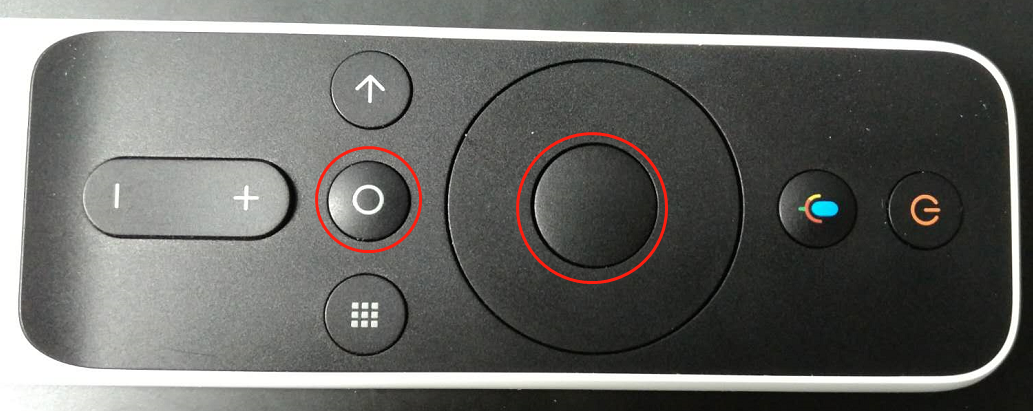
Q11: How to enter Recovery?
A:Keep remote within 10cm (4in) to the front-right corner of projector, turn off the projector and remove the power cable. Then hold the enter & home button together and plug-in power cable, loose the button until the projector into recovery mode
Q12:Does the projector support 3D?
A:For global version,no.
Q11: How to enter Recovery?
A:Keep remote within 10cm (4in) to the front-right corner of projector, turn off the projector and remove the power cable. Then hold the enter & home button together and plug-in power cable, loose the button until the projector into recovery mode
Q12:Does the projector support 3D?
A:For global version,no.
Does it help?
Yes
No