
Mi 360° Home Security Camera 2K FAQ
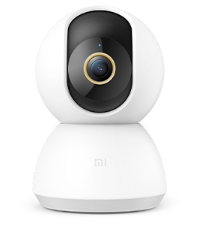
| Mi 360° Home Security Camera 2K |
|
|
| Specifications | Product name:Mi 360° Home Security Camera 2K | |
| Product net weight:310 g | ||
| Product model no.:MJSXJ09CM | ||
| Power input:5V=2A | ||
| Working temperature:-10°C to 50°C | ||
| Aperture:F1.4 | ||
| Lens angle:110° | ||
| Resolution:2304 × 1296 | ||
| Product dimensions:115 × 78 × 78 mm | ||
| Video encoding:H.265 | ||
| Compatible with:Android 4.4 or iOS 9.0 and above | ||
| Storage:Micro SD card (up to 32 GB supported) | ||
| Wireless connection:Wi-Fi IEEE 802.11b/g/n 2.4GHz | ||
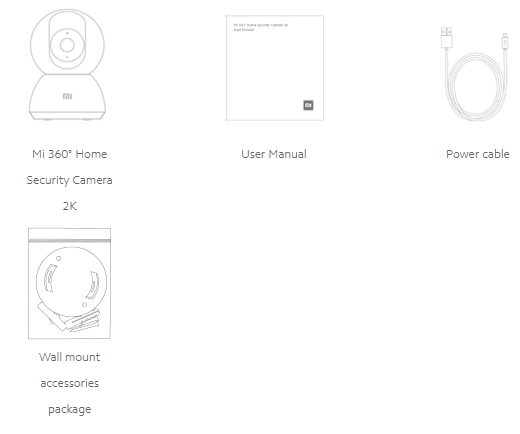
| Package contents |
|
Product Introduction
1. Q:Does Mi 360° Home Security Camera 2K support 5GHzWiFi?
A:Not support,Mi 360° Home Security Camera 2K only supports 2.4GHz WiFi.
2. Q:Can Mi 360° Home Security Camera 2K be taken to use outside the area of sale?
A:Not possible. Due to other voltage environments and network conditions that may differ from the sales area, it may not work or may not work as well in non-sales areas.
3. Q:Does Mi 360° Home Security Camera 2K support NAS storage?
A:Support. The prerequisite for using NAS dumping is that the camera is inserted into a memory card, which acts as a relay tool to dump the video to the NAS storage device.
4.Q:Does Mi 360° Home Security Camera 2K support two-way voice calls?
A:Yes. Support Two-way voice calls in real time.
5.Q:Does Mi 360° Home Security Camera 2K support continue recording video to a memory card without the network?
A:Support,with the camcorder inserted into the memory card, you can continue to record video to the memory card in case of disconnection network.
WiFi and APP related
1.Q:Does Mi 360° Home Security Camera 2K support Bluetooth gateway function?
A:Not support.
2.Q:How does Mi 360° Home Security Camera 2K upgrade firmware version?
A:Setting path:Mi Home App->select corresponding camera->click the General Settings->Firmware upgrade
3.Q:How to adjust the picture quality of Mi 360° Home Security Camera 2K?
A:Mi 360° Home Security Camera 2K can adjust the picture quality of Auto, 360P Smooth, 2K HD options.
Setting path:Mi Home App->select corresponding camera-> click to adjust picture quality-> select the picture quality.
4.Q:How to check the network of Mi 360° Home Security Camera 2K?
A:Mi Home App->select the corresponding camera->click General Setting->Additional Settings->Network info
5.Q:How to set the security passward of Mi 360° Home Security Camera 2K?
A:Mi Home App->select the corresponding camera->click General Setting->Additional Setting->Security Settings,set the security passward.
6.Q:How does the Mi 360° Home Security Camera 2K face recognition function work?
A:Mi Home APP->select the corresponding camera->Settings ->AI settings->Face Management -> The camera will process the faces that have been captured, prompting for a note of the face name.
Note: The face recognition function is only available after the purchase of the camera's cloud storage, otherwise this function is not available.
Troublshooting
1.Q:What do I do if I can't hear the sound or there is noise when I view the live video with Mi 360° Home Security Camera 2K?
A: 1. The volume of the live video is turned off by default, you can turn on the volume key in the Mi Home App video window; if the volume is low, turn up the volume on your phone.
2. If there is noise in the live video, please keep your phone away from the camera and avoid placing the camera next to electronic devices such as refrigerators and microwave ovens.
2.Q:What should I do if the video stutters or the picture and sound are not in sync when viewing the camera screen?
A: 1. When the video is stuttering or loading frequently, please switch the video clarity to auto or smooth mode.
2. When the picture and sound are not in sync, please check whether the network connected to the camera is normal. If the delay is too long, try to exit the video and re-enter it again.
3.Q:What should I do if I can't hear the sound on the camera side when make a call?
A:1. Check if the sound on the phone is too low, resulting in no sound.
2.Check whether the Mi Home App has obtained the permission to use the phone microphone (recording), if it has not obtained the permission, please open the relevant permission in the phone settings. 、
4.Q:What should I do if the Mi 360° Home Security Camera 2K is not continuous or smooth when watching history videos?
A: 1. If the video is not continuous, it may be because the camera is only recording moving images, after this function is turned on, the camera will only record when the image changes.
2、If the video is stuttering, it may be due to the network. Check whether the camera is connected to a network with too many devices or whether there are other devices playing video at the same time.
5.Q:What can I do if the memory card of Mi 360° Home Security Camera 2K is used abnormally?
A:1. Please use a special memory card made by a regular manufacturer for the car recorder or camera.
2、 Please make sure that a memory card that meets the requirements is installed in the camera. Cameras without a memory card installed cannot store recordings or watch back historical videos.
3、 If the memory card does not record, or if the memory card does not automatically cycle through the deleted files, you can format the memory card in the storage settings of the camera app plug-in.
4、 If you cannot format the card in the app, you can format the card on your computer via a card reader. Format the memory card on the computer. After formatting, power off the camera and reload the memory card.
Note: After formatting, the files on the memory card will be deleted.
6.Q:What should I do if it prompts with "device offline" in Mi Home App?
A:1. Please check if the camera is disconnected, and make sure you are using the original adapter.
2、 Please try to reboot the router.
3, if the device power supply is normal, the network is normal, please check the device indicator.
Blue light flashing: the camera is connecting to the network, if the WiFi name or password has been modified, please reset the camera and reconnect.
Yellow light flashing fast: the camera has been reset, please reconnect.
Yellow light is always on: the camera needs to be flashed for processing.
7.Q:What should I do if the Mi 360° Home Security Camera 2K blue light is flashing and cannot be used normally?
A:1.If the blue light blinks when connecting to the APP, it means that the camera cannot connect to the network, or cannot be bound to the account, please check whether the account password is correct and whether the network meets the requirements of the camera.
2.If you have successfully connected to the APP, the blue light suddenly appears flashing and can not be used, please check whether the network is normal.
8.Q :I forgot the password in the security settings of the camera, what should I do?
A:Delete the device in Mi Home App, long press the device reset button and hold it for about 3 seconds, then re-add the camera to Mi Home App.
9.Q:Why does the Mi 360° Home Security Camera 2K whistle during voice calls?
A:When making a call, please try not to place your phone and device in the same space and stay more than 10 meters away from the device, as the echo whistling caused by close calls is normal.
10.Q:What can I do if the Mi 360° Home Security Camera 2K is blurred or dark during night vision?
A:1. Please make sure the lens of the camera is clean and dust-free.
2、Please check if the lens is blocked by the lens angle, if so, please turn the head upwards in Mi Home App to move the lens to the normal shooting range.
11.Q:What should I do if the Mi 360° Home Security Camera 2K indicator light is not on?
A:Go to the main interface of the camera live video from Mi Home App, click the upper right corner to enter the camera settings, click the status light button and turn on the status light.
12.Q:How can I solve the problem that the video on the memory card has sound when viewed on the phone but not on the computer?
A:This problem is caused by the incompatibility of the video playback software on your computer.Try to replace the player.
13.Q:What can I do if the video recorded on the memory card is incoherent and the picture and sound are not in sync?
A:1. Reboot the device to see if it will return to normal.
2, Whether often plug memory card, plugging the memory card needs to be operated in the camera power off status, often plugging will cause the memory card performance degradation, resulting in the recording of abnormal video problems.
3, whether the memory card reading rate is too low.
4, Replace the memory card.
14.Q:How to do if the camera can not recognize the memory card?
A:1、 Reboot the device.
2, check the camera firmware version and Mi Home APP version needs to be updated.
3, clear the Mi Home APP data.
4, Replace the memory card.
15.Q:How to do if Mi 360° Home Security Camera 2K always rotates by itself?
A:In the camera settings, turn off the motion tracking function.
16. Q:What should I do if Mi 360° Home Security Camera 2K lags when watching HD videos with some mobile phones?
A:This camera is a 3.0 megapixel HD video camera, which requires high decoding requirements for mobile phones. Due to the limited CPU computing power of some mobile phones, it may cause lag when watching HD videos,suggest to switch to smooth mode.
Does it help?