
Mi Smart Standing Fan 1X FAQ
Specification:
Product introduction and use
1. Q:What is the difference between Mi Smart Standing Fan 1X and Mi Smart Standing Fan?
A: 1. The height raises from 900mm to 950mm, suitable for more scenarios,
2. Rated power raises from 20W to 15W, save more energy,
3.Overall noise reduction of 5dB (A), quieter operation,
4.The head swing angle increases from 120° to 140° to further improve the air supply range,
5.The weight reduces from 3kg to 2.8kg, and the product is lighter
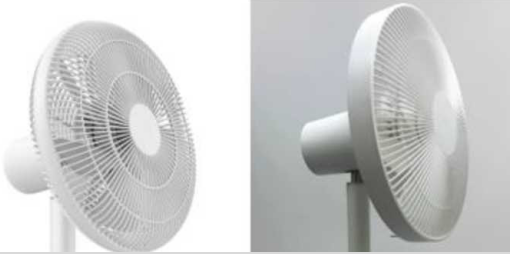
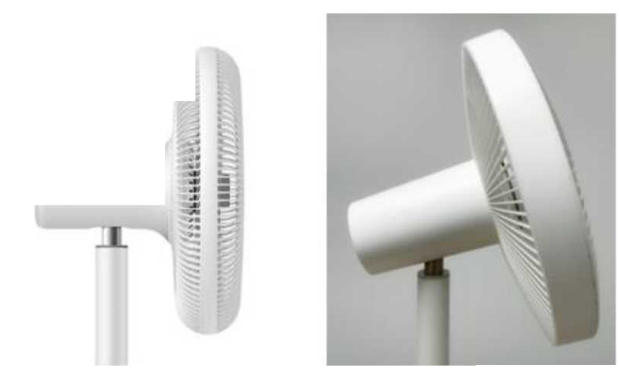
2.Q:What is the difference between Mi Smart Standing Fan 1X and Mi Smart Standing Fan appearance?
A: 1.The shape design of the hood is different
2.Different fan head design
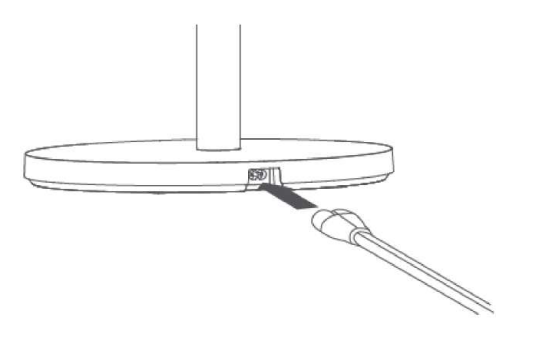
3.Q: How does Mi Smart Standing Fan 1X connect to power source?
A:Connect the power line to the power interface of the base, and then connect the power. After hearing the "drop" prompt, the fan will connect the power source successfully.
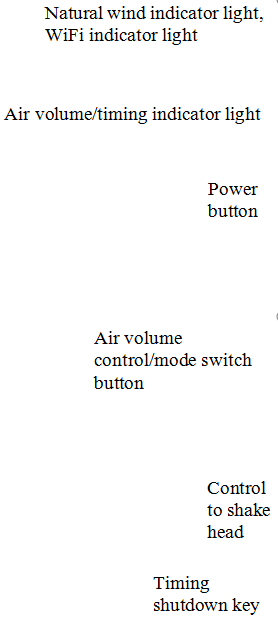
4.Q:How many buttons does Mi Smart Standing Fan 1X have?
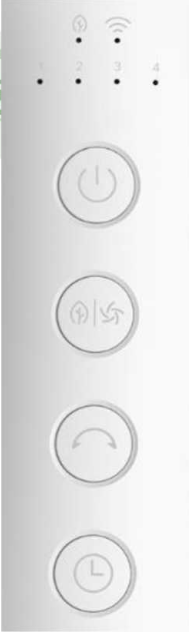
5.Q:How does Mi Smart Standing Fan 1X turn off?
A:Turn on:Press power button,fan start to work.For the first time, the starting air volume is 1 gear.Turn it off and turn it on again. The fan defaults to the block of the air volume during the last use.
Turn off:Press power button in the state of turn on, the fan will stop working.
6.Q:How does Mi Smart Standing Fan 1X adjust the air volume?
A:Short press Air volume control/mode switch button,Switch air speed gear.Each time, the air volume will switch between 1, 2, 3 and 4, and the corresponding status indicator light will always be on.
7.Q:How does Mi Smart Standing Fan 1X switch mode?
A:Long press Air volume control/mode switch button,switch between "straight air" and "natural air" modes.Under natural air mode, the natural air indicator light is always on, while under straight air mode, the natural air indicator light is off.The operation of mode switching does not change the fan's current air volume gear.The factory mode of the fan is the straight air blowing mode. After shutdown, turn on the fan again. The default mode is the mode setting of the last use.
8.Q:How does Mi Smart Standing Fan 1X turn on or turn off shake head?
A:Press shake head button,turn on 140°to control shake head and turn off shake head.Turn it off and turn it on again. The fan defaults to the shake heads settings the last time it was used.
9.Q:How to adjust Mi Smart Standing Fan 1X air supply angle up and down?
A: Please gently lift or press the nose or hood to make adjustment.
Mi Home App Related
1.Q:Does Mi Smart Standing Fan 1X support to connect to network?
A:Mi Smart Standing Fan 1X support WiFi function,After access to the network through the Mi Home App, remote control of turning on/off and other functions can be achieved.
2.Q:Does Mi Smart Standing Fan 1X have to connect to xiaomi router?
A:Mi Smart Standing Fan 1X is compatible with the mainstream of the market router.It should be noted that Mi Smart Standing Fan 1X has the following requirements for wireless network:
1. Only 2.4g WiFi network can be connected;Not support for 5G WiFi,
2.The SSID of WiFi does not support Chinese and special characters,
3. WiFi encryption mode should be WPA/WPA2, and WEP is not supported;
4.DHCP is required to be turned on by the router. It does not support static designation IP, webpage authentication or enterprise-oriented 802.1 X network.
3.Q:How to reset Mi Smart Standing Fan 1X WiFi?
A: Long press

and

at the same time,after hearing the long "drop", WiFi reset successfully and enter the state of waiting for connection.
The following cases need to reset Mi Smart Standing Fan 1X WiFi :
1. Change the Mi Home APP which bound with fan
2. Replace the router connected to the fan,
3. Change the router's password and account,
4. Mi Home APP cannot control the fan,
5. The fan remains offline for more than half an hour.
4.Q:How to use Mi Home App bind to Mi Smart Standing Fan 1X?
A: 1. App Download: Scan the QR code on the manual or search for "Mi Home" App through the App Store to download and install.Make sure there is WiFi to access.
2. Open Mi Home App and click "+" in the upper right corner to add it from nearby devices or manually;Operate according to App prompts.
3. Select the WiFi to be connected to Mi Smart Standing Fan 1X and enter the password, click "Next". If "Mi Home is trying to turn on or off WiFi" , pops up during networking, click "Allow once".
4. After the device is connected to the Internet successfully, click "Use it now".
5.Q:What is the status of the WiFi indicator of Mi Smart Standing Fan 1X?
A:

6.Q:Does Mi Smart Standing Fan 1X have bluetooth gateway function?
A:It doesn’t have bluetooth gateway function.
7.Q:How to adjust the shaking angle of the fan through App?
A:Open Mi Home App, click the Mi Smart Standing Fan 1X, and then click the shake switch to turn on the shake function.Click to turn left or right to manually adjust the air supply angle.Click the value below to select the shaking angle.The angles available are 30°, 60°, 90°, 120° and 140°.
Note: When the fan is powered on again and the shaking head function is started, the shaking head angle will be automatically calibrated. After the calibration, the shaking head will start.The maximum calibration time is 14 seconds.
8.Q:Does Mi Smart Standing Fan 1X have Child Lock?
A:Mi Smart Standing Fan 1X have Child Lock function.
9.Q:Does Mi Smart Standing Fan 1X support to be controlled by multiple people?
A: It supports multiple people to control, provided that it is shared to designated users through the "Mi Home" APP.Open Mi Home App, click Mi Smart Standing Fan 1X, and click "... "in the upper right corner.Select device sharing, which can be Shared to other xiaomi account,etc.
10.Q:Does Mi Smart Standing Fan 1X support firmware upgrade?
A:Mi Smart Standing Fan 1X supports firmware upgrade.Check firmware update and click … on the top right corner of Mi Smart Standing Fan 1X plug-in.Select Settings and check firmware updates. If there is new firmware, click update now.
11.Q:Afte sharing Mi Smart Standing Fan 1X to others,can the person being shared to update firmware?
A:It is not supported.
12.Q:How to unbind Mi Smart Standing Fan 1X?
A: 1.Through Mi Home App: open Mi Smart Standing Fan 1X plug-in,Click the upper right corner to enter Settings, click Settings, delete the device, and unbind.
2.It also can unbind through Mi Smart Standing Fan 1X to reset WiFi.
Q&A
1. Q:In Mi Home APP, how to solve if Mi Smart Standing Fan 1X always shows offline or fails to connect to WiFi?
A: 1.Confirm whether Mi Smart Standing Fan 1X is powered on and running normally.
2.Confirm whether WiFi is normal.
3. Check whether the fan has been offline for more than half an hour, and reset Wi-Fi if the fan has been offline for more than half an hour.Check whether the router frequency band is 2.4G and adjust the router frequency band to 2.4G.
4. Please unplug the power cable and power it again 10 seconds later (the power needs to be discharged for a period time). Try to reset and reconnect it.
5. Mi Smart Standing Fan 1X is not recommended to connect repeater or other equipment.
2.Q:Why does Mi Smart Standing Fan 1X produce resonance sound under the natural wind state?
A: If the fan blade knob is too tight, it will resonate with the fan blade completely. After the fan blade knob is in place naturally, then twist it 30~60 degrees. From the side, there is a gap between the fan blade knob and the fan blade.
3.Q:What about the blade swing of Mi Smart Standing Fan 1X?
A: 1. Check whether the fan blade knob is screwed up;
2. Check whether the fan blade is deformed;
3. Take off the fan blade and rotate it 180 degrees. After installing it, try whether the next fan blade will still swing;
4. Whether the after-sale inspection is a performance fault.
4.Q: How to do if there is abnormal noise in the operation of Mi Smart Standing Fan 1X?
A:When there is abnormal noise when working, it is necessary to check whether the knob of the fan cover is screwed up, and whether there is any foreign matter in the fan assembly.
5.Q:What if Mi Smart Standing Fan 1X does not turn on?
A:Press the switch/mode key of Mi Smart Standing Fan 1X. When there is no response or appears alarm sounds:
1. Check whether the power socket is energized;
2. Check whether the base bolts are loose;
3. Check whether the connection between the pillar and the base is in correct alignment;
4. Whether the after-sale inspection is a performance fault.
6.Q:Why is there no response when opening shake head function?
A:When the fan is powered on again and the shaking head function is started (button or APP is on), the shaking head angle will be automatically calibrated. After the calibration, the shaking head will start.The maximum calibration time is 14 seconds.
Judgment Method:
1. Stand opposite the fan, point the fan nose at the center line of chassis, turn on the power on, turn on the shaking head function, and see if the fan is shaking head.If it shake head, the fan is normal.
2. Stand opposite the fan, rotate the fan head to the right, turn on the power, turn on the shaking head function, see if the fan is shaking head to the left, if it is shaking head, the machine is normal.
7.Q:After turning on Mi Smart Standing Fan 1X, why does the fan blade occasionally delay rotation?
A:In this case, it is necessary to check whether the fan position is ventilated or easy to be ventilated. In the case of good ventilation, the fan blade will rotate in the opposite direction. When the fan is turned on, the fan blade will rotate in the opposite direction, so delayed rotation of the fan blade will occur.
Does it help?
Yes
No