
The projection distance of the Mi Smart Projector is how far away the projector needs to be from the screen for clear images. The screen size is the size of the projected image. Both vary based on the projector model and settings.
If you are interested in the projection distance and screensize of the Mi Smart Projector, here are more details for your reference:
1. Screen dimension (SD) refers to the diagonal size of the projection screen in inches, offering you flexibility in choosing the size of the displayed image;
2. Relative distance (D) represents the distance between the projector and the wall or screen, measured in centimeters. You can adjust this distance to achieve the desired image size and sharpness;
3. Relative height (H) denotes the distance from the bottom of the projector to the bottom edge of the projected image, measured in centimeters. This measurement ensures proper alignment and positioning of the projected image on the screen.
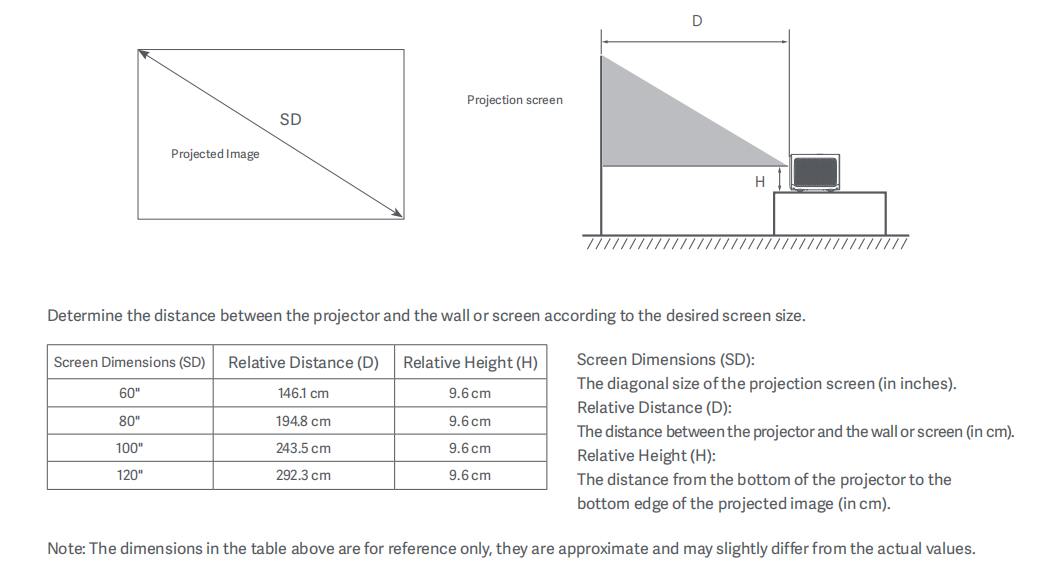
If you are interested in the projection distance and screensize of the Mi Smart Projector, here are more details for your reference:
1. Screen dimension (SD) refers to the diagonal size of the projection screen in inches, offering you flexibility in choosing the size of the displayed image;
2. Relative distance (D) represents the distance between the projector and the wall or screen, measured in centimeters. You can adjust this distance to achieve the desired image size and sharpness;
3. Relative height (H) denotes the distance from the bottom of the projector to the bottom edge of the projected image, measured in centimeters. This measurement ensures proper alignment and positioning of the projected image on the screen.