Introduction:
1. History of USB port naming
USBport Universal Serial Bus (English: Universal Serial Bus, abbreviation: USB) is a serial port bus standard and a technical specification for input and output ports. It is widely used in information communication products such as personal computers and mobile devices, and expands To photographic equipment, digital TV (set-top box), game consoles and other related fields. The latest generation is USB4, the transmission speed is 40Gbit/s, the three-stage voltage is 5V/12V/20V, the maximum power supply is 100W, and the new Type Cport allows positive and negative blind insertion.
USB is a protocol specification for transmitting data and a port technical specification.
In 1996, the USB Implement Forum (USB-IF), a non-profit organization composed of seven industry giants including Intel, Microsoft, Compaq, DEC and IBM in the United States, NEC in Japan, and Northern Telecom in Canada, launched the USB 1.0, followed by the faster USB 1.1 and USB 2.0.
USB 3.0, which is composed of industry giants such as Intel, Microsoft, HP, Texas Instruments, NEC, ST-NXP, etc., the Promoter Group announced in November 2008 that the organization is responsible for formulating a new generation of USB 3.0 standards. The completed USB 3.0 standard has been handed over to the USB Implementers Forum (USB-IF), the management organization of the specification.
From 2013 to the present, the USB 3.0 Promoter Group, a joint venture of major companies such as Intel, has successively launched the USB 3.1, USB 3.2 and USB4 protocol specifications, which have been published and updated on the USB-IF official website. In USB 2.0 and before, it mainly supports low speed (1.5Mbps), high speed (12Mbps) and full speed (480Mbps). By the time USB 3.0 began to enter superspeed mode, and with each upgrade, the bandwidth doubled, from the original 5Gbps to the current 40Gbps. USBport is divided into USB1.0, USB 1.1, USB2.0, and USB 3.0 according to the specification. We often say that USB2.0port and USB 3.0port are classified according to the USB specification.
In 2013, USB 3.0 was renamed USB 3.1 Gen 1, and at the same time, USB 3.1 Gen 2 with 10Gbps bandwidth was launched, and the two were collectively referred to as USB 3.1.
In 2017, USB 3.1 Gen 1 and USB 3.1 Gen 2 were renamed as USB 3.2 Gen 1 and USB 3.2 Gen 2, respectively. At the same time, USB 3.2 Gen 1x2 with a bandwidth of 10Gbps and a USB 3.2 Gen 2x2 with a bandwidth of 20Gbps are added, and these four are collectively referred to as USB 3.2. So far we have entered the era of USB 3.2, and the name of USB 3.0 has become history. In short, USB 2.0 remains, and USB 3.0 has now been renamed USB 3.2 Gen 1 by the USB-IF Association, and there are more USB 3.2 Gen 2, USB 3.2 Gen 1x2, and USB 3.2 Gen 2x2. Among them, USB 3.2 Gen 1x2 and USB 3.2 Gen 2x2 represent dual-channel modes of USB 3.2 Gen 1 and USB 3.2 Gen 2, while USB 3.2 Gen 1 and USB 3.2 Gen 2 are single-channel modes.
The latest USB naming convention of USB-IF, the original USB 3.0 and USB 3.1 will no longer be named, and all USB standards will be called USB 3.2. Considering compatibility, USB 3.0 to USB 3.2 are respectively called USB 3.2 Gen 1. USB 3.2 Gen 2, USB 3.2 Gen 2x2.
The biggest difference is the increase in transmission rate.
| Theoretical transmission speed | USB port standard |
| 40Gbps | USB4 |
| 20Gbps | USB3.2 Gen2*2(dual channel) |
| 10Gbps | USB3.2 Gen2*1(single channel) |
| 5Gbps | USB3.2 Gen1*1(single channel) |
| 480Mbps | USB2.0 |
| 12Mbps | USB1.1 |
| 1.5Mbps | USB1.0 |
2.The biggest difference is the improvement of the transmission rate, as shown in the following figure:
Differences between USB3.0 (now named: USB3.2Gen1), USB3.1 Gen1 (now named: USB3.2Gen1), and USB3.1 Gen2 (now named: USB3.2Gen2):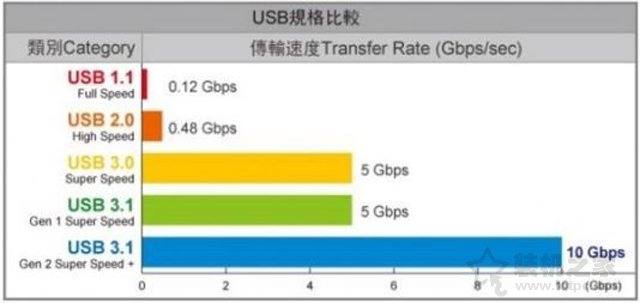
3.The difference between USB3.0 and USB2.0 Pin
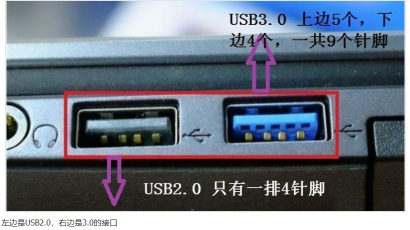
4. The appearance difference between USB3.0 and USB2.0 and USB3.1
We can distinguish by color, check the color of the USB plastic sheet, USB3.0 is blue; USB2.0 is black; and USB3.1 is usually blue-green, as shown in the following figure.