
What is Enterprise Mode?
- Enterprise mode is designed for company owned devices which are provided to employees that's used exclusively for work and no personal use. This allows admins to manage the entire device and enforce an extended range of policy controls which allows the device to only corporate use. For example, you drive a car which looks like yours, but it's a company asset.
What does Enterprise Mode provide?
★Comprehensive capability
- Apps, communications, hardware, data, etc. can be fully controlled; complete and advanced system capabilities can provide enterprises and institutions with comprehensive services.
★Safety and reliability
- With the support of MIUI core security technology, the perfect defense and security mechanism ensures the security of equipment and information.
★Centralized management
- Centralized management of users, data, apps and behaviors with flexible remote configuration and management services.
★Personalized customization
- The core functions of the system can be flexibly configured and freely matched, so as to comprehensively, multi-dimensionally and highly control the equipment.
How to enable Enterprise Mode?
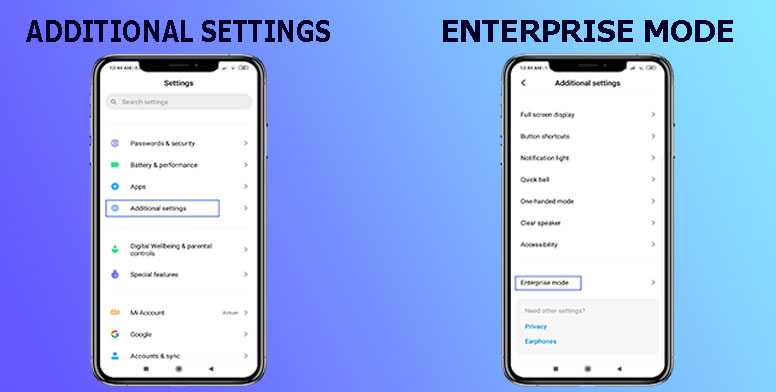
Step 1:Find Enterprise Mode
★Navigate to App settings - Additional settings - Enterprise Mode
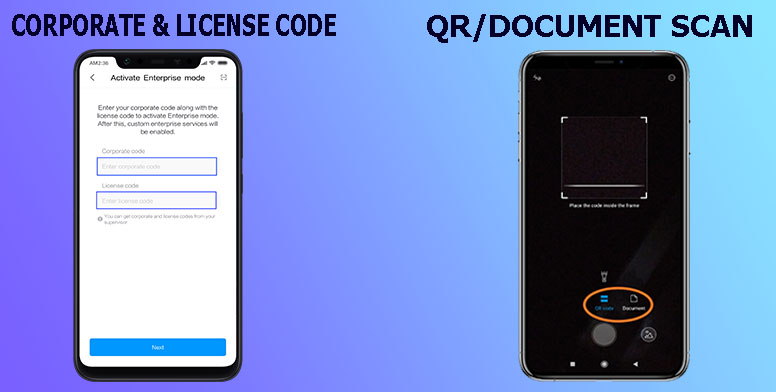
Step 2:Fill required info
★Provide your corporate code and license code or scan QR code/document tapping on the right corner icon. Collect these data from your supervisor.
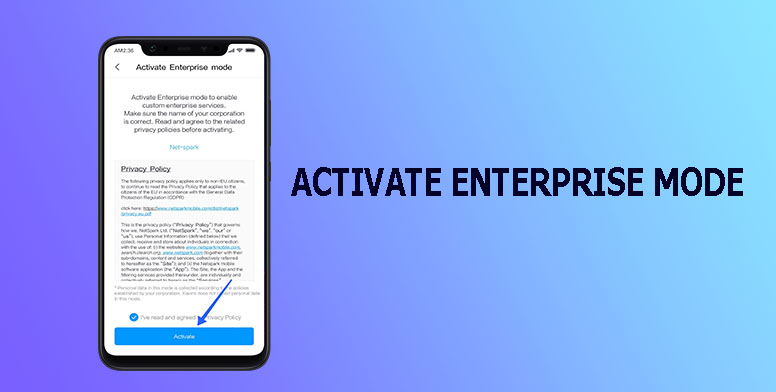
Step 3:Verify & activate Enterprise mode
★Read the privacy policy carefully before verification and activate right away.
How does enterprise apply for Enterprise mode?
★If enterprise has a demand for this function, enter the website https://global.web.b.mi.com/business.html , apply for trial or submit cooperation application in the "Contact us" interface.