

How to set the default SIM card for calls on the Xiaomi 14T?
The default SIM card for calls on the Xiaomi 14T refers to choosing one of the two SIM cards to handle all outgoing voice calls by default, you don’t need to select a SIM each time manually.
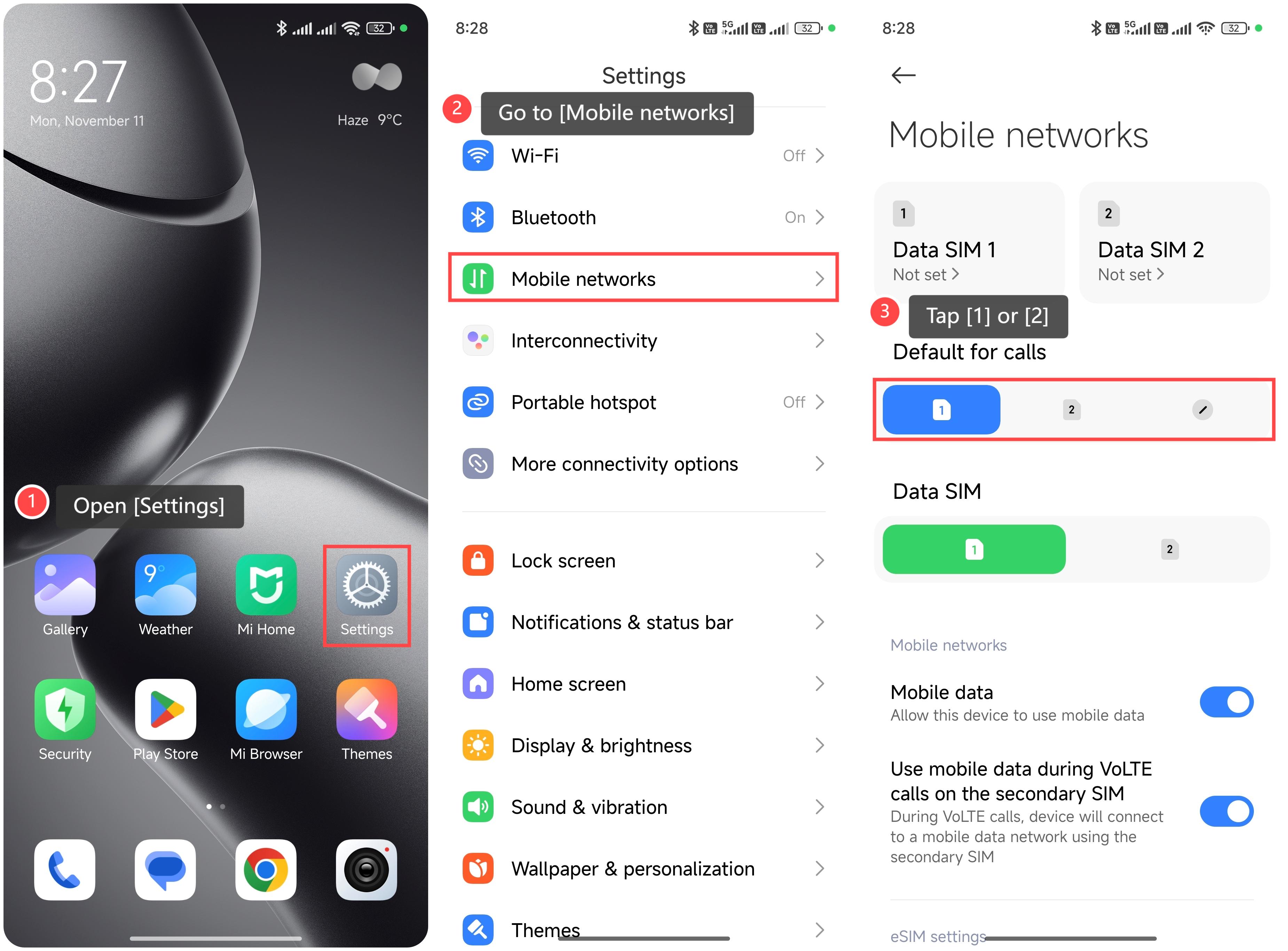
To set the default SIM card for calls, please refer to the following steps:
1. Open [Settings];
2. Go to [Mobile networks];
3. You can choose the specific SIM card as your preference, and tap [1] or [2].
Friendly tips:
1. You can choose to set or change the default SIM for calls based on your needs, such as which plan offers better rates for calls or which number is more frequently used;
2. If your contacts are divided by the purpose of each SIM, setting a default can reduce confusion and make it easier to remember which contacts are associated with each SIM.
To set the default SIM card for calls, please refer to the following steps:
1. Open [Settings];
2. Go to [Mobile networks];
3. You can choose the specific SIM card as your preference, and tap [1] or [2].
Friendly tips:
1. You can choose to set or change the default SIM for calls based on your needs, such as which plan offers better rates for calls or which number is more frequently used;
2. If your contacts are divided by the purpose of each SIM, setting a default can reduce confusion and make it easier to remember which contacts are associated with each SIM.
Does it help?
Yes
No