

What to do if the Mijia Smart Air Purifier with Humidification Pro indicates low water even though there is still water in the tank?
If the Mijia Smart Air Purifier with Humidification Pro indicates low water even though there is still water in the tank, please refer to the following troubleshooting steps:
1. The device is equipped with a low water protection feature. After the low water protection is triggered, unevaporated water on the filter will gradually flow down to the lower water tank, resulting in some remaining water. This residual water is normal and does not indicate that there is enough water for the device to operate. Generally, the higher the humidity, the more residual water there will be.
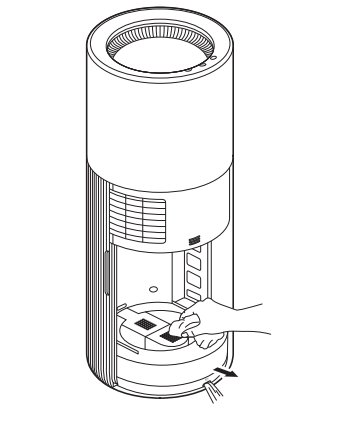
2. Move the main unit to a bathroom or sink, remove the drain plug at the bottom of the water tank, and drain the accumulated water. Ensure that the drain plug is securely reinstalled and properly sealed, then gently wipe the bottom of the water tank with a soft cloth.
3. Check whether the float in the water tank is correctly installed and can move normally. Make sure the float is not stuck by dirt or foreign objects.
4. Add clean water to the water tank without exceeding the maximum water level, then restart the device and check whether the low water warning disappears.
5. If the Mijia Smart Air Purifier with Humidification Pro still indicates low water when the water level is sufficient after the above checks, please contact your local after-sales service center for further assistance.
Does it help?
Yes
No