

REDMI Buds 8 Pro FAQ
Overview
Q1: What is the Bluetooth version of the REDMI Buds 8 Pro?
A: The REDMI Buds 8 Pro use the latest Bluetooth 5.4 version. With the commercialization of the latest technology standard, more and more smartphones are adopting Bluetooth 5.4. When earbuds also support Bluetooth 5.4, they can fully leverage the advantages of this standard, providing you with an excellent experience. The REDMI Buds 8 Pro offers a faster transmission speed, a more stable connection, and lower power consumption.
Q2: How long is the battery life of REDMI Buds 8 Pro?
A: The REDMI Buds 8 Pro battery life varies by usage mode as follows:
1. For single music playback with AAC format at 50% volume and noise cancellation turned off, the earbuds last 8.5 hours, and 35 hours with the charging case.
2. For single music playback with AAC format at 50% volume and noise cancellation turned on, the earbuds last 4.5 hours, and 16 hours with the charging case.
3. For single calls at 50% volume using AAC format with noise cancellation turned off, the earbuds last 4.5 hours, and 16 hours with the charging case.
4. For single calls at 50% volume using AAC format with noise cancellation turned on, the earbuds last 3 hours, and 10.5 hours with the charging case.
Note:
The above data are based on Xiaomi Lab tests, and actual usage time varies depending on usage habits, charging conditions, and environmental factors.
Q3: Is the battery of the REDMI Buds 8 Pro replaceable?
A: The battery of the REDMI Buds 8 Pro is not replaceable.
Appearance Related
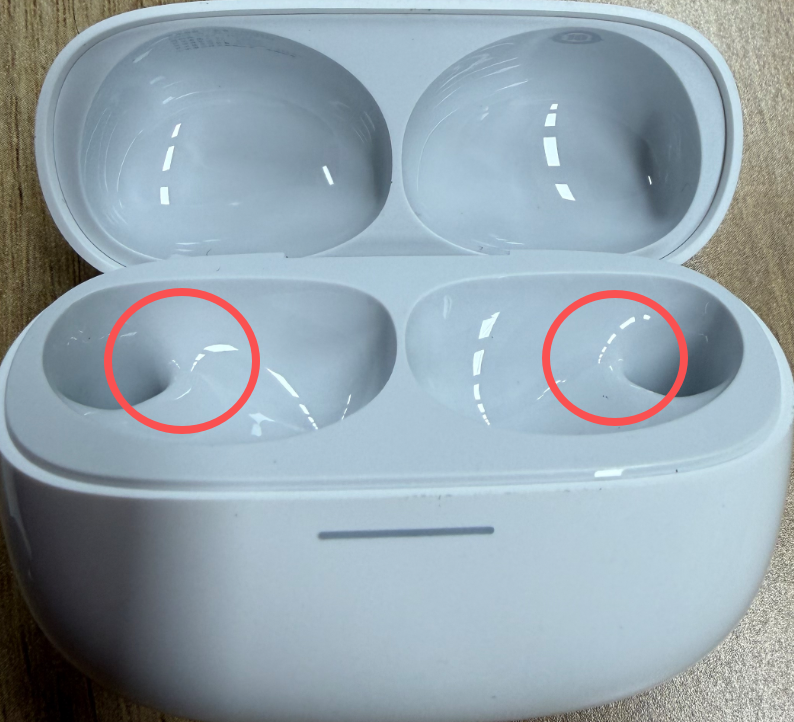
Q1: Why are the REDMI Buds 8 Pro earbuds and the charging case’s inner tray prone to scratches?
A: The recessed groove inside the REDMI Buds 8 Pro charging case is made of glossy material. When placing the earbuds into the charging case, the magnetic attraction can cause the earbuds to bump against the inner tray, resulting in minor scratches.
Q2: Is the charging case of the REDMI Buds 8 Pro waterproof?
A: The REDMI Buds 8 Pro earbuds have an IPX4 water resistance rating, while the charging case has an IPX2 water resistance rating.
Q3: Why does the white version of the REDMI Buds 8 Pro earbuds and charging case feel slightly rough?
A: To achieve the pure and clean look of the white version, the REDMI Buds 8 Pro casing uses a special paint-free process, and the edges are precisely angled. This can cause a slight rough sensation when touched at certain angles. This is not a quality issue.
Q4: Why does the seal sticker on the REDMI Buds 8 Pro retail box appear slightly crooked?
A: The transparent seal sticker on the REDMI Buds 8 Pro retail box is applied automatically during production. There can be a very slight positional deviation, making it appear off-center visually. This is within normal manufacturing tolerance and does not affect the packaging’s seal or the product quality.
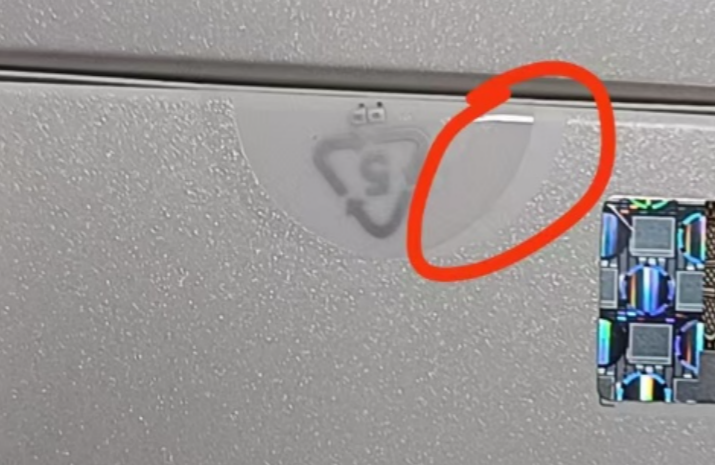
This slight misalignment is limited by industry production processes and cannot be completely eliminated. The overall product quality meets Xiaomi’s inspection standards, and the integrity of the seal is not affected.
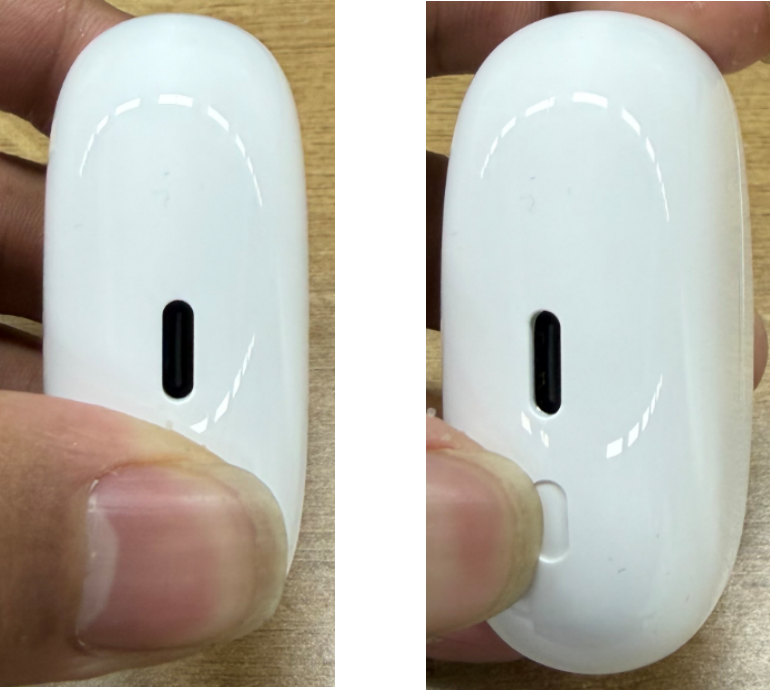
Q5: What to do if the button on the REDMI Buds 8 Pro charging case sometimes gets stuck?
A: Please rest assured, this is usually not a defect. The side button of the REDMI Buds 8 Pro charging case has a precise internal structure to ensure tactile feedback and durability. Pressing the button from one side with a sharp object, such as a fingernail, can cause it to stick temporarily. In that case, pressing from the opposite side will restore normal function. For the smoothest operation, it is recommended to press the button with your fingertip.
The left side shows the correct pressing method, the right side shows the incorrect pressing method:
Wearing Related
Q1: Will the REDMI Buds 8 Pro wobble or fall out when worn?
A: The REDMI Buds 8 Pro are designed based on ergonomics and can fit securely in the ears during normal daily use without wobbling. However, in high-intensity activities such as playing basketball, slight movement or even falling out can occur. Wearing the earbuds in such scenarios is not recommended.
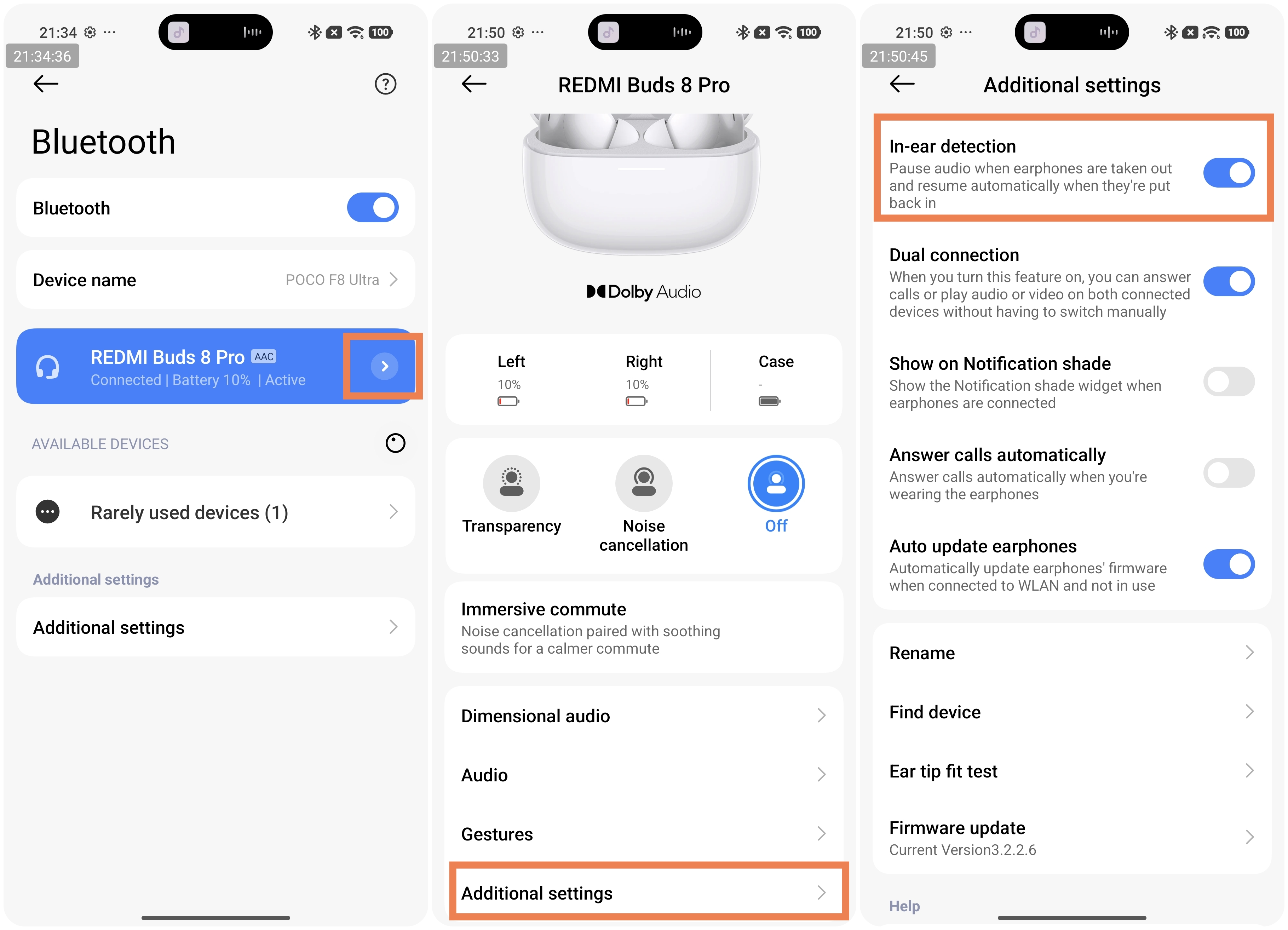
Q2: Does the audio pause automatically when removing the REDMI Buds 8 Pro?
A: The REDMI Buds 8 Pro supports the in-ear detection function. In-ear detection is enabled by default. When the earbuds are removed, playback will pause automatically. If in-ear detection is turned off, removing the earbuds will not pause playback.
Q3: What to do if wearing the REDMI Buds 8 Pro causes discomfort or allergic reactions?
A: All skin-contact components of the REDMI Buds 8 Pro have passed strict harmful substance testing and are safe for use. However, you are advised to avoid prolonged wear (such as during sleep), keep your ears clean, and prevent sweat or dirt buildup, which can cause discomfort, inflammation, or allergy-like symptoms.
Possible causes of allergy-like symptoms include:
1. Prolonged wearing (such as during sleep) can reduce ventilation, and sweat can remain on the earbuds, which can cause discomfort.
2. If the earbuds are not cleaned for a long time, dirt and residue will accumulate, potentially leading to symptoms that resemble an allergic reaction.
3. If you experience severe discomfort, inflammation, or allergic reactions after wearing the earbuds, it is recommended to stop using them immediately and consult a medical professional. If you only experience mild itching, please follow these guidelines:
(1). After exercising while wearing the earbuds, check for sweat on the earbuds and wipe them clean before placing them back into the charging case.
(2). During daily use, regularly check the earbuds and the inside of the charging case for dirt, and clean them promptly if any is found.
(3). After wearing the earbuds continuously for a long time, remove them and allow your ears to rest for about 30 minutes to relieve ear fatigue.
(4). After showering, if there is any residual water inside your ears, make sure to dry them thoroughly before wearing the earbuds again.
Q4: Is it normal to hear a popping sound or trigger wind-noise reduction when turning the head while wearing the REDMI Buds 8 Pro in Noise cancellation or Transparency mode?
A: The issue usually occurs when the microphones on the REDMI Buds 8 Pro are temporarily affected by airflow or pressure changes due to certain wearing positions. For example, your cheek or clothing can momentarily block the call microphone. The system can mistakenly interpret this as wind noise, triggering wind-noise reduction, which can cause a slight popping sound or other minor noises.
If you hear a popping sound or trigger wind-noise reduction when turning the head while wearing the REDMI Buds 8 Pro in Noise cancellation or Transparency mode, please refer to the following aspects:
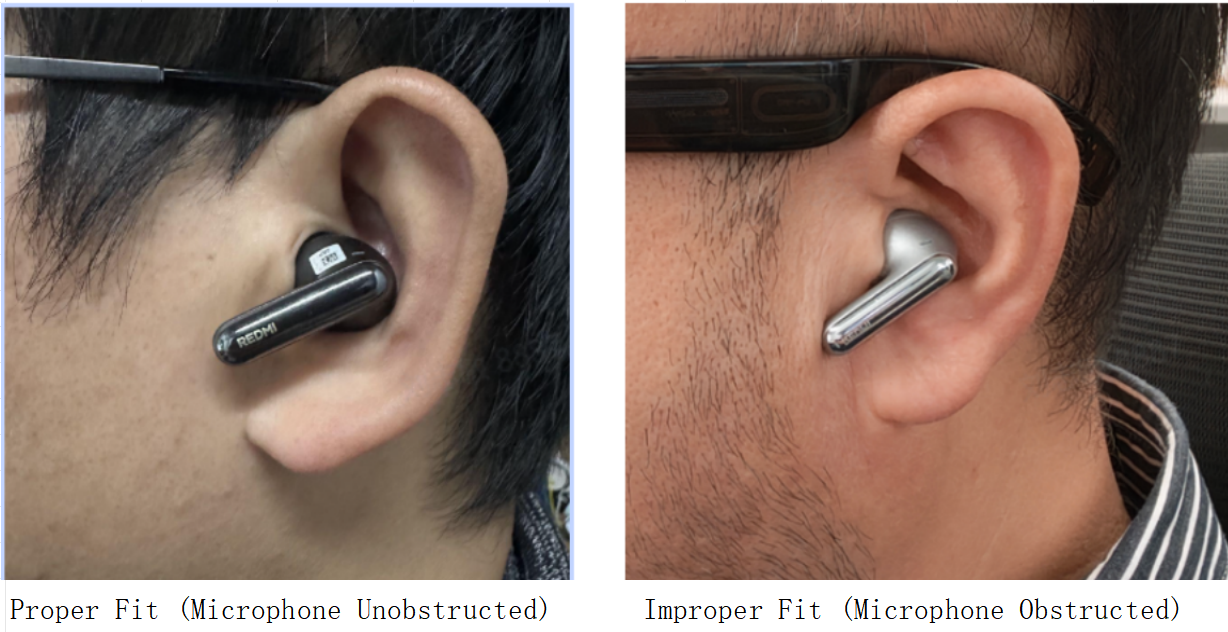
1. Adjust the fit of the earbuds to ensure they sit securely, and keep the call microphones (usually on the outer side near your mouth) clear of your cheeks, hair, or clothing.
The left image shows the correct way to wear it, and the right image shows the incorrect way to wear it:
2. Regularly clean the microphone openings with a dry, soft cloth to prevent dust or dirt from affecting signal detection.
3. If this happens frequently in certain positions, switch temporarily to Standard mode by turning off Noise cancellation and Transparency, and switch back after use.
4. Keep your earbuds’ firmware and the Xiaomi Earbuds App updated to the latest version, as algorithm optimizations continue to improve performance in such scenarios.
Connection Related
Q1: How to connect the REDMI Buds 8 Pro to the phone for the first time?
A: If there is no previous pairing record, there are three ways to connect the REDMI Buds 8 Pro for the first time. Please follow the methods below:
Connect the new device:
1. Place the earbuds in the charging case and close the lid. Then open the charging case lid, the white indicator will flash continuously, and the earbuds will be ready to pair.
2. Turn on Bluetooth on your device and search for REDMI Buds 8 Pro. For some devices, a pairing password can be required, and enter “0000” if prompted.
Connect via the Xiaomi Earbuds App:
1. Download the Xiaomi Earbuds App from your phone's App store. Log in with your Xiaomi account and allow location access. On the homepage, tap the [+] icon in the top-right corner to search for devices.
2. Open the charging case lid, then press and hold the button for 2 seconds until the white indicator flashes, entering pairing mode.
3. The App will display "REDMI Buds 8 Pro". Tap connect and wait until pairing is complete.
Connect using the Pair compatible devices function:
Place the earbuds in the charging case, close the lid, and bring the case near an unlocked Xiaomi phone with Bluetooth turned on. Open the charging case lid, and follow the on-screen instructions on your phone to complete the connection.
Note:
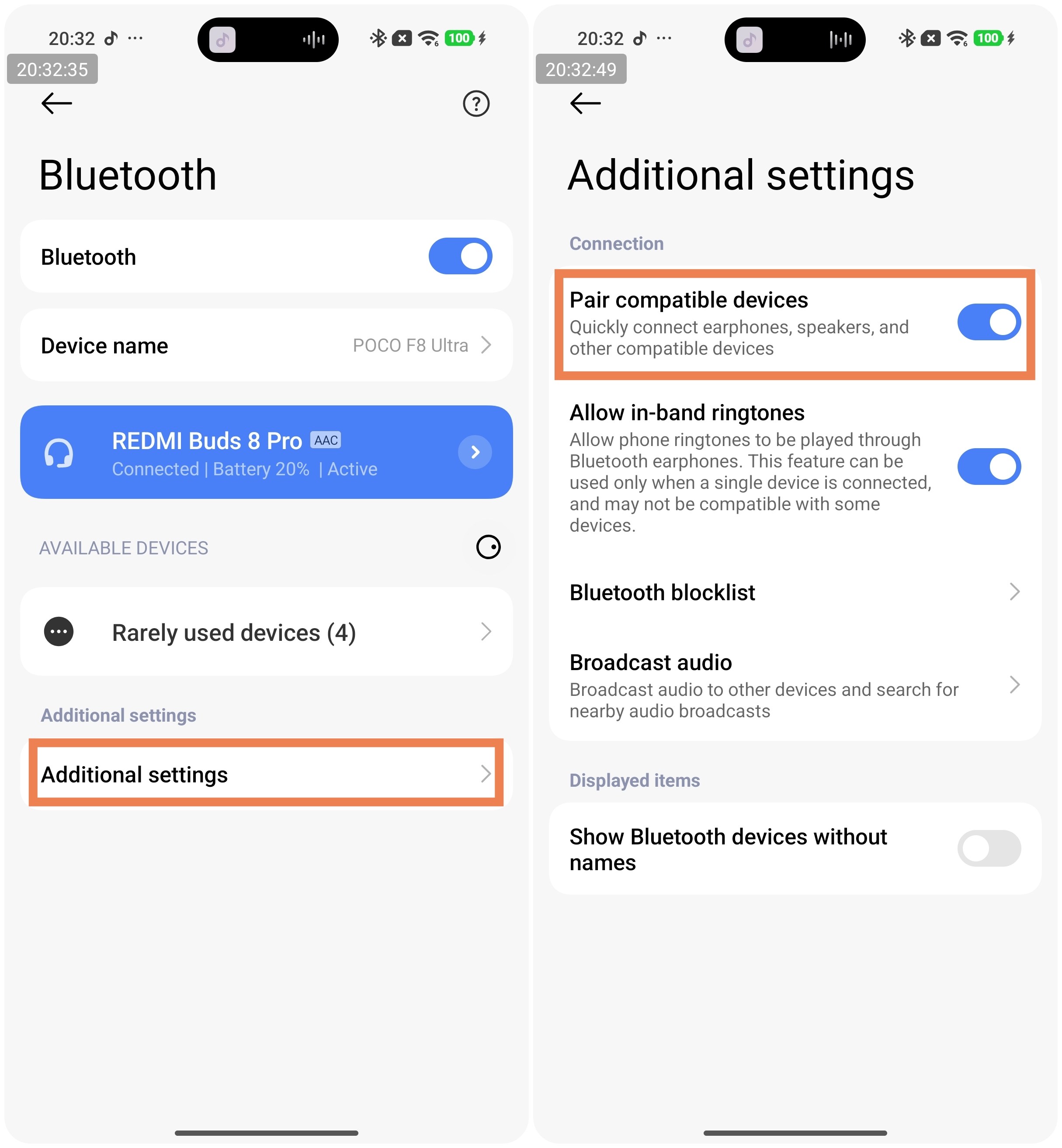
To use the Pair compatible devices feature, your phone’s system must be updated to the latest stable version. Currently, this feature is only supported on some Xiaomi phones. Take a Xiaomi phone with HyperOS as an example. To enable it, go to [Bluetooth] >> [Additional settings] >> turn on [Pair compatible devices].
Q2: How to pair the REDMI Buds 8 Pro with a new phone?
A: To pair the REDMI Buds 8 Pro with a new phone, please refer to the following methods:
Method 1:
Put the earbuds into pairing mode: Place the earbuds in the charging case and open the lid. Press and hold the button on the charging case for 2 seconds while the lid is open. The white indicator on the case will flash continuously, indicating that the earbuds are ready to pair. You can now connect the earbuds to your new device.
Method 2:
Restore factory settings: Place the earbuds back in the charging case and open the lid. Press and hold the button on the bottom of the charging case for 10 seconds until the white indicator flashes quickly. The earbuds will reset to factory settings and enter pairing mode again, ready to connect to a new device.
Q3: How to disconnect the REDMI Buds 8 Pro from the phone?
A: To disconnect the REDMI Buds 8 Pro from the phone, please refer to the following methods:
1. Place both earbuds in the charging case and close the lid. The connection will automatically disconnect after 5 seconds.
2. On your device, tap the Bluetooth name of the earbuds and select [OK] to disconnect.
3. Turn off the Bluetooth function on your device to disconnect.
Q4: How to automatically reconnect the REDMI Buds 8 Pro to a paired phone?
A: To automatically reconnect the REDMI Buds 8 Pro to a paired phone, please refer to the following methods:
1. If the phone you want to connect to is the last device the earbuds were paired with, simply open the charging case lid to reconnect automatically.
2. If the phone is not the last paired device, you need to manually tap the earbuds' Bluetooth name on the phone to connect.
Q5: Does the REDMI Buds 8 Pro support Dual connection?
A: The REDMI Buds 8 Pro supports Dual connection, and this feature is enabled by default.
To use the Dual connection, please refer to the following steps:
1. Put the earbuds into pairing mode by placing them in the charging case and pressing and holding the case button for 2 seconds.
2. The white indicator on the charging case will flash continuously, and the earbuds will enter pairing mode, allowing you to connect to a new device.
3. Once the new device is successfully connected, the earbuds will automatically reconnect to the previous device, enabling Dual connection.
Note:
1. The phone’s system version should be up to date.
2. In Dual connection mode, the earbuds are connected to two devices simultaneously. When neither device is actively in use, the device connected first has priority. After both devices finish their activity, the device that finishes last has priority. If both devices are active at the same time, device 1 has priority.
3. The earbuds can only be connected to one device running the Xiaomi Earbuds App in Dual connection mode.
4. During dual connection, if device A is idle and device B is playing audio, and the earbuds go out of range of device B, they will not automatically reconnect to device A when back in range. Placing the earbuds in the case and reopening the lid restores the connection.
5. The HyperOS system supports dual connection and auto-reconnect simultaneously. (Currently, auto-reconnect is supported only on Xiaomi/REDMI devices with the HyperOS system.)
Q6: Why do the REDMI Buds 8 Pro disconnect from my phone after turning off the Dual connection?
A: Turning off the Dual connection feature on your REDMI Buds 8 Pro will keep the connection with the device that was last active, disconnecting the other device, rather than maintaining a connection with your phone directly. This is normal behavior.
Q7: Why can’t the REDMI Buds 8 Pro be recognized by the phone?
A: If the REDMI Buds 8 Pro can't be recognized by the phone, please refer to the following aspects:
1. When searching for Bluetooth earbuds on your phone, make sure the REDMI Buds 8 Pro are in pairing mode.
(1). First, ensure the earbuds have sufficient battery power. When you open the charging case, the indicator will turn on once. If the indicator flashes six times and then turns off, the charging case battery is low.
(2). Open the charging case lid and press and hold the function button for 2 seconds. The white indicator will flash continuously, indicating that the earbuds are in pairing mode.
(3). On your phone, search for the Bluetooth name "REDMI Buds 8 Pro" and tap it to connect.
(4). Once pairing is complete, the status will show "Connected", indicating a successful Bluetooth connection and normal use.
2. If pairing times out, the REDMI Buds 8 Pro may become undiscoverable. Place the earbuds back into the charging case, close the lid, wait at least 5 seconds, then reopen the lid and press and hold the function button for 2 seconds to enter pairing mode.
3. If the REDMI Buds 8 Pro is already paired with another device, the current device can fail to connect. Please disconnect the earbuds from the other device first, then try pairing them again.
4. If none of the above methods work, restore the REDMI Buds 8 Pro to factory settings. Place the earbuds in the charging case with the lid open. Press and hold the button at the bottom of the charging case for 10 seconds until the white indicator flashes rapidly. The earbuds will reset to factory settings and enter pairing mode. After resetting, follow the steps above to pair again.
Note:
Due to the nature of Bluetooth technology, electromagnetic interference in your area can affect Bluetooth connections and prevent your phone from detecting earbuds.
Q8: Does the REDMI Buds 8 Pro support connecting to a Xiaomi Smart Band/Xiaomi Watch or other Bluetooth Bands/Watches?
A: The REDMI Buds 8 Pro can connect to watches that support Bluetooth pairing functionality.
Q9: Why does the REDMI Buds 8 Pro fail to reconnect or reconnect slowly to one of the two paired devices (A and B) when the charging case is opened?
A: If the REDMI Buds 8 Pro fail to reconnect or reconnect slowly to one of the two paired devices (A and B) when the charging case is opened, please refer to the following aspects:
1. When opening the charging case to reconnect to two devices and neither device A nor device B has an active audio stream (such as calls, audio/video playback, or system sound prompts), REDMI Buds 8 Pro will reconnect to the devices one by one. Since the earbuds need to query the pairing address information of the previously connected devices, the reconnection process can take some time. Please wait patiently for up to around 20 seconds.
2. In the dual-device reconnection scenario, if REDMI Buds 8 Pro has already reconnected to device A and device A has an active audio stream (such as calls, audio/video playback, or system sound prompts), the earbuds will temporarily pause reconnection to device B to prevent a poor experience. As a result, device B can reconnect more slowly or fail to reconnect due to a timeout. If REDMI Buds 8 Pro still cannot reconnect to device B after 5 minutes, you can manually reconnect by selecting REDMI Buds 8 Pro from the Bluetooth device list on device B.
Q10: Will the REDMI Buds 8 Pro automatically turn off if they remain disconnected for an extended period of time?
A: When the REDMI Buds 8 Pro are outside the charging case and not connected to any device, they will enter sleep mode after 1 minute. To reconnect, place the earbuds back into the charging case and press and hold the case button for 2–3 seconds. When the white indicator on the charging case flashes continuously, the earbuds enter pairing mode and can be connected to a new device.
When the REDMI Buds 8 Pro move out of the Bluetooth connection range, they will automatically enter a waiting-for-connection state. If no device is connected within 1 hour, the earbuds will enter sleep mode. To reconnect, place the earbuds back into the charging case and press and hold the case button for 2 seconds. When the white indicator on the charging case flashes continuously, the earbuds enter pairing mode and can be connected to a new device.
Note:
1. When the REDMI Buds 8 Pro are placed into the charging case, they will automatically start charging. After the earbuds are fully charged with the case closed, they will enter the power-off state.
2. When the charging case battery level is below 5%, placing the earbuds into the case and closing the lid will cause the earbuds to disconnect and power off.
Q11: Why does the sound of the REDMI Buds 8 Pro stutter in certain environments (such as train stations, subway stations, or substations)?
A: In environments with strong interference, radio frequency (RF) performance can be affected, causing audio stuttering when using the REDMI Buds 8 Pro. This is a common characteristic of all Bluetooth products and is considered normal behavior. In environments with less interference, such as offices, cafés, or homes, audio stuttering should not occur.
Q12: Why does the REDMI Buds 8 Pro disconnect even though Bluetooth is connected, causing audio to play through the phone speaker?
A: If the REDMI Buds 8 Pro disconnect even though Bluetooth is connected, causing audio to play through the phone speaker, please refer to the following aspects:
1. Due to the nature of Bluetooth devices, electromagnetic interference in your environment (such as train stations or airports with large base stations) can affect the Bluetooth connection, resulting in disconnections. In this case, please re-pair the REDMI Buds 8 Pro with your device.
2. If the phone is too far away from the REDMI Buds 8 Pro, exceeding the effective transmission range (approximately 10 meters), or if there are obstacles between the earbuds and the phone, the connection can be interrupted. Please bring the phone and earbuds closer together. If needed, place the earbuds back into the charging case and press and hold the case button for 2 seconds to manually enter Bluetooth pairing mode.
Q13: What to do if the phone cannot find the REDMI Buds 8 Pro via Bluetooth?
A: Please make sure that the REDMI Buds 8 Pro has entered pairing mode, and try the following steps:
1. Check whether the charging case or earbuds have sufficient battery power. If the earbuds have sufficient battery, the white indicator on the charging case will briefly light up when the earbuds are placed into the case.
2. Check whether the charging case or earbud charging contacts are dirty. Please carefully clean the contact points on both the earbuds and the charging case to ensure proper contact.
3. If the battery level is sufficient but the REDMI Buds 8 Pro still cannot be found, try restoring the earbuds to factory settings. Place the earbuds back into the charging case with the lid open, then press and hold the function button on the charging case for 10 seconds until the white indicator flashes rapidly. The earbuds will be reset to factory settings and automatically enter pairing mode. After the reset is complete, please follow the steps above to pair the earbuds again.
4. Try restarting your phone, using a different phone, or changing the usage environment and searching again. If the REDMI Buds 8 Pro still cannot be found, please contact after-sales service for further inspection.
Q14: Under what circumstances can the REDMI Buds 8 Pro experience disconnections or audio latency?
A: The REDMI Buds 8 Pro can experience varying degrees of latency due to factors such as the usage environment, network conditions, and the phone’s audio codec processing speed, which can affect how audio data is transmitted from the phone to the earbuds. As true wireless Bluetooth earbuds, REDMI Buds 8 Pro can have a slight delay during audio transmission from the phone to the primary and secondary earbuds. However, this does not affect the quality of music or calls. Whether during voice calls or music playback, sound details and rich frequency ranges are accurately reproduced.
If multiple routers or Bluetooth devices are operating nearby, different levels of interference may occur, which can result in audio stuttering, intermittent sound, or disconnections.
Note:
The effective connection distance between REDMI Buds 8 Pro and a phone is approximately 10 meters in an unobstructed environment. Exceeding this distance can cause disconnections.
Q15: What is the effective usage range of the REDMI Buds 8 Pro?
A: In an unobstructed environment, the effective Bluetooth connection range between the REDMI Buds 8 Pro and a phone is approximately 10 meters. In environments with stronger interference, such as areas with many obstacles, multiple routers, or nearby base stations, the effective range can be reduced.
When used in offices or homes, walls or other physical obstacles can further shorten the usable distance. As a result, moving from a living room to a bedroom while wearing REDMI Buds 8 Pro can cause audio stuttering or Bluetooth disconnections.
Q16: What to do if the phone can find the REDMI Buds 8 Pro but cannot connect?
A: If the device can detect the REDMI Buds 8 Pro but cannot connect, it can be due to abnormal Bluetooth data on the phone. Please try deleting the previous connection record on the device and restoring the earbuds to factory settings. Place the earbuds back into the charging case with the lid open, then press and hold the button on the bottom of the charging case for 10 seconds until the white indicator on the case flashes rapidly. The earbuds will be restored to factory settings and enter pairing mode. After the factory reset is complete, please follow the steps above to pair the earbuds again.
To delete the Bluetooth record on the phone:
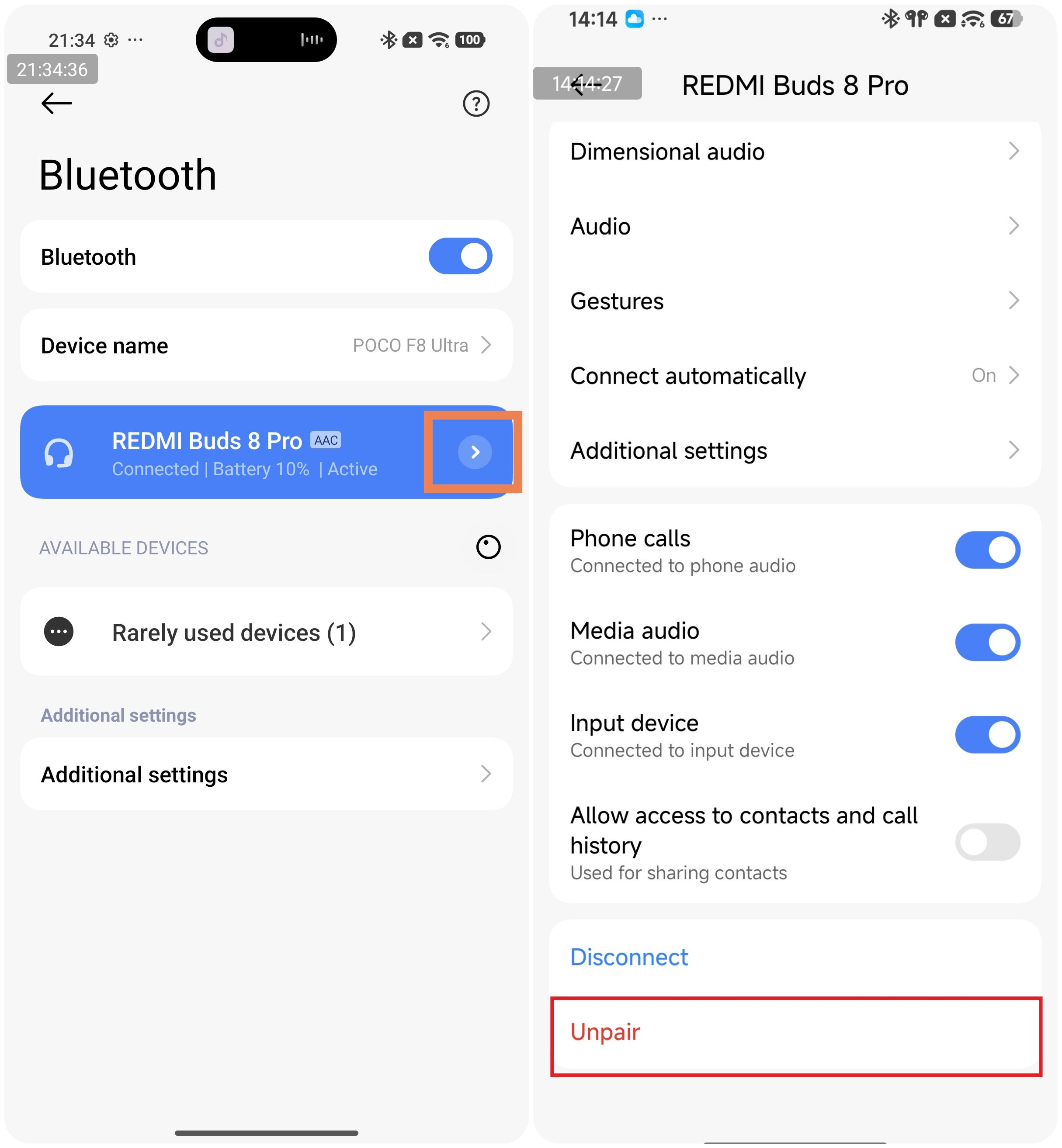
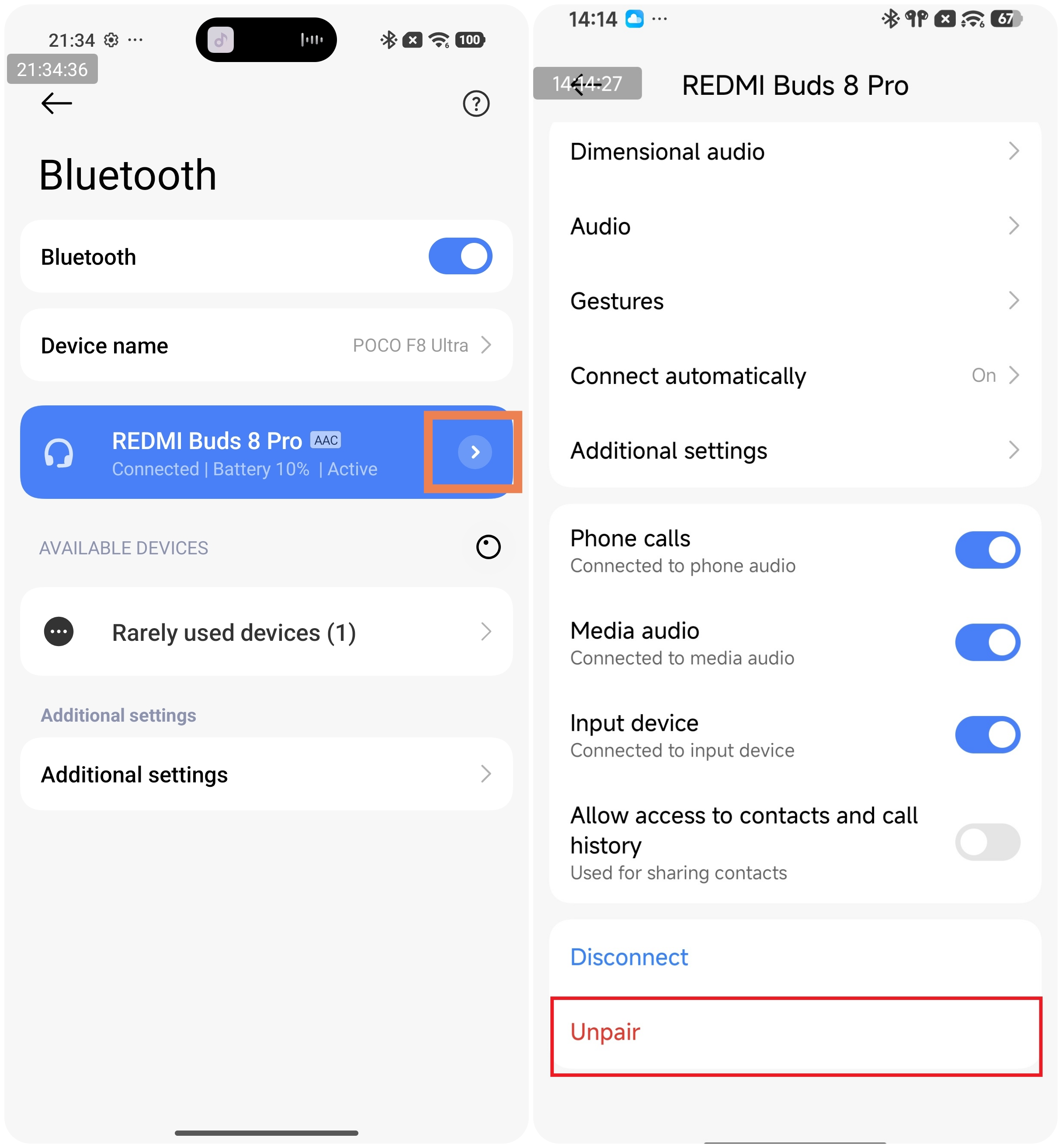
Go to [Settings] >> [Bluetooth] >> tap the [>] icon on the right side of [REDMI Buds 8 Pro] >> choose [Unpair].
Go to [Settings] >> [Bluetooth] >> tap the [>] icon on the right side of [REDMI Buds 8 Pro] >> choose [Unpair].
Q17: What to do if the REDMI Buds 8 Pro cannot reconnect after disconnecting from the phone?
A: If the REDMI Buds 8 Pro do not automatically reconnect when the charging case is opened, the following factors can be involved:
1. The phone's Bluetooth may not be turned on or may not be functioning properly.
2. The phone may be too far from the earbuds, exceeding the effective transmission range (approximately 10 meters), or there may be obstacles between the phone and the earbuds.
3. REDMI Buds 8 Pro will automatically attempt to reconnect to the last paired device, which may not be your current phone.
4. Due to the nature of Bluetooth devices, electromagnetic interference in your environment may prevent automatic reconnection.
5. Turn Bluetooth off and on again from the phone’s Bluetooth settings, then try connecting to the earbuds. If this does not work, try restoring the earbuds to factory settings. Place the earbuds back into the charging case with the lid open, then press and hold the function button on the bottom of the case for 10 seconds until the white indicator flashes rapidly. The earbuds will be reset to factory settings and enter pairing mode. After the factory reset is complete, follow the steps above to reconnect.
Q18: What to do if the REDMI Buds 8 Pro keep reconnecting continuously after being placed into the charging case and closing the lid?
A: If the REDMI Buds 8 Pro keep reconnecting continuously after being placed into the charging case and closing the lid, please refer to the following aspects:
1. Check for debris or dirt between the earbuds’ contacts and the bottom of the charging case, which can interfere with signal transmission and cause continuous reconnection. You can carefully clean the earbuds' contact pins with a cotton swab.
2. Ensure the charging case has sufficient power. When opening the case, the indicator should respond (the white light flashes once when the case is opened). If the light flashes six times and turns off, the case battery is low.
Q19: What to do if the device prompts for a PIN or reports pairing password errors when connecting to the REDMI Buds 8 Pro?
A: If the device prompts for a PIN or reports pairing password errors when connecting to the REDMI Buds 8 Pro, please refer to the following aspects:
1. Try entering "0000". If it still fails, the issue may be caused by abnormal Bluetooth data on the device.
2. Delete the previous Bluetooth connection record on the device.
3. Restore REDMI Buds 8 Pro to factory settings. Place the earbuds back into the charging case with the lid open, then press and hold the function button on the bottom of the case for 10 seconds until the white indicator flashes rapidly. The earbuds will reset and enter pairing mode. After the factory reset, follow the previous pairing steps to reconnect the earbuds.
Q20: Why can’t the REDMI Buds 8 Pro reconnect to the computer when connected to both a phone and a computer, after moving away from the phone and returning to the computer’s signal range?
A: If the REDMI Buds 8 Pro are disconnected from a device for more than 10 minutes, they will not automatically reconnect to the original device. If you return to the PC’s Bluetooth range within 10 minutes, the earbuds can reconnect to the PC. This only works if the phone is idle (no music playback, calls, or other active tasks). If the phone is active, the earbuds will not reconnect to the PC.
Pause or stop any music playback or calls on the phone, or place the earbuds back into the charging case and reopen the case to reconnect.
Q21: Why does the REDMI Buds 8 Pro show as connected on the computer even after being disconnected from the earbuds?
A: This is a PC compatibility display issue. The problem has been reported to Microsoft and will be addressed in future updates.
As a workaround, you can delete the REDMI Buds 8 Pro from the PC’s Bluetooth settings and re-pair them, or place the earbuds in the charging case and reopen it. After reconnection, the PC should show REDMI Buds 8 Pro as "Connected," and the earbuds can be used normally.
Q22: Does the REDMI Buds 8 Pro support automatic connection (audio stream transfer)?
A: The REDMI Buds 8 Pro does not support automatic connection (audio stream transfer).
Q23: Why don't the REDMI Buds 8 Pro reconnect immediately when the charging case is opened?
A: This may be due to the charging case being low on power or the previously connected device being out of range. Please try the following steps to restore the connection:
1. Ensure the charging case has sufficient battery. When opening the case, the indicator should respond (the white light flashes once when the case is opened). If the light flashes six times and then turns off, the case battery is low.
2. Make sure the earbuds are properly seated, and the charging pins are in full contact with the case.
3. If both of the above are confirmed, try closing the lid for 1 minute and reopening it to see if the earbuds reconnect.
4. If the earbuds still do not reconnect after these steps, restore the earbuds to factory settings and reconnect to the device. To do this, first delete the device’s Bluetooth pairing record on your phone, then place the earbuds back into the charging case with the lid open, and press and hold the function button on the bottom of the charging case for 10 seconds until the white indicator flashes rapidly. The earbuds will reset to factory settings and enter pairing mode. After the reset, follow the steps above to pair the earbuds again.
Q24: Why can't the iOS device reconnect to the REDMI Buds 8 Pro after the Xiaomi Earbuds App has been closed in the background for a period of time?
A: The REDMI Buds 8 Pro broadcast for only 2 minutes, so if the Xiaomi Earbuds App is closed for too long, it can not be able to reconnect to the earbuds. This design helps prevent the earbuds from consuming power too quickly.
Keep the Xiaomi Earbuds App running in the background. This prevents disconnection from earbuds. If the Xiaomi Earbuds App has already failed to reconnect, place the earbuds in the charging case to charge, then connect the earbuds in the Xiaomi Earbuds App to re-establish the connection.
Q25: Does the REDMI Buds 8 Pro support Low Energy Audio (LEA)?
A: The REDMI Buds 8 Pro does not support Low Energy Audio (LEA).
Q26: How to use Google Fast Pair of the REDMI Buds 8 Pro?
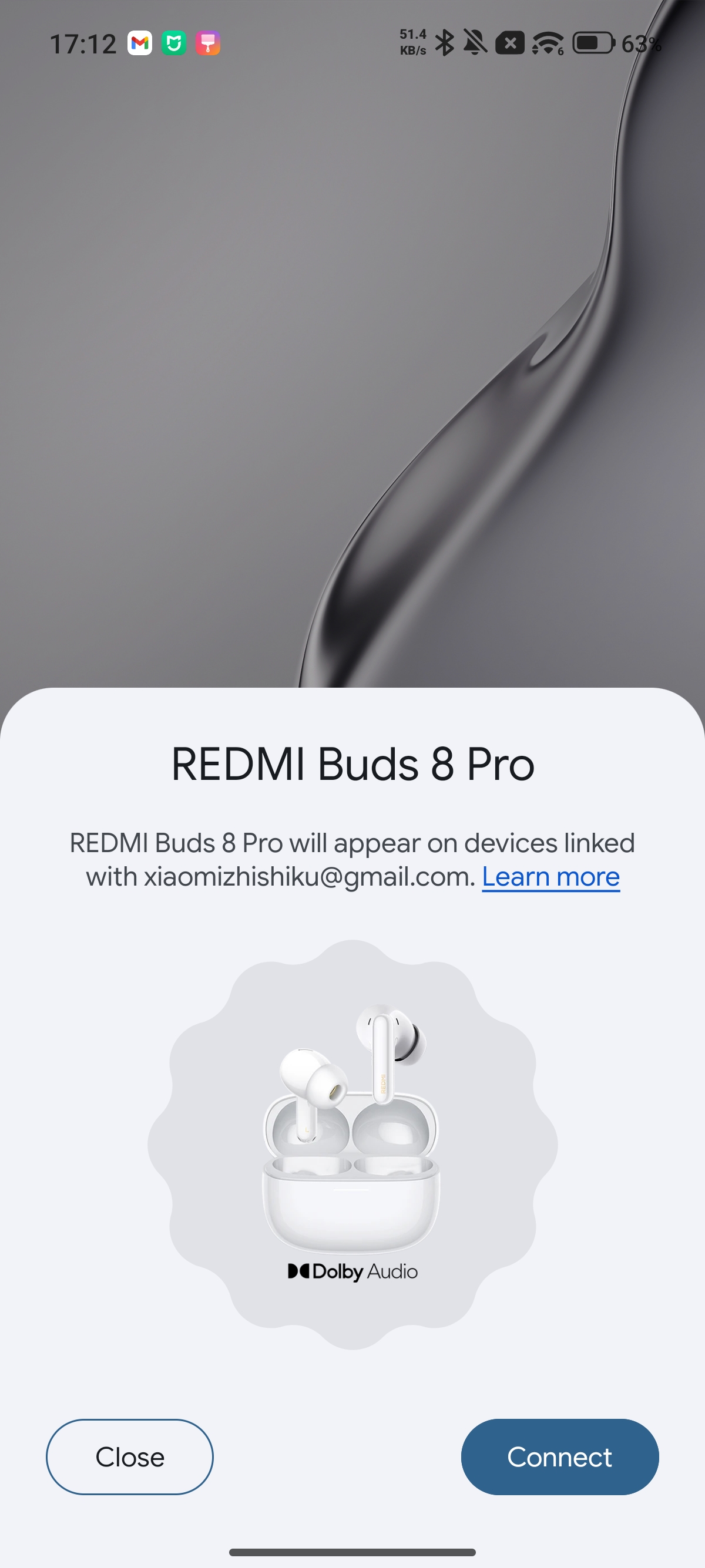
A: Log in to a Google account on an Android phone and connect to the network. Place both earbuds into the charging case, leave the lid open, and press and hold the button on the charging case for 2 seconds. The white indicator on the charging case will begin flashing rapidly to enter pairing mode; only at this point will the Google Fast Pair pop-up window appear.
Q27: What to do if the REDMI Buds 8 Pro doesn't pop-up a Google Fast Pair window?
A: If the REDMI Buds 8 Pro doesn't pop-up a Google Fast Pair window, please refer to the following troubleshooting steps:
1. Ensure that the contact points between the earbuds and the charging case are functioning correctly and that both have sufficient battery power. Place both earbuds into the charging case, open the lid, and then press and hold the button on the charging case for 2 seconds. The white indicator on the charging case will begin to flash rapidly, indicating that it has entered pairing mode; only at this point can the pairing pop-up window be triggered. Simply opening the lid without entering pairing mode will not trigger the Google Fast Pair pop-up window.
2. Ensure that your device is connected to a stable network (an unstable connection may prevent the pairing pop-up from appearing on your phone).
3. If the pop-up appears on your phone but fails to establish a connection with the earbuds, tap an empty area of the screen to dismiss the pop-up twice. You must then wait at least 5 minutes before the pop-up will reappear; alternatively, you may restart your phone.
4. If you repeatedly test the Google Fast Pair pop-up window multiple times on the same device, there is a possibility that the pop-up will cease to appear. In this scenario, you must either restart your phone or leave the device idle for at least 24 hours before the pop-up will reappear.
Note:
This issue is related to system or platform level policies (such as those from Google) and is part of a general mechanism, rather than being caused by the earphones.
Touch Controls
Q1: How to control the REDMI Buds 8 Pro?
A: When the REDMI Buds 8 Pro are connected to your phone, you can use the touch controls on the earbuds for convenient operation. Please refer to the user manual for the exact touch area.
1. A single tap on the left or right earbud touch control area has no default function.
2. By default, double-tap on the left or right earbud touch control area to play or pause music and answer or end calls.
3. By default, triple-tapping on the left or right earbud touch control area will skip to the next track.
4. By default, press and hold on the left or right earbud touch control area to switch between Noise cancellation and Transparency mode, or reject a call.
5. By default, swiping up on the left or right earbud touch control area will increase the volume.
6. By default, swiping down on the left or right earbud touch control area will decrease the volume.
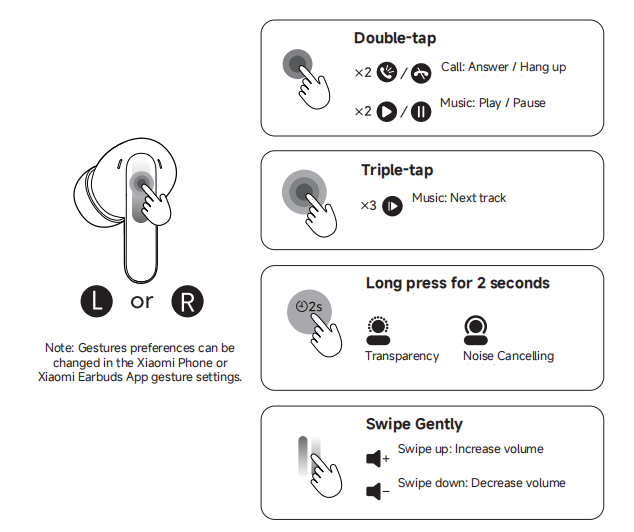
The touch gestures on the REDMI Buds 8 Pro can be customised. By installing the Xiaomi Earbuds App and connecting your earbuds, you can modify the touch gesture functions according to your preference.
Q2: Why do the REDMI Buds 8 Pro touch controls sometimes not respond?
A: If the REDMI Buds 8 Pro touch controls sometimes do not respond, please refer to the following troubleshooting steps:
1. Ensure you are touching the correct area of the earbuds as described in the user manual.
2. Double-tapping to pause or play music should be performed while music is playing. Open your music App on your phone before attempting this gesture.
3. Consecutive taps may be too slow. Make sure to complete the double-tap or triple-tap quickly and continuously.
4. Excess oil or moisture on your fingers can reduce touch sensitivity. Make sure your fingers are clean and dry when tapping.
5. In cold weather, dry fingers can cause touch gestures to malfunction.
Q3: Why is the single-tap gesture on the REDMI Buds 8 Pro easily triggered by mistake?
A: Due to the touch area size and other factors, single-tap gestures on the REDMI Buds 8 Pro are prone to accidental triggers. To avoid a poor experience, it is recommended to set the single-tap gesture to [None].
Please refer to the following steps:
Open the Xiaomi Earbuds App or go to the Xiaomi phone Bluetooth shortcut settings >> [Gestures] >> choose [Press left earphone once] and [Press right earphone once] >> choose [None].
Charging and Battery Life
Q1: How to tell the charging status of the REDMI Buds 8 Pro and check the battery level?
A: The charging LED is located on the front of the charging case. When charging, the white LED lights up from left to right sequentially. Once charging is complete, the white indicator turns off. The earbuds start charging automatically when placed in the case.
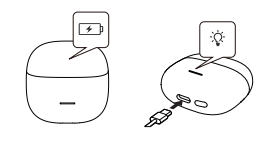
To check the battery level, please refer to the following methods:
1. Check the earbuds’ battery via the Xiaomi Earbuds App:
Install the Xiaomi Earbuds App on your phone, follow the on-screen instructions, grant the necessary permissions, and log in with your Xiaomi account.
If the earbuds have not been connected before, place them in the charging case and press and hold the case button for 2–3 seconds until the white LED flashes continuously. The earbuds will enter pairing mode.
In the App, tap the [+] button in the top-right corner to add the earbuds and follow the App instructions to complete the connection. Once connected, you can view the battery level of both the earbuds and the charging case.
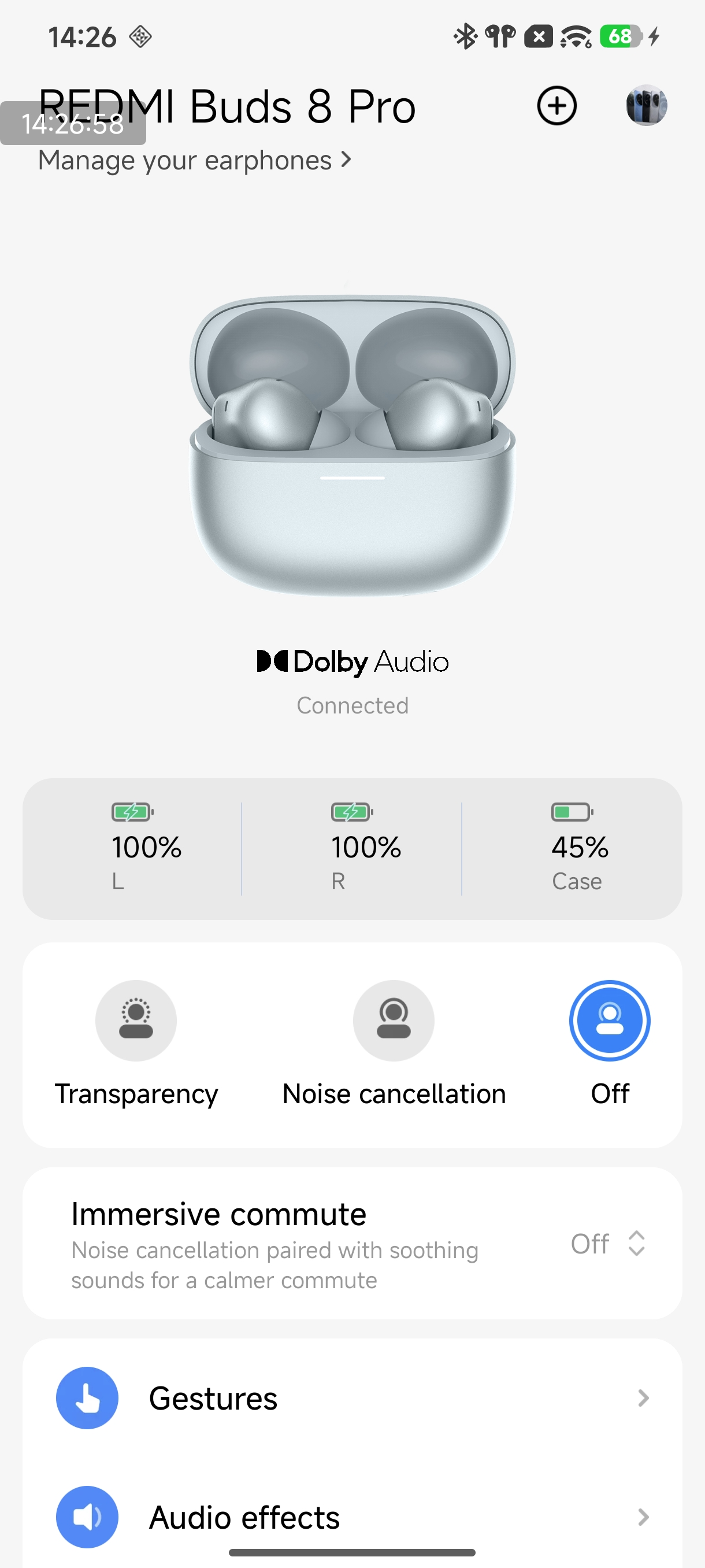
2. Quickly check battery level on a Xiaomi phone:
After a successful connection, place the earbuds in the charging case, close the lid, and bring them near an unlocked Xiaomi phone with Bluetooth enabled. Open the charging case, and a pop-up will appear on the phone showing the battery level of both the earbuds and the case.
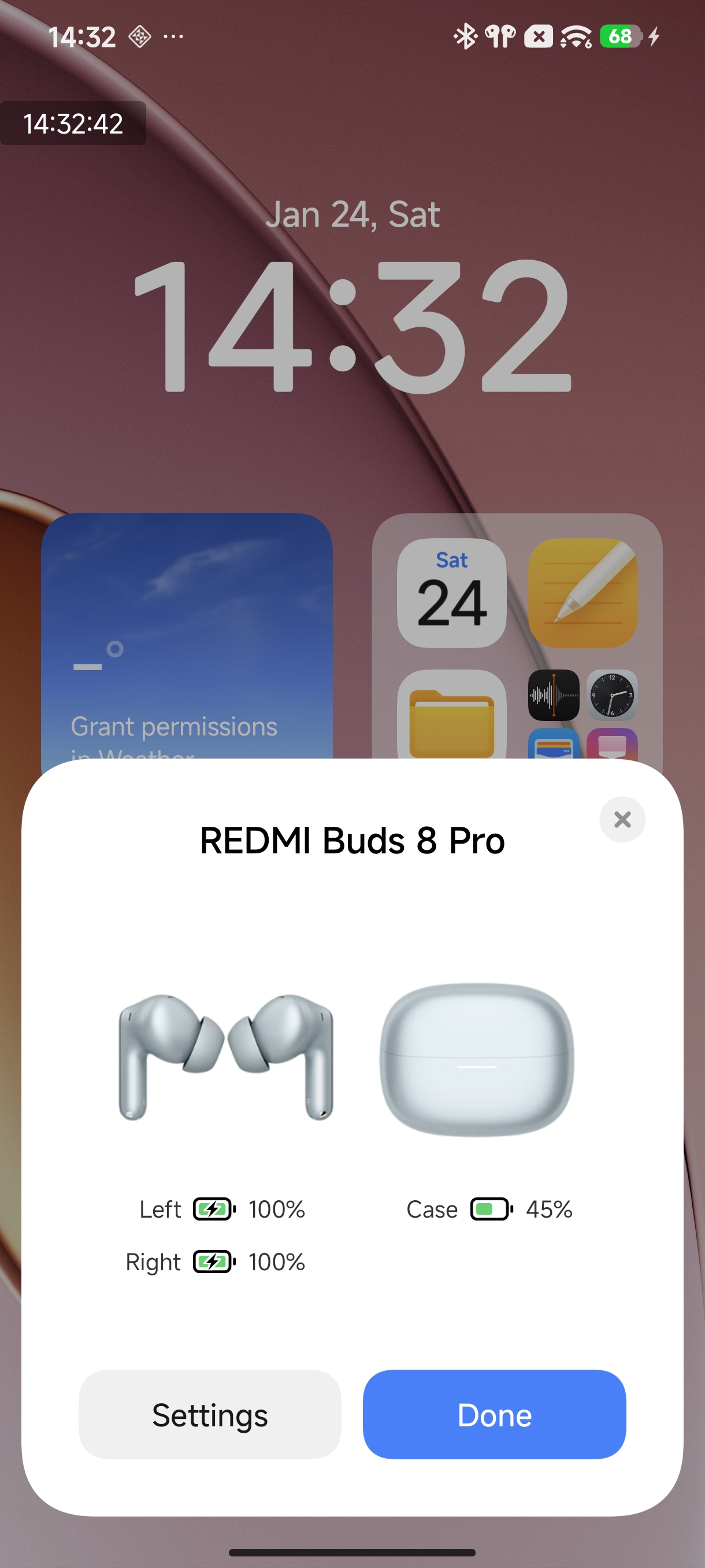
Note:
1. To use the quick battery check feature, your phone system must be updated to the latest stable version. Currently, only certain Xiaomi phones support this feature (go to [Bluetooth] >> [Additional settings] >> enable [Pair compatible devices]).
2. Opening the charging case will automatically power on the earbuds. When the earbuds are placed back in the charging case and the lid is closed, they will automatically disconnect and enter sleep mode.
Q2: Why does the REDMI Buds 8 Pro have a relatively short usage time?
A: If the REDMI Buds 8 Pro has a relatively short usage time, please refer to the following troubleshooting steps:
1. If the earbuds are not fully charged, their usage time will be shorter. It is recommended to fully charge the earbuds before use.
2. Playing audio at a high volume consumes more power. Try lowering the volume to see if the usage time improves.
3. Using the earbuds near devices that generate strong electromagnetic interference (such as microwaves) or with walls or other obstacles between the earbuds and phone can reduce battery life. Try to use the earbuds away from such devices and ensure a clear line of sight between the earbuds and your phone.
4. Having multiple functions active, such as the dual connection feature, can increase power consumption. Evaluate and turn off unnecessary features on your phone based on your needs.
5. Battery life varies depending on the audio format. For example, using LDAC consumes more power than AAC or SBC. For longer battery life, switch the audio format to AAC or SBC.
Q3: How to charge the REDMI Buds 8 Pro, and does it support wireless charging?
A: The REDMI Buds 8 Pro does not support wireless charging.
Charging for the earbuds and the charging case is as follows:
1. To charge the earbuds, place the earbuds in the charging case, and they will automatically start charging.
2. To charge the charging case, use the included Type-C cable. When charging begins, the LED bar on the case gradually lights up from left to right once, then the LED bar breathes to indicate the current battery level:
One quarter of the LED bar indicates less than 25% charged.
Two quarters indicate 26%–50%.
Three-quarters indicate 51%–75%, and a fully lit LED bar indicates 76%–100% charged. Once the case is fully charged, the LED will stay on for 5 seconds and then turn off.
Q4: What to do if the REDMI Buds 8 Pro cannot be charged after the battery is completely drained?
A: If the REDMI Buds 8 Pro cannot be charged after the battery is completely drained, please refer to the following troubleshooting steps:
1. If the earbuds have not been used for a long time, they may require initial activation, so it is recommended to charge the earbuds for at least 30 minutes.
2. If the charging case has no power (the LED does not light up when the lid is opened), the earbuds will not charge. To check the connection, repeatedly insert and remove the earbuds from the case three times. If the contacts are properly connected, the case LED will light up when the earbuds are placed inside.
3. If the charging pins on the earbuds or the contacts in the charging case are dirty, they may prevent charging. Use a cotton swab to clean both the earbuds’ charging pins and the contacts inside the case.
4. If the earbuds are in an environment that is too cold or too hot, charging may be paused for safety reasons. It is recommended to charge the earbuds in an environment with a temperature between 15 °C and 35 °C.
Q5: Is it normal for the REDMI Buds 8 Pro to become warm while charging?
A: The REDMI Buds 8 Pro uses a more efficient charging method, so their temperature can rise during fast charging. This is a normal phenomenon. Core components have been designed with protection mechanisms, so you can use the earbuds safely.
Note:
Charging heat has been tested in laboratories and by professional institutions and meets all safety standards. It will not cause harm to the human body. However, it is recommended to keep the earbuds away from highly flammable materials with low ignition points, such as white phosphorus, during charging.
Q6: Does the REDMI Buds 8 Pro support charging with a power bank?
A: It is not recommended to charge the REDMI Buds 8 Pro with a power bank. Most power banks have current protection features. If the output current is too low, the power bank can stop charging. Because the REDMI Buds 8 Pro has a small battery and draws low current during charging, it can trigger the power bank’s current protection and prevent full charging. If your power bank supports a low-current mode, you can use it to charge the earbuds safely.
Q7: Why do the left and right earbuds of the REDMI Buds 8 Pro show different battery levels or have different usage times?
A: The REDMI Buds 8 Pro uses a primary–secondary earbud design. Power consumption differs between the two earbuds depending on their roles, with the primary earbud consuming more power than the secondary one. Over time, this can cause the battery levels displayed in the Xiaomi Earbuds App to differ, and the usage times of the left and right earbuds can vary. This is normal.
Please note the following scenario:
If you usually wear only one earbud while the other charges in the case, the battery levels can become unsynchronized when both earbuds are used together. It is recommended to wear both earbuds consistently to minimize differences in battery levels.
Q8: What to do if the REDMI Buds 8 Pro cannot be charged or turned on?
A: If the REDMI Buds 8 Pro cannot be charged or turned on, please follow these troubleshooting steps:
1. Check the charging case battery. If the case has no power, charge the case first before charging the earbuds. If the earbuds have been unused for a long time and the battery is completely drained, it can take some time for the LED to light up.
2. Check the earbuds’ charging contacts and the pins inside the charging case for dirt, deformation, or damage. Clean any dirt and ensure the contacts and pins make a proper connection.
3. Try resetting the earbuds. Place the earbuds in the charging case with the lid open, then press and hold the function button on the bottom of the case for 10 seconds until the LED flashes rapidly. The earbuds will be restored to factory settings and enter pairing mode. After resetting, follow the pairing steps again.
4. If the above steps do not work, please contact after-sales support for assistance.
Q9: What to do if the REDMI Buds 8 Pro charging case cannot be charged?
A: If the charging case of the REDMI Buds 8 Pro cannot be charged, please follow these troubleshooting steps:
1. Try a different charging cable and adapter. If the case charges successfully with a different cable or adapter, the original cable or adapter may be faulty.
2. Test the charging cable and adapter with another device. If they charge other devices normally, charge the case for at least 30 minutes and observe. If it still cannot be charged, contact after-sales support.
Note:
To ensure the best experience, charge the case promptly when its battery level falls below 10% to maintain the earbuds’ battery life.
Q10: Why does the battery level not show in the notification bar after connecting the REDMI Buds 8 Pro to the phone?
A: Not all phones support showing earbud battery levels in the notification bar. If your phone does not support this feature, the battery level cannot be displayed.
Q11: Why does the actual battery life of the REDMI Buds 8 Pro appear shorter than the advertised time?
A: The battery life of the REDMI Buds 8 Pro is strongly affected by usage habits. The advertised battery life corresponds to specific test scenarios, such as music format, volume level, and other functions like adaptive sound or dimensional audio. The test data was obtained under controlled conditions in Xiaomi labs. In real-world use, environmental factors such as signal interference and electromagnetic interference can cause the actual battery life of REDMI Buds 8 Pro to differ from the lab results. This is normal.
Q12: Why does the charging speed slow down when the REDMI Buds 8 Pro charging case has a low battery?
A: When the REDMI Buds 8 Pro charging case battery is low, the charging current for the earbuds decreases to protect the circuit, which is normal. Please charge the charging case promptly to maintain optimal performance.
To experience the feature of "5 minutes of charging for 2 hours of music playback," the REDMI Buds 8 Pro charging case battery should be at least 20% before placing the earbuds in the case.
Audio Related
Q1: Are the REDMI Buds 8 Pro earbuds stereo?
A: Yes, the REDMI Buds 8 Pro are stereo earbuds.
Q2: How to adjust the volume on the REDMI Buds 8 Pro?
A: To adjust the volume on the REDMI Buds 8 Pro, please refer to the following methods:
1. Swipe up or down on the touch area of the earbuds to adjust the volume.
2. Use the volume buttons on your phone.
3. In the Bluetooth settings interface or the Xiaomi Earbuds App, you can customize touch gestures for the REDMI Buds 8 Pro to control volume.
Q3: Why does the REDMI Buds 8 Pro sometimes automatically adjust volume when connecting to a device?
A: The REDMI Buds 8 Pro may automatically adjust the volume in the following situations, which is normal:
1. When connecting the earbuds to a Xiaomi device for the first time, the HyperOS volume protection mechanism can adjust the volume automatically.
2. When connecting the earbuds to an iOS device for the first time, the iOS device can automatically sync the volume level.
3. After adjusting the volume on a connected device, the earbuds will synchronize to the last set volume when reconnected.
Q4: Does the REDMI Buds 8 Pro support noise cancellation?
A: The REDMI Buds 8 Pro supports noise cancellation.
To use the Noise cancellation feature, please refer to the following methods:
1. When you wear both earbuds for the first time, the REDMI Buds 8 Pro will automatically enter noise cancellation mode.
2. In the Xiaomi Earbuds App on your phone, you can manually switch between [Noise cancellation], [Off], and [Transparency] mode.
3. You can also press and hold the touch area on the earbuds to switch between noise cancellation modes.
Q5: Does the REDMI Buds 8 Pro support Dimensional audio?
A: The REDMI Buds 8 Pro supports Dimensional audio.
To use the Dimensional audio on the REDMI Buds 8 Pro, please refer to the following information:
1. In the Xiaomi Earbuds App, connect the REDMI Buds 8 Pro, go to the homepage >> [Audio] >> select [Dimensional audio] >> enable [Immersive sound].
2. On supported Xiaomi or REDMI phones, go to the Bluetooth device list >> tap the [>] icon next to the REDMI Buds 8 Pro >> select [Dimensional audio] >> enable [Immersive sound].
3. If Dimensional audio is not available in the system settings on your Xiaomi or REDMI phone, it is recommended to download and use the Xiaomi Earbuds App.
Note:
Dimensional audio is not supported on all Xiaomi phones. Even after updating to the latest system version, some models still do not support this feature. Support will gradually increase with future system updates, and actual availability depends on the device.
4. When the audio codec of the REDMI Buds 8 Pro is set to LDAC, and the sampling rate is 96 kHz or higher, Dimensional audio effects are not supported.
Note:
1. If you enable Dimensional audio in the Bluetooth settings while using LDAC at 96 kHz or higher, the phone will automatically reduce the sampling rate to 48 kHz. This is normal.
2. If you enable Dimensional audio in the Xiaomi Earbuds App under the same conditions, a prompt will appear. This is also normal. To use Dimensional audio, please set the sampling rate to 48 kHz.
Q6: How to use the audio sharing feature on the REDMI Buds 8 Pro?
A: The REDMI Buds 8 Pro supports the audio sharing feature.
Please refer to the following methods:
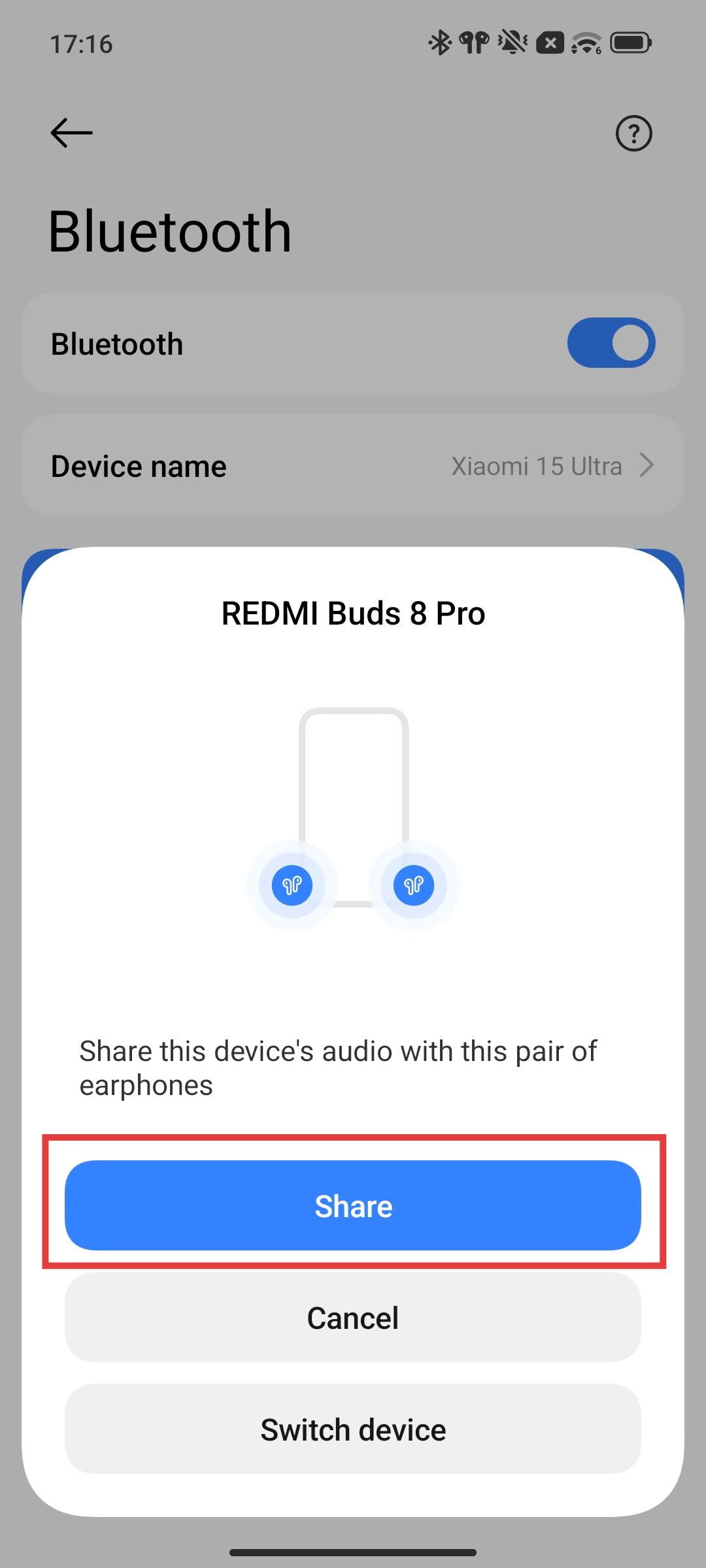
1. When the phone is already connected to one earbud device, connect a second earbud device via the pop-up prompt. A [Share] pop-up will appear on the phone. Tap [Share] to directly enter audio sharing mode.
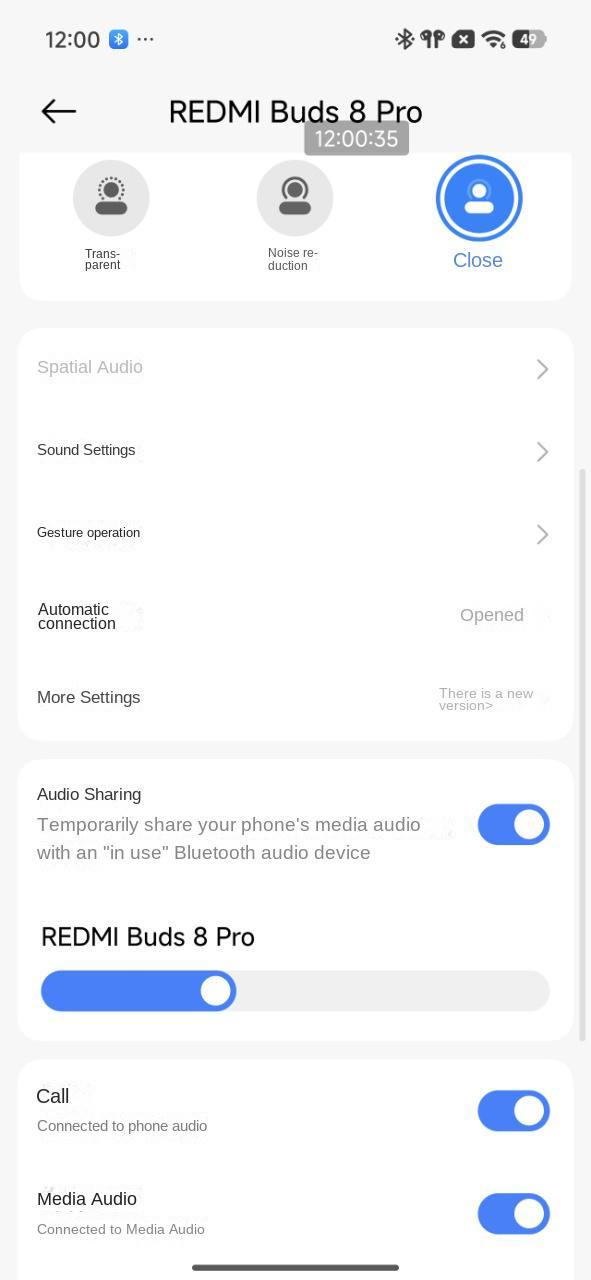
2. When the phone is connected to one Xiaomi earbud device (device A), connect another Xiaomi earbud device (device B). Then go to the Bluetooth settings page for device B and turn on the [Audio Sharing] to enter audio sharing mode.
Q7: What to do if the sound of the REDMI Buds 8 Pro is intermittent or has noise during use?
A: If the REDMI Buds 8 Pro have intermittent sound or noise during use, please refer to the following troubleshooting steps:
1. The low battery on the phone or the REDMI Buds 8 Pro can cause unstable audio, so please fully charge both devices and check again.
2. If the distance between the phone and the REDMI Buds 8 Pro, or between the two earbuds, is too far, or if there are obstacles such as walls blocking the signal, audio interruptions or noise can occur. Please keep the phone and earbuds close to each other and avoid signal obstructions.
3. Signal interference in the current environment can affect audio quality, so please try using the earbuds in a different environment for comparison.
4. You can reset the REDMI Buds 8 Pro, delete the Bluetooth pairing record on the phone, restart the phone, and pair again. If the issue persists, test the earbuds with another phone. If the problem still exists, please contact the after-sales service for inspection.
Q8: What to do if the sound quality or noise cancellation performance of the REDMI Buds 8 Pro is poor?
A: If the sound quality or noise cancellation performance of the REDMI Buds 8 Pro is poor, please refer to the following aspects:
For sound quality:
1. Please choose ear tips that fit your ear canal properly to ensure a comfortable and secure fit when using the REDMI Buds 8 Pro.
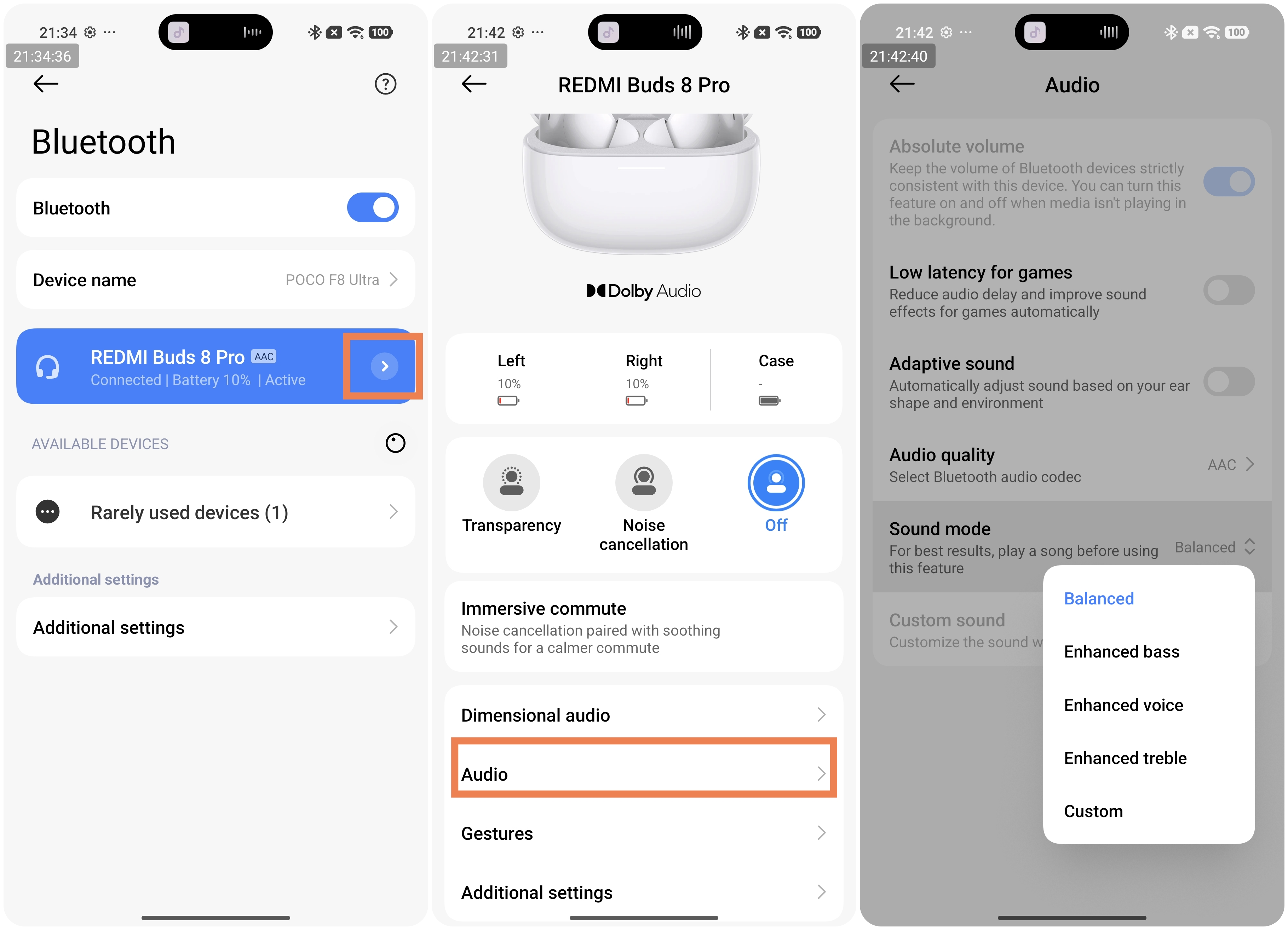
2. You can adjust different sound effect modes according to your preference, such as [Balanced], [Enhanced bass], [Enhanced voice], [Enhanced treble], and [Custom].
For noise cancellation:
1. Please choose ear tips that match your ear canal size to reduce sound leakage when using the REDMI Buds 8 Pro.
2. In the Xiaomi Earbuds App, you can manually select a suitable noise cancellation level or enable [Smart noise cancellation] to automatically match the noise reduction depth.
Q9: What to do if the sound volume of the REDMI Buds 8 Pro is too low during use?
A: If the sound volume of the REDMI Buds 8 Pro is too low during use, please refer to the following troubleshooting steps:
1. Please choose ear tips that fit your ear canal properly to reduce sound leakage and improve volume perception when using the earbuds.
2. Please confirm that [Absolute volume] is enabled on your phone. On Xiaomi phones, go to the Bluetooth device list >> tap the [>] icon next to the REDMI Buds 8 Pro >> select [Audio] >> enable [Absolute volume].
3. You may try switching to a different audio source to check whether the volume issue is related to the content itself.
Q10: What to do if there is no sound from the REDMI Buds 8 Pro when making calls or listening to music?
A: If there is no sound from the REDMI Buds 8 Pro during calls or music playback, please refer to the following steps:
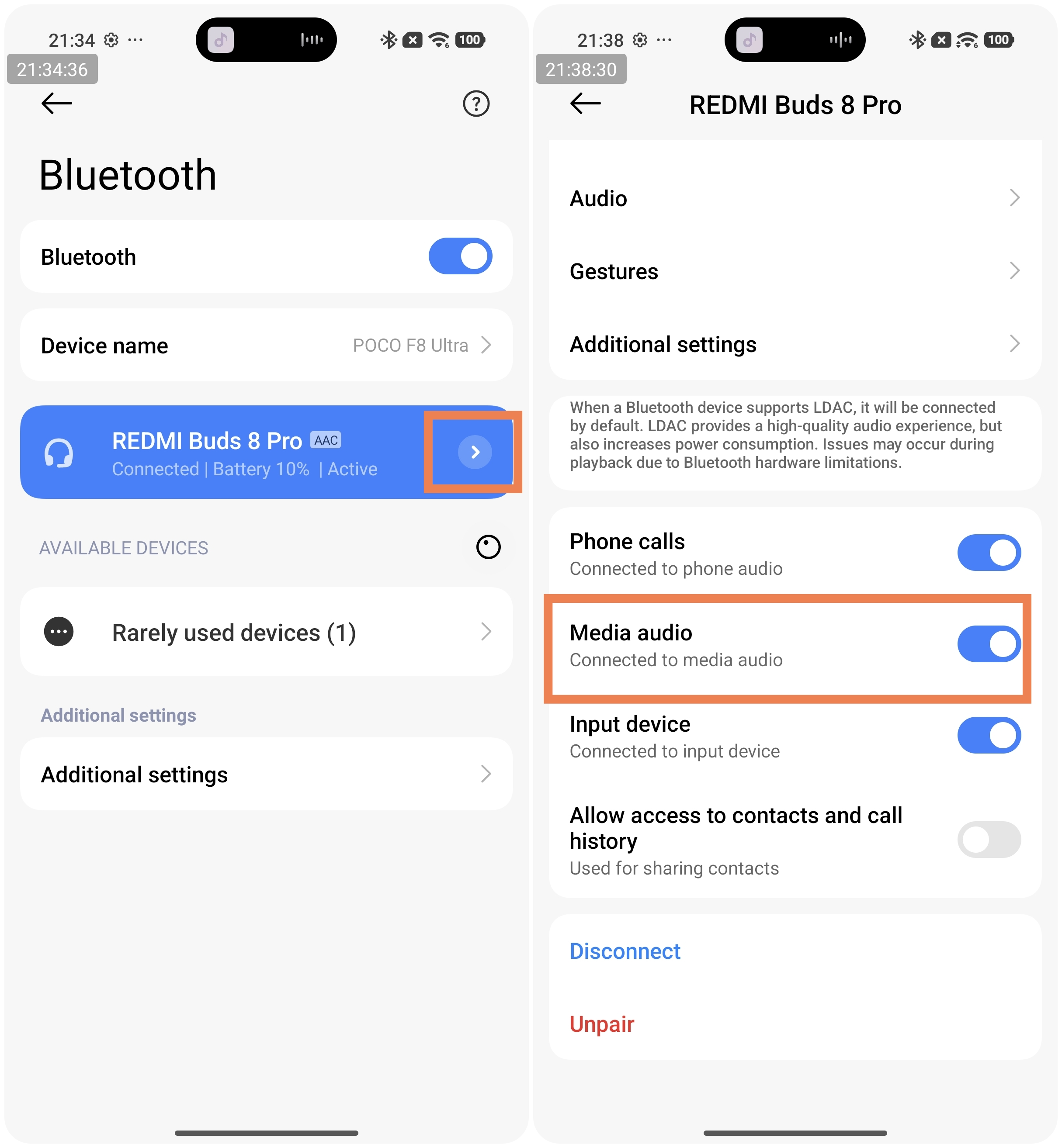
1. Please check whether the phone volume is set too low. If the volume is normal, go to the phone’s Bluetooth settings and check whether both [Phone calls] and [Media audio] are enabled for the REDMI Buds 8 Pro. If they are already enabled, disconnect and reconnect the earbuds.
2. Place the REDMI Buds 8 Pro into the charging case, then press and hold the button on the charging case for about 10 seconds until the white indicator flashes three times, and release it. When the indicator changes to a slowly flashing white light, the earbuds will be reset. Restart the phone and reconnect the earbuds to check whether the sound is restored. If there is still no sound, test the earbuds with another phone. If the issue persists, please contact the after-sales service for inspection.
Q11: Why does the REDMI Buds 8 Pro suddenly have no sound while listening to music?
A: If the REDMI Buds 8 Pro suddenly have no sound while listening to music, please refer to the following steps:
1. During use, the REDMI Buds 8 Pro needs to maintain audio synchronization between the left and right earbuds. In environments with heavy interference, audio link synchronization may fail, which can result in no sound.
2. When this issue occurs, place the REDMI Buds 8 Pro back into the charging case, close the lid, wait for about 60 seconds, then open the case and reconnect the earbuds to the phone. After Bluetooth reconnects, check whether music playback resumes.
3. Please check whether the phone has automatically connected to another Bluetooth audio device, which can cause the REDMI Buds 8 Pro to have no audio output.
Q12: Why is there sound during calls but no sound when listening to music after connecting the REDMI Buds 8 Pro to the phone?
A: Please go to the phone's Bluetooth settings, tap the paired REDMI Buds 8 Pro, and make sure the [Media audio] option is enabled. If [Media audio] is turned off, there will be no sound when listening to music or watching videos, and this option needs to be manually enabled.
Q13: What to do if one earbud of the REDMI Buds 8 Pro has no sound or does not connect?
A: If one earbud of the REDMI Buds 8 Pro has no sound or fails to connect, please refer to the following troubleshooting steps:
1. Reset the REDMI Buds 8 Pro by placing both earbuds into the charging case, keeping the lid open, and pressing and holding the button on the bottom of the charging case for about 10 seconds until the white indicator starts flashing rapidly. The earbuds will be restored to factory settings and enter pairing mode again.
2. After the reset is complete, reconnect the REDMI Buds 8 Pro following the pairing steps.
3. Restart the phone and reconnect the earbuds to check whether the sound is restored.
4. If the issue persists, test the REDMI Buds 8 Pro with another phone. If the problem still cannot be resolved, please contact after-sales service for inspection.
Q14: Why does the noise cancellation effect feel weaker after enabling Smart noise cancellation on the REDMI Buds 8 Pro?
A: If the noise cancellation effect feels weaker after enabling Smart noise cancellation on the REDMI Buds 8 Pro, please refer to the following information:
1. Smart noise cancellation on the REDMI Buds 8 Pro automatically adjusts the noise reduction level based on the detected sound leakage. If the leakage level is relatively high, the resulting noise cancellation effect can be weaker.
2. Please try wearing the REDMI Buds 8 Pro correctly again or switch to ear tips that better fit your ear canal to reduce sound leakage. Then turn off Smart noise cancellation and enable it again to achieve a better noise cancellation effect.
3. In quiet environments, Smart noise cancellation can switch to a lighter noise reduction mode, which provides a weaker effect compared to deep or continuous noise cancellation modes.
Q15: Why are abnormal sounds sometimes heard when using the REDMI Buds 8 Pro with noise cancellation enabled during exercise?
A: If your ear canal is relatively large, the REDMI Buds 8 Pro can move slightly up, down, left, or right during intense physical activity. This movement can compress the air inside the ear canal and cause abnormal sounds. Please switch to ear tips that better match your ear canal size so that the earbuds fit securely. This can prevent movement during exercise and resolve the issue.
Q16: Why can people’s voices in the office still be heard after enabling noise cancellation on the REDMI Buds 8 Pro?
A: Noise-cancelling earbuds mainly reduce low- and mid-frequency noises. The REDMI Buds 8 Pro primarily target these frequency ranges, while human voices are mainly in the mid- to high-frequency range and cannot be completely eliminated by noise-cancellation technology. This is a normal limitation of all noise-cancelling earbuds.
Q17: Why is the unlock sound inaudible after connecting the REDMI Buds 8 Pro, or why is the first keypress sound very quiet after a short pause when typing?
A: The unlock notification sound is very short and falls within the "smooth transition" period of the REDMI Buds 8 Pro, so it can sound quieter or be barely noticeable. After a pause in typing, the first keypress sound can also be slightly quieter due to this smooth start mechanism, while subsequent keypress sounds will return to normal volume.
This behavior is normal and not a malfunction or quality issue. It is designed to provide a smoother and safer listening experience. Music playback, video watching, and calls are not affected.
Q18: Why does the REDMI Buds 8 Pro sometimes produce weaker noise cancellation or slight noise when noise cancellation is turned on?
A: If the REDMI Buds 8 Pro sometimes produce weaker noise cancellation or slight noise when noise cancellation is turned on, please refer to the following aspects:
1. The REDMI Buds 8 Pro has a built-in wind-noise reduction mechanism. In strong wind environments, the earbuds actively adjust parameters to reduce wind noise, which can make the noise cancellation effect seem weaker. This is normal.
2. Sometimes the earbud stem can press against the cheek, blocking the microphone hole. Adjusting the wearing angle or direction so the stem does not touch the cheek can resolve this issue.
Q19: Why does the REDMI Buds 8 Pro play two short tones every time the earbuds are worn, or the touch area is tapped?
A: When the touch area is tapped, the REDMI Buds 8 Pro recognize it as a control input and execute the preset command according to the gesture settings in the Xiaomi Earbuds App. This is normal.
Q20: Why does the call quality vary when using the REDMI Buds 8 Pro with different Apps?
A: The REDMI Buds 8 Pro use their own call algorithms, while each App also has its own call-processing algorithm. The combination of these algorithms can cause slight differences in call quality. Call quality also depends on the network signal. When the signal is weak or unstable, call quality can decrease.
Usage Scenarios
Q1: Does the charging cable included with the REDMI Buds 8 Pro support data transfer?
A: The included charging cable for the REDMI Buds 8 Pro does not support data transfer and only ensures 5 V charging functionality.
Q2: Can the left and right earbuds of the REDMI Buds 8 Pro each connect to a separate phone?
A: The left and right earbuds of the REDMI Buds 8 Pro cannot each connect to a separate device and cannot be used as two single earbuds.
Q3: How to clear the pairing records and reset the REDMI Buds 8 Pro?
A: To reset the REDMI Buds 8 Pro, place the earbuds back into the charging case, open the lid, and press and hold the function button on the bottom of the charging case for 10 seconds until the white LED flashes rapidly. This will restore the earbuds to factory settings and enter pairing mode. After the reset, please follow the usual steps to pair the earbuds again.
To delete the Bluetooth record on the phone:
Go to [Settings] >> [Bluetooth] >> tap the [>] icon on the right side of [REDMI Buds 8 Pro] >> choose [Unpair].
Q4: Do the REDMI Buds 8 Pro support voice calls on third-party Apps?
A: Support for voice calls on third-party Apps on the REDMI Buds 8 Pro varies depending on the system:
1. Both iOS and Android systems support voice calls.
2. Windows devices that support Bluetooth can make voice calls once connected and correctly configured.
Q5: Why does the REDMI Buds 8 Pro show a pop-up saying "This is not your earbuds"?
A: If the REDMI Buds 8 Pro have been connected to other devices, supported phones may display a pop-up saying "This is not your earbuds." This is normal.
There are two ways to connect earbuds in this situation:
1. Place the earbuds in the charging case and open the lid, then follow the pop-up instructions on the phone to connect the earbuds.
2. Reset the REDMI Buds 8 Pro. To restore factory settings, please place the earbuds in the charging case, open the lid, press and hold the function button at the bottom of the case for 10 seconds until the case’s white LED flashes quickly, and the earbuds will reset to factory settings and enter pairing mode. After the reset, follow the previous steps to reconnect.
Updating the phone system to the latest HyperOS 3.0 version will prevent this pop-up from appearing on future devices.
Q6: Which LHDC versions do the REDMI Buds 8 Pro support?
A: The REDMI Buds 8 Pro does not support LHDC.
Q7: How to maintain the REDMI Buds 8 Pro?
A: To maintain the REDMI Buds 8 Pro, please refer to the following information:
1. Do not expose the REDMI Buds 8 Pro to liquids, rain, or humid environments. If exposure occurs, clean them immediately.
2. Do not use unknown chemical solvents to clean the REDMI Buds 8 Pro.
3. Avoid leaving the REDMI Buds 8 Pro in low-temperature environments (below 0 °C), high-temperature environments (above 43 °C), or places with extreme temperature fluctuations for long periods, as this can damage the battery.
4. Keep the REDMI Buds 8 Pro away from open flames to prevent explosion hazards.
5. Avoid contact with sharp objects to prevent scratches or damage.
6. Do not insert any objects into the REDMI Buds 8 Pro, as this can cause damage.
7. Do not attempt to disassemble the REDMI Buds 8 Pro.
8. If the REDMI Buds 8 Pro are not used for an extended period, store them in a dry place. If stored for more than one month, charge the earbuds to prevent battery damage.
Q8: Why does the REDMI Buds 8 Pro charging case show no LED effect or fail to function normally when opened?
A: Place both REDMI Buds 8 Pro earbuds in the charging case, close the lid, and charge the case using a charging cable for 10–20 minutes. Ensure the case has sufficient power before opening the lid and using it. If the charging case still isn’t working after 30 minutes of charging with both earbuds inside, please contact the after-sales service.
Q9: Why do the REDMI Buds 8 Pro show no LED effect when placed in the charging case with a full battery?
A: When the REDMI Buds 8 Pro are fully charged and in a low-power off or deep sleep state (to protect the battery), the charging current detected in the charging case is very low, so the in-case LED may not light up. Opening and closing the charging case will restore the LED effect.
New Feature
Q1: How to enable Smart noise cancellation on the REDMI Buds 8 Pro?
A: To enable Smart noise cancellation on the REDMI Buds 8 Pro, please refer to the following methods:
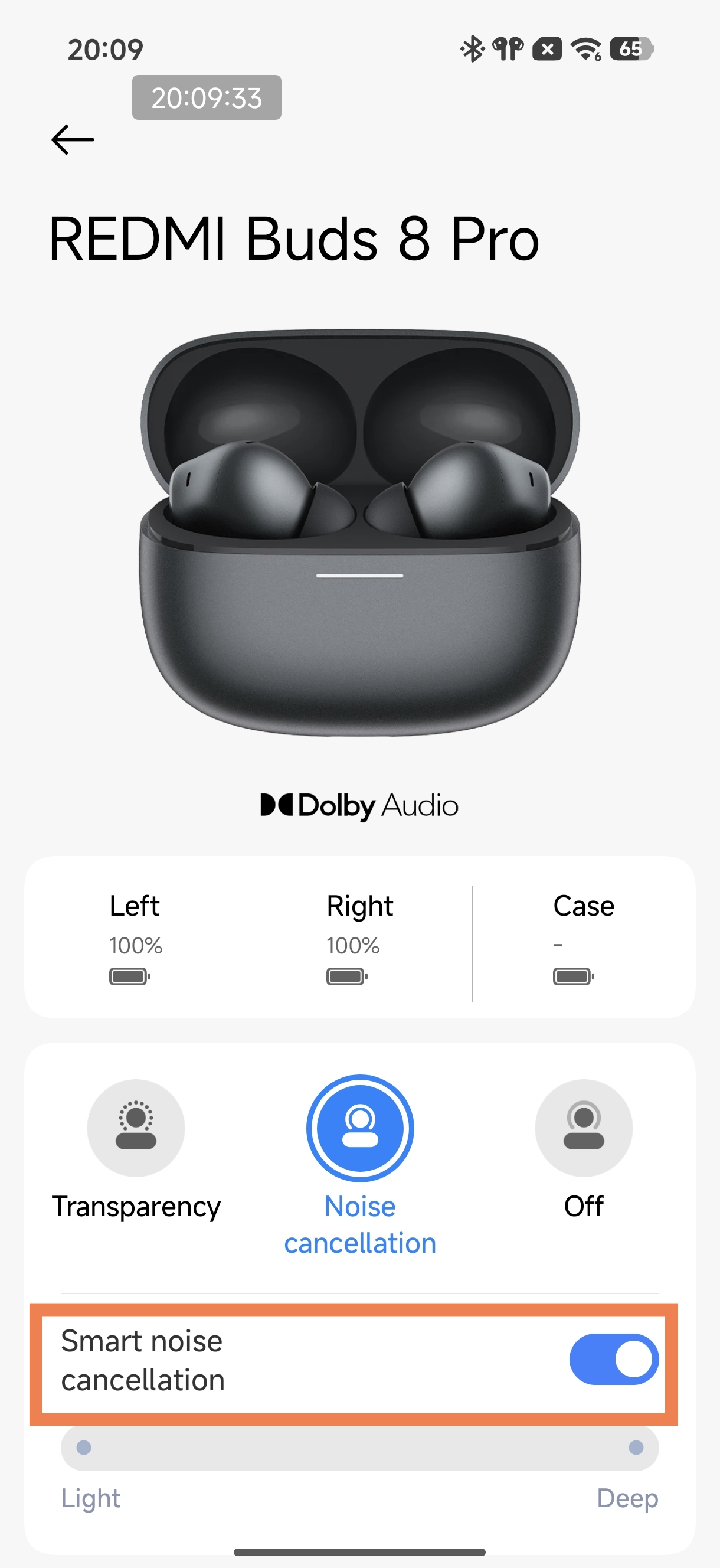
1. On a Xiaomi phone, go to [Settings] >> [Bluetooth] >> tap the [>] icon on the right side of [REDMI Buds 8 Pro] >> put on the earbuds and tap [Noise cancellation] >> enable [Smart noise cancellation].
2. Alternatively, open the Xiaomi Earbuds App, go to the Noise cancellation interface, and turn on [Smart noise cancellation].
Q2: Why does the noise cancellation level become greyed out after enabling Smart noise cancellation on the REDMI Buds 8 Pro?
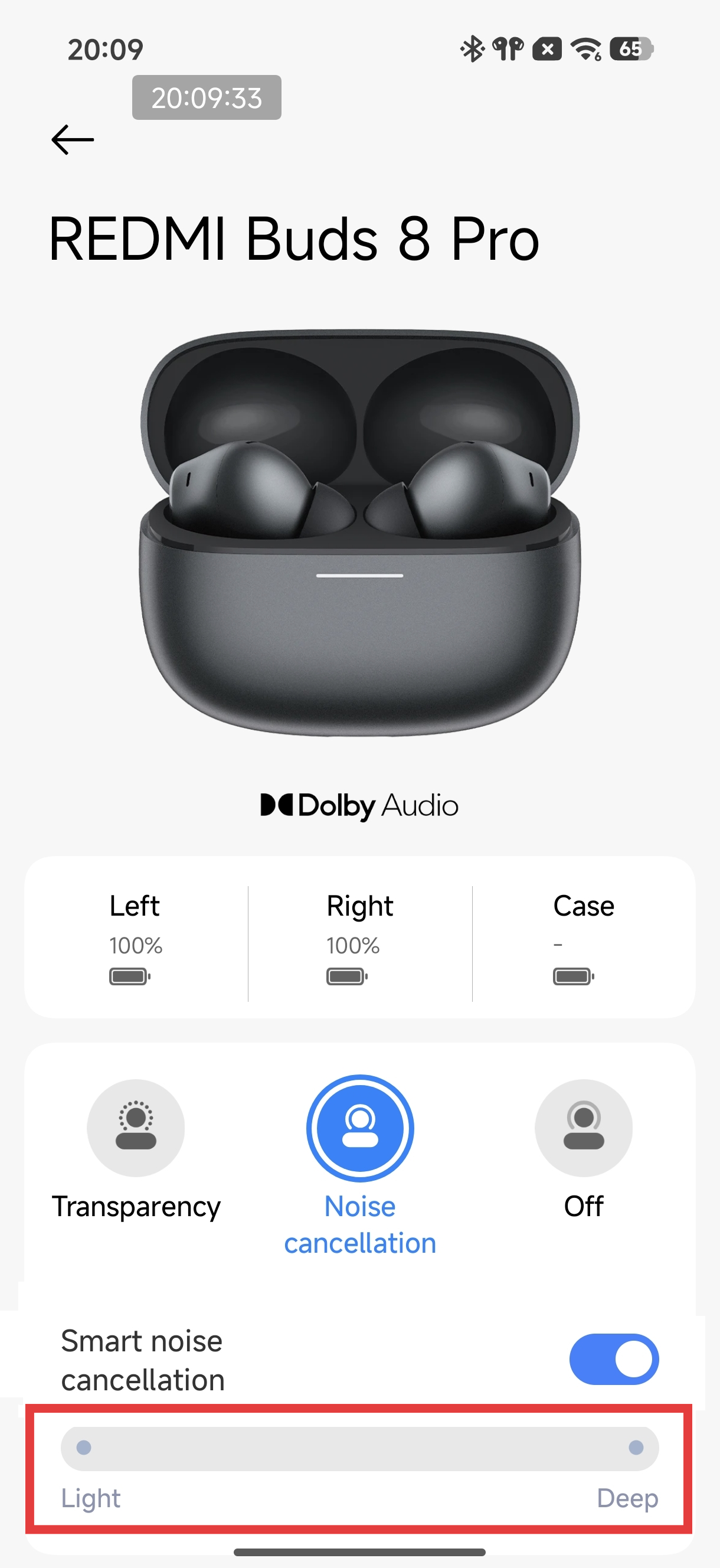
A: This is normal. When Smart noise cancellation is enabled, the earbuds automatically adjust the noise cancellation level based on the surrounding environment. Smart noise cancellation is mutually exclusive with manual 20-level noise cancellation.
If you want to manually select the noise cancellation, turn off Smart noise cancellation, then adjust the 20-level noise cancellation manually for your preferred experience.
Q3: What is the Immersive commute feature on the REDMI Buds 8 Pro?
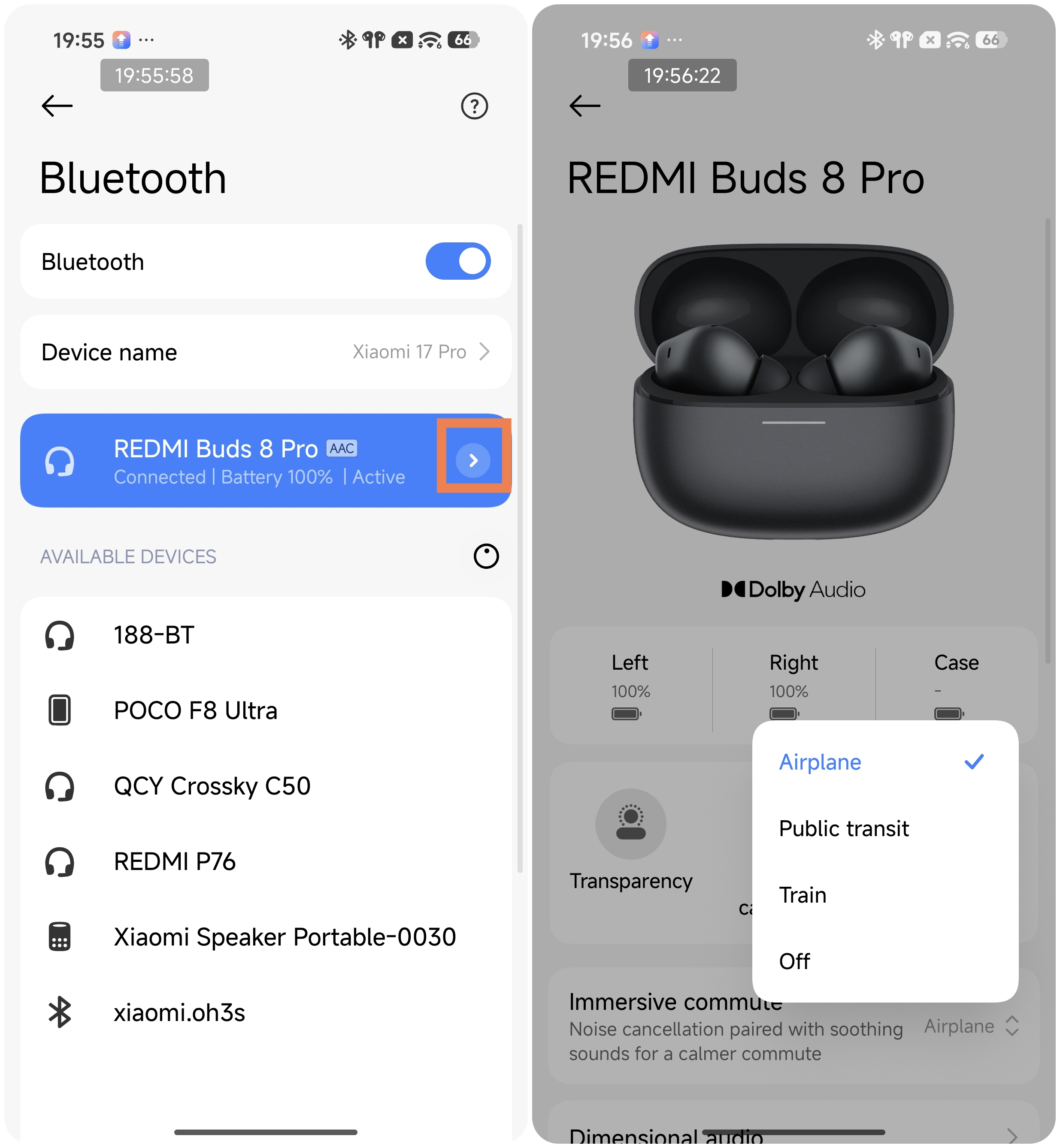
A: On a Xiaomi phone, go to [Settings] >> [Bluetooth] >> tap the [>] icon on the right side of [REDMI Buds 8 Pro] >> put on the earbuds and tap [Immersive commute] >> choose [Airplane], [Public transit], [Train], and [Off].
Alternatively, open the Xiaomi Earbuds App, go to the noise cancellation interface, and turn on [Immersive commute].
This feature plays a short white noise track in the earbuds and enables custom noise cancellation for commuting scenarios.
Q4: Why does the Immersive commute feature on the REDMI Buds 8 Pro stop during calls or music playback?
A: To ensure a complete calling and listening experience, the white noise of Immersive commute on the REDMI Buds 8 Pro will be temporarily disabled during these situations.
Does it help?
Yes
No