

How to turn on/off Update automatically on the Mi 11 Lite 5G?
To turn on/off Update automatically on your Mi 11 Lite 5G, please refer to the following steps:
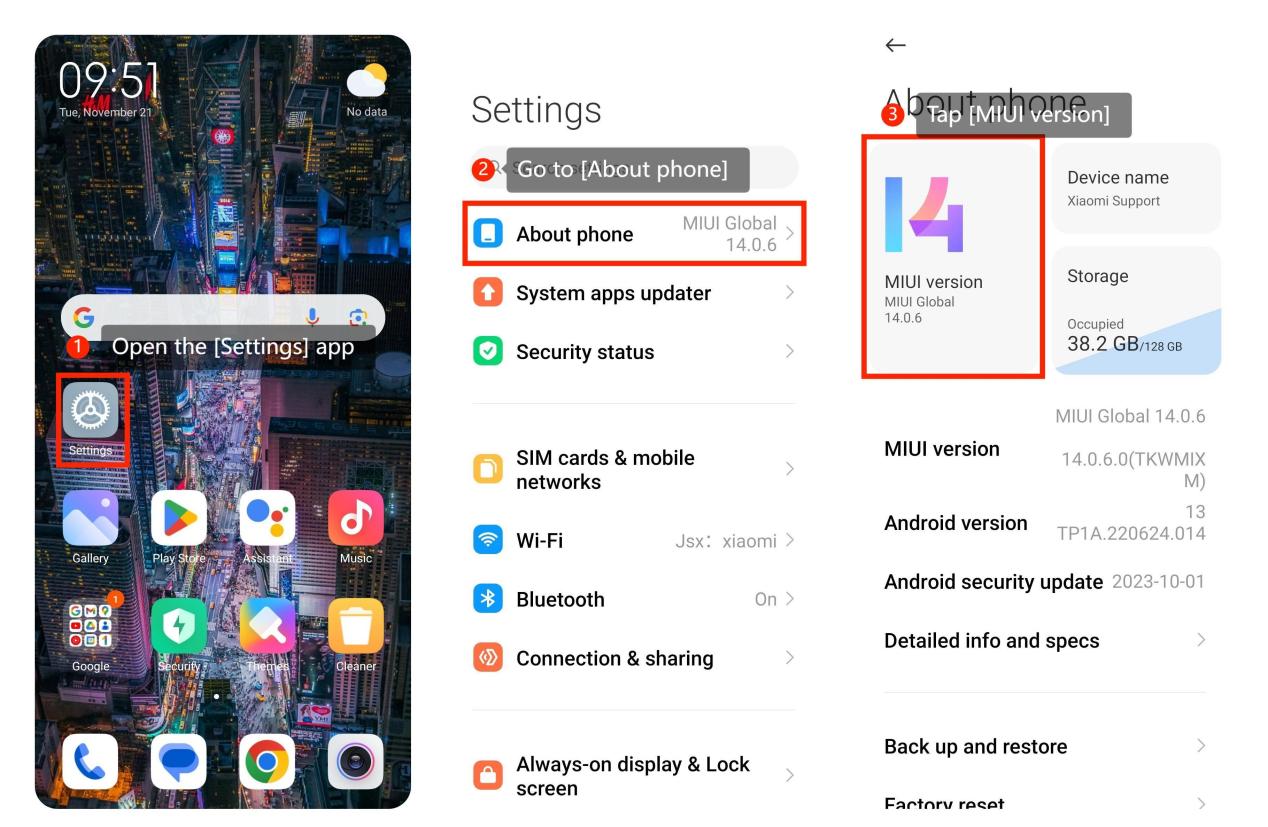
1. Open the [Settings] app on your Xiaomi smartphone, it is typically represented by a gear or cogwheel icon.
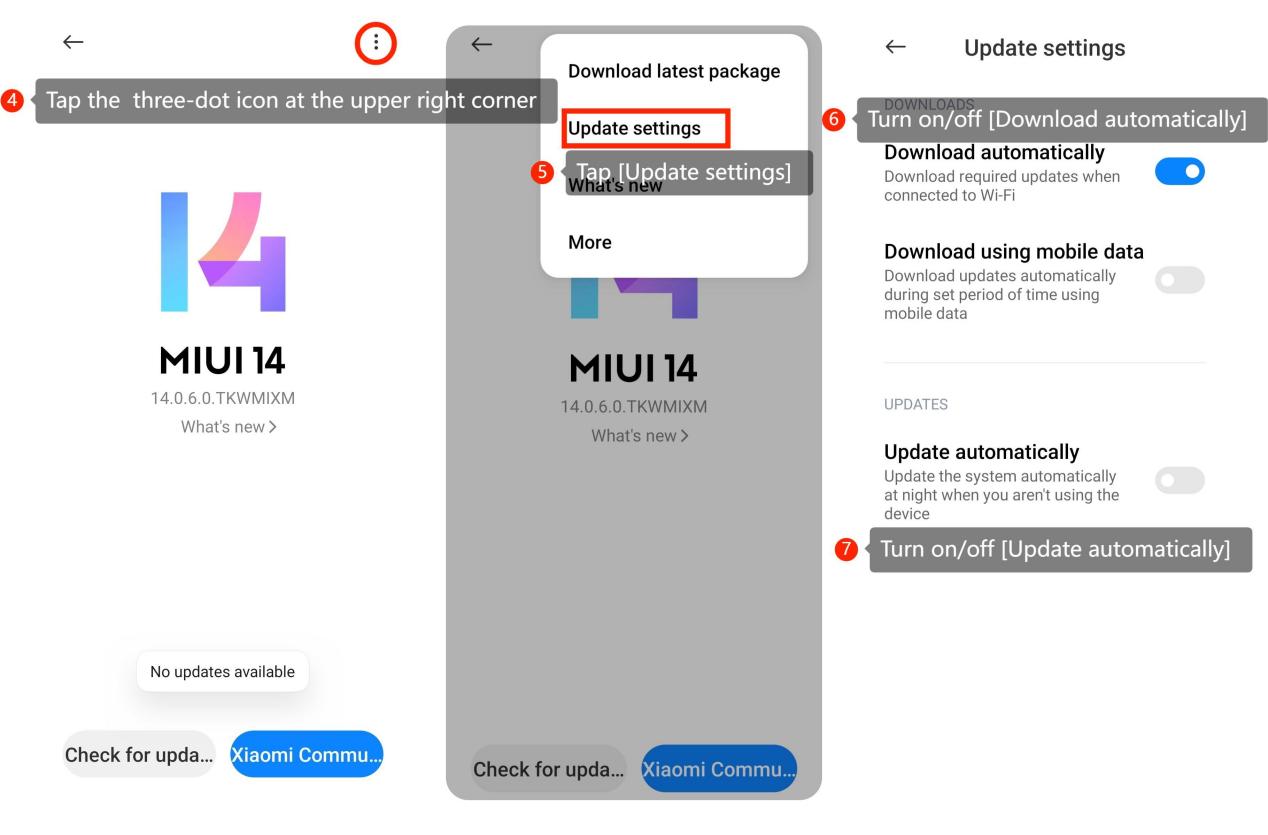
2. Go to [About phone] >> tap [MIUI version] >> tap the three-dot icon at the upper right corner >> [Update settings] >> turn on/off [Download automatically] >> turn on/off [Update automatically].
When deciding whether to turn on or off automatic updates on your device, there are several considerations to keep in mind:
1. Turning On Automatic Updates:
(1). Security:
Automatic updates often include security patches that protect your device from vulnerabilities. Keeping updates on enhances your device's security.
(2). Bug Fixes and Improvements:
Updates can include bug fixes and performance improvements, leading to a smoother and more stable user experience.
(3). Compatibility:
Automatic updates help ensure that your device remains compatible with the latest software and applications, reducing the risk of issues.
(4). Time-Saving:
Automatic updates save you time and effort by handling the update process in the background without requiring your manual intervention.
2. Turning Off Automatic Updates:
(1). Control Over Updates:
Turning off automatic updates gives you more control over when and how updates are installed. This can be important if you want to avoid potential disruptions during specific tasks.
(2). Data Usage:
Updates, especially large ones, can consume a significant amount of data. If you have limited data or are on a metered connection, you might want to manage updates manually.
(3). Software Stability:
While updates aim to improve stability, there's a small chance that an update could introduce new issues. Some users prefer to wait for others to test updates before installing them.
(4). Customization:
If you have a specific setup or configuration that relies on certain software versions, turning off automatic updates allows you to maintain a specific software environment.
1. Open the [Settings] app on your Xiaomi smartphone, it is typically represented by a gear or cogwheel icon.
2. Go to [About phone] >> tap [MIUI version] >> tap the three-dot icon at the upper right corner >> [Update settings] >> turn on/off [Download automatically] >> turn on/off [Update automatically].
When deciding whether to turn on or off automatic updates on your device, there are several considerations to keep in mind:
1. Turning On Automatic Updates:
(1). Security:
Automatic updates often include security patches that protect your device from vulnerabilities. Keeping updates on enhances your device's security.
(2). Bug Fixes and Improvements:
Updates can include bug fixes and performance improvements, leading to a smoother and more stable user experience.
(3). Compatibility:
Automatic updates help ensure that your device remains compatible with the latest software and applications, reducing the risk of issues.
(4). Time-Saving:
Automatic updates save you time and effort by handling the update process in the background without requiring your manual intervention.
2. Turning Off Automatic Updates:
(1). Control Over Updates:
Turning off automatic updates gives you more control over when and how updates are installed. This can be important if you want to avoid potential disruptions during specific tasks.
(2). Data Usage:
Updates, especially large ones, can consume a significant amount of data. If you have limited data or are on a metered connection, you might want to manage updates manually.
(3). Software Stability:
While updates aim to improve stability, there's a small chance that an update could introduce new issues. Some users prefer to wait for others to test updates before installing them.
(4). Customization:
If you have a specific setup or configuration that relies on certain software versions, turning off automatic updates allows you to maintain a specific software environment.
Does it help?
Yes
No