

Mijia Lint Remover 2 FAQ
Product Introduction
Q1: What are the package contents of the Mijia Lint Remover 2?
A: The package contents of the Mijia Lint Remover 2 are lint remover × 1, user manual × 1, Type-C charging cable × 1, cleaning brush × 1, Power adapter × 1, and Image guide × 1.
Note:
Contents in the package may differ across different regions.
Q2: What is the appearance introduction of Mijia Lint Remover 2?
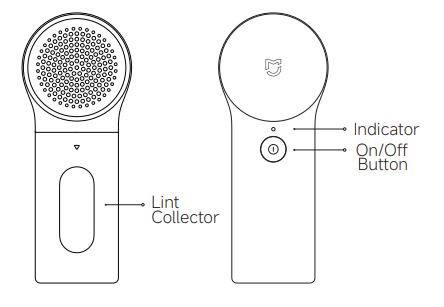
A: The Mijia Lint Remover 2 features a sleek, ergonomic design for easy handling, with the following key components:
1. Lint collector: Located on the front side, it is used to collect the lint that has been trimmed off.
2. Indicator and Power button: On the back, the indicator shows the battery status and working conditions, and the power button is used to turn the device on or off.
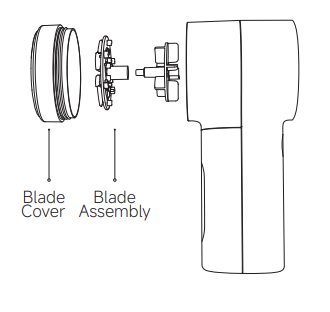
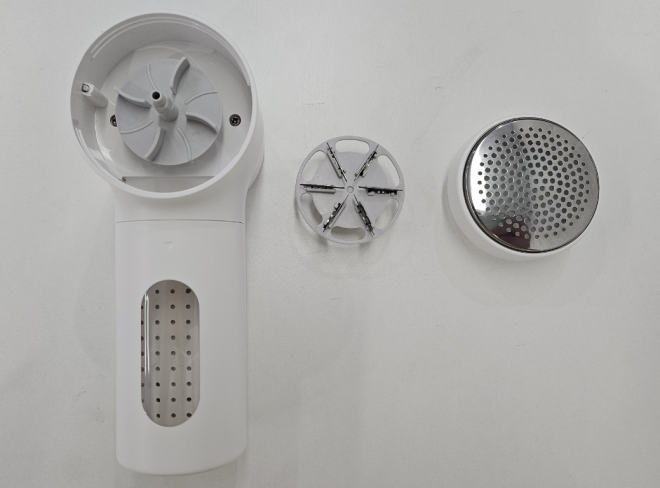
3. Blade cover and Blade assembly: The blade cover protects the blade. When it's time to clean or replace the blade, you can remove the blade cover to access the blade assembly. The blade assembly is responsible for cutting off the lint balls on clothes or other fabrics.
Note:
The illustrations of products and accessories in this manual are schematic diagrams and are for reference only. Due to product updates and upgrades, the actual product may differ slightly from the illustrations. Please refer to the actual product for details.
Q3: What fabrics are suitable for the Mijia Lint Remover 2?
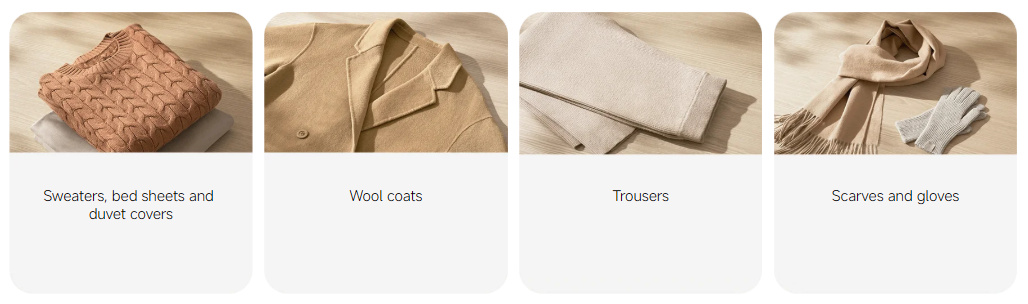
A: Here are some trimmable fabrics of the Mijia Lint Remover 2 as follows:
1. Sweaters/Bed Sheets/Quilt Covers
2. Woolen coat.
3. Trousers.
4. Scarves and gloves.
Note:
The Mijia Lint Remover 2 is suitable for trimming all pilling fabrics, including sweaters, woolen coats, woolen suits, chemical staple fibers, and blended textiles. However, it is prohibited to trim down jackets, lace fabrics, stockings, and fleece sweaters with lint length exceeding 5mm; otherwise, it may cause damage to the clothing.
Q4: Is the charging cable of the Mijia Lint Remover 2 compatible with chargers available on the market?
A: The Mijia Lint Remover 2 comes with a USB charging cable, ensuring optimal compatibility. It's compatible with all major chargers on the market, including standard power banks and other charging devices that have an output current of 5 V/1 A.
Q5: What are the dimensions and net weight of the Mijia Lint Remover 2?
A: The product has dimensions of 60 mm × 80 mm × 148 mm and a net weight of approximately 190 g.
Q6: How long does it take to fully charge the Mijia Lint Remover 2? What is the battery life on a full charge?
A: The Mijia Lint Remover 2 has a built-in 1300 mAh (nominal) lithium battery, which can be fully charged in approximately 2 hours using a 5 V/1 A charger. A fully charged battery lasts for ≥ 180 minutes.
FAQ
Q1: Why does the Mijia Lint Remover 2 charge normally, but won't turn on when I press the power button?
A: The Mijia Lint Remover 2 does not support charging while in use. Secondly, there are two safety contacts inside the blade cover and at the junction of the lint collector.
If the safety contacts are disconnected, the machine will be forced to shut down. If you find that you cannot turn on the machine when there is power, please reinstall the blade cover and the lint collector first. If you still cannot turn on the machine, please contact after-sales service.
Q2: Will the casing of the Mijia Lint Remover 2 sometimes accumulate a small amount of lint during use?
A: The casing of Mijia Lint Remover 2 is made of plastic. When it rubs against sweaters during use, it will generate static electricity, which will cause slight lint clinging.
It's normal for the casing of the Mijia Lint Remover 2 to accumulate a small amount of lint during use. If this occurs, simply wipe it gently with a cloth.
Q3: How to maintain and care for the Mijia Lint Remover 2?
A: To maintain and care for the Mijia Lint Remover 2, please refer to the following steps:
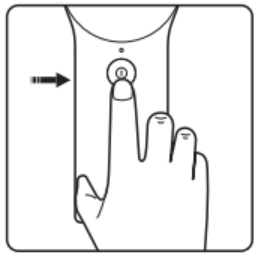
1. Turn off the power of the lint remover to ensure safe operation.
2. Remove the blade cover from the device.
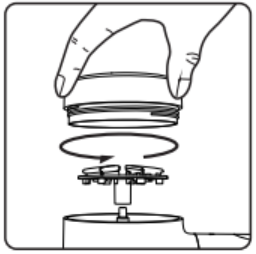
3. Take out the blade assembly by lifting it upwards.
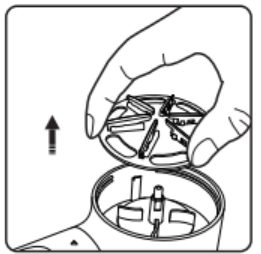
4. Use a cleaning brush to thoroughly clean the blade cover.
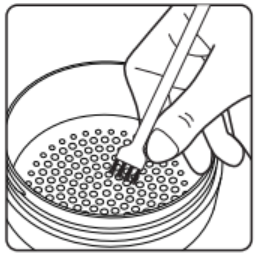
5. Continue using the cleaning brush to clean the blade assembly, removing any residual lint or debris.
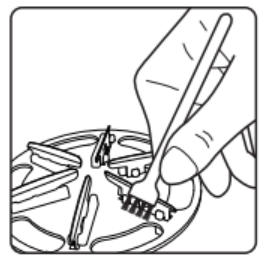
6. Use the cleaning brush to clean the working chamber of the device as well.
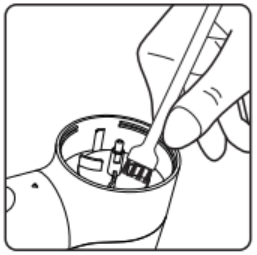
7. Remove the lint collector from the device, empty its contents, and clean it with the cleaning brush.
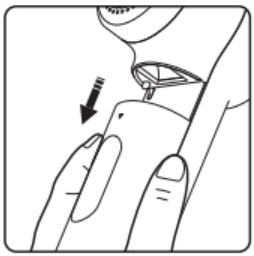
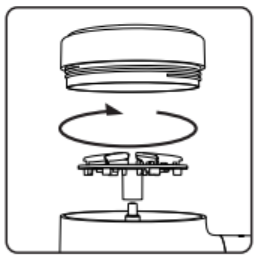
8. After cleaning, reinstall the blade assembly, blade cover, and lint collector in the correct order to restore the device to its usable state.
Note:
1. When not in use, please store the Mijia Lint Remover 2 in a dry and cool place. Before cleaning and maintenance, unplug the charging cable and make sure the product is turned off.
2. When removing or installing the blade assembly, be careful not to scratch your hands.
3. Do not apply force or impact the blade cover.
4. Please wipe the body with a dry cloth. Do not clean it under the tap.
5. Please keep the body dry.
6. Please clean the lint collector in time.
Q4: Is it normal for the Mijia Lint Remover 2 to have a slight odor when I first receive it?
A: It is normal for new products to have a slight odor. This is the odor of the packaging and materials themselves. Because the new product packaging contains glue and the product is assembled from plastic and metal parts, the odor will evaporate after a few uses.
Q5: Why does the Mijia Lint Remover 2 freeze or stall when in use?
A: The Mijia Lint Remover 2 can only trim lint from clothing and cannot be used to trim items other than lint from clothing. If a foreign object causes the machine to jam or stop working, please turn it off first and then clean the machine according to the instructions in the manual.
Q6: Will the Mijia Lint Remover 2 damage clothes?
A: The Mijia Lint Remover 2 has been upgraded to a six-leaf blade with a mesh thickness of 0.35 mm, minimizing mesh deformation and damage to clothing caused by insufficient blade sharpness. Please follow the trimming instructions in the manual and avoid thin or easily ripped areas, protruding areas, areas where foreign matter can get stuck, around buttons and zippers, at seams, and on fabrics where trimming is prohibited.
Q7: What are the indicator statuses of the Mijia Lint Remover 2 during operation?
A: Below is the description of the Mijia Lint Remover 2’s indicator statuses corresponding to different operating states:
1. Sufficient battery: The indicator shows a steady white.
2. Low battery: The indicator flashes orange.
3. Battery exhausted: The orange indicator turns off.
4. Charging: The indicator displays a white breathing effect (gradually brightening and dimming in a cycle).
5. Fully charged: The indicator returns to a steady white.
Q8: Can the Mijia Lint Remover 2 still be turned on and used normally when the battery is low?
A: When the indicator flashes orange, it is recommended to fully charge the battery before use.
Q9: Can the Mijia Lint Remover 2 be turned on while charging?
A: For safety reasons, the machine cannot be used during charging. It cannot be turned on while charging to avoid freezing when shutting down during trimming.
Q10: How loud is the noise when using the Mijia Lint Remover 2?
A: When the machine is fully charged (ambient noise ≤ 45dBA), the noise level is recorded 1 minute after powering on, the noise meter is 1 meter away from the machine, and the maximum noise data is read at the front, left, and right sides of the machine; the test result is < 65dBA.
Q11: What precautions should I take when using the Mijia Lint Remover 2?
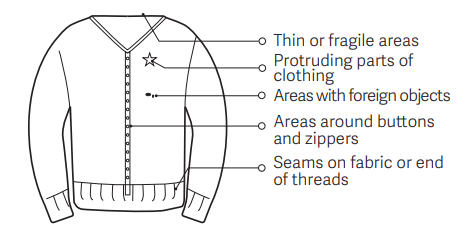
A: To avoid damaging your clothing when using the Mijia Lint Remover 2, please exercise caution when operating it on the following areas:
1. Thin or cracked fabric sections
2. Protruding parts of the clothing
3. Areas with foreign objects
4. Areas around buttons and zippers
5. Seams on the fabric or the end of threads
Note:
Before turning on the machine, make sure the blade cover and lint collector are installed in place. Otherwise, the machine may not turn on normally.
Q12: Is the Mijia Lint Remover 2 waterproof?
A: The Mijia Lint Remover 2 is not waterproof. If you need to clean it, you can use a dry cloth to wipe the body. You can use the cleaning brush included in the package to clean the blade cover.
Q13: How to replace the blade of the Mijia Lint Remover 2?
A: Turn off the power, remove the blade cover by rotating it counterclockwise, pull out the blade to be replaced and install the new one, and then tighten the blade cover clockwise.
Note:
Be careful not to scratch the blade during operation.
Q14: Where to find the SN of the Mijia Lint Remover 2?
A: The SN code of the Mijia Lint Remover 2 is located on the sticker on the back of the package box and on the handle of the machine (the lint collector needs to be removed).
Q15: What to do if the Mijia Lint Remover 2 fails to turn on during first use?
A: If the Mijia Lint Remover 2 fails to turn on during first use, please refer to the troubleshooting methods as follows:
1. Check whether the blade cover is installed in place.
2. Check whether the lint collector has fallen off.
3. Check if the battery of the device is low and try to recharge it.
4. If the issue persists, please go to the after-sales inspection.
Note:
There are two safety contacts at the junction of the inside of the blade cover and the lint collector. If any of the safety contacts are disconnected, the machine will not be able to turn on.
Q16: What are the differences between the Mijia Lint Remover 2 and the Xiaomi Lint Remover?
A: Here are the differences between the Mijia Lint Remover 2 and the Xiaomi Lint Remover as follows:
1. These two devices have different appearances and lint collector capacities.
2. The hand-held grip is optimized for a more comfortable hand-held grip (handle size is reduced) on the Mijia Lint Remover 2.
3. The blade is upgraded from 5 blades to 6 blades, which improves the cutting efficiency.
4. The Xiaomi Lint Remover does not have a unique code, and a 19-digit unique code is added to the Mijia Lint Remover 2.
Use related
Q1: After using the Mijia Lint Remover 2, can the blade cover be rinsed under the tap?
A: No, the Mijia Lint Remover 2 is not waterproof. For daily use, you can wipe the body with a dry cloth and use the cleaning brush included in the package to clean the blade cover.
Q2: Can the Mijia Lint Remover 2 be turned on and used while charging?
A: No, the Mijia Lint Remover 2 cannot be used during charging. It is recommended to fully charge before use.
Q3: When the Mijia Lint Remover 2 is trimming larger lint balls, will the sound be more noticeable?
A: Yes, this is a normal phenomenon. Specific causes and manifestations are as follows:
1. Increased volume: When trimming larger lint balls, the motor load increases (the blade cuts more intensively), causing the operating sound to become louder.
2. Intermittent vibration sound: Larger lint balls can be pulled or stuck by the blades, causing the machine to briefly pause or emit a "clicking" vibration noise.
3. High-frequency friction sound: A sharp noise occurs when the blade rubs against stubborn lint balls.
Troubleshooting
Q1: Why does the Mijia Lint Remover 2 not run when turned on?
A: If the Mijia Lint Remover 2 does not run when turned on, please follow the steps below to troubleshoot:
1. Check whether the blade cover is installed in place and tighten it.
2. Check whether the lint collector has fallen off and whether it is installed in place.
3. Check if the battery of the device is low and try to recharge it.
4. If the issue persists, please go to the after-sales inspection.
Note:
There are two safety contacts at the junction of the blade cover and the lint collector. If any of the safety contacts are disconnected, the machine will not be able to turn on.
Q2: What to do if the Mijia Lint Remover 2 doesn't spin after being turned on or if the blade is malfunctioning?
A: This is likely due to the accumulation of lint inside the blade assembly. Please clean the lint and debris from inside the blade assembly promptly.
Q3: Why is the Mijia Lint Remover 2 so noisy when I turn it on?
A: If the lint remover makes too much noise when turned on, please refer to the following methods:
1. Please check if the blade assembly is properly installed. Improper installation of the blade assembly can cause noise. Please try reinstalling the blade assembly.
2. Please check if the blade cover is deformed or damaged, and try replacing the blade cover.
3. Please check if the blade assembly is deformed or damaged, and try replacing the blade assembly.
Q4: Why does the Mijia Lint Remover 2 have poor hair removal performance?
A: If the Mijia Lint Remover 2 has poor hair removal performance, please refer to the following methods:
1. Please check if the blade cover is deformed or damaged, and try replacing the blade cover.
2. Please check if the blade assembly is deformed or damaged, and try replacing the blade assembly.
3. Please check the battery level. If the battery level is low, please charge the device in time.
4. Please check if there is too much debris accumulated in the lint collector and try cleaning it out.
Q5: Why doesn't the indicator of the Mijia Lint Remover 2 light?
A: If the product's battery is depleted, the indicator will not illuminate. Please charge the product promptly.
Q6: Why can't the Mijia Lint Remover 2 be charged?
A: If the Mijia Lint Remover 2 can't be charged, please check if the charging cable is damaged and try using a different charging cable. If the issue persists, please try contacting the after-sales department.
Does it help?
Yes
No