

What to do if the Xiaomi Watch S4 41mm fails to measure heart rate?
If the heart rate measurement fails on the Xiaomi Watch S4 41mm, please refer to the following information:
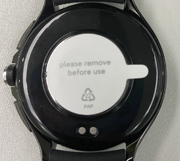
1. Check if the protective film on the back of the watch has been removed. If the protective film is removed, disable all-day heart rate monitoring, then open the heart rate App for a single measurement.
2. While measuring, check if the heart rate light at the watch’s bottom is on. If the light doesn’t turn on, try unbinding and re-pairing the watch or restarting it. If issues persist, please contact after-sales support.
Note:
1. The back cover of the watch comes with a protective film from the factory to prevent damage during transportation.
2. The measurement of blood oxygen and heart rate relies on sensors located on the back cover. The protective film needs to be removed for these functions to work properly.
3. If the film is not removed, the sensor light cannot reach the wrist skin, resulting in failed measurements or no readings.
Does it help?
Yes
No