

Why does the Xiaomi Smart Camera C302 send notifications of movement when there is no one moving in the camera's view?
If the Xiaomi Smart Camera C302 sends notifications of movement when there is no one moving in the camera's view, you can report it as a recognition error.
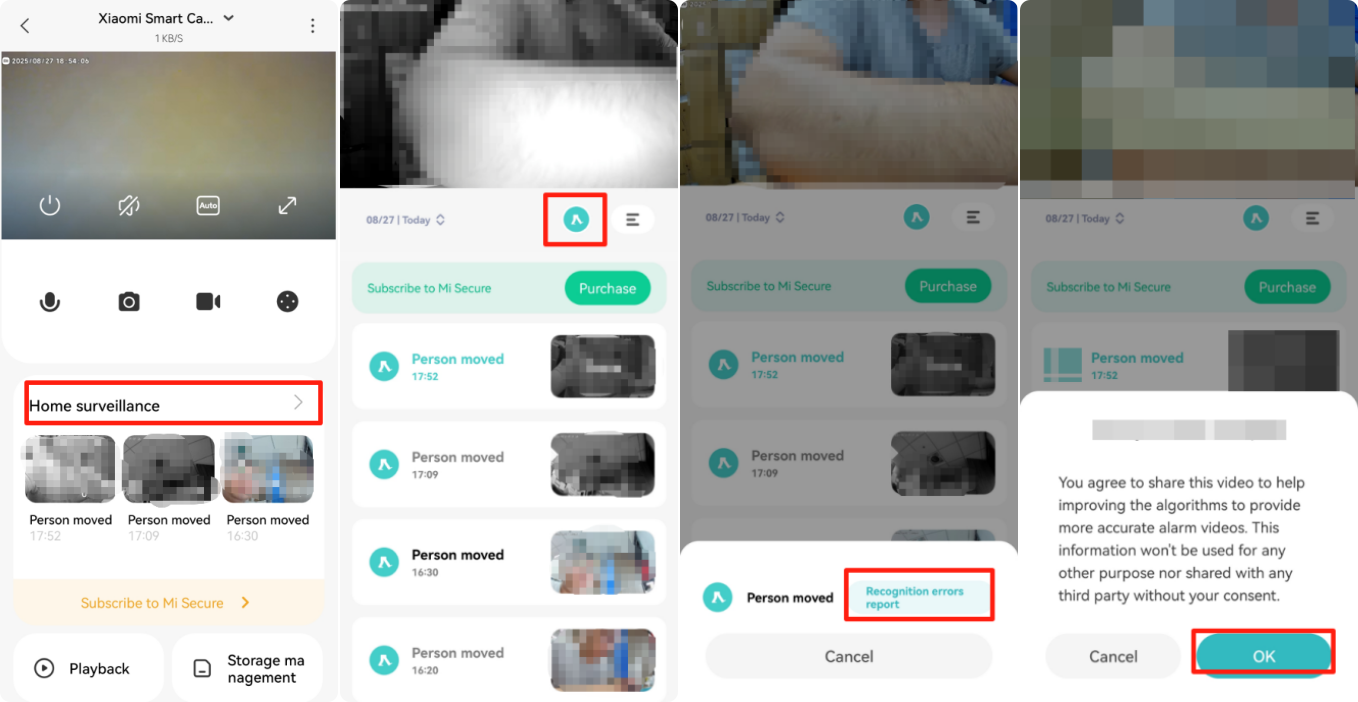
To submit the recognition errors report, please refer to the following steps:
1. Open the Xiaomi Home App on your device.
2. Select [Device card] from the list of connected devices.
3. Tap [Home surveillance].
4. Access the alarm video.
5. Navigate to [Recognition errors report] and provide feedback by tapping [OK]. By reporting recognition errors, you're helping improve the camera's detection accuracy.
We will continue to optimize this issue. Please wait patiently for future updates. Thank you for your understanding and support.
Does it help?
Yes
No