

Mijia Front Load Washer Dryer Pro 9kg FAQ
Product Information
Q1: What are the selling points of the Mijia Front Load Washer Dryer Pro 9kg?
A: The selling points of the Mijia Front Load Washer Dryer Pro 9kg are as follows:
1. Thorough washing, outstanding energy efficiency, European energy label A-25%.
2. Detergent premixing technology, smart dual dosing.
3. Wash & dry 2-in-1, worry-free daily care.
4. Steam sterilization and mite removal, 99.99% sterilization.
5. Xiaomi smart connectivity, smarter living.
6. DD inverter motor, 12-year warranty.
Q2: What color is the Mijia Front Load Washer Dryer Pro 9kg?
A: The color of the Mijia Front Load Washer Dryer Pro 9kg in EU is white, and in Morocco is gray.
Q3: What are the dimensions of the Mijia Front Load Washer Dryer Pro 9kg?
A: The product dimensions of the Mijia Front Load Washer Dryer Pro 9kg are 598 mm × 570 mm × 850 mm and the package dimensions are 735 mm × 650 mm × 890 mm.
Q4: What is the net weight of the Mijia Front Load Washer Dryer Pro 9kg?
A: The net weight of the Mijia Front Load Washer Dryer Pro 9kg is 72 kg.
Q5: What is the gross weight of the Mijia Front Load Washer Dryer Pro 9kg?
A: The gross weight of the Mijia Front Load Washer Dryer Pro 9kg is 77 kg.
Q6: What material is the Mijia Front Load Washer Dryer Pro 9kg body made of?
A: The material of the body of the Mijia Front Load Washer Dryer Pro 9kg is metal sheet.
Q7: What material is the drum of the Mijia Front Load Washer Dryer Pro 9kg made of?
A: The material of the drum of the Mijia Front Load Washer Dryer Pro 9kg is stainless steel.
Q8: What material is the Mijia Front Load Washer Dryer Pro 9kg door made of?
A: The material of the part that contacts with door seal of the door of the Mijia Front Load Washer Dryer Pro 9kg is glass.
Q9: What is the operating environment of the Mijia Front Load Washer Dryer Pro 9kg?
A: The operating environment of the Mijia Front Load Washer Dryer Pro 9kg is 0 °C-40 °C. Exceeding this range will affect the use of the washer dryer.
Q10: What is the IP rating of the Mijia Front Load Washer Dryer Pro 9kg?
A: The IP rating of the Mijia Front Load Washer Dryer Pro 9kg is IPX4.
Q11: What are the accessories of the Mijia Front Load Washer Dryer Pro 9kg?
A: The accessories of the Mijia Front Load Washer Dryer Pro 9kg are as follows:
1. Mijia Front Load Washer Dryer Pro 9kg × 1.
2. User Manual × 1.
3. Water Inlet Hose × 1.
4. Drain Hose Fixing Bracket × 1.
5. Transit Bolt Hole Cover × 4.
6. Base Plate × 1.
7. Screw × 8.
8. Feet Adjusting Wrench × 1.
Q12: What is the energy efficiency rating for the Mijia Front Load Washer Dryer Pro 9kg?
A: The Mijia Front Load Washer Dryer Pro 9kg has a washing energy efficiency rating of A and a wash-and-dry energy efficiency rating of D.
Q13: What is the noise level for the Mijia Front Load Washer Dryer Pro 9kg?
A: The maximum noise level of the Mijia Front Load Washer Dryer Pro 9kg is less than or equal to 71 dB.
Q14: What is the required water pressure for the Mijia Front Load Washer Dryer Pro 9kg?
A: The water pressure required for the Mijia Front Load Washer Dryer Pro 9kg is 0.05 MPa - 0.8 MPa.
Q15: What is the application to connect and manage the Mijia Front Load Washer Dryer Pro 9kg?
A: The application to connect and manage the Mijia Front Load Washer Dryer Pro 9kg is Xiaomi Home App.
Q16: What is the rated voltage of the Mijia Front Load Washer Dryer Pro 9kg?
A: The rated voltage of the Mijia Front Load Washer Dryer Pro 9kg is 220 V - 240 V. Exceeding the voltage range will affect the operation of the washer dryer.
Q17: What is the maximum current of the Mijia Front Load Washer Dryer Pro 9kg?
A: The maximum current of the Mijia Front Load Washer Dryer Pro 9kg is 10 A.
Q18: What is the power of the Mijia Front Load Washer Dryer Pro 9kg?
A: The power specifications of the Mijia Front Load Washer Dryer Pro 9kg are as follows:
1. The rated washing power of the Mijia Front Load Washer Dryer Pro 9kg is 1800 W - 2200 W..
2. The rated drying power of the Mijia Front Load Washer Dryer Pro 9kg is 1400 W - 1800 W.
3. The standby power of the Mijia Front Load Washer Dryer Pro 9kg is less than or equal to 4 W.
Q19: What is the length of the power cord of the Mijia Front Load Washer Dryer Pro 9kg?
A: The length of the power cord of the Mijia Front Load Washer Dryer Pro 9kg is 1.5 m.
Q20: What is the power consumption of the Mijia Front Load Washer Dryer Pro 9kg?
A: The power consumption of the Mijia Front Load Washer Dryer Pro 9kg is 306 kWh/100 cycles.
Q21: What is the length of the Water Inlet Hose of the Mijia Front Load Washer Dryer Pro 9kg?
A: The length of the Water Inlet Hose of the Mijia Front Load Washer Dryer Pro 9kg is 1.5m.
Q22: What are the specifications of the Water Inlet Hose of the Mijia Front Load Washer Dryer Pro 9kg?
A: The Mijia Front Load Washer Dryer Pro 9kg comes with a 3/4-inch threaded Water Inlet Hose.
Q23: What is the length of the Mijia Front Load Washer Dryer Pro 9kg Drain Hose?
A: The length of the Mijia Front Load Washer Dryer Pro 9kg's Drain Hose is 2.25m (including the internal part of the Mijia Front Load Washer Dryer Pro 9kg).
Q24: What are the specifications of the Mijia Front Load Washer Dryer Pro 9kg Drain Hose?
A: The specifications of the Mijia Front Load Washer Dryer Pro 9kg Drain Hose are as follows:
1. Head outer diameter: 26 mm.
2. Head inner diameter: 20 mm.
3. Hose body diameter: 22.5 mm.
Q25: Does the Mijia Front Load Washer Dryer Pro 9kg have a Night Wash?
A: The Mijia Front Load Washer Dryer Pro 9kg supports Night Wash, but it can only be selected using the App after connecting to the Xiaomi Home App.
Q26: Does the Mijia Front Load Washer Dryer Pro 9kg come with protective film on the exterior?
A: The Mijia Front Load Washer Dryer Pro 9kg has protective film on some areas of the exterior, but it is not fully covered.
Q27: What is the drainage method of the Mijia Front Load Washer Dryer Pro 9kg?
A: The Mijia Front Load Washer Dryer Pro 9kg uses upper drainage.
Q28: Does the Mijia Front Load Washer Dryer Pro 9kg support being remotely controlled?
A: The Mijia Front Load Washer Dryer Pro 9kg supports being remotely controlled.
Q29: What are the specifications of the power plug for the Mijia Front Load Washer Dryer Pro 9kg?
A: The power plug of the Mijia Front Load Washer Dryer Pro 9kg is Plug Type E.
Q30: What buttons does the Mijia Front Load Washer Dryer Pro 9kg have?
A: The Mijia Front Load Washer Dryer Pro 9kg includes six buttons as follows:
1. On/Off
2. Start/Pause
3. Select/Switch
4. Return
5. Scroll up/Confirm
6. Scroll down/Confirm
Q31: What is the structure of the door lock of the Mijia Front Load Washer Dryer Pro 9kg?
A: The Mijia Front Load Washer Dryer Pro 9kg uses an electromagnetic door lock.
Q32: Is the door seal of the Mijia Front Load Washer Dryer Pro 9kg antibacterial?
A: The Mijia Front Load Washer Dryer Pro 9kg uses an antibacterial door seal.
Q33: Does the Mijia Front Load Washer Dryer Pro 9kg support a silent mode?
A: The Mijia Front Load Washer Dryer Pro 9kg supports a silent mode.
Q34: What is a DD motor on the Mijia Front Load Washer Dryer Pro 9kg and what are its advantages?
A: The Mijia Front Load Washer Dryer Pro 9kg uses a DD motor. The working principle of the DD (Direct Drive) motor: In a direct-drive structure, the motor rotor shares the same shaft with the washing drum, eliminating the need for belts, pulleys, or other transmission devices. The power is applied directly to the inner drum. The electronic controller precisely adjusts the motor’s speed and torque to match different washing programs.
Functions
Q1: What are the precautions when using the Mijia Front Load Washer Dryer Pro 9kg?
A: The precautions when using the Mijia Front Load Washer Dryer Pro 9kg are as follows:
1. Do not wash clothes with any of the following symbols in the washer dryer. Otherwise, the clothes will be damaged.
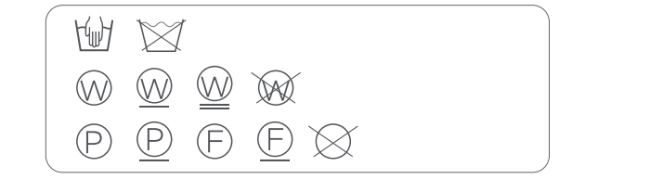
2. Do not wash clothes stained with flammable substances such as gasoline, petroleum, benzene, and alcohol.
3. Do not wash clothes contaminated with chemicals.
4. Do not wash heavy and highly absorbent items such as carpets, as this will cause imbalance and excessive vibration in the machine.
5. Do not wash clothes prone to stain or cracking such as those with prints and multicolored seams.
6. Do not wash clothes with lace, silk, or other materials that can easily snag or unravel.
7. Do not wash suits, woolen coats, fur coats, leather garments, cheongsams, formal dresses, etc.
8. Do not wash bras with metal underwires.
9. Do not wash clothes with irremovable metal or plastic ornaments.
10. Do not wash fabrics containing metal wires.
11. Do not wash raincoats, car covers, or other waterproof items that are not machine washable.
12. Check the care label on the clothes before washing, and select an appropriate washing method.
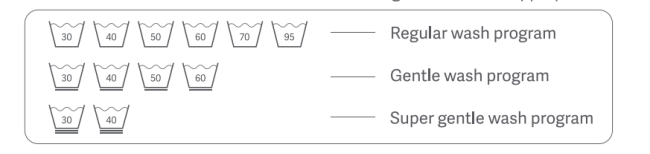
13. Wash colored items separately to avoid staining.
14. When washing large items, add two or three smaller items to avoid spin error during the spin cycle due to weight imbalance.
15. Check all pockets before washing to prevent items such as hairpins, coins, and keys from damaging the clothing.
16. For heavily stain laundry, apply a small amount of detergent directly to the heavy stains and rub gently before putting it in the washer dryer.
17. Before starting a wash cycle, make sure that no item is trapped in the door seal of the washer dryer to prevent damage to the laundry and the seal.
18. Before loading laundry into the washer dryer, tie up the straps, fasten the buttons, and zip up the zippers. Remove metal ornaments. Use a brush to remove debris like sand from the clothes and the hems. Turn clothes prone to pilling inside out.
19. Before washing curtains, remove accessories such as curtain hooks and rings.
20. Place small items (such as handkerchiefs, gloves, socks, and bras) and easily tangled or worn items in a laundry bag before washing.
21. Do not exceed the Max. washing capacity when washing clothes (Max. washing capacity varies based on the cycle). Otherwise, the washing performance will be affected.
22. The appliance automatically redistributes the load throughout the cycle to ensure a balanced load before spinning. Therefore, there will be a difference of up to 30 minutes between the actual wash duration and the displayed time.
Q2: How to add laundry detergent in the Mijia Front Load Washer Dryer Pro 9kg?
A: To add laundry detergent to the Mijia Front Load Washer Dryer Pro 9kg, please refer to the following steps:
1. Pull open the dispenser drawer.
2. Add the detergent into the detergent compartment. Refer to the instructions for use of the detergent and pour liquid detergent or fabric softener into the corresponding compartments of the dispenser drawer. Do not fill above the MAX line. Do not put powder detergent in the drawer.
3. Close the detergent dispenser drawer.
4. If laundry detergent is spilled, wipe it up with a rag as soon as possible.
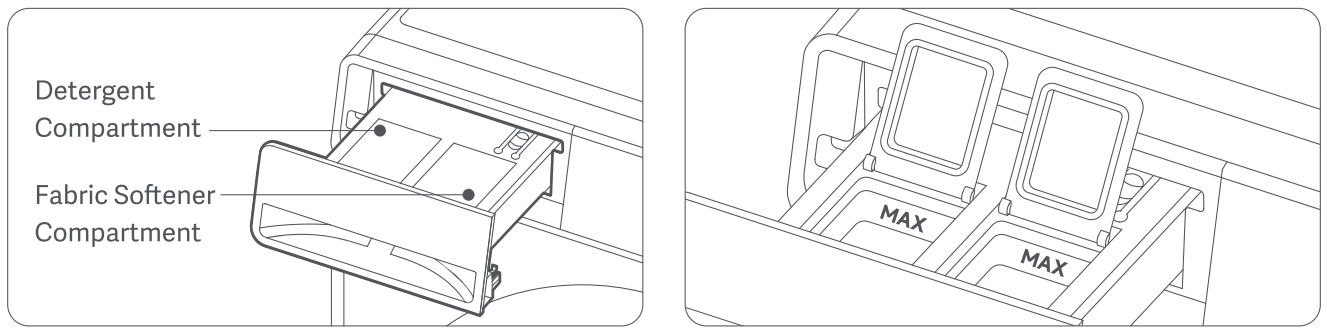
Q3: How to add fabric softener to the Mijia Front Load Washer Dryer Pro 9kg?
A: To add fabric softener in the Mijia Front Load Washer Dryer Pro 9kg, please refer to the following steps:
1. Pull open the dispenser drawer.
2. Add the fabric softener to the fabric softener compartment.
3. Pour the diluted fabric softener into the corresponding dispenser, making sure the liquid level stays below the MAX line on the dispenser.
4. Close the dispenser drawer.
5. If the fabric softener is spilled, wipe it up with a rag as soon as possible.
Q4: How to use laundry pods in the Mijia Front Load Washer Dryer Pro 9kg?
A: If you want to use laundry pods in the Mijia Front Load Washer Dryer Pro 9kg, please use the Laundry pod mode. Place the laundry pod directly into the drum with your clothes (do not put the pod in the dispenser drawer, as this can cause clogging).
To enable the Laundry pod mode of the Mijia Front Load Washer Dryer Pro 9kg, please refer to the following information:
1. On the panel: Go to Settings on the display screen, find Laundry pod mode, and set it to On.
2. Via the Xiaomi Home App: Open the device page for the Mijia Front Load Washer Dryer Pro 9kg in the App and enable Laundry pod mode. (This can only be set after remote control is activated.)
Q5: How to use laundry powder in the Mijia Front Load Washer Dryer Pro 9kg?
A: If you want to use laundry powder in the Mijia Front Load Washer Dryer Pro 9kg, please use Laundry pod mode. Place the laundry powder directly into the drum with your clothes (do not put it in the dispenser drawer, as this can cause clogging).
To enable the Laundry pod mode of the Mijia Front Load Washer Dryer Pro 9kg, please refer to the following information:
1. On the panel: Go to Settings on the display screen, find Laundry pod mode, and set it to On.
2. Via the Xiaomi Home App: Open the device page for the Mijia Front Load Washer Dryer Pro 9kg in the App and enable Laundry pod mode. (This can only be set after remote control is activated.)
Q6: How to use the Auto-Dispensing on the Mijia Front Load Washer Dryer Pro 9kg?
A: With auto-dispensing, the machine automatically dispenses detergent during the water intake phase. Programs without a wash phase won't activate detergent dispensing.
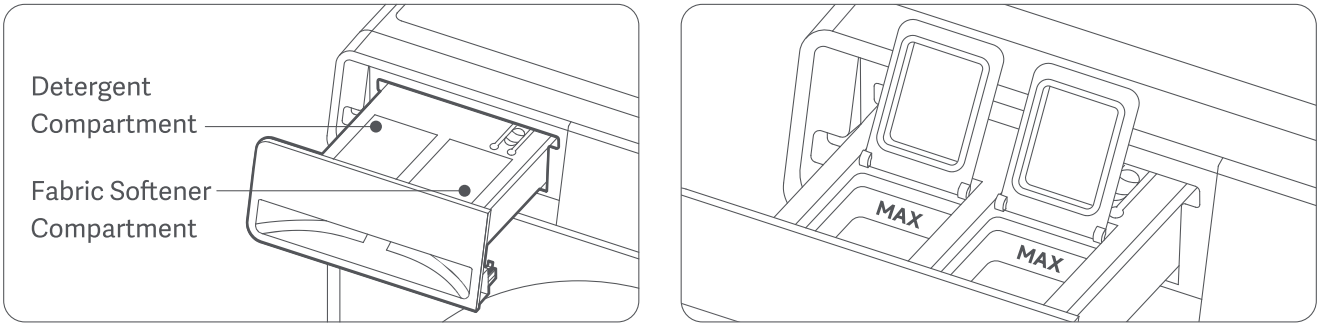
Pour liquid detergent or fabric softener into the corresponding compartments of the dispenser drawer. Do not fill above the MAX line. Do not put powder detergent in the drawer.
Note:
1. Do not exceed the MAX line when pouring liquid detergent into the detergent compartment.
2. Do not exceed the MAX line when pouring fabric softener into the fabric softener compartment.
3. Do not add powder detergent into the dispenser drawer.
4. If concentrated fabric softener is used, evenly dilute it with water in the appropriate proportion.
5. Do not add detergent (powder or liquid) into the fabric softener compartment.
6. Do not open the dispenser drawer when the machine is in operation.
7. When the washer dryer remains unused for extended periods, residual detergent may solidify. Dilute it with water before next use.
8. When using viscous detergents, dilute them with a small amount of water to reduce viscosity before adding to the detergent compartment.
9. If a false low-liquid alert occurs, check whether the detergent has solidified inside the dispenser drawer.
10. Promptly wipe off any detergent spilled on the machine body to prevent corrosive damage to its exterior.
Q7: Can laundry powder be added to the dispenser drawer of the Mijia Front Load Washer Dryer Pro 9kg?
A: Laundry powder cannot be added to the dispenser drawer of the Mijia Front Load Washer Dryer Pro 9kg. If you need to use laundry powder, place it directly into the drum and activate the Laundry pod mode.
Q8: How to use the Delay function on the Mijia Front Load Washer Dryer Pro 9kg?
A: The Delay function on the Mijia Front Load Washer Dryer Pro 9kg allows you to set the completion time of the program, with a maximum delay time of 24 hours. For example, setting "6h" means the program will complete in 6 hours. The selected delay time does not start counting immediately when set, but indicates the time by which the program will be completed.
To use the Delay function on the Mijia Front Load Washer Dryer Pro 9kg, please refer to the following steps:
1. Select a program, configure the parameters, and access the delay menu before starting.
2. Press the Select/Switch button repeatedly to set the delay duration.
3. Finally, confirm with the Start/Pause button. The display will first show the remaining waiting time until washing completion and then switch to the remaining program duration once the program begins.
Q9: How to use the Temp. function on the Mijia Front Load Washer Dryer Pro 9kg?
A: Press and hold the On/Off button for 1 second to turn on the Mijia Front Load Washer Dryer Pro 9kg. Use the Scroll up/Confirm button or Scroll down/Confirm button to select the desired program, then press the Select/Switch button to enter program settings. Use the Scroll up/Confirm button or Scroll down/Confirm button to navigate to Temp, press the Select/Switch button, and select the desired temperature. After setting, press the Start/Pause button to begin the wash.
Alternatively, you can select the program and then select the desired temperature in the Xiaomi Home App.
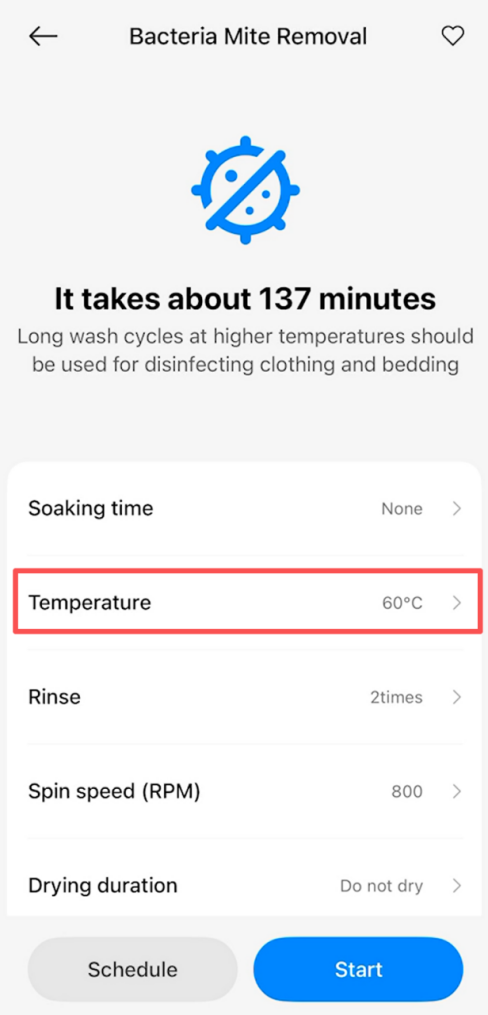
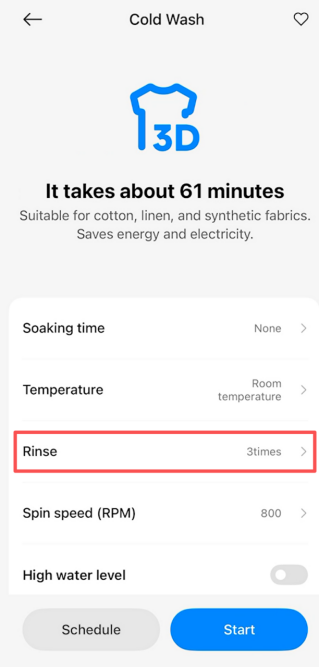
Q10: How to use the Rinse function on the Mijia Front Load Washer Dryer Pro 9kg?
A: Press and hold the On/Off button for 1 second to turn on the Mijia Front Load Washer Dryer Pro 9kg. Use the Scroll up/Confirm button or Scroll down/Confirm button to select the desired program, then press the Select/Switch button to enter program settings. Use the Scroll up/Confirm button or Scroll down/Confirm button to navigate to Rinse, press the Select/Switch button, and select the number of rinse cycles needed. After setting, press the Start/Pause button to begin the wash.
Alternatively, you can select the program and then set the number of rinse cycles in the Xiaomi Home App.
Q11: How to use the Spin speed function on the Mijia Front Load Washer Dryer Pro 9kg?
A: Press and hold the On/Off button for 1 second to turn on the Mijia Front Load Washer Dryer Pro 9kg. Use the Scroll up/Confirm button or Scroll down/Confirm button to select the desired program, then press the Select/Switch button to enter program settings. Use the Scroll up/Confirm button or Scroll down/Confirm button to navigate to Spin speed, press the Select/Switch button, and select the desired spin speed. After setting, press the Start/Pause button to begin the wash.
Alternatively, you can select the program and then choose spin speed (RPM) in the Xiaomi Home App.
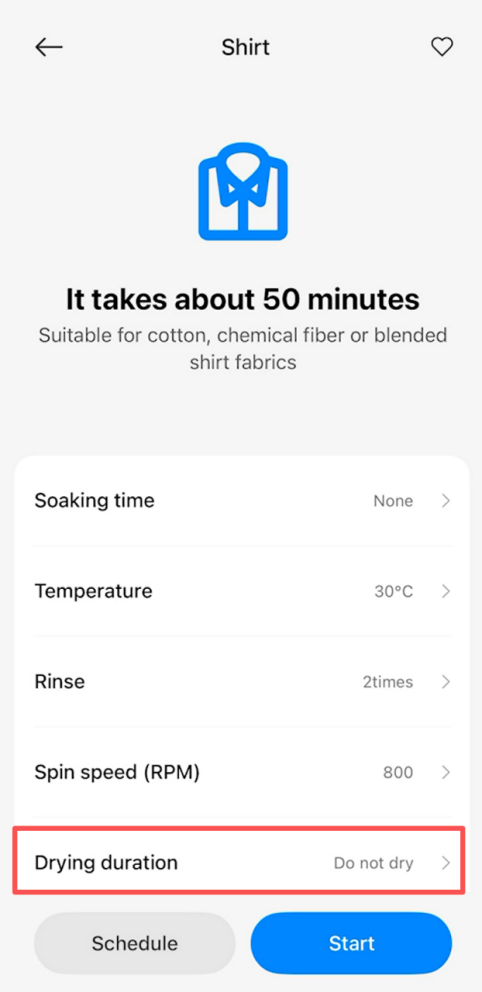
Q12: How to use the Dry function on the Mijia Front Load Washer Dryer Pro 9kg?
A: Press and hold the On/Off button for 1 second to turn on the Mijia Front Load Washer Dryer Pro 9kg. Use the Scroll up/Confirm button or Scroll down/Confirm button to select the desired program, then press the Select/Switch button to enter program settings. Use the Scroll up/Confirm button or Scroll down/Confirm button to navigate to Dry, press the Select/Switch button. After setting, press the Start/Pause button to begin the wash.
Alternatively, you can select the program and then choose the dry duration in the Xiaomi Home App.
Q13: How to use the Refresh & Loosen function on the Mijia Front Load Washer Dryer Pro 9kg?
A: Press and hold the On/Off button for 1 second to turn on the Mijia Front Load Washer Dryer Pro 9kg. Use the Scroll up/Confirm button or Scroll down/Confirm button to select the desired program, then press the Select/Switch button to enter program settings. Use the Scroll up/Confirm button or Scroll down/Confirm button to navigate to Refresh & Loosen, press the Select/Switch button, and select the desired anti-crease time, which can be set for up to 24 hours. After setting, press the Start/Pause button to begin the wash.
Q14: How to use the High water level function on the Mijia Front Load Washer Dryer Pro 9kg?
A: Press and hold the On/Off button for 1 second to turn on the Mijia Front Load Washer Dryer Pro 9kg. Use the Scroll up/Confirm button or Scroll down/Confirm button to select the desired program, then press the Select/Switch button to enter program settings. Use the Scroll up/Confirm button or Scroll down/Confirm button to navigate to High water level, press the Select/Switch button, and select high water level. After setting, press the Start/Pause button to begin the wash.
Alternatively, you can select the program and then choose high water level in the Xiaomi Home App.
Q15: How to use the Soak function on the Mijia Front Load Washer Dryer Pro 9kg?
A: Press and hold the On/Off button for 1 second to turn on the Mijia Front Load Washer Dryer Pro 9kg. Use the Scroll up/Confirm button or Scroll down/Confirm button to select the desired program, then press the Select/Switch button to enter program settings. Use the Scroll up/Confirm button or Scroll down/Confirm button to navigate to Soak, press the Select/Switch button, and select soaking time. After setting, press the Start/Pause button to begin the wash.
Alternatively, you can select the program and then select soaking time in the Xiaomi Home App.
Q16: How to use the Night wash function on the Mijia Front Load Washer Dryer Pro 9kg?
A: Press and hold the On/Off button for 1 second to turn on the Mijia Front Load Washer Dryer Pro 9kg. Use the Scroll up/Confirm button or Scroll down/Confirm button to select the desired program, then press the Select/Switch button to enter program settings. Use the Scroll up/Confirm button or Scroll down/Confirm button to navigate to Night wash, press the Select/Switch button, and turn on the Night wash function. After setting, press the Start/Pause button to begin the wash.
Alternatively, you can select the program and then select the Night wash function in the Xiaomi Home App.
Q17: How to use the Dry level function on the Mijia Front Load Washer Dryer Pro 9kg?
A: Press and hold the On/Off button for 1 second to turn on the Mijia Front Load Washer Dryer Pro 9kg. Use the Scroll up/Confirm button or Scroll down/Confirm button to select the desired program, then press the Select/Switch button to enter program settings. Use the Scroll up/Confirm button or Scroll down/Confirm button to navigate to Dry, then press the Select/Switch button and choose auto dry. Press the Select/Switch button again to select the Dry Level. After setting, press the Start/Pause button to start the program.
Alternatively, you can select the program and then select the dry function in the Xiaomi Home App.
Q18: How to use the Detergent function on the Mijia Front Load Washer Dryer Pro 9kg?
A: With Laundry pod mode inactive, select a program and access the detergent option. Press the Select/Switch button repeatedly to adjust the dispense ratio (0.7x, 1.0x, 1.2x, or 1.3x), and the machine will automatically adjust the detergent dispensing amount based on your selection (unavailable for programs that do not support automatic detergent dispensing).
Note:
1. This feature has a memory function, and the setting will apply to all programs that support automatic detergent dispensing.
2. This feature requires Laundry pod mode to be turned off.
Q19: How to use the Fabric softener function on the Mijia Front Load Washer Dryer Pro 9kg?
A: With Laundry pod mode inactive, select a program and access the fabric softener option. Press the Select/Switch button repeatedly to adjust the dispense ratio (0.7x, 1.0x, 1.2x, or 1.3x), and the machine will automatically adjust the fabric softener dispensing amount based on your selection (unavailable for programs that do not support automatic fabric softener dispensing).
Note:
This feature has a memory function, and the setting will apply to all programs that support automatic fabric softener dispensing.
Q20: How to use the Auto child lock function on the Mijia Front Load Washer Dryer Pro 9kg?
A: Press and hold the On/Off button for 1 second to turn on the Mijia Front Load Washer Dryer Pro 9kg. Use the Scroll up/Confirm button or Scroll down/Confirm button to select Settings, then press the Select/Switch button to enter the settings menu. Select the Auto child lock and turn it on. Once enabled, the washer will automatically activate the child lock one minute after starting. During operation, the child lock can be manually turned off, and it will automatically deactivate when the program ends.
Q21: How to use the One-touch smart wash function on the Mijia Front Load Washer Dryer Pro 9kg?
A: Press and hold the On/Off button for 1 second to turn on the Mijia Front Load Washer Dryer Pro 9kg. Use the Scroll up/Confirm button or Scroll down/Confirm button to select Settings, then press the Select/Switch button to enter the settings menu. Turn on One-touch Smart Wash and then exit the settings. Once One-touch Smart Wash is enabled, when the washer is off, press and hold the Start/Pause button for 2 seconds. The washer will automatically turn on and start the default One-touch Smart Wash program.
Q22: How to use the Silent mode function on the Mijia Front Load Washer Dryer Pro 9kg?
A: Press and hold the On/Off button for 1 second to turn on the Mijia Front Load Washer Dryer Pro 9kg. Use the Scroll up/Confirm button or Scroll down/Confirm button to select Settings, then press the Select/Switch button to enter the settings menu. Select Silent mode and turn on this function. Once enabled, the washer will mute all button sounds.
Q23: How to use the Laundry pod mode on the Mijia Front Load Washer Dryer Pro 9kg?
A: When using laundry pods, switch to Laundry pod mode to prevent detergent waste.
To enable the Laundry pod mode of the Mijia Front Load Washer Dryer Pro 9kg, please refer to the following information:
1. On the panel: Go to Settings on the display screen, find Laundry pod mode, and set it to On.
2. Via the Xiaomi Home App: Open the device page for the Mijia Front Load Washer Dryer Pro 9kg in the App and enable Laundry pod mode. (This can only be set after remote control is activated.)
Q24: How to use the Auto-dispense off (low liquid) function on the Mijia Front Load Washer Dryer Pro 9kg?
A: Press and hold the On/Off button for 1 second to turn on the Mijia Front Load Washer Dryer Pro 9kg. Use the Scroll up/Confirm button or Scroll down/Confirm button to select Settings, then press the Select/Switch button to enter the settings menu. Select the Auto-dispense off (low liquid) and turn it on. Once this function is enabled, if the washer detects a low detergent level six times, the Auto-dispense function will be turned off automatically.
Q25: How to use the Wireless network function on the Mijia Front Load Washer Dryer Pro 9kg?
A: The Mijia Front Load Washer Dryer Pro 9kg only supports 2.4 GHz wireless networks.
Connecting wireless network: When the wireless network is not connected, press the Scroll down/Confirm button to select "Connect" and then confirm with "Restart". The display will briefly turn off for 1 second as wireless network activates. Complete device pairing and wireless network connection via the Xiaomi Home App.
Resetting wireless network: When the wireless network is connected, press the Scroll down/Confirm button to select "Reconnect" and then confirm with "Restart". The display will briefly turn off for 1 second while clearing current network configuration. Re-pair the device and configure the wireless network via the Xiaomi Home App.
You can disable the wireless network by selecting "Reset" in the settings.
Q26: How to set the language of the Mijia Front Load Washer Dryer Pro 9kg?
A: Press and hold the On/Off button for 1 second to turn on the Mijia Front Load Washer Dryer Pro 9kg. Use the Scroll up/Confirm button or Scroll down/Confirm button to select Settings, then press the Select/Switch button to enter the settings menu. Select Language, press the Select/Switch button, and choose the desired language.
Q27: How to check the button instructions of the Mijia Front Load Washer Dryer Pro 9kg?
A: Press and hold the On/Off button for 1 second to turn on the Mijia Front Load Washer Dryer Pro 9kg. Use the Scroll up/Confirm button or Scroll down/Confirm button to select Settings, then press the Select/Switch button to enter the settings menu. Select Instructions, press the Select/Switch button, and you can check all the functions of the buttons.
Q28: How to check the system information (About) of the Mijia Front Load Washer Dryer Pro 9kg?
A: Press and hold the On/Off button for 1 second to turn on the Mijia Front Load Washer Dryer Pro 9kg. Use the Scroll up/Confirm button or Scroll down/Confirm button to select Settings, then press the Select/Switch button to enter the settings menu. Select About, press the Select/Switch button, and you can check the system information of the washer.
Q29: How to restore the Mijia Front Load Washer Dryer Pro 9kg to factory settings?
A: Press and hold the On/Off button for 1 second to turn on the Mijia Front Load Washer Dryer Pro 9kg. Use the Scroll up/Confirm button or Scroll down/Confirm button to select Settings, then press the Select/Switch button to enter the settings menu. Select Reset, press the Select/Switch button, and the washer will be restored to factory settings.
Q30: Can the Mijia Front Load Washer Dryer Pro 9kg be filled with water manually?
A: The Mijia Front Load Washer Dryer Pro 9kg cannot be filled with water manually.
Q31: Can the Mijia Front Load Washer Dryer Pro 9kg have a customized ringtone?
A: The Mijia Front Load Washer Dryer Pro 9kg does not support customized ringtones.
Q32: How to set the washing time on the Mijia Front Load Washer Dryer Pro 9kg?
A: The washing time on the Mijia Front Load Washer Dryer Pro 9kg cannot be set manually. You can adjust the water temperature or select a program with a longer duration instead.
Panel Settings
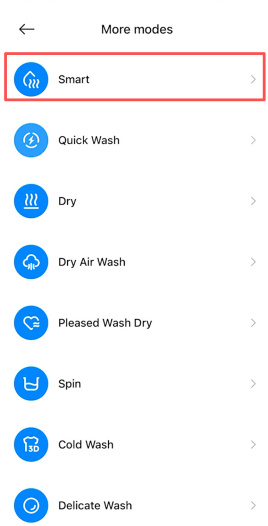
Q33: How to use the Smart function on the Mijia Front Load Washer Dryer Pro 9kg?
A: The Smart program of the Mijia Front Load Washer Dryer Pro 9kg is suitable for washing or drying mixed loads of cotton, linen, and synthetic fabrics for daily wear.
You can operate the Smart program of the Mijia Front Load Washer Dryer Pro 9kg via the panel or the Xiaomi Home App:
1. On the panel: Press and hold the On/Off button for 1 second to turn on the washer dryer. Use the Scroll up/Confirm button or the Scroll down/Confirm button to select the Smart Wash program, then press the Start/Pause button to begin.
2. In the App: Select the Smart program in the Xiaomi Home App, adjust the program settings as needed, and start the program.
Q34: What is the maximum washing capacity and maximum drying capacity of the Smart program of the Mijia Front Load Washer Dryer Pro 9kg?
A: The maximum washing capacity of the Smart program of the Mijia Front Load Washer Dryer Pro 9kg is 6 kg, and the maximum drying capacity is 4 kg.
Q35: How to use the Quick program on the Mijia Front Load Washer Dryer Pro 9kg?
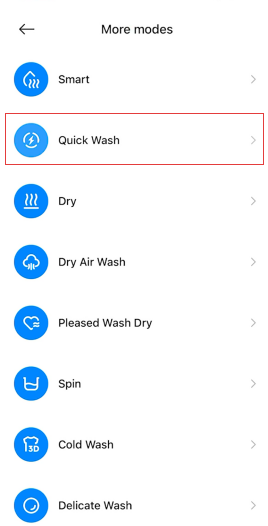
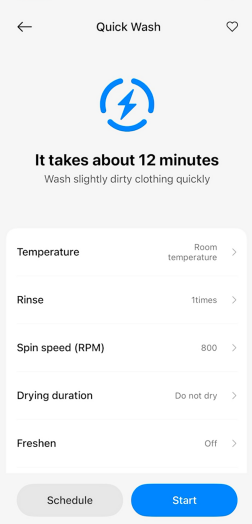
A: The Quick program of the Mijia Front Load Washer Dryer Pro 9kg is suitable for washing or drying thin, lightly soiled fabrics.
You can operate the Quick program of the Mijia Front Load Washer Dryer Pro 9kg via the panel or the Xiaomi Home App:
1. On the panel: Press and hold the On/Off button for 1 second to turn on the washer dryer. Use the Scroll up/Confirm button or the Scroll down/Confirm button to select the Quick program, then press the Start/Pause button to begin.
2. In the App: Select the Quick Wash program in the Xiaomi Home App, adjust the program settings as needed, and start the program.
Q36: What is the maximum washing capacity and maximum drying capacity of the Quick program of the Mijia Front Load Washer Dryer Pro 9kg?
A: The maximum washing capacity of the Quick program of the Mijia Front Load Washer Dryer Pro 9kg is 2 kg, and the maximum drying capacity is 1 kg.
Q37: How to use the Intensive program on the Mijia Front Load Washer Dryer Pro 9kg?
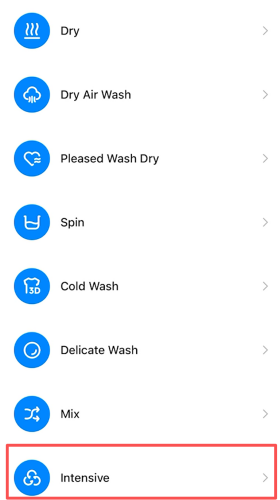
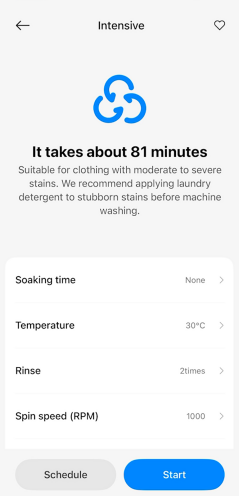
A: The Intensive program of the Mijia Front Load Washer Dryer Pro 9kg is suitable for washing or drying moderately or heavily soiled fabrics. It is recommended to pre-treat stubborn stains with laundry detergent before machine washing.
You can operate the Intensive program of the Mijia Front Load Washer Dryer Pro 9kg via the panel or the Xiaomi Home App:
1. On the panel: Press and hold the On/Off button for 1 second to turn on the washer dryer. Use the Scroll up/Confirm button or the Scroll down/Confirm button to select the Intensive program, then press the Start/Pause button to begin.
2. In the App: Select the Intensive program in the Xiaomi Home App, adjust the program settings as needed, and start the program.
Q38: What is the maximum washing capacity and maximum drying capacity of the Intensive program of the Mijia Front Load Washer Dryer Pro 9kg?
A: The maximum washing capacity of the Intensive program of the Mijia Front Load Washer Dryer Pro 9kg is 9 kg, and the maximum drying capacity is 6 kg.
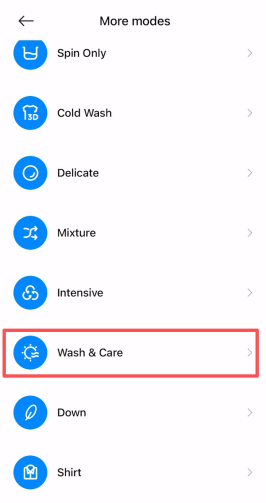
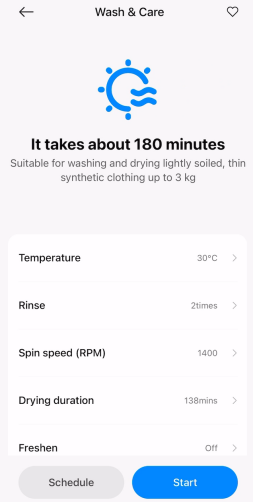
Q39: How to use the Wash & Care program on the Mijia Front Load Washer Dryer Pro 9kg?
A: The Wash & Care program of the Mijia Front Load Washer Dryer Pro 9kg is suitable for washing or drying lightly soiled fabrics. It is recommended to use it for up to 3 kg of thin and light synthetic fabrics.
You can operate the Wash & Care program of the Mijia Front Load Washer Dryer Pro 9kg via the Xiaomi Home App. Select the Wash & Care program in the App, adjust the program settings as needed, and start the program.
Q40: What is the maximum washing capacity and maximum drying capacity of the Wash & Care program of the Mijia Front Load Washer Dryer Pro 9kg?
A: The maximum washing capacity of the Wash & Care program of the Mijia Front Load Washer Dryer Pro 9kg is 3 kg, and the maximum drying capacity is 3 kg.
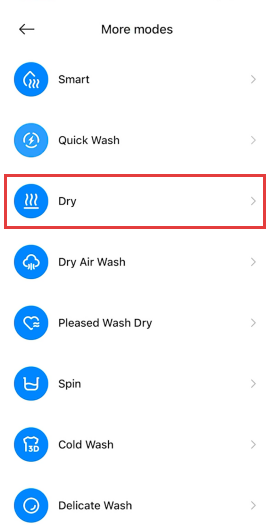
Q41: How to use the Dry Only program on the Mijia Front Load Washer Dryer Pro 9kg?
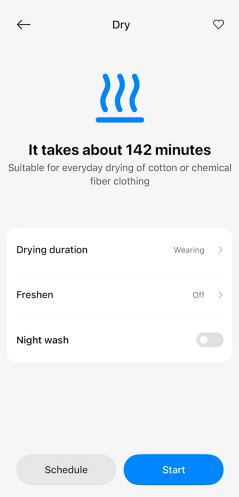
A: The Dry Only program of the Mijia Front Load Washer Dryer Pro 9kg is suitable for separately drying cotton, linen, and synthetic fabrics (make sure to spin the laundry before drying until it no longer drips water).
You can operate the Dry Only program of the Mijia Front Load Washer Dryer Pro 9kg via the panel or the Xiaomi Home App:
1. On the panel: Press and hold the On/Off button for 1 second to turn on the washer dryer. Use the Scroll up/Confirm button or the Scroll down/Confirm button to select the Dry Only program, then press the Start/Pause button to begin.
2. In the App: Select the Dry program in the Xiaomi Home App, adjust the program settings as needed, and start the program.
Q42: What is the maximum drying capacity of the Dry Only program of the Mijia Front Load Washer Dryer Pro 9kg?
A: The maximum drying capacity of the Dry Only of the Mijia Front Load Washer Dryer Pro 9kg is 6 kg.
Q43: Does the water tap need to be turned on when the Mijia Front Load Washer Dryer Pro 9kg dries?
A: The Mijia Front Load Washer Dryer Pro 9kg uses condensation drying, which requires the water tap to be turned on and maintain normal water pressure during the drying process. Otherwise, the drying performance can be affected.
Q44: How to adjust the drying time of the Mijia Front Load Washer Dryer Pro 9kg?
A: If you want to select the drying time on the Mijia Front Load Washer Dryer Pro 9kg, you can operate it in the Xiaomi Home App. Select the program, choose the drying time, and use the timed dry function to set the desired duration.
Q45: How to use the Spin Only program on the Mijia Front Load Washer Dryer Pro 9kg?
A: You can operate the Delicate program of the Mijia Front Load Washer Dryer Pro 9kg via the Xiaomi Home App. Select the Spin program in the Xiaomi Home App, adjust the program settings as needed, and start the program.
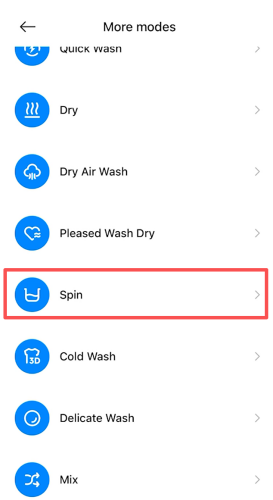
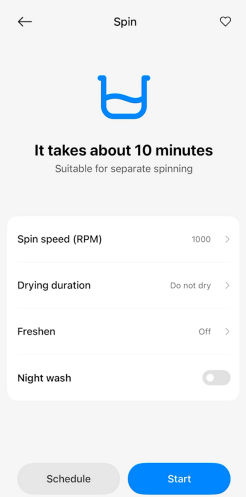
Q46: What is the maximum washing capacity and maximum drying capacity of the Spin Only program of the Mijia Front Load Washer Dryer Pro 9kg?
A: The Spin Only function of the Mijia Front Load Washer Dryer Pro 9kg does not support washing. The maximum spin capacity is 9 kg, and the maximum drying capacity is 6 kg.
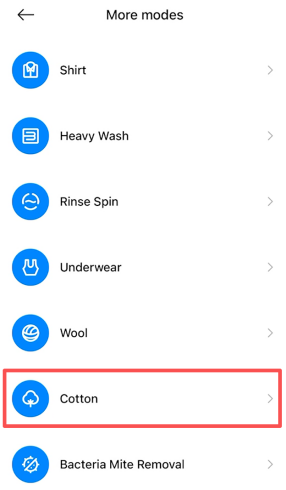
Q47: How to use the Cotton program on the Mijia Front Load Washer Dryer Pro 9kg?
A: The Cotton program of the Mijia Front Load Washer Dryer Pro 9kg is suitable for washing or drying cotton and linen fabrics.
You can operate the Cotton program of the Mijia Front Load Washer Dryer Pro 9kg via the panel or the Xiaomi Home App:
1. On the panel: Press and hold the On/Off button for 1 second to turn on the washer dryer. Use the Scroll up/Confirm button or the Scroll down/Confirm button to select the Cotton program, then press the Start/Pause button to begin.
2. In the App: Select the Cotton program in the Xiaomi Home App, adjust the program settings as needed, and start the program.
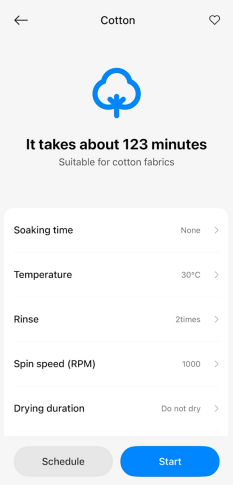
Q48: What is the maximum washing capacity and maximum drying capacity of the Cotton program of the Mijia Front Load Washer Dryer Pro 9kg?
A: The maximum washing capacity of the Cotton program of the Mijia Front Load Washer Dryer Pro 9kg is 9 kg, and the maximum drying capacity is 6 kg.
Q49: How to use the Wool program on the Mijia Front Load Washer Dryer Pro 9kg?
A: The Wool program of the Mijia Front Load Washer Dryer Pro 9kg is suitable for washing or drying most clothes that do not need to be sorted.
You can operate the Wool program of the Mijia Front Load Washer Dryer Pro 9kg via the panel or the Xiaomi Home App:
1. On the panel: Press and hold the On/Off button for 1 second to turn on the washer dryer. Use the Scroll up/Confirm button or the Scroll down/Confirm button to select the Wool program, then press the Start/Pause button to begin.
2. In the App: Select the Wool program in the Xiaomi Home App, adjust the program settings as needed, and start the program.
Q50: What is the maximum washing capacity and maximum drying capacity of the Wool program of the Mijia Front Load Washer Dryer Pro 9kg?
A: The maximum washing capacity of the Wool program of the Mijia Front Load Washer Dryer Pro 9kg is 2 kg, and drying is not available for this program.
Q51: How to use the Delicate program on the Mijia Front Load Washer Dryer Pro 9kg?
A: You can operate the Delicate program of the Mijia Front Load Washer Dryer Pro 9kg via the panel or the Xiaomi Home App:
1. On the panel: Press and hold the On/Off button for 1 second to turn on the washer dryer. Use the Scroll up/Confirm button or the Scroll down/Confirm button to select the Delicate program, then press the Start/Pause button to begin.
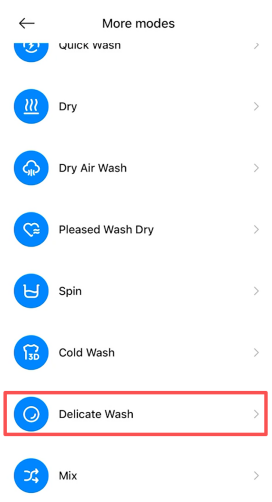
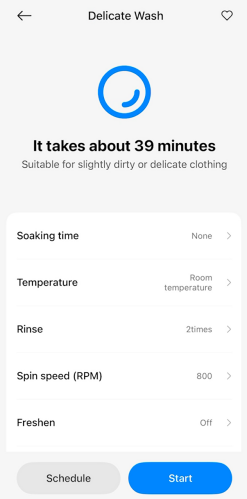
2. In the App: Select the Delicate Wash program in the Xiaomi Home App, adjust the program settings as needed, and start the program.
Q52: What is the maximum washing capacity and maximum drying capacity of the Delicate program of the Mijia Front Load Washer Dryer Pro 9kg?
A: The maximum washing capacity of the Delicate program of the Mijia Front Load Washer Dryer Pro 9kg is 4 kg, and drying is not available for this program.
Q53: How to use the Eco 40-60 program on the Mijia Front Load Washer Dryer Pro 9kg?
A: The Eco 40-60 program of the Mijia Front Load Washer Dryer Pro 9kg is suitable for cleaning normally soiled cotton laundry labeled as washable at 40 ℃ or 60 ℃.
You can operate the Eco 40-60 program of the Mijia Front Load Washer Dryer Pro 9kg via the panel or the Xiaomi Home App:
1. On the panel: Press and hold the On/Off button for 1 second to turn on the washer dryer. Use the Scroll up/Confirm button or the Scroll down/Confirm button to select the Eco 40-60 program, then press the Start/Pause button to begin.
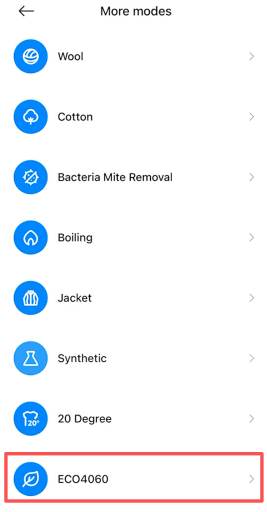
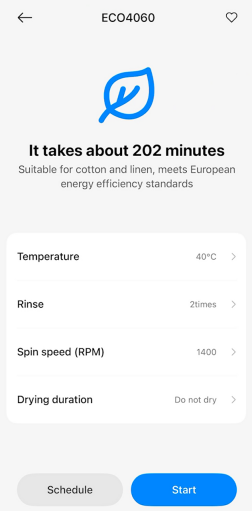
2. In the App: Select the ECO4060 program in the Xiaomi Home App, adjust the program settings as needed, and start the program.
Q54: What is the maximum washing capacity and maximum drying capacity of the Eco 40-60 program of the Mijia Front Load Washer Dryer Pro 9kg?
A: The maximum washing capacity of the Eco 40-60 program of the Mijia Front Load Washer Dryer Pro 9kg is 9 kg, and the maximum drying capacity is 6 kg.
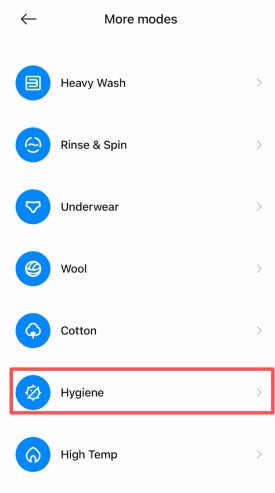
Q55: How to use the Hygiene program on the Mijia Front Load Washer Dryer Pro 9kg?
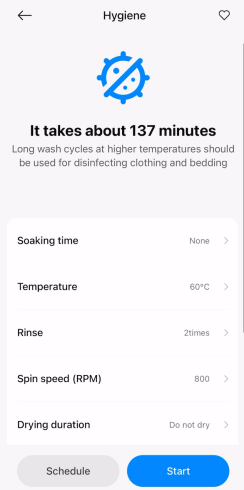
A: The Hygiene program of the Mijia Front Load Washer Dryer Pro 9kg is suitable for washing or drying cotton items like clothing and bedding that can withstand high temperatures and have high-sterilization requirements.
You can operate the Hygiene program of the Mijia Front Load Washer Dryer Pro 9kg via the Xiaomi Home App. Select the Hygiene program in the Xiaomi Home App, adjust the program settings as needed, and start the program.
Q56: What is the maximum washing capacity and maximum drying capacity of the Hygiene program of the Mijia Front Load Washer Dryer Pro 9kg?
A: The maximum washing capacity of the Hygiene program of the Mijia Front Load Washer Dryer Pro 9kg is 3 kg, and the maximum drying capacity is 3 kg.
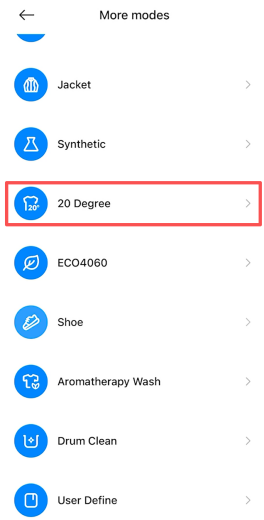
Q57: How to use the 20℃ program on the Mijia Front Load Washer Dryer Pro 9kg?
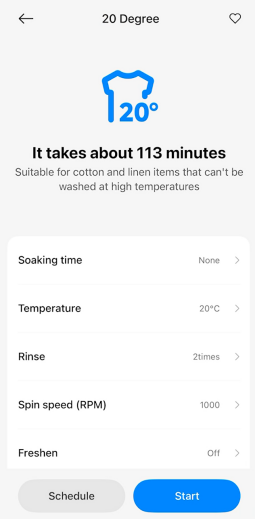
A: The 20℃ program of the Mijia Front Load Washer Dryer Pro 9kg is suitable for washing or drying baby clothes that are safe for high-temperature washing.
You can operate the 20℃ program of the Mijia Front Load Washer Dryer Pro 9kg via the panel or the Xiaomi Home App:
1. On the panel: Press and hold the On/Off button for 1 second to turn on the washer dryer. Use the Scroll up/Confirm button or the Scroll down/Confirm button to select the 20℃ program, then press the Start/Pause button to begin.
2. In the App: Select the 20 Degree program in the Xiaomi Home App, adjust the program settings as needed, and start the program.
Q58: What is the maximum washing capacity and maximum drying capacity of the 20℃ program of the Mijia Front Load Washer Dryer Pro 9kg?
A: The maximum washing capacity of the 20℃ program of the Mijia Front Load Washer Dryer Pro 9kg is 9 kg, and drying is not available for this program.
Q59: How to use the Tub Clean program on the Mijia Front Load Washer Dryer Pro 9kg?
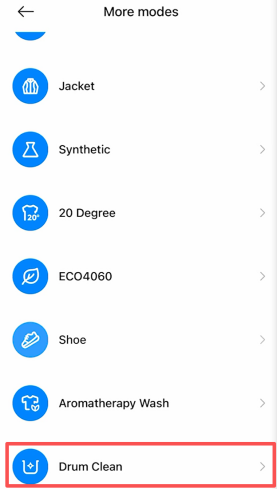
A: You can operate the Tub Clean program of the Mijia Front Load Washer Dryer Pro 9kg via the panel or the Xiaomi Home App:
1. On the panel: Press and hold the On/Off button for 1 second to turn on the washer dryer. Use the Scroll up/Confirm button or the Scroll down/Confirm button to select the Tub Clean program, then press the Start/Pause button to begin.
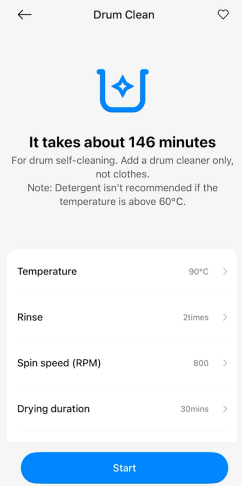
2. In the App: Select the Drum Clean program in the Xiaomi Home App, adjust the program settings as needed, and start the program.
Q60: Does detergent need to be added when using the Tub Clean program of the Mijia Front Load Washer Dryer Pro 9kg?
A: When the Mijia Front Load Washer Dryer Pro 9kg uses the Tub Clean program, detergent and softener cannot be added.
Q61: How to use the Heavy Wash program on the Mijia Front Load Washer Dryer Pro 9kg?
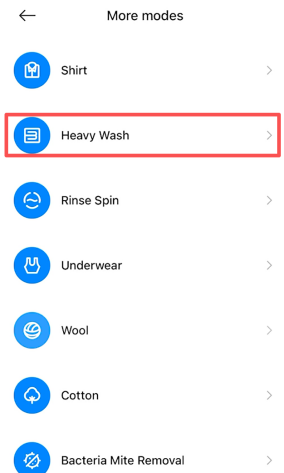
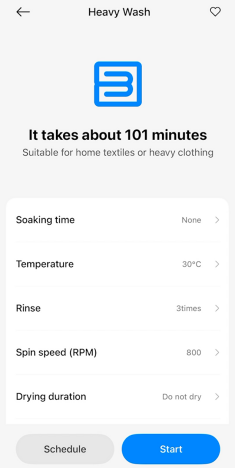
A: The Heavy Wash program of the Mijia Front Load Washer Dryer Pro 9kg is suitable for washing or drying bed linens such as bed covers, sheets, and quilt covers.
You can operate the Heavy Wash program of the Mijia Front Load Washer Dryer Pro 9kg via the Xiaomi Home App. Select the Heavy Wash program in the Xiaomi Home App, adjust the program settings as needed, and start the program.
Q62: What is the maximum washing capacity and maximum drying capacity of the Heavy Wash program of the Mijia Front Load Washer Dryer Pro 9kg?
A: The maximum washing capacity of the Hygiene program of the Mijia Front Load Washer Dryer Pro 9kg is 6 kg, and the maximum drying capacity is 3 kg.
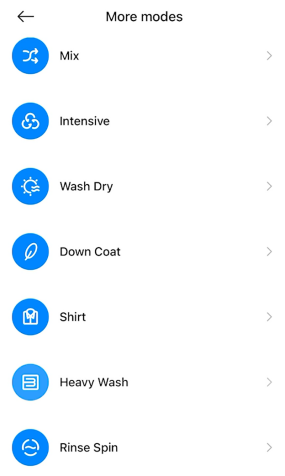
Q63: How to use the Rinse & Spin program on the Mijia Front Load Washer Dryer Pro 9kg?
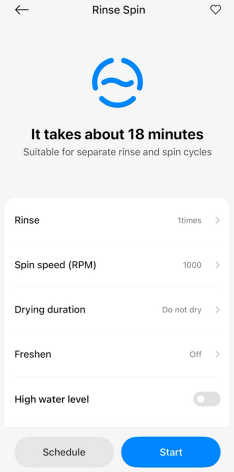
A: The Rinse & Spin program of the Mijia Front Load Washer Dryer Pro 9kg is suitable for clothes that only need rinsing or that require an extra rinse cycle with fabric softeners.
You can operate the Rinse & Spin program of the Mijia Front Load Washer Dryer Pro 9kg via the Xiaomi Home App. Select the Rinse Spin program in the Xiaomi Home App, adjust the program settings as needed, and start the program.
Q64: What is the maximum washing capacity and maximum drying capacity of the Rinse & Spin program of the Mijia Front Load Washer Dryer Pro 9kg?
A: The maximum washing capacity of the Rinse & Spin program of the Mijia Front Load Washer Dryer Pro 9kg is 9 kg, and the maximum drying capacity is 6 kg.
Q65: How to use the Down program on the Mijia Front Load Washer Dryer Pro 9kg?
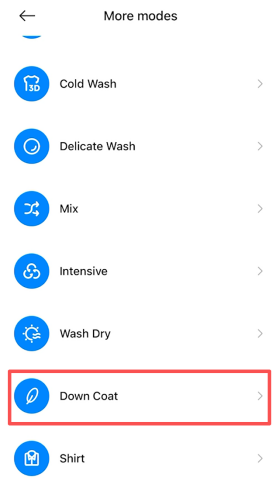
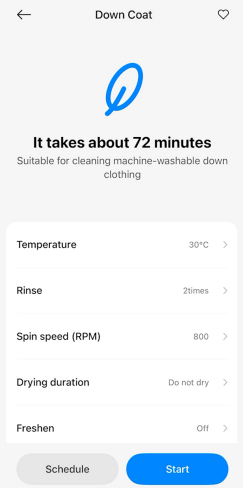
A: The Down program of the Mijia Front Load Washer Dryer Pro 9kg is suitable for washing or drying down-filled clothes (unsuitable for pillows or bedding).
You can operate the Down program of the Mijia Front Load Washer Dryer Pro 9kg via the Xiaomi Home App. Select the Down Coat program in the Xiaomi Home App, adjust the program settings as needed, and start the program.
Q66: What is the maximum washing capacity and maximum drying capacity of the Down program of the Mijia Front Load Washer Dryer Pro 9kg?
A: The maximum washing capacity of the Down program of the Mijia Front Load Washer Dryer Pro 9kg is 2 kg, and the maximum drying capacity is 2 kg.
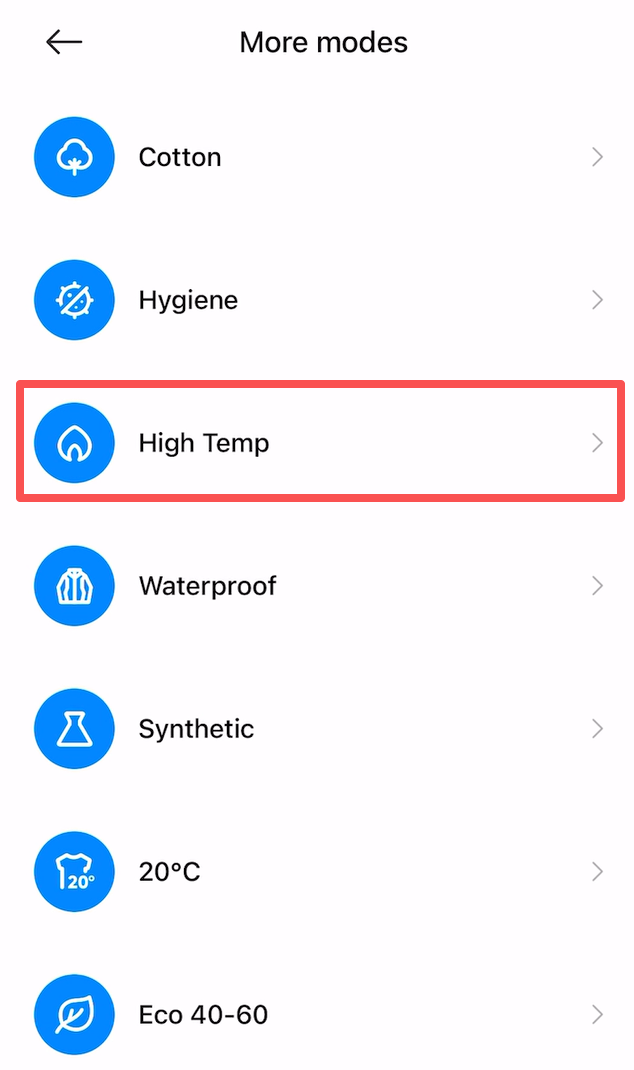
Q67: How to use the High Temp program on the Mijia Front Load Washer Dryer Pro 9kg?
A: The High Temp program of the Mijia Front Load Washer Dryer Pro 9kg is suitable for washing or drying fabrics that can withstand high temperatures.
You can operate the High Temp program of the Mijia Front Load Washer Dryer Pro 9kg via the Xiaomi Home App. Select the High Temp program in the Xiaomi Home App, adjust the program settings as needed, and start the program.
Q68: What is the maximum washing capacity and maximum drying capacity of the High Temp program of the Mijia Front Load Washer Dryer Pro 9kg?
A: The maximum washing capacity of the High Temp program of the Mijia Front Load Washer Dryer Pro 9kg is 6 kg, and the maximum drying capacity is 3 kg.
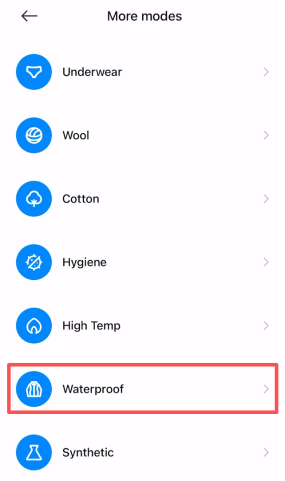
Q69: How to use the Waterproof program on the Mijia Front Load Washer Dryer Pro 9kg?
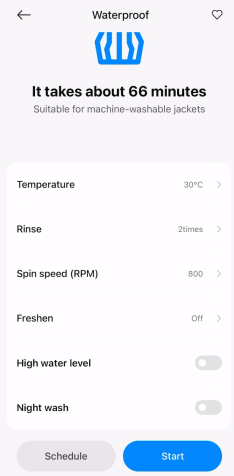
A: You can operate the Waterproof program of the Mijia Front Load Washer Dryer Pro 9kg via the Xiaomi Home App. Select the Waterproof program in the Xiaomi Home App, adjust the program settings as needed, and start the program.
Q70: What is the maximum washing capacity and maximum drying capacity of the Waterproof program of the Mijia Front Load Washer Dryer Pro 9kg?
A: The maximum washing capacity of the Waterproof program of the Mijia Front Load Washer Dryer Pro 9kg is 4 kg, and drying is not available for this program.
Q71: How to use the Synthetic program on the Mijia Front Load Washer Dryer Pro 9kg?
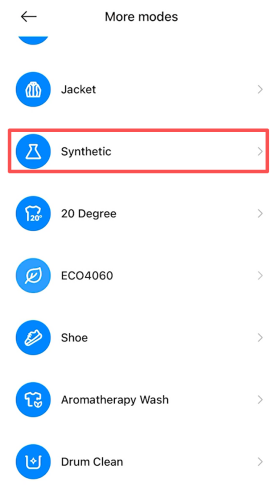
A: The Synthetic program of the Mijia Front Load Washer Dryer Pro 9kg is suitable for washing or drying synthetic fabrics.
You can operate the Synthetic program of the Mijia Front Load Washer Dryer Pro 9kg via the Xiaomi Home App. Select the Synthetic program in the Xiaomi Home App, adjust the program settings as needed, and start the program.
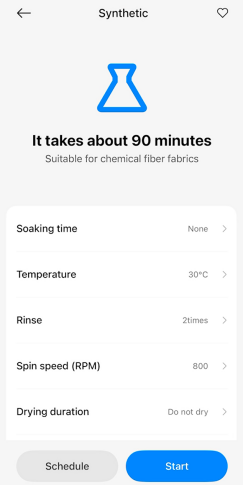
Q72: What is the maximum washing capacity and maximum drying capacity of the Synthetic program of the Mijia Front Load Washer Dryer Pro 9kg?
A: The maximum washing capacity of the Synthetic program of the Mijia Front Load Washer Dryer Pro 9kg is 4 kg, and the maximum drying capacity is 4 kg.
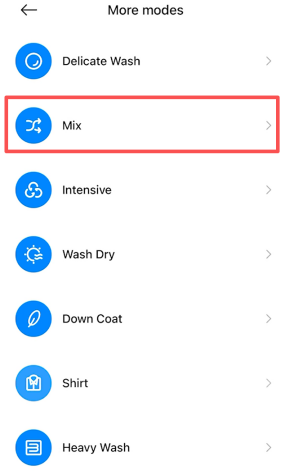
Q73: How to use the Mixture program on the Mijia Front Load Washer Dryer Pro 9kg?
A: The Mixture program of the Mijia Front Load Washer Dryer Pro 9kg is suitable for washing or drying most clothes that do not need to be sorted.
You can operate the Mixture program of the Mijia Front Load Washer Dryer Pro 9kg via the Xiaomi Home App. Select the Mix program in the Xiaomi Home App, adjust the program settings as needed, and start the program.
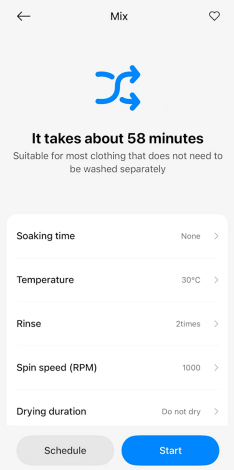
Q74: What is the maximum washing capacity and maximum drying capacity of the Mixture program of the Mijia Front Load Washer Dryer Pro 9kg?
A: The maximum washing capacity of the Mixture program of the Mijia Front Load Washer Dryer Pro 9kg is 9 kg, and the maximum drying capacity is 6 kg.
Q75: How to use the Underwear program on the Mijia Front Load Washer Dryer Pro 9kg?
A: The Underwear program of the Mijia Front Load Washer Dryer Pro 9kg is suitable for washing underwear.
You can operate the Underwear program of the Mijia Front Load Washer Dryer Pro 9kg via the Xiaomi Home App. Select the Underwear program in the Xiaomi Home App, adjust the program settings as needed, and start the program.
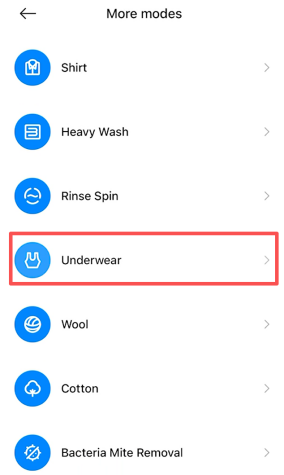
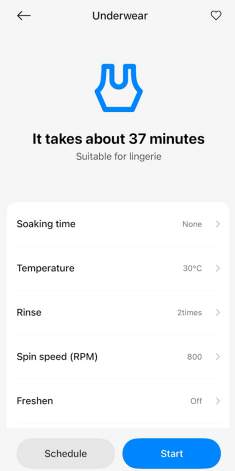
Q76: What is the maximum washing capacity and maximum drying capacity of the Underwear program of the Mijia Front Load Washer Dryer Pro 9kg?
A: The maximum washing capacity of the Underwear program of the Mijia Front Load Washer Dryer Pro 9kg is 4 kg, and drying is not available for this program.
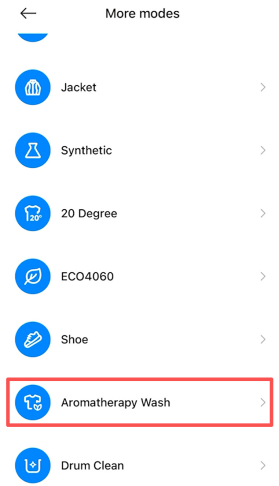
Q77: How to use the Aromatherapy program on the Mijia Front Load Washer Dryer Pro 9kg?
A: You can operate the Aromatherapy program of the Mijia Front Load Washer Dryer Pro 9kg via the Xiaomi Home App. Select the Aromatherapy Wash program in the Xiaomi Home App, adjust the program settings as needed, and start the program.
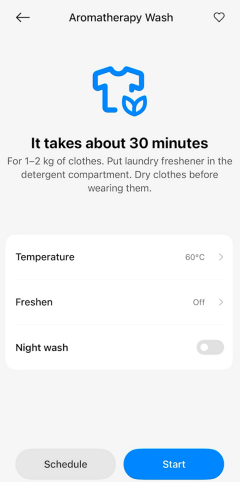
Q78: What is the maximum washing capacity and maximum drying capacity of the Aromatherapy program of the Mijia Front Load Washer Dryer Pro 9kg?
A: The maximum washing capacity of the Aromatherapy program of the Mijia Front Load Washer Dryer Pro 9kg is 1 kg, and drying is not available for this program.
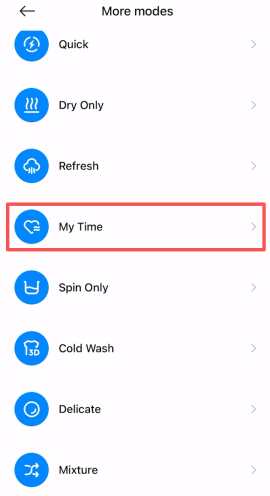
Q79: How to use the My Time program on the Mijia Front Load Washer Dryer Pro 9kg?
A: You can operate the My Time program of the Mijia Front Load Washer Dryer Pro 9kg via the Xiaomi Home App. Select the My Time program in the Xiaomi Home App, adjust the program settings as needed, and start the program.
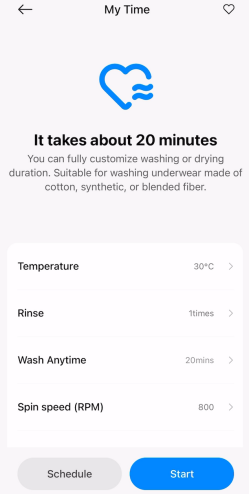
Q80: What is the maximum washing capacity and maximum drying capacity of the My Time program of the Mijia Front Load Washer Dryer Pro 9kg?
A: The maximum washing capacity of the My Time program of the Mijia Front Load Washer Dryer Pro 9kg is 6 kg, and the maximum drying capacity is 4 kg.
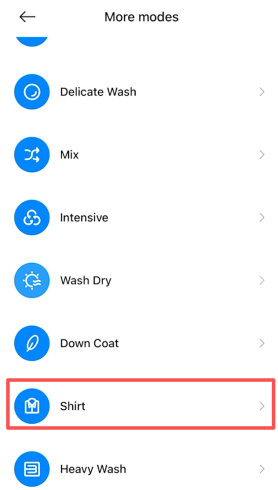
Q81: How to use the Shirt program on the Mijia Front Load Washer Dryer Pro 9kg?
A: The Shirt program of the Mijia Front Load Washer Dryer Pro 9kg is suitable for washing or drying shirts.
You can operate the Shirt program of the Mijia Front Load Washer Dryer Pro 9kg via the Xiaomi Home App. Select the Shirt program in the Xiaomi Home App, adjust the program settings as needed, and start the program.
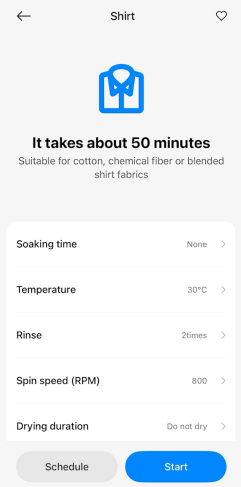
Q82: What is the maximum washing capacity and maximum drying capacity of the Shirt program of the Mijia Front Load Washer Dryer Pro 9kg?
A: The maximum washing capacity of the Shirt program of the Mijia Front Load Washer Dryer Pro 9kg is 4 kg, and the maximum drying capacity is 2 kg.
Q83: How to use the Cold Wash program on the Mijia Front Load Washer Dryer Pro 9kg?
A: You can operate the Cold Wash program of the Mijia Front Load Washer Dryer Pro 9kg via the Xiaomi Home App. Select the Cold Wash program in the Xiaomi Home App, adjust the program settings as needed, and start the program.
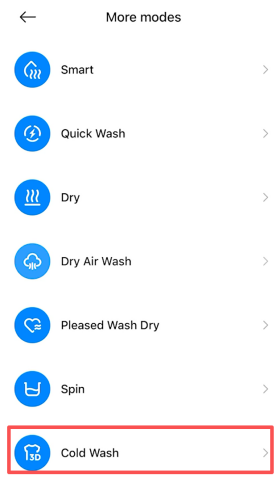
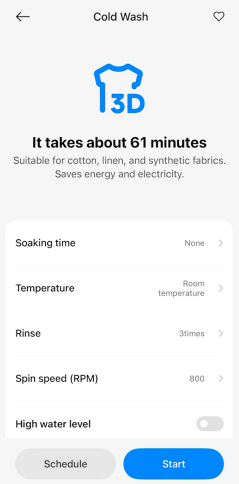
Q84: What is the maximum washing capacity and maximum drying capacity of the Cold Wash program of the Mijia Front Load Washer Dryer Pro 9kg?
A: The maximum washing capacity of the Cold Wash program of the Mijia Front Load Washer Dryer Pro 9kg is 6 kg, and drying is not available for this program.
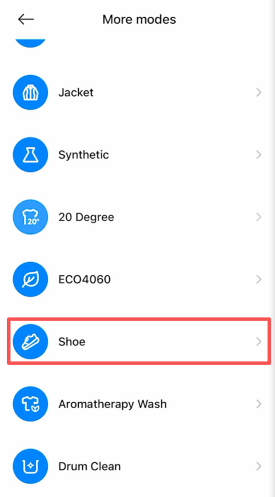
Q85: How to use the Sneakers program on the Mijia Front Load Washer Dryer Pro 9kg?
A: You can operate the Sneakers program of the Mijia Front Load Washer Dryer Pro 9kg via the Xiaomi Home App. Select the Shoe program in the Xiaomi Home App, adjust the program settings as needed, and start the program.
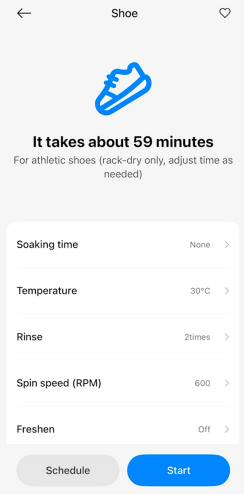
Q86: What is the maximum washing capacity and maximum drying capacity of the Shoe program of the Mijia Front Load Washer Dryer Pro 9kg?
A: The maximum washing capacity of the Shoe program of the Mijia Front Load Washer Dryer Pro 9kg is two pairs of shoes, and drying is not supported in this program.
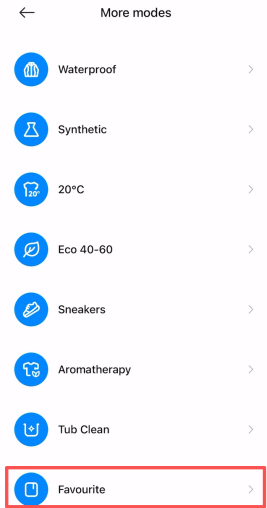
Q87: How to use the Favourite program on the Mijia Front Load Washer Dryer Pro 9kg?
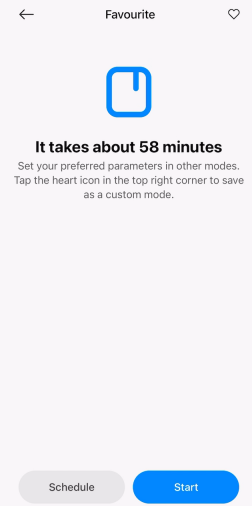
A: The Mijia Front Load Washer Dryer Pro 9kg supports the Favourite program. To use it, select a frequently used washing mode, adjust your preferred settings, then tap the heart icon in the upper right corner to save it as a custom mode.
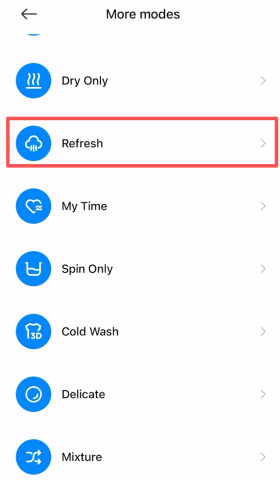
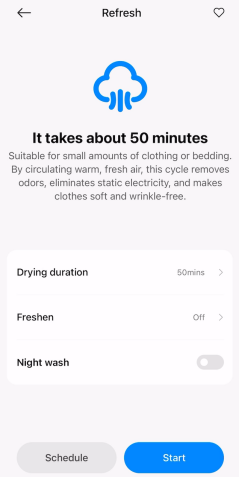
Q88: How to use the Refresh program on the Mijia Front Load Washer Dryer Pro 9kg?
A: You can operate the Refresh program of the Mijia Front Load Washer Dryer Pro 9kg via the Xiaomi Home App. Select the Refresh program in the Xiaomi Home App, adjust the program settings as needed, and start the program.
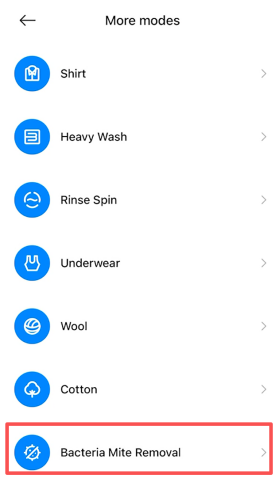
Q89: How to use the Bacteria Mite Removal program on the Mijia Front Load Washer Dryer Pro 9kg?
A: You can operate the Bacteria Mite Removal program of the Mijia Front Load Washer Dryer Pro 9kg via the Xiaomi Home App. Select the Bacteria Mite Removal program in the Xiaomi Home App, adjust the program settings as needed, and start the program.
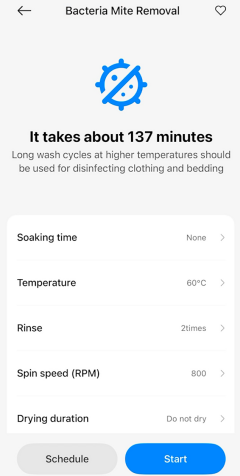
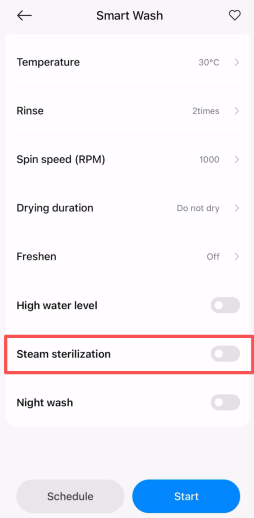
Q90: How to use the Steam sterilization program on the Mijia Front Load Washer Dryer Pro 9kg?
A: You can operate the Steam sterilization program of the Mijia Front Load Washer Dryer Pro 9kg via the Xiaomi Home App. In the Xiaomi Home App, select the program, go to the program settings, choose Steam sterilization, and then start the program.
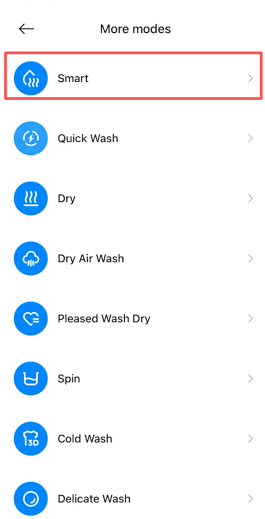
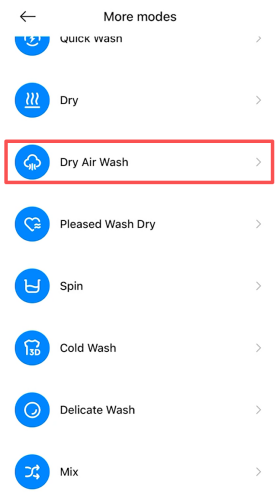
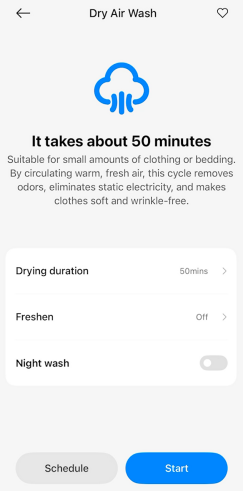
Q91: How to use the Dry Air Wash program on the Mijia Front Load Washer Dryer Pro 9kg?
A: You can operate the Dry Air Wash program of the Mijia Front Load Washer Dryer Pro 9kg via the Xiaomi Home App. Select the Dry Air Wash program in the Xiaomi Home App, adjust the program settings as needed, and start the program.
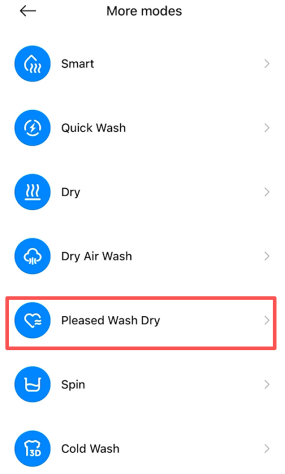
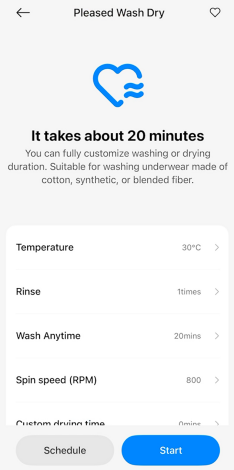
Q92: How to use the Pleased Wash Dry program on the Mijia Front Load Washer Dryer Pro 9kg?
A: You can operate the Pleased Wash Dry program of the Mijia Front Load Washer Dryer Pro 9kg via the Xiaomi Home App. Select the Pleased Wash Dry program in the Xiaomi Home App, adjust the program settings as needed, and start the program.
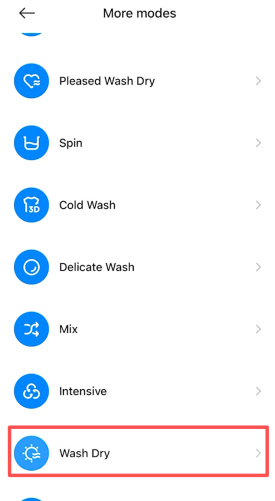
Q93: How to use the Wash Dry program on the Mijia Front Load Washer Dryer Pro 9kg?
A: You can operate the Wash Dry program of the Mijia Front Load Washer Dryer Pro 9kg via the Xiaomi Home App. Select the Wash Dry program in the Xiaomi Home App, adjust the program settings as needed, and start the program.
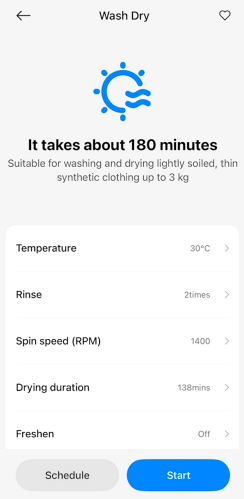
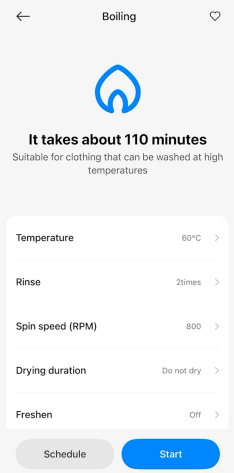
Q94: How to use the Boiling program on the Mijia Front Load Washer Dryer Pro 9kg?
A: You can operate the Boiling program of the Mijia Front Load Washer Dryer Pro 9kg via the Xiaomi Home App. Select the Boiling program in the Xiaomi Home App, adjust the program settings as needed, and start the program.
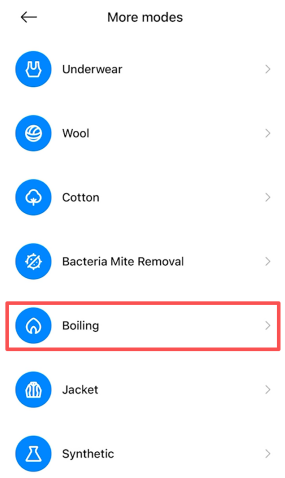
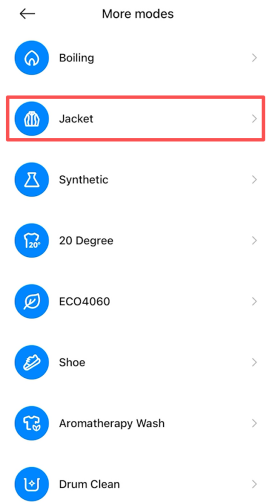
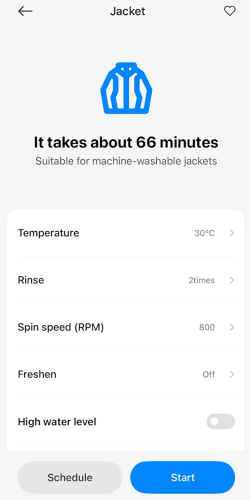
Q95: How to use the Jacket program on the Mijia Front Load Washer Dryer Pro 9kg?
A: You can operate the Jacket program of the Mijia Front Load Washer Dryer Pro 9kg via the Xiaomi Home App. Select the Jacket program in the Xiaomi Home App, adjust the program settings as needed, and start the program.
Q96: How to add clothes when the Mijia Front Load Washer Dryer Pro 9kg is washing?
A: To add clothes when the Mijia Front Load Washer Dryer Pro 9kg is washing, please refer to the following requirements:
1. The washing machine has reached a safe water level.
2. The temperature inside the washing machine has reached a safe temperature.
Here are the steps to add clothes when the Mijia Front Load Washer Dryer Pro 9kg is washing for your reference:
1. Press the pause button to stop the washing machine.
2. Open the door and put in the clothes you need to add.
If the door cannot be opened, please follow the steps below:
(1). Select the Spin Only program, drain the water inside the washing machine.
(2). Press the pause button again and open the door.
(3). If the internal temperature is high, wait until the temperature drops before opening the door.
3. Finally close the door and restart.
Note:
Make sure the remote control is off when adding clothes.
Q97: Do the water tap need to be turned on when running the Hygiene program of the Mijia Front Load Washer Dryer Pro 9kg?
A: When the Mijia Front Load Washer Dryer Pro 9kg uses the Hygiene program, the water tap needs to be turned on throughout the process.
Q98: How to use the Spray function of the Mijia Front Load Washer Dryer Pro 9kg?
A: Some programs of the Mijia Front Load Washer Dryer Pro 9kg have a built-in spray function, which cannot be selected separately.
Q99: How to use the Drum light function of the Mijia Front Load Washer Dryer Pro 9kg?
A: The Drum light will automatically turn on when the Mijia Front Load Washer Dryer Pro 9kg is running.
Q100: Is there a time limit for the Drum light of the Mijia Front Load Washer Dryer Pro 9kg?
A: The Drum light of the Mijia Front Load Washer Dryer Pro 9kg will automatically turn off after a period of time during operation. It will turn off automatically two minutes after being activated.
Q101: Can the Mijia Front Load Washer Dryer Pro 9kg adjust the water intake?
A: The Mijia Front Load Washer Dryer Pro 9kg does not support manual adjustment of the water intake. However, some programs allow you to enable the high water level function.
Q102: Can the drying temperature of the Mijia Front Load Washer Dryer Pro 9kg be adjusted?
Q103: What drying method does the Mijia Front Load Washer Dryer Pro 9kg use for drying function?
A: The Mijia Front Load Washer Dryer Pro 9kg uses condensation drying method.
Q104: Does the Mijia Front Load Washer Dryer Pro 9kg have the Refresh & Loosen function? How to achieve it?
A: The Mijia Front Load Washer Dryer Pro 9kg features a Refresh & Loosen function, which prevents clothes from developing odors and wrinkles when left in the drum for an extended period of time. It achieves this by using drum rotation and air circulation to keep the clothes fresh and loose.
To use the Refresh & Loosen function, you can press and hold the On/Off button for 1 second to turn on the Mijia Front Load Washer Dryer Pro 9kg. Use the Scroll up/Confirm button or Scroll down/Confirm button to select the desired program, then press the Select/Switch button to enter program settings. Use the Scroll up/Confirm button or Scroll down/Confirm button to navigate to Refresh & Loosen, press the Select/Switch button, and select the desired anti-crease time, which can be set for up to 24 hours. After setting, press the Start/Pause button to begin the wash.
Q105: Can laundry bag be used in the Mijia Front Load Washer Dryer Pro 9kg?
A: It is not recommended to use a laundry bag in the Mijia Front Load Washer Dryer Pro 9kg. However, you can place small items in a laundry bag and wash them together with larger garments.
Q106: How to choose the Mijia Front Load Washer Dryer Pro 9kg detergent?
A: When choosing detergent for Mijia Front Load Washer Dryer Pro 9kg, please choose low foaming detergent and use it according to the instructions of the detergent.
Q107: Does the capacity of the Mijia Front Load Washer Dryer Pro 9kg refer to dry clothes or wet clothes?
A: The capacity of the Mijia Front Load Washer Dryer Pro 9kg refers to the dry clothes capacity.
Q108: Can other items be placed on the Mijia Front Load Washer Dryer Pro 9kg?
A: It is not recommended to place other items on the Mijia Front Load Washer Dryer Pro 9kg, especially electrical appliances, as magnetic field can cause operational errors. In addition, the vibration of the washer dryer during operation can cause items to fall.
Q109: How to open the door of the Mijia Front Load Washer Dryer Pro 9kg during washing?
A: To open the door when the Mijia Front Load Washer Dryer Pro 9kg is running, the following conditions are required:
1. The washing machine has reached a safe water level.
2. The temperature inside the washing machine has reached a safe temperature.
3. Remote control is off.
Here are the steps to open the door when the Mijia Front Load Washer Dryer Pro 9kg is running for your reference:
1. Press the pause button to stop the washing machine.
2. Open the door.
If the door cannot be opened, please follow the steps below:
(1). Select the Spin Only program, drain the water inside the washing machine.
(2). Press the pause button again and open the door.
(3). If the internal temperature is high, wait until the temperature drops before opening the door.
(4). Check if the remote control is turned off. The door cannot be opened when the remote control is turned on.
(5). If you cannot wait long enough, open the drain filter cover and unplug the emergency drain hose to drain the water.
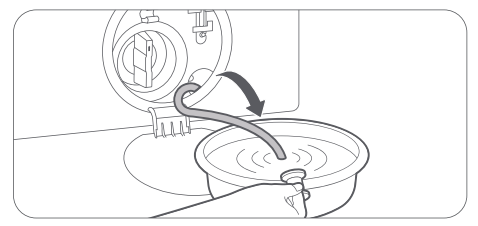
(6). In case of emergency, you can open the door by pulling down the emergency release cord with a tool.
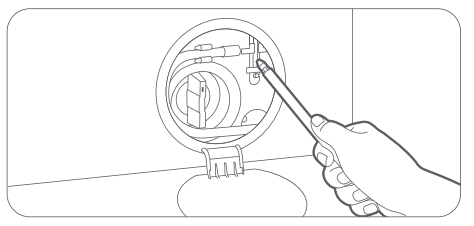
Note:
The emergency pull ring is for use in emergencies. Please do not use it in non-emergency situations.
Q110: What do the icons on the Mijia Front Load Washer Dryer Pro 9kg panel mean?
A: The meanings of the programs icon on the Mijia Front Load Washer Dryer Pro 9kg panel are as follows:
1. Wireless Network: A lit wireless network icon indicates that the washer dryer is successfully connected to the Internet, enabling remote control and status check via the Xiaomi Home App. A slowly blinking wireless network icon indicates that the washer dryer is waiting for network configuration. A quickly blinking wireless network icon indicates a network configuration error, and a reset is necessary.
2. Steam: A lit steam icon indicates that the steam function is active, adding 30 minutes to the cycle duration.
3. Door Lock: A lit door Lock icon means the door is locked and cannot be opened. When the icon goes out, it means the door is unlocked.
4. Remote Control: A lit remote control icon indicates that remote control is enabled. When the icon goes out, it means remote control is disabled.
5. Dry: A lit dry icon indicates that the drying function is active.
6. Child Lock: A lit child lock icon means child lock is enabled. When the icon goes out, it means child lock is disabled.
7. Refresh & Loosen: When the Refresh & Loosen function is enabled, this icon and the door lock icon will remain lit. If you don't open the door to remove the clothes within 30 minutes after a program ends (except for Tub Clean, Wool, and Eco 40-60), the machine will automatically run Refresh & Loosen.
8. Fabric Softener: A blinking icon indicates low fabric softener. Refill the fabric softener compartment to the proper level, and the icon will stop blinking and remain lit. If the selected program does not use fabric softener, the icon will turn off.
9. Detergent: A blinking icon indicates low detergent. Refill the detergent compartment to the proper level, and the icon will stop blinking and remain lit. If the selected program does not use detergent, the icon will turn off.
10. Delay: Enable the delay function and press the Start/Pause button, and the icon will remain lit during the delay period and turn off when the washing program begins.
Q111: Where is the water inlet of the Mijia Front Load Washer Dryer Pro 9kg?
A: The water inlet of the Mijia Front Load Washer Dryer Pro 9kg is facing the left rear of the machine.
Q112: How to connect the Mijia Front Load Washer Dryer Pro 9kg with the Xiaomi Home App?
A: To connect the Mijia Front Load Washer Dryer Pro 9kg with Xiaomi Home App, please refer to the following steps:
1. Scan the QR code on the instruction manual to download and install the Xiaomi Home App.

2. If the App is already installed, you will be directed to the connection settings page. Alternatively, search for "Xiaomi Home" in the App store to download and install it.
3. Open the Xiaomi Home App, tap [+] in the upper right corner, and follow the instructions to add your device.
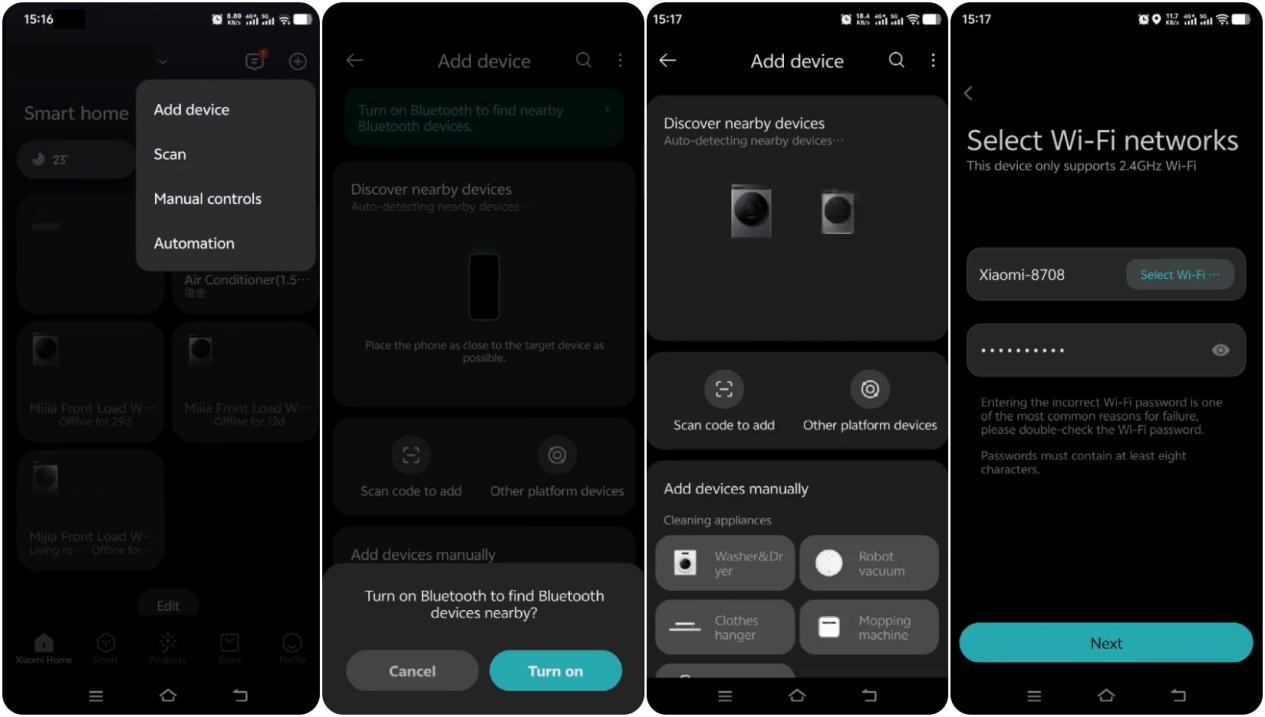
Remote Control Instructions
1. Make sure the washer dryer is connected to a wireless network (the Wi-Fi icon on the panel should remain on).
2. Place the laundry into the drum and close the door.
3. Enable remote control on the device. The drum door will automatically lock, and you can then control the washer dryer using your smartphone.
Note:
1. You can turn remote control On/Off on the program selection page of the device or press the Scroll up/Confirm button during a program to enable/disable remote control.
2. After enabling Remote Control, if there is no operation from the App within 10 minutes, the washer dryer will enter low-power mode. The remote control function will remain active for up to 24 hours and then automatically turn off. During this period, pressing any button on the device or sending a command from the App will exit low-power mode.
3. After the washing program finishes, remote control will automatically turn off and the door will unlock. If the washer dryer is powered off or disconnected from power, remote control will also automatically turn off.
Q113: How to modify the device name of the Mijia Front Load Washer Dryer Pro 9kg?
A: To modify the device name of the Mijia Front Load Washer Dryer Pro 9kg, please refer to the following steps:
1. Open the Xiaomi Home App.
2. Tap the [Mijia Front Load Washer Dryer Pro 9kg].
3. Tap the three dots icon in the upper right corner.
4. Tap [More device info].
5. Tap [Custom name].
6. Fill the name and tap [OK] to change device name.
Q114: How to manage the location of the Mijia Front Load Washer Dryer Pro 9kg on the Xiaomi Home App?
A: To manage the location of the Mijia Front Load Washer Dryer Pro 9kg on the Xiaomi Home App, please refer to the following steps:
1. Open the Xiaomi Home App.
2. Tap the [Mijia Front Load Washer Dryer Pro 9kg].
3. Tap the three dots icon in the upper right corner.
4. Tap [More device info].
5. Tap [Room].
6. Select a room you want to set.
7. Tap [√] icon to confirm.
Q115: How to share the Mijia Front Load Washer Dryer Pro 9kg with others?
A: After binding the device with the Xiaomi Home App, you can share the device with others referring to the following steps:
1. Open the Xiaomi Home App.
2. Tap the [Mijia Front Load Washer Dryer Pro 9kg].
3. Tap the three dots icon in the upper right corner.
4. Tap [Share device].
5. You can select a previously shared Xiaomi account or enter the Xiaomi account manually.
6. Wait for the invite to be accepted to complete the device sharing.
Note:
Sharing the main account device too many times has risk to affect the function. It is recommended to set the sharing permissions reasonably according to the actual usage scenario.
Q116: How to update the firmware version of the Mijia Front Load Washer Dryer Pro 9kg?
A: To update the firmware version of the Mijia Front Load Washer Dryer Pro 9kg, please refer to the following steps:
1. Open the Xiaomi Home App.
2. Tap the [Mijia Front Load Washer Dryer Pro 9kg].
3. Tap the three dots icon in the upper right corner.
4. Tap [Firmware update].
5. Tap [Update].
Q117: Can I use Xiaomi Home App to control the Mijia Front Load Washer Dryer Pro 9kg after turning on the Child Lock?
A: When the Child Lock is turned on, the Xiaomi Home App cannot be used to control the Mijia Front Load Washer Dryer Pro 9kg to ensure safety.
Q118: How to view the electronic manual of the Mijia Front Load Washer Dryer Pro 9kg?
A: To view the electronic manual of the Mijia Front Load Washer Dryer Pro 9kg, please refer to the following methods:
Method 1:
1. Open the Xiaomi official website mi.com in your country/region.
2. Select [Support].
3. Select [User Guide].
4. Choose your country/region.
5. Select [Ecosystem].
6. Choose [User Manual] Mijia Front Load Washer Dryer Pro 9kg.
Method 2:
1. Open to the Xiaomi official website mi.com in your country/region.
2. Select the search icon.
3. Search the Mijia Front Load Washer Dryer Pro 9kg.
4. Select [Support] to check the electronic manual.
Q119: How to check the SN of the Mijia Front Load Washer Dryer Pro 9kg?
A: The SN of the Mijia Front Load Washer Dryer Pro 9kg is on the back of the door (the door needs to be opened), or you can check it on the back of the Mijia Front Load Washer Dryer Pro 9kg.
Q120: How to check the running status of the Mijia Front Load Washer Dryer Pro 9kg?
A: You can check it on the panel of the Mijia Front Load Washer Dryer Pro 9kg or on the Xiaomi Home App.
Q121: How should clothes be treated before using the Mijia Front Load Washer Dryer Pro 9kg?
A: Before using the Mijia Front Load Washer Dryer Pro 9kg, please do the following for the clothes:
1. For clothes of different colors, please wash them separately to avoid staining.
2. When washing large items, put two or three small items in the washing machine.
3. Avoid abnormal dehydration and drying caused by weight imbalance.
4. Please check all pockets before washing to avoid damage to clothes by hairpins, coins, keys, etc..
5. When there are many stains, first use a small amount of detergent to scrub the areas with more stains, and then put them in the washing machine for washing.
6. Before starting the washing process, make sure that the sealing ring of door is not caught by the clothes to prevent damage to the clothes and the sealing ring of the door.
7. Before putting clothes in for washing, please fasten the belts, buttons and zip up the clothes.
8. Remove metal decorations from clothing. Use a brush to remove sand on clothing and inside the hems.
9. Clothes that are prone to pilling should be washed inside out.
10. When cleaning curtains, you need to remove curtain hooks, rings and other accessories.
11. Small items (such as handkerchiefs, gloves, socks, bras, etc.) and clothes that are easily tangled or worn should be placed in a laundry bag for washing.
12. Do not exceed the maximum washing capacity when washing clothes (the maximum washing capacity of each program is different), otherwise, it will affect the washing effect.
Q122: How to change the program while the Mijia Front Load Washer Dryer Pro 9kg is running?
A: If you need to change the program during operation, please press the Start/Pause button or the On/Off button to change the program.
Q123: Can the Mijia Front Load Washer Dryer Pro 9kg remember the last program set?
A: After the Mijia Front Load Washer Dryer Pro 9kg has finished running, it will default to the Smart program when it is turned on again. If the device loses power during operation, it will default to the program when the power is turned on again.
Q124: How to restore the Mijia Front Load Washer Dryer Pro 9kg to factory settings?
A: On the control panel of the Mijia Front Load Washer Dryer Pro 9kg, find Reset, then press the Select/Switch button. Use the Scroll down/Confirm button to confirm and restore the washer dryer to factory settings.
Q125: Can the Mijia Front Load Washer Dryer Pro 9kg be connected to the hot water hose?
A: The Mijia Front Load Washer Dryer Pro 9kg cannot be connected to the hot water hose.
Q126: Will the Mijia Front Load Washer Dryer Pro 9kg automatically shut off after completing the program?
A: After the Mijia Front Load Washer Dryer Pro 9kg program is completed, the display will prompt "End" and then turn off.
Q127: How to reset the Wi-Fi of the Mijia Front Load Washer Dryer Pro 9kg?
A: To reset the Wi-Fi of the Mijia Front Load Washer Dryer Pro 9kg, press and hold the On/Off button for one second to turn on the device. Select [Settings] and tap the Select/Switch button. When prompted with Connect, press the Scroll down/Confirm button. When the message “Restart to connect to wireless network?” appears, select Restart and press the Scroll down/Confirm button to reset the Wi-Fi.
Installation
Q1: What are the precautions about the installation environment of the Mijia Front Load Washer Dryer Pro 9kg?
A: Here are the precautions about the installation environment of the Mijia Front Load Washer Dryer Pro 9kg for your reference:
Power supply requirements
1. All electrical circuits and grounding must comply with the relevant requirements of national electrical standards.
2. Protect the power cord. Do not place the power cord where it could be stepped on or crushed by other items.
3. Be careful with the power cord, power socket, and where the power cord connects to the washer dryer to prevent electric shock.
Water supply requirements
1. The operating water pressure of the washer dryer is 0.05 MPa to 0.8 MPa. When the water pressure is below 0.05 MPa, the water inlet valve will not let water in, or the water fill time is longer than the program control time and the display shows Water Inlet Abnormal.
2. The washing machine should be as close to the tap as possible.
3. Before using the washing machine, check whether all the connections on the water inlet valve and the tap are fastened properly to prevent water leakage.
Installation environment requirements
1. Install on a hard, flat, clean, and level ground free from water and oil.
2. Avoid direct sunlight and ensure good ventilation.
3. Keep away from heat sources such as charcoal fires and gas stoves. Keep away from washing machine that has a risk of causing interference, such as induction cookers.
4. The operating ambient temperature of the washing machine is 0 °C to 40 °C. Do not place it in temperatures below 0 °C. There will be residual water in the water valve, drain pump, or water hose of the washing machine.
Note:
If the washing machine is placed in an alcove or closet, the minimum required clearances are 15 mm on each side, 30 mm at the rear, 20 mm at the top, and 550 mm at the front.
Q2: How to adjust the balance of the Mijia Front Load Washer Dryer Pro 9kg?
A: Once the Mijia Front Load Washer Dryer Pro 9kg is in place, check whether it is stable. Press the two ends of a diagonal line on the top of the washing machine with both hands respectively to see whether it wobbles. Check the two ends on the other diagonal line using the same method. If the washing machine wobbles, adjust the leveling feet to make sure it remains stable.
Here are the steps to adjust the balance of the Mijia Front Load Washer Dryer Pro 9kg for your reference:
1. Use the Feet Adjusting Wrench to turn a foot bolt counterclockwise to loosen it.
2. Turn the leveling foot and adjust it to the desired height. Turn counterclockwise to raise the feet, and turn clockwise to lower the feet.
3. Use the wrench to tighten the foot bolt. Adjust the other leveling feet by the same method to ensure the washing machine is level and stable.
4. After adjustment, press the two ends of a diagonal line on the top of the washing machine with both hands respectively to see whether it wobbles. Check the two ends on the other diagonal line using the same method.
Note:
Do not place wooden pieces or any other items under the feet, as this has risk to cause excessive vibration or noise during operation.
Q3: How to judge whether the Mijia Front Load Washer Dryer Pro 9kg is balanced?
A: After installing the Mijia Front Load Washer Dryer Pro 9kg, press the two ends of a diagonal line on the top of the washing machine with both hands respectively to see whether it wobbles. Check the two ends on the other diagonal line using the same method. If the washing machine wobbles, adjust the leveling feet to make sure it remains stable.
Q4: Can the Mijia Front Load Washer Dryer Pro 9kg be embedded?
A: The Mijia Front Load Washer Dryer Pro 9kg can be embedded, but sufficient clearance must be reserved as follows:
1. Top: at least 20 mm.
2. Sides: at least 15 mm.
3. Rear: at least 30 mm.
Q5: How to connect the Water Inlet Hose of the Mijia Front Load Washer Dryer Pro 9kg?
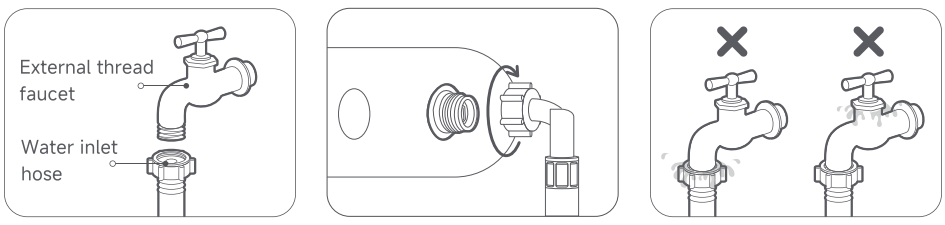
A: To connect the Water Inlet Hose of the Mijia Front Load Washer Dryer Pro 9kg, please refer to the following steps:
1. Attach the provided water inlet hose directly to a 6-point (3/4 inch) external thread faucet, ensuring a tight seal.
2. Connect the other end of the water inlet hose to the washer dryer's water inlet valve (located at the back), and tighten it clockwise to secure.
3. Turn on the faucet and check all connections for leaks. If any leaks are found, tighten the affected fitting by following the previous steps. If the faucet itself is leaking, replace it promptly.
Q6: How to connect the Drain Hose of the Mijia Front Load Washer Dryer Pro 9kg?
A: To connect the Drain Hose to the Mijia Front Load Washer Dryer Pro 9kg, please refer to the following ways:
1. Fixing on the edge of the laundry sink:
The Drain Hose must be positioned at a height between 60 cm and 90 cm from the floor. Secure it to the edge of the laundry sink with a thin rope, ensuring that the water flow is not obstructed.
2. Inserting directly into the floor drain:
To prevent siphoning, ensure that the vertical pipe above the floor drain is 60 cm to 90 cm high. A 65 cm vertical pipe is recommended. Make sure the Drain Hose is connected to the vertical pipe at a downward angle.
3. Connecting to the branch pipe of the sink drain:
Connect the end of the Drain Hose to the branch pipe of the laundry sink drain. The height of the branch pipe from the floor should be less than 90 cm.
Q7: Can the Water Inlet Hose of the Mijia Front Load Washer Dryer Pro 9kg be extended?
A: The Mijia Front Load Washer Dryer Pro 9kg comes with a 1.5 m water inlet hose. If a longer hose is needed, you can request one from the installation personnel.
Q8: How long can the Water Inlet Hose of the Mijia Front Load Washer Dryer Pro 9kg be extended?
A: There is no clear regulation on the maximum extension of the Water Inlet Hose of the Mijia Front Load Washer Dryer Pro 9kg. It can be used as long as it meets the water pressure requirement of 0.05 MPa - 0.8 MPa.
Q9: Can the Drain Hose of the Mijia Front Load Washer Dryer Pro 9kg be extended?
A: The Drain Hose of the Mijia Front Load Washer Dryer Pro 9kg can be extended. Please contact the after-sales service center for more information.
Q10: How long can the Drain Hose of the Mijia Front Load Washer Dryer Pro 9kg be extended?
A: The extended portion of the Drain Hose for the Mijia Front Load Washer Dryer Pro 9kg should not exceed 2.5 m. Extending the hose too much can affect the drainage time and could trigger the error code “E1.” If this occurs, adjust the length of the Drain Hose accordingly.
Q11: How to replace the Drain Hose of the Mijia Front Load Washer Dryer Pro 9kg by myself?
A: The Drain Hose of the Mijia Front Load Washer Dryer Pro 9kg cannot be replaced by yourself. If you need to replace the Drain Hose, please contact after-sales service.
Q12: Can the Mijia Front Load Washer Dryer Pro 9kg be placed on a base?
A: The Mijia Front Load Washer Dryer Pro 9kg cannot be placed on a base, as installing it on a base can cause excessive noise or vibration.
Q13: How many Transit Bolts are in the Mijia Front Load Washer Dryer Pro 9kg? How to remove them?
A: The Mijia Front Load Washer Dryer Pro 9kg has four Transit Bolts at the back. Before use, loosen all the Transit Bolts on the rear of the washer using the included wrench. Hold the bolt heads and pull the bolts out of the holes.
To remove the Transit Bolts in the Mijia Front Load Washer Dryer Pro 9kg, please refer to the following steps:
1. Use the wrench to unscrew all the Transit Bolts on the back of the washing machine.
2. Hold the bolt caps and pull the bolts out of the bolt holes. Keep the Transit Bolts in a safe place for future use when needed.
3. Seal the 4 bolt holes with the Transit Bolt hole covers provided in the accessory bag to prevent dust from entering.
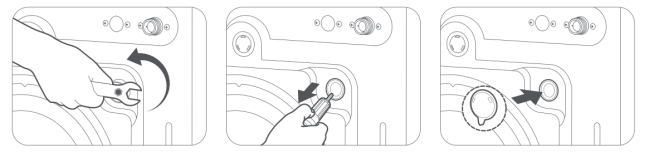
Note:
Please keep the Transit Bolts for future use. To prevent dust from entering, cover the four holes with the Transit Bolt caps.
Q14: Do the Transit Bolts of the Mijia Front Load Washer Dryer Pro 9kg need to be removed?
A: The Transit Bolts of the Mijia Front Load Washer Dryer Pro 9kg must be removed before it can be used normally.
Q15: What will happen if the Transit Bolts of the Mijia Front Load Washer Dryer Pro 9kg are not removed?
A: If the Mijia Front Load Washer Dryer Pro 9kg is used without removing the Transit Bolts, it will cause the washing machine to vibrate violently, shift, and other problems that will prevent it from working properly.
Q16: Is there any impact if the Transit Bolt Hole Covers of the Mijia Front Load Washer Dryer Pro 9kg are not installed?
A: The Transit Bolt Hole Covers of the Mijia Front Load Washer Dryer Pro 9kg are used to prevent dust from entering. Not installing it will not affect the use, but it will cause dust to enter.
Q17: How to adjust the feet of the Mijia Front Load Washer Dryer Pro 9kg?
A: Here are the steps to adjust the feet of the Mijia Front Load Washer Dryer Pro 9kg for your reference:
1. Use the Feet Adjusting Wrench to turn a foot bolt counterclockwise to loosen it.
2. Turn the leveling foot and adjust it to the desired height. Turn counterclockwise to raise the feet, and turn clockwise to lower the feet.
3. Use the wrench to tighten the foot bolt. Adjust the other leveling feet by the same method to ensure the washing machine is level and stable.
4. After adjustment, press the two ends of a diagonal line on the top of the washing machine with both hands respectively to see whether it wobbles. Check the two ends on the other diagonal line using the same method.
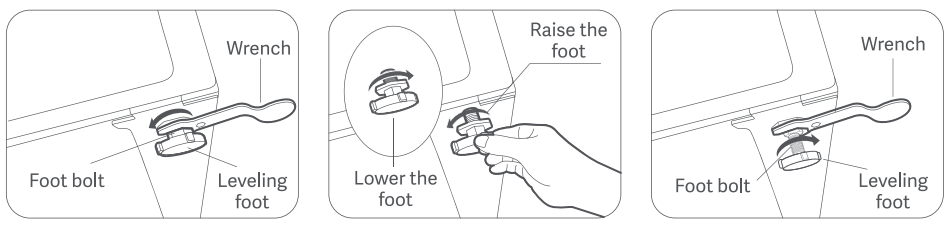
After installing the Mijia Front Load Washer Dryer Pro 9kg, press the two ends of a diagonal line on the top of the washing machine with both hands respectively to see whether it wobbles. Check the two ends on the other diagonal line using the same method. If the washing machine wobbles, adjust the leveling feet to make sure it remains stable.
Note:
Do not place wooden pieces or any other items under the feet, as this has risk to cause excessive vibration or noise during operation.
Q18: What are the precautions when transporting the Mijia Front Load Washer Dryer Pro 9kg?
A: Here are the precautions when transporting the Mijia Front Load Washer Dryer Pro 9kg for your reference:
1. When transporting the washer dryer, always keep it upright on its feet. Do not lay it on its side or upside down.
2. For long-distance transport, always install the transit bolts in advance.
3. After moving the washer dryer, readjust the feet to ensure stability and prevent excessive vibration or movement during washing.
Q19: Do the Transit Bolts need to be reinstalled when transporting the Mijia Front Load Washer Dryer Pro 9kg?
A: If the Mijia Front Load Washer Dryer Pro 9kg is being moved a short distance (a few meters), reinstalling the transit bolts is not necessary. However, for long-distance transport, the transit bolts must be reinstalled to prevent damage to the washer from excessive movement during transport.
Q20: How to install the Mijia Front Load Washer Dryer Pro 9kg?
A: Here are the steps to install the Mijia Front Load Washer Dryer Pro 9kg:
Installing the Base Plate
Tilt the washer dryer and lay it down on a soft fabric to prevent scratches. Adjust the position of the base plate and tighten the 8 screws with a cross screwdriver. Lift the washer dryer and put it back to its upright position.
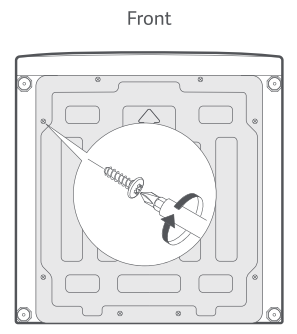
Unpack the product and remove the 4 Transit Bolts:
1. Use the wrench to unscrew all the Transit Bolts on the back of the washer dryer.
2. Hold the bolt caps and pull the bolts out of the bolt holes. Keep the Transit Bolts in a safe place for future use when needed.
3. Seal the 4 bolt holes with the Transit Bolt hole covers provided in the accessory bag to prevent dust from entering.
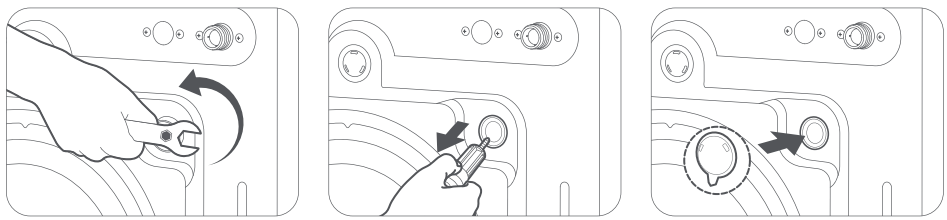
Adjust the leveling foot:
1. Use the Feet Adjusting Wrench to turn a foot bolt counterclockwise to loosen it.
2. Turn the leveling foot and adjust it to the desired height. Turn counterclockwise to raise the feet, and turn clockwise to lower the feet.
3. Use the wrench to tighten the foot bolt. Adjust the other leveling feet by the same method to ensure the washing machine is level and stable.
4. After adjustment, press the two ends of a diagonal line on the top of the washing machine with both hands respectively to see whether it wobbles. Check the two ends on the other diagonal line using the same method.
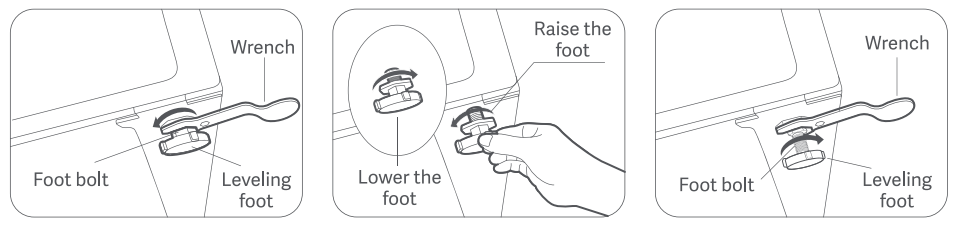
Note:
Do not place wooden pieces or any other items under the feet, as this can cause excessive vibration or noise during operation.
Connect the Water Inlet Hose:
1. Attach the provided water inlet hose directly to a 6-point (3/4 inch) external thread faucet, ensuring a tight seal.
2. Connect the other end of the water inlet hose to the washer dryer's water inlet valve (located at the back), and tighten it clockwise to secure.
3. Turn on the faucet and check all connections for leaks. If any leaks are found, tighten the affected fitting by following the previous steps. If the faucet itself is leaking, replace it promptly.
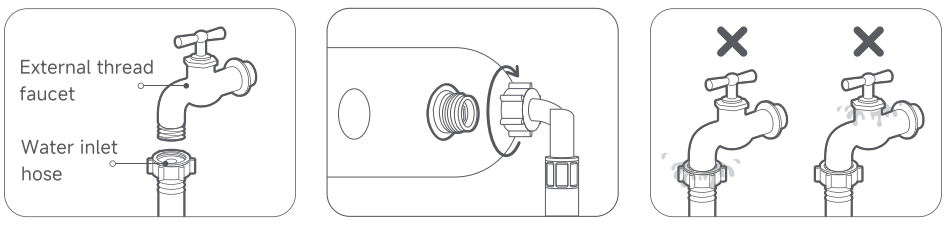
Faucet selection instructions
1. The water hose connections will be under full water pressure. Ensure the faucet is fully open when checking the tightness of the connections.
2. To prevent water leaks, turn off the faucet when the washer dryer is not in operation.
3. The water inlet hose has an internal thread and requires a faucet with a miminum of 3 external threads.
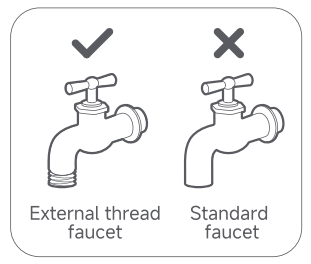
Connecting the Drain Hose
When connecting the Drain Hose, make sure it is fixed securely so that it will not move or fall off during drainage, avoiding property loss due to water leakage.
There are three ways to connect the Drain Hose:
1. Fixing on the edge of the laundry sink:
The Drain Hose must be positioned at a height between 60 cm and 90 cm from the floor. Secure it to the edge of the laundry sink with a thin rope, ensuring that the water flow is not obstructed.
2. Inserting directly into the floor drain:
To prevent siphoning, ensure that the vertical pipe above the floor drain is 60 cm to 90 cm high. A 65 cm vertical pipe is recommended. Make sure the Drain Hose is connected to the vertical pipe at a downward angle.
3. Connecting to the branch pipe of the sink drain:
Connect the end of the Drain Hose to the branch pipe of the laundry sink drain. The height of the branch pipe from the floor should be less than 90 cm.
Running test:
After you have completed installing your washing machine, run the Quick program to ensure it is installed correctly.
Q21: Does the Mijia Front Load Washer Dryer Pro 9kg need to connect to the ground wire?
A: The Mijia Front Load Washer Dryer Pro 9kg needs to be connected to a reliable ground wire to prevent induction electricity from affecting touch.
Q22: How to install the Base Plate on the Mijia Front Load Washer Dryer Pro 9kg?
A: The Mijia Front Load Washer Dryer Pro 9kg comes with the Base Plate. To install it, lay the washer dryer on its side and use the included screws to secure the Base Plate to the bottom of the washer dryer.
To install the Base Plate on the Mijia Front Load Washer Dryer Pro 9kg, please refer to the following steps:
1. Tilt the washer dryer and lay it down on a soft fabric to prevent scratches.
2. Adjust the position of the Base Plate and tighten the 8 screws with a cross screwdriver.
3. Lift the washer dryer and put it back to its upright position.
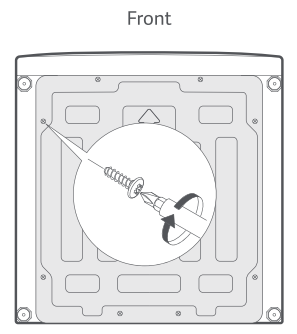
Q23: Can the Door Seal of the Mijia Front Load Washer Dryer Pro 9kg be replaced?
A: The Door Seal of the Mijia Front Load Washer Dryer Pro 9kg cannot be replaced by yourself. If the door seal is damaged, please contact after-sales service.
Q24: Why does the Mijia Front Load Washer Dryer Pro 9kg not turn on when powered on for the first time?
A: When the Mijia Front Load Washer Dryer Pro 9kg is powered on for the first time, a delayed response of the On/Off button is normal. After plugging in the washer, wait 5-10 seconds before pressing the power button to turn it on.
Troubleshooting
Q1: What to do if the Mijia Front Load Washer Dryer Pro 9kg doesn’t turn on?
A: If the Mijia Front Load Washer Dryer Pro 9kg fails to power on, please refer to the following methods to troubleshoot:
1. Check the power supply. Plug another appliance into the washing machine's power socket to test if it works properly. If the other appliance doesn't work, please check the power supply.
2. To power on the Mijia Front Load Washer Dryer Pro 9kg, press and hold on the power button for one second.
3. When first powering on the Mijia Front Load Washer Dryer Pro 9kg, there is a normal delay before the power button turns on. After plugging in the power cord, wait 5 - 10 seconds before pressing the power button to power it on.
If the above methods still do not solve the problem, please apply for local after-sales service center inspection.
Q2: What to do if the Mijia Front Load Washer Dryer Pro 9kg does not work?
A: If the Mijia Front Load Washer Dryer Pro 9kg does not work, please refer to the following methods to troubleshoot:
1. Check the power supply. Plug another appliance into the washing machine to confirm it works. If it doesn't, check your home power supply.
2. Verify that you are operating the machine correctly:
(1). Turn on the faucet and make sure there's water.
(2). Ensure the door is securely closed.
(3). Select a program and press and hold the start button to start the machine.
(4). Check the child lock function. If it is, disable it.
3. Before the device begins filling with water, it will make a series of clicking sounds and drain quickly to confirm that the door is locked. This is normal.
4. Verify the voltage is not too low when using the device. Low voltage can cause the device to fail to start. Wait until the voltage stabilizes before using the device.
5. Check the door for clothing stuck in it.
If the above methods still do not solve the problem, please apply for local after-sales service center inspection.
Q3: What to do if the Mijia Front Load Washer Dryer Pro 9kg automatically stops during operation?
A: If the Mijia Front Load Washer Dryer Pro 9kg automatically stops during operation, please refer to the following methods to troubleshoot:
1. Check the power supply. Plug another appliance into the power source to confirm it works. If it doesn't, check your home power supply.
2. The washing machine will pause or soak during operation. Wait a moment, and the machine will automatically start.
3. Check if the water inlet filter is blocked. A blockage in the water filter can cause water flow problems. Clean the filter.
(1). Turn off the water tap and unplug the power cord. Loosen and remove the water inlet hose from the back of the washer dryer. Cover the port with a cloth to prevent water from spraying out.
(2). Pull out the filter cover from the water inlet valve hole with nipper pliers and clean it thoroughly.
(3). Use a brush to clean the inside and the outside of the threaded connector.
(4). Reinstall the water inlet valve filter cover. Turn on the water tap and make sure there is no water leakage at the connection.
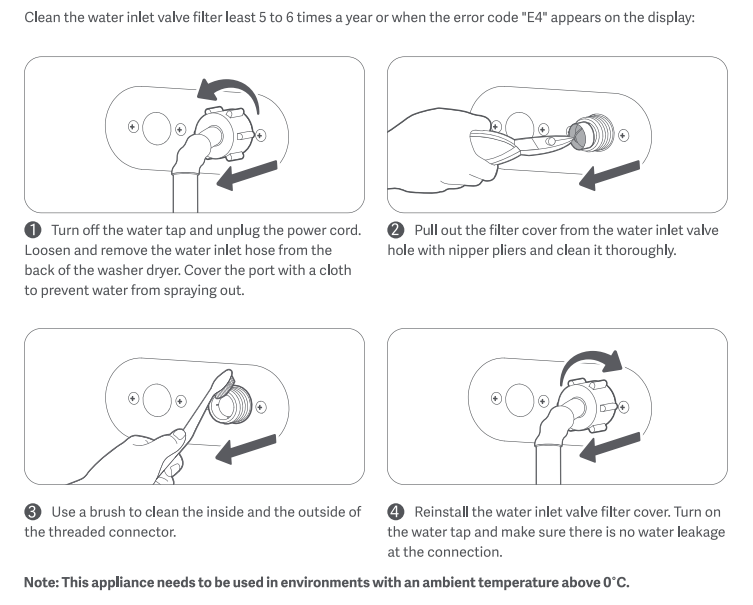
4. Check the drain filter for blockage. A blockage in the drain filter can cause water flow problems. Clean the drain filter.
(1). Open the filter cover at the bottom of the appliance, pull out the emergency drain hose, and remove the plug to let water drain.
(2). After all the water is drained, reinstall the plug and put the emergency drain hose back to its original position. Turn the drain filter counterclockwise to open it.
(3). Check and make sure the inside of the drain pump is not blocked.
(4). Clean any residues and stains from the drain pump filter cover.
(5). Put the drain pump filter cover back to its original position.
(6). Turn the drain pump filter cover clockwise to secure it and reinstall the drain cover.
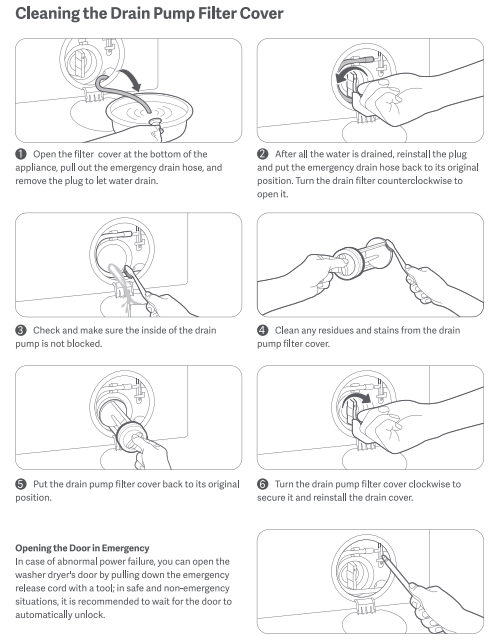
If the above methods still do not solve the problem, please apply for local after-sales service center inspection.
Q4: What to do if the Mijia Front Load Washer Dryer Pro 9kg does not take in water?
A: If the Mijia Front Load Washer Dryer Pro 9kg does not take in water, please refer to the following methods to troubleshoot:
1. Turn on the faucet and confirm that water is flowing normally.
2. Check that the water pressure is between 0.05 and 0.8 MPa. Low water pressure can cause water to not flow in. Avoid peak usage periods.
3. Before filling the washing machine with water. Check the washing machine's water inlet filter for blockage and clean it.
(1). Turn off the water tap and unplug the power cord. Loosen and remove the water inlet hose from the back of the washer dryer. Cover the port with a cloth to prevent water from spraying out.
(2). Pull out the filter cover from the water inlet valve hole with nipper pliers and clean it thoroughly.
(3). Use a brush to clean the inside and the outside of the threaded connector.
(4). Reinstall the water inlet valve filter cover. Turn on the water tap and make sure there is no water leakage at the connection.
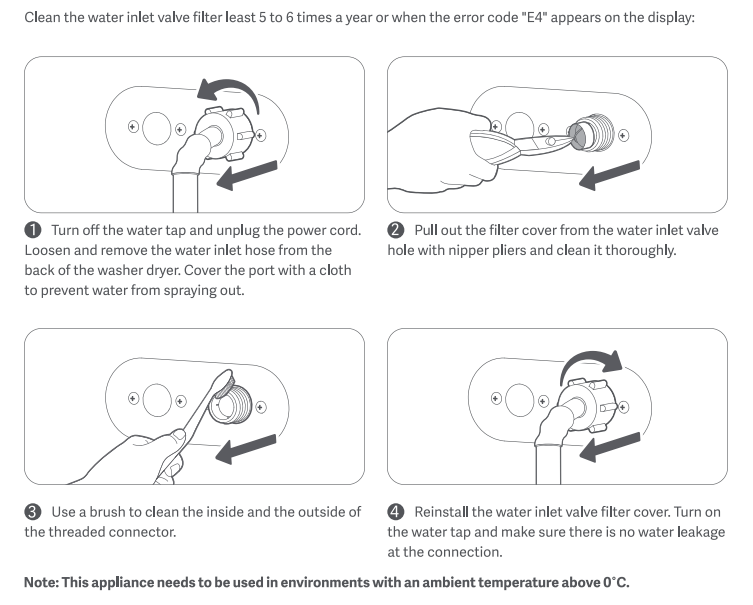
4. Confirm that no scheduled program is selected.
5. Before the washing machine begins filling with water, it will make a series of clicking sounds and drain quickly. This is to confirm that the door is securely locked. This is normal.
6. Press the start button to start the washing machine.
If the above methods still do not solve the problem, please apply for local after-sales service center inspection.
Q5: What to do if the Mijia Front Load Washer Dryer Pro 9kg is slow to fill with water?
A: If the Mijia Front Load Washer Dryer Pro 9kg is slow to fill with water, please refer to the following methods to troubleshoot:
1. Check the water inlet filter for clogs. A clogged filter can cause water flow obstruction. Please clean the filter.
(1). Turn off the water tap and unplug the power cord. Loosen and remove the water inlet hose from the back of the washer dryer. Cover the port with a cloth to prevent water from spraying out.
(2). Pull out the filter cover from the water inlet valve hole with nipper pliers and clean it thoroughly.
(3). Use a brush to clean the inside and the outside of the threaded connector.
(4). Reinstall the water inlet valve filter cover. Turn on the water tap and make sure there is no water leakage at the connection.
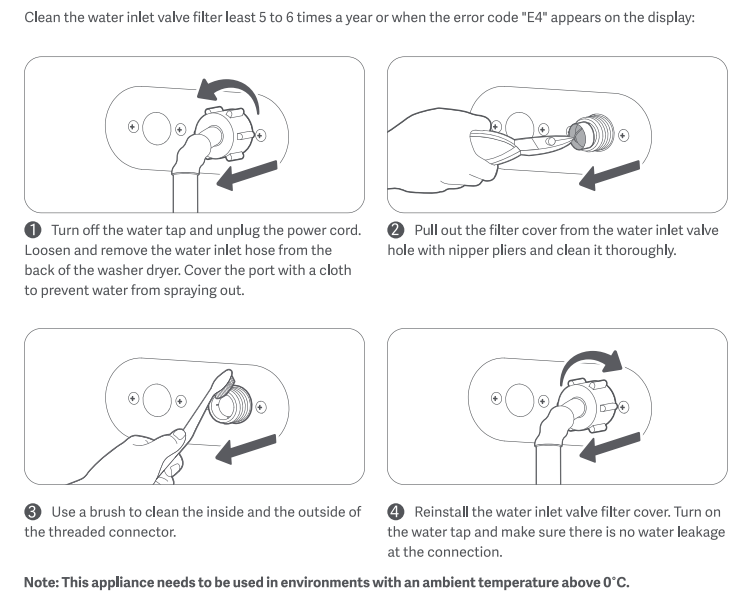
2. Check the water inlet hose for kinks that could cause water flow obstruction.
3. Check that the water pressure is between 0.05 and 0.8 MPa. Low water pressure can cause water flow obstruction. Alternatively, avoid peak usage hours. If this problem persists, we recommend purchasing a booster pump, but do not adjust the water pressure above 0.8 MPa.
Q6: What to do if the Mijia Front Load Washer Dryer Pro 9kg does not take in enough water?
A: The drum washing machine is designed to save water. It is normal for the water intake to be low. The water intake will generally not exceed the bottom edge of the door.
If the washing machine can work normally, please feel free to use it. If the washing machine does not work due to low water intake, please refer to the following methods to troubleshoot:
1. Turn the faucet on full blast.
2. If the environment is cold, make sure the water inlet hose is not blocked.
3. Check the water inlet hose for kinks that could cause water flow obstruction.
4. Check the water inlet filter for blockage. A clogged filter can cause water flow obstruction. Clean the filter.
(1). Turn off the water tap and unplug the power cord. Loosen and remove the water inlet hose from the back of the washer dryer. Cover the port with a cloth to prevent water from spraying out.
(2). Pull out the filter cover from the water inlet valve hole with nipper pliers and clean it thoroughly.
(3). Use a brush to clean the inside and the outside of the threaded connector.
(4). Reinstall the water inlet valve filter cover. Turn on the water tap and make sure there is no water leakage at the connection.
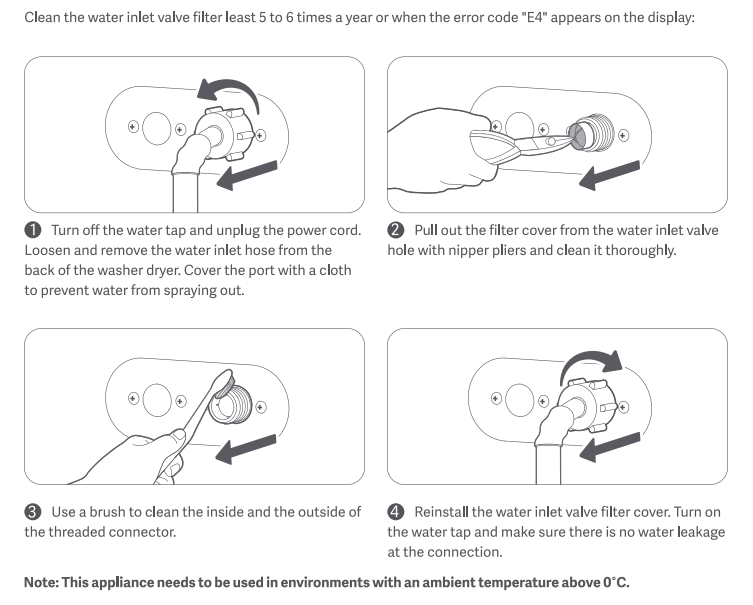
5. Check that the water pressure is between 0.05 and 0.8 MPa. Low water pressure can cause water flow obstruction. Alternatively, avoid peak usage hours. If this problem persists, we recommend purchasing a booster pump, but keep the water pressure below 0.8 MPa.
Q7: What to do if the Mijia Front Load Washer Dryer Pro 9kg keeps filling with water?
A: If the Mijia Front Load Washer Dryer Pro 9kg keeps filling with water, please refer to the following methods to troubleshoot:
1. Check whether the water intake exceeds the door. If so, request an after-sales inspection.
2. Check the water inlet filter for blockage. A clogged filter can cause water flow to become clogged, leading to prolonged water retention. Clean the filter.
(1). Turn off the water tap and unplug the power cord. Loosen and remove the water inlet hose from the back of the washer dryer. Cover the port with a cloth to prevent water from spraying out.
(2). Pull out the filter cover from the water inlet valve hole with nipper pliers and clean it thoroughly.
(3). Use a brush to clean the inside and the outside of the threaded connector.
(4). Reinstall the water inlet valve filter cover. Turn on the water tap and make sure there is no water leakage at the connection.
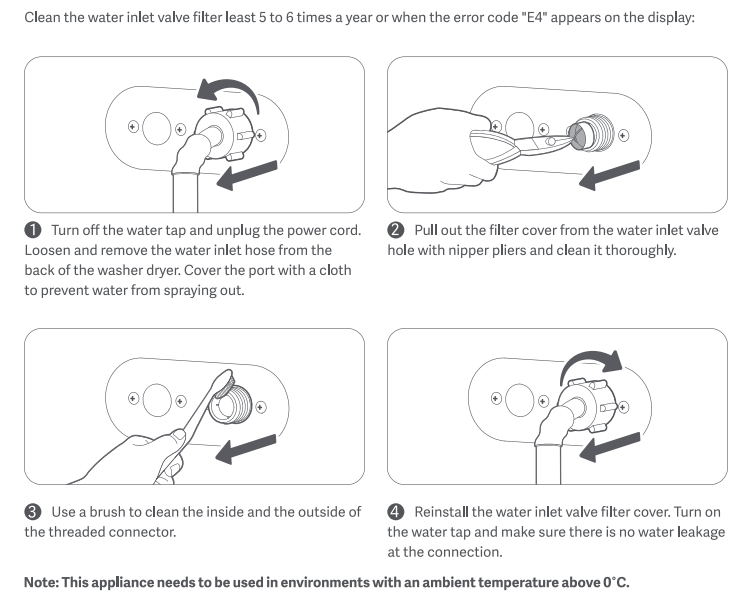
3. Check the water pressure to be between 0.05 and 0.8 MPa. Low water pressure can cause water to not flow in. Alternatively, avoid peak usage periods. If this doesn't resolve the issue, it's recommended to purchase a booster pump, but adjust the water pressure to no more than 0.8 MPa.
4. Observe whether the drain hose is draining simultaneously with the washing machine's intake. If so, the drain hose is positioned too low. Since the washing machine has a top-drain design, lift the drain hose to the latch on the back of the washing machine.
Q8: What to do if the water level in the Mijia Front Load Washer Dryer Pro 9kg is too high?
A: When the water level of the washing machine is too high, please check whether the water inflow exceeds the door. If it exceeds the door, please apply for local after-sales service center inspection.
Q9: What to do if the Mijia Front Load Washer Dryer Pro 9kg is filling with water and draining out at the same time?
A: The Mijia Front Load Washer Dryer Pro 9kg is designed to drain water from above. If the drain hose is placed flat on the ground, water will flow in and out at the same time. Please lift the drain hose to the latch on the back of the washing machine.
Q10: What to do if the Mijia Front Load Washer Dryer Pro 9kg does not drain?
A: If the Mijia Front Load Washer Dryer Pro 9kg does not drain, please refer to the following methods to troubleshoot:
1. Check the placement of the drain hose to ensure there are no bends between the hose and the drain outlet.
2. Check the washing machine drain hose for ice. Wait until the ice melts before using the machine.
3. Check the drain filter for blockage. A clogged drain filter can cause poor drainage or even incomplete drainage. Clean the drain filter.
(1). Open the filter cover at the bottom of the appliance, pull out the emergency drain hose, and remove the plug to let water drain.
(2). After all the water is drained, reinstall the plug and put the emergency drain hose back to its original position. Turn the drain filter counterclockwise to open it.
(3). Check and make sure the inside of the drain pump is not blocked.
(4). Clean any residues and stains from the drain pump filter cover.
(5). Put the drain pump filter cover back to its original position.
(6). Turn the drain pump filter cover clockwise to secure it and reinstall the drain cover.
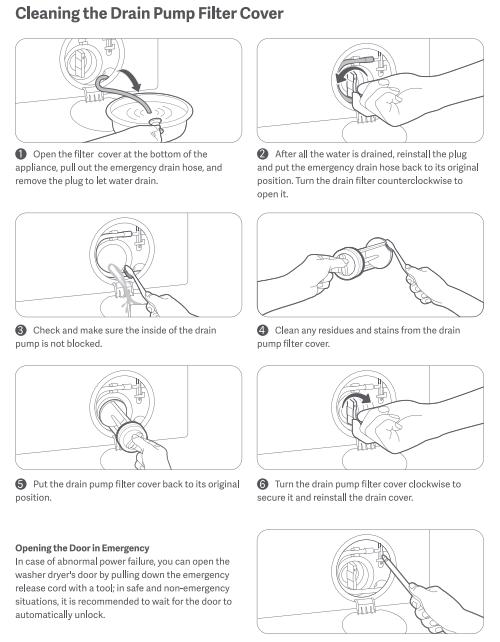
4. Check the drain hose for excessive depth in the drain. This can cause the washing machine to not drain properly and, in severe cases, cause siphoning. Remove the drain hose from the drain and place it near the drain.
5. If using the Spin Only mode, ensure the washing machine door is completely closed and press and hold the start button to start the machine.
If the above methods still do not solve the problem, please apply for local after-sales service center inspection.
Q11: What to do if the Mijia Front Load Washer Dryer Pro 9kg does not drain cleanly?
A: If the Mijia Front Load Washer Dryer Pro 9kg does not drain cleanly, please refer to the following methods to troubleshoot:
1. This washing machine uses a top-drain system. A small amount of water remaining in the outer drum after each cycle is normal and safe to use.
2. Check the drain filter for clogs. A clogged filter can cause poor drainage or even complete failure. Clean the filter.
(1). Open the filter cover at the bottom of the appliance, pull out the emergency drain hose, and remove the plug to let water drain.
(2). After all the water is drained, reinstall the plug and put the emergency drain hose back to its original position. Turn the drain filter counterclockwise to open it.
(3). Check and make sure the inside of the drain pump is not blocked.
(4). Clean any residues and stains from the drain pump filter cover.
(5). Put the drain pump filter cover back to its original position.
(6). Turn the drain pump filter cover clockwise to secure it and reinstall the drain cover.
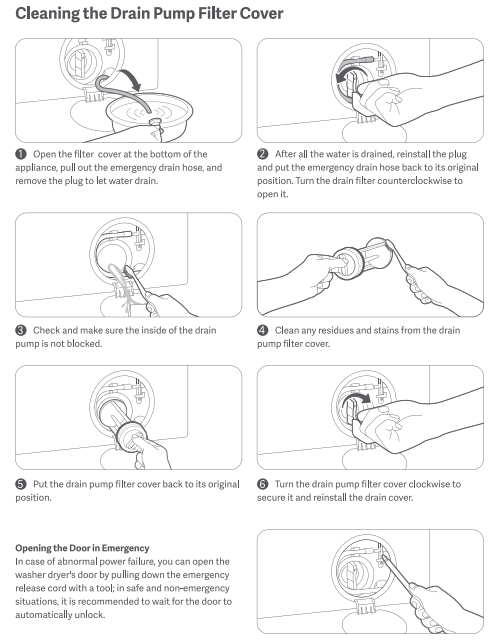
3. Check the drain hose for excessive depth in the drain. This can cause the washing machine to fail to drain and, in severe cases, lead to siphoning. Remove the hose from the drain and place it near the drain.
If the above methods still do not solve the problem, please apply for local after-sales service center inspection.
Q12: What to do if there is water inside the Mijia Front Load Washer Dryer Pro 9kg when shaking it?
A: During the production process of the washing machine, a water addition test will be carried out. It is normal for a new machine to have a small amount of water inside when it is shaken. Please feel free to use it.
Q13: What to do if the Mijia Front Load Washer Dryer Pro 9kg does not spin?
A: If the Mijia Front Load Washer Dryer Pro 9kg does not spin, please refer to the following methods to troubleshoot:
1. If using the Spin Only mode, check that the washing machine is operating correctly. Ensure the door is securely closed and press the start button to start the machine.
2. Check the placement of the drain hose. Ensure there are no bends in the hose between the drain hose and the drain outlet.
3. Check the drain hose for ice. Wait until the ice melts before using the machine.
4. Check the drain filter for blockage. A clogged drain filter can cause poor drainage. Clean the drain filter.
(1). Open the filter cover at the bottom of the appliance, pull out the emergency drain hose, and remove the plug to let water drain.
(2). After all the water is drained, reinstall the plug and put the emergency drain hose back to its original position. Turn the drain filter counterclockwise to open it.
(3). Check and make sure the inside of the drain pump is not blocked.
(4). Clean any residues and stains from the drain pump filter cover.
(5). Put the drain pump filter cover back to its original position.
(6). Turn the drain pump filter cover clockwise to secure it and reinstall the drain cover.
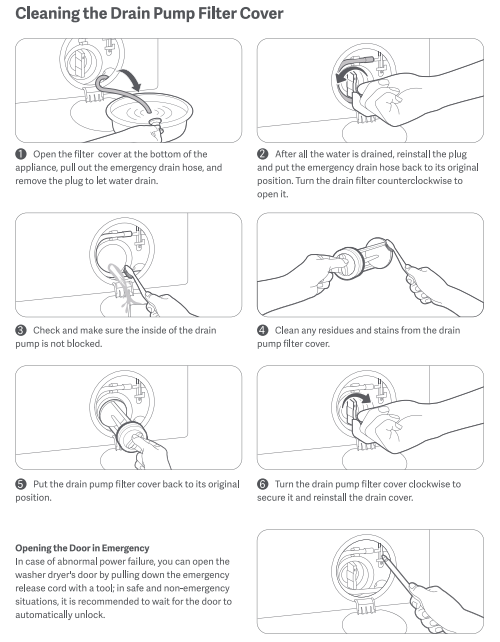
5. Check that the drain hose is not inserted too deeply into the drain. Inserting the drain hose too deeply can prevent the machine from draining and, in severe cases, cause siphoning. Remove the drain hose from the drain and place it near the drain.
If the above methods still do not solve the problem, please apply for local after-sales service center inspection.
Q14: What to do if the Mijia Front Load Washer Dryer Pro 9kg does not spin dry properly?
A: If the Mijia Front Load Washer Dryer Pro 9kg does not spin dry properly, please refer to the following methods to troubleshoot:
1. Check the type of detergent used. For drum washing machines, we recommend using a low-sudsing detergent. If you are using a high-sudsing detergent, reduce the amount.
2. Check the spin speed. If the clothes are not completely dry, select a higher speed and re-spin.
3. Check the drain filter for clogs. A clogged drain filter can cause poor or incomplete drainage. Clean the drain filter.
(1). Open the filter cover at the bottom of the appliance, pull out the emergency drain hose, and remove the plug to let water drain.
(2). After all the water is drained, reinstall the plug and put the emergency drain hose back to its original position. Turn the drain filter counterclockwise to open it.
(3). Check and make sure the inside of the drain pump is not blocked.
(4). Clean any residues and stains from the drain pump filter cover.
(5). Put the drain pump filter cover back to its original position.
(6). Turn the drain pump filter cover clockwise to secure it and reinstall the drain cover.
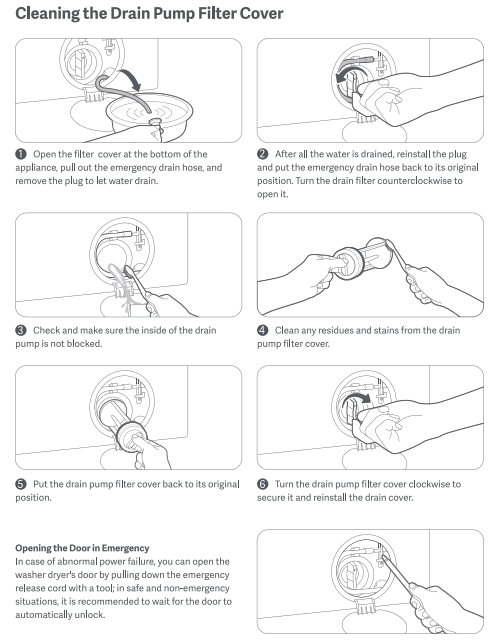
4. Check the placement of the drain hose to ensure there are no bends between the drain hose and the drain outlet.
5. Check the drain hose for ice. Ice can prevent the washing machine from draining properly or prevent the water from flowing out completely.
6. Check the type of clothes placed. If the weight of the clothes placed is too small or too few, or a single large item is placed, the clothes may not be completely dehydrated due to uneven distribution. We recommend the following placement methods:
(1). Load large and small items together. Do not spin small items individually.
(2). Place clothes separately. If they are placed randomly, they may become tangled and cause an imbalance.
If the above methods still do not solve the problem, please apply for local after-sales service center inspection.
Q15: What to do if the time on the Mijia Front Load Washer Dryer Pro 9kg doesn't run?
A: If the time on the Mijia Front Load Washer Dryer Pro 9kg doesn't run, please refer to the following methods to troubleshoot:
1. When using a high-temperature program such as the Sterilizer or High-Temperature Wash function, and the water temperature exceeds 60 °C, the machine will enter the cooling cycle during draining. During this period, the timer will not run until the cooling cycle is complete.
2. When excessive foam accumulates inside the machine, the machine will defoam to prevent overflow. During this period, the timer will not run until the defoaming cycle is complete.
3. When using a drying program, the machine will enter the cooling cycle after the drying cycle ends, and the timer will not run until the temperature drops.
4. During the spin cycle, the laundry inside the machine will be turned over. If the laundry inside is uneven, the machine will not run until the laundry inside is uneven. When the washing machine is balanced, it will automatically adjust its balance. During this time, the timer will not run, and high-speed spin will not be possible. Once the clothes are balanced, the high-speed spin cycle will resume, and the timer will continue to decrease. If the clothes do not balance for a long time, try pausing the washing machine, removing the clothes, shaking them loose, and then placing them back in the spin drum to continue spinning. Because clothes cannot maintain a stable trajectory in the spin drum, please follow the following instructions to minimize this problem:
(1). Place clothes in a mixed pattern. Do not spin small items individually.
(2). Place clothes in a dispersed manner. If clothes are placed in a disorderly manner, they may become tangled, causing an imbalance.
If the above methods still do not solve the problem, please apply for local after-sales service center inspection.
Q16: What to do if the displayed time of the Mijia Front Load Washer Dryer Pro 9kg does not match the actual time?
A: If the displayed time of the Mijia Front Load Washer Dryer Pro 9kg does not match the actual time, please refer to the following methods to troubleshoot:
The displayed running time for a washing machine is from the time the machine is turned on to the end of the cycle. However, the overall time may vary due to special reasons, such as:
1. Insufficient water pressure can cause the time to be exceeded due to slow water inflow. We recommend using a water pressure between 0.05 MPa and 0.8 MPa.
2. Unbalanced laundry can cause the machine to automatically enter the adjustment mode, causing the time to be exceeded. We recommend washing multiple pieces of clothing at once, rather than washing individual, heavy, and absorbent items.
Q17: What to do if the Mijia Front Load Washer Dryer Pro 9kg runs without stopping?
A: If the Mijia Front Load Washer Dryer Pro 9kg runs without stopping, it may be due to the following reasons:
1. When there is excessive foam inside, the machine will de-foam to prevent it from overflowing. It will then resume operation after the de-foaming process is complete.
2. During the spin cycle, the laundry inside the washing machine may be tilted, causing the laundry to become unbalanced. The machine will automatically adjust the balance, preventing the timer from running and preventing high-speed spin. Once the laundry is balanced, the high-speed spin cycle will resume, further reducing the timer. If the balance is not achieved after a long period of time, try pausing the washing machine, removing the laundry, shaking it loose, and then placing it back in the spin cycle. Because the laundry's trajectory within the spin cycle is unstable, please follow the following instructions to minimize this:
(1). Load large and small items together. Do not spin small items individually.
(2). Place laundry separately. If the laundry is placed randomly, it may become tangled and cause an imbalance.
If the above methods still do not solve the problem, please apply for local after-sales service center inspection.
Q18: What to do if the door of the Mijia Front Load Washer Dryer Pro 9kg won’t open?
A: If you need to open the door of the Mijia Front Load Washer Dryer Pro 9kg, following conditions must be met:
1. The washing machine water level has reached a safe level.
2. The internal temperature has reached a safe level.
3. Remote control is off.
If the internal temperature is too high after the washing machine cycle has completed, wait for it to cool down before opening the door. If the door still cannot be opened, follow these steps:
1. Select the spin cycle, drain the water from the washing machine, press the pause button again, and then open the door.
2. Please check if the child lock function is turned off. The door cannot be opened when the child lock is activated. Please turn off the child lock, wait a few seconds, and then try opening the door again;
3. If the internal temperature is high, wait for it to cool down before opening the door.
4. Check if the remote control is turned off. The door cannot be opened when the remote control is turned on.
5. If you cannot wait for a long time, open the drain filter cover and remove the emergency drain plug to drain the water.
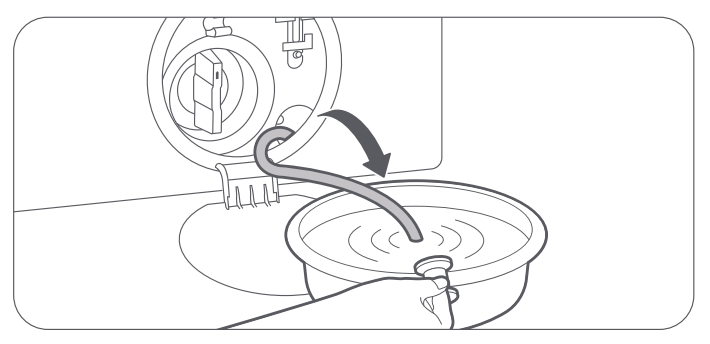
6. In an emergency, use a screwdriver to pull the emergency ring to open the door.
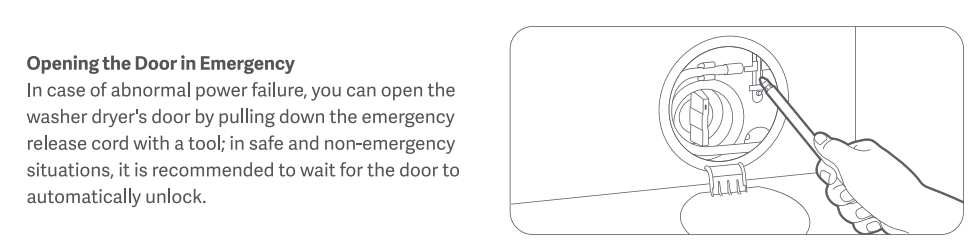
Note:
The emergency ring is for emergency use only. Do not use it outside of an emergency.
If the above methods still do not solve the problem, please apply for local after-sales service center inspection.
Q19: What to do if the door of the Mijia Front Load Washer Dryer Pro 9kg won’t close?
A: If the door of the Mijia Front Load Washer Dryer Pro 9kg won’t close, please refer to the following methods to troubleshoot:
1. Check if any clothing is caught in the door. Clothes caught in the door can prevent it from closing.
2. Check if the start button has been pressed. The door can be opened at any time without the device starting.
3. Check if the door is completely closed. You can apply a little force when closing it.
If the above methods still do not solve the problem, please apply for local after-sales service center inspection.
Q20: What to do if there are water marks or white stains on the door seal and oil stains inside the drum of the Mijia Front Load Washer Dryer Pro 9kg?
A: If a new Mijia Front Load Washer Dryer Pro 9kg has water stains:
Clean them with a towel and run the drum Tub Clean mode before using it normally. Washing machines are tested with water during production, so some water stains are normal.
If a new Mijia Front Load Washer Dryer Pro 9kg has oil on its door seal:
The oil on the door seal prevents sticking and is normal and will not affect normal use. Wipe the door seal clean with a towel before running the Tub Clean.
If the door seal is white:
This is caused by the high temperature and humidity inside the machine during transportation. This is normal and does not affect the machine's performance. To fix it, apply vaseline (or other oil-based cleaner) to the door seal to dissolve the white residue. Then wipe it clean with a damp towel.
Q21: What to do if the Mijia Front Load Washer Dryer Pro 9kg does not dry clothes?
A: If the washing machine does not dry, please check whether the correct drying program is selected and the faucet is turned on.
If the operation is correct and the faucet is turned on, but it still does not dry, please apply for local after-sales service center inspection.
Q22: What to do if the Mijia Front Load Washer Dryer Pro 9kg does not dry well?
A: If the Mijia Front Load Washer Dryer Pro 9kg does not dry well, please refer to the following methods to troubleshoot:
1. Check the program and load size for the correct amount of laundry. The maximum drying capacity varies depending on the program. Exceeding the maximum capacity will result in poor drying results.
2. Check if the drying time is too short. Repeatedly pressing the dry button adjusts the drying time. If there is a lot of laundry, increase the drying time.
3. Because it uses condensation drying, the laundry may feel slightly damp after drying. Please air-dry it for a short period of time.
If the above methods still do not solve the problem, please apply for local after-sales service center inspection.
Q23: What to do if the Mijia Front Load Washer Dryer Pro 9kg is drying unevenly?
A: If the washing machine is drying unevenly, it means that the clothes inside are entangled. Please shake the clothes and continue to dry. When using it later, please put the clothes in separately and do not put them in at the same time.
Q24: What to do if the detergent in the Mijia Front Load Washer Dryer Pro 9kg cannot be flushed?
A: If the detergent in the Mijia Front Load Washer Dryer Pro 9kg cannot be flushed, please refer to the following methods to troubleshoot:
1. Check if the detergent is completely used. Please add more detergent.
2. Check if you are using a high-viscosity detergent. If you are using a high-viscosity detergent, dilute it with water before adding it.
3. Check if you have added powdered detergent to the automatic dispenser. The automatic dispenser can only hold liquid detergent.
4. Check if the detergent is added to the correct location.
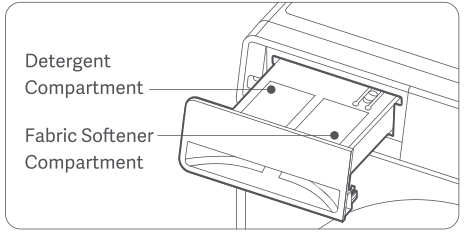
5. Check if the automatic dispense function is turned on.
6. Check if the detergent has solidified due to the washing machine not being used for a long time. Please clean the detergent compartment before adding detergent.
7. Check if the detergent is expired or has deteriorated.
If the above methods still do not solve the problem, please apply for local after-sales service center inspection.
Q25: What to do if the fabric softener in the Mijia Front Load Washer Dryer Pro 9kg cannot be flushed?
A: If the softener in the Mijia Front Load Washer Dryer Pro 9kg cannot be flushed, please refer to the following methods to troubleshoot:
1. Check if the fabric softener is depleted. Please refill.
2. Check if it is a concentrated softener. Dilute it with water before adding fabric softener.
3. Check if the fabric softener is added to the correct location.
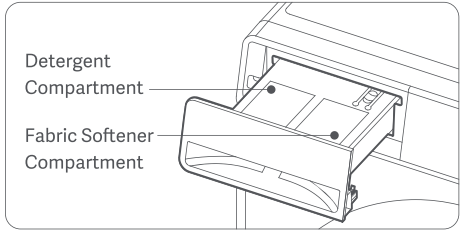
4. Check if the fabric softener has solidified due to long periods of inactivity. Please clean the fabric softener compartment and refill it.
5. Check if the fabric softener has expired or has deteriorated.
If the above methods still do not solve the problem, please apply for local after-sales service center inspection.
Q26: What to do if the Mijia Front Load Washer Dryer Pro 9kg doesn’t wash cleanly?
A: If the Mijia Front Load Washer Dryer Pro 9kg doesn’t wash cleanly, please follow the methods below:
1. Be careful not to mix detergent and softener in the drum.
2. For heavily soiled items, choose a longer cycle.
3. For stubborn stains, such as collar cuffs, pre-wash or soak the garment before washing.
Q27: What to do if clothes are stained after washing with the Mijia Front Load Washer Dryer Pro 9kg?
A: It is recommended to wash clothes of different colors separately when placing them in the washing machine. Washing dark and light clothes at the same time is prone to staining problems.
Q28: What to do if the Mijia Front Load Washer Dryer Pro 9kg does not clean parts thoroughly?
A: If the Mijia Front Load Washer Dryer Pro 9kg does not clean parts thoroughly, please refer to the following methods to troubleshoot:
1. For heavily soiled clothing, please select a longer cycle.
2. For stubborn stains, such as collar cuffs, it is recommended to pre-wash or soak the garment before washing.
Q29: What to do if the Mijia Front Load Washer Dryer Pro 9kg causes damage to clothes?
A: If the Mijia Front Load Washer Dryer Pro 9kg causes damage to clothes, please refer to the following methods to troubleshoot:
1. Check the material of the laundry to see if it matches the washing machine's program. Select a matching program.
2. Please check if there are other sharp objects inside the inner tube or if there are any scratches caused by zippers.
If the above methods still do not solve the problem, please apply for local after-sales service center inspection.
Q30: What to do if the Mijia Front Load Washer Dryer Pro 9kg does not rinse cleanly?
A: If the Mijia Front Load Washer Dryer Pro 9kg does not rinse cleanly, please refer to the following methods to troubleshoot:
1. Check the type of detergent and use a low-foaming detergent.
2. When setting the program, increase the number of rinses to ensure a good rinse.
3. Set to reduce the automatic amount of detergent.
4. It is normal to have a little foam on the door after washing. Just wipe it dry.
Q31: What to do if the Mijia Front Load Washer Dryer Pro 9kg makes a lot of noise while washing?
A: If the Mijia Front Load Washer Dryer Pro 9kg makes a lot of noise while washing, please refer to the following methods to troubleshoot:
1. If the washing machine has not been installed, please check that the transit bolts are removed.
(1). Use the wrench to unscrew all the transit bolts on the back of the appliance.
(2). Hold the bolt caps and pull the bolts out of the bolt holes. Keep the transit bolts in a safe place for future use when needed.
(3). Seal the 4 bolt holes with the transit bolt hole covers provided in the accessory bag to prevent dust from entering.
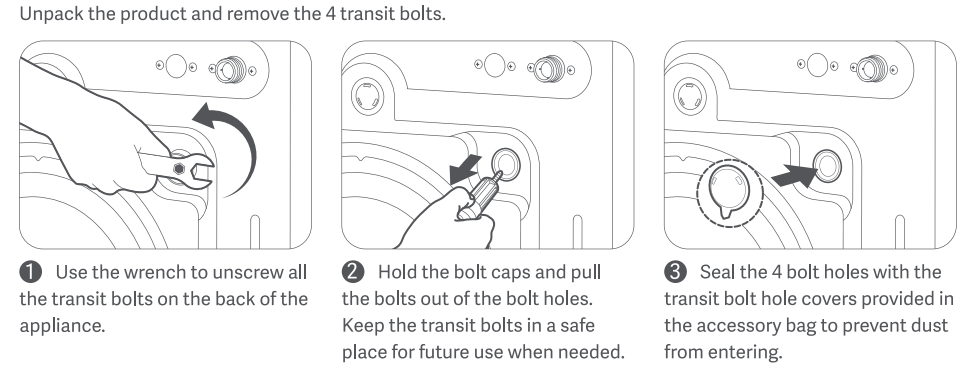
2. Check that the floor is level. The washing machine should be placed on a firm, flat, dry surface.
3. This washing machine uses a tumbling cycle, so some tumbling noises are normal during the washing cycle.
4. Check that the washing machine is balanced. An uneven placement can cause excessive noise. You can adjust the balance by adjusting the feet as follows:
(1). Press down on each diagonal point on the top of the washing machine with both hands to check for any wobbling. This will determine which feet need adjustment.
(2). Use a wrench to loosen the foot bolts by turning them to the left.
(3). Rotate the leveling feet to the desired height (turning left raises the feet, turning right lowers them).
(4). After adjustment, press down on each diagonal point on the top of the washing machine with both hands again to check for any wobbling.
(5). Use a wrench to tighten the foot bolts to secure the feet.
Note:
Do not place wood chips or any other objects under the feet. This may cause abnormal vibration or noise.
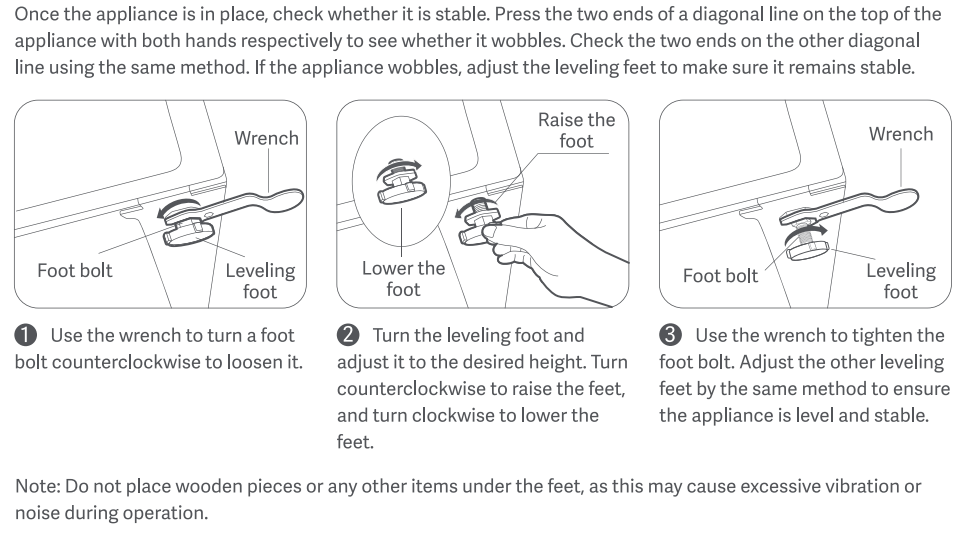
5. Check to see if there are too many clothes in the washing machine. Excessive clothing can cause excessive noise. Please load clothes according to the maximum capacity of each program and avoid exceeding the limit.
6. Check for foreign objects on the clothes, such as zippers and buttons. These objects may rub against the inner drum during operation and cause noise.
If the above methods still do not solve the problem, please apply for local after-sales service center inspection.
Q32: What to do if the Mijia Front Load Washer Dryer Pro 9kg makes a loud noise when dehydrating?
A: If the Mijia Front Load Washer Dryer Pro 9kg makes a loud noise when dehydrating, please refer to the following methods to troubleshoot:
1. For new, uninstalled machines, please check that the transit bolts are removed.
(1). Use the wrench to unscrew all the transit bolts on the back of the appliance.
(2). Hold the bolt caps and pull the bolts out of the bolt holes. Keep the transit bolts in a safe place for future use when needed.
(3). Seal the 4 bolt holes with the transit bolt hole covers provided in the accessory bag to prevent dust from entering.
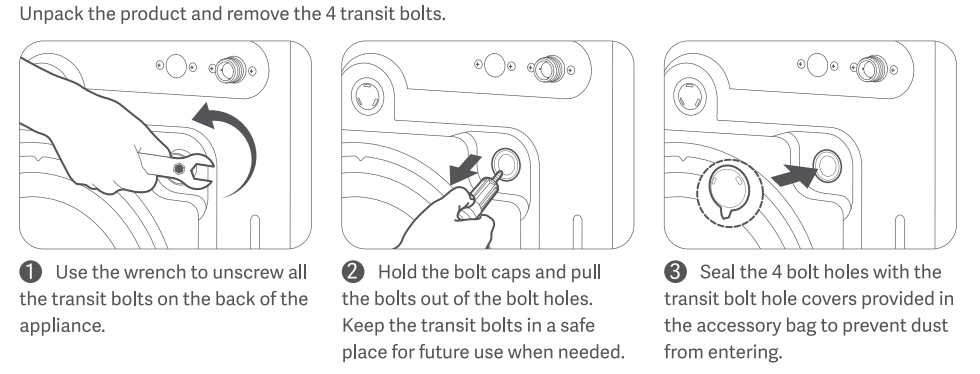
2. Check that the floor is level. The washing machine should be placed on a firm, flat, dry surface.
3. Check whether the washing machine is placed in a balanced manner. If the washing machine is not placed level, it will cause loud noises. You can adjust the balance of the washing machine by adjusting the feet.
To do this, follow these steps:
(1). Press down on each diagonal point on the top of the washing machine with both hands to check for any wobbling. This will determine which foot needs adjustment.
(2). Use a wrench to loosen the foot bolts by turning them counterclockwise.
(3). Rotate the horizontal foot to the desired height (turning counterclockwise raises the foot, turning counterclockwise lowers it).
(4). After adjustment, press down on each diagonal point on the top of the washing machine with both hands again to check for any wobbling.
(5). Use a wrench to tighten the foot bolts to secure the feet.
Note:
Do not place wood pieces or any other objects under the feet. This may cause abnormal vibration or noise.
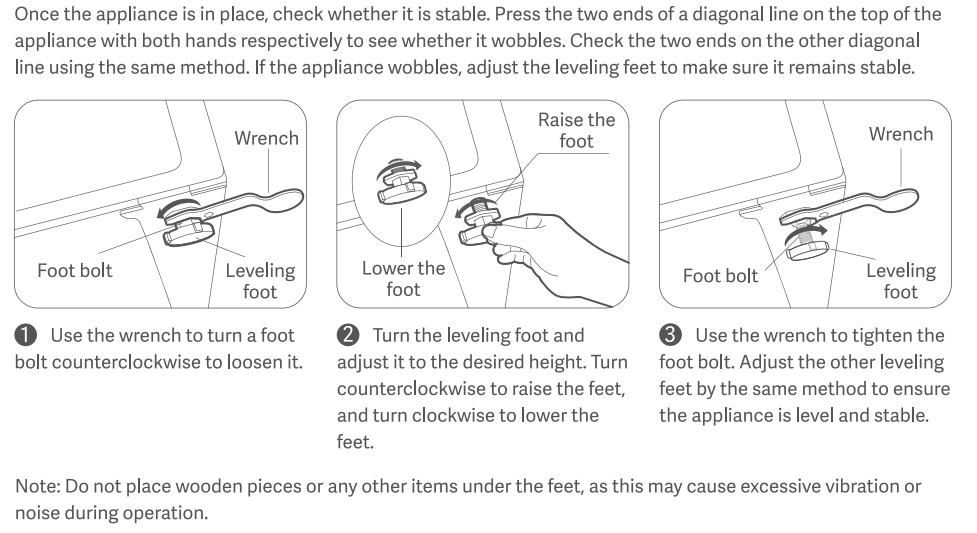
4. Check to see if there are too many clothes in the washing machine. Excessive clothing can cause excessive noise. Please load clothes according to the maximum capacity of each program and avoid exceeding the limit.
5. Check for foreign objects on the clothes, such as zippers and buttons. These objects may rub against the inner drum during operation and cause noise.
If the above methods still do not solve the problem, please apply for local after-sales service center inspection.
Q33: What to do if the Mijia Front Load Washer Dryer Pro 9kg makes a loud drainage noise?
A: When the washing machine drains, the drain pump works, and there will be some noise, which is normal.
If the noise is too loud or there is an abnormal noise, please clean the drain filter as follows:
1. Open the filter cover at the bottom of the appliance, pull out the emergency drain hose, and remove the plug to let water drain.
2. After all the water is drained, reinstall the plug and put the emergency drain hose back to its original position. Turn the drain filter counterclockwise to open it.
3. Check and make sure the inside of the drain pump is not blocked.
4. Clean any residues and stains from the drain pump filter cover.
5. Put the drain pump filter cover back to its original position.
6. Turn the drain pump filter cover clockwise to secure it and reinstall the drain cover.
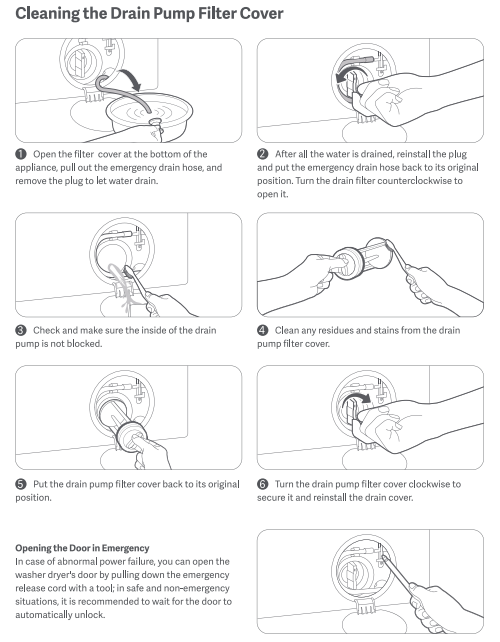
Q34: What to do if the Mijia Front Load Washer Dryer Pro 9kg makes a loud noise when water enters?
A: When the washing machine fills with water, the water inlet valve operates, making a certain noise. This is normal.
If the noise is excessive or there is a murmur, please check as follows:
1. Check the water pressure. The recommended pressure is 0.05 - 0.8 MPa. If the water pressure is low, the water inlet noise will be louder. Please avoid peak usage times or add a booster pump.
2. Check the water inlet filter for obstruction. A clogged filter can cause loud water inlet noise. Please clean the filter as follows:
(1). Turn off the water tap and unplug the power cord. Loosen and remove the water inlet hose from the back of the washer dryer. Cover the port with a cloth to prevent water from spraying out.
(2). Pull out the filter cover from the water inlet valve hole with nipper pliers and clean it thoroughly.
(3). Use a brush to clean the inside and the outside of the threaded connector.
(4). Reinstall the water inlet valve filter cover. Turn on the water tap and make sure there is no water leakage at the connection.
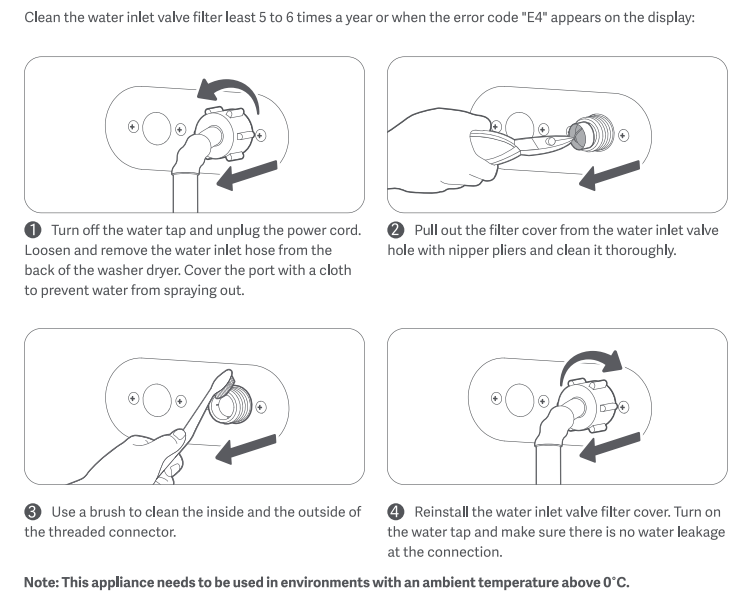
If the above methods still do not solve the problem, please apply for local after-sales service center inspection.
Q35: What to do if the Mijia Front Load Washer Dryer Pro 9kg makes a loud drying noise?
A: The washing machine makes a lot of noise when drying. Please check whether there are any hard objects, such as zippers, colliding with the inner drum. If not, please apply for the local after-sales service center inspection.
Q36: What to do if the Mijia Front Load Washer Dryer Pro 9kg vibrates?
A: If the Mijia Front Load Washer Dryer Pro 9kg vibrates, please refer to the following methods to troubleshoot:
1. For new, uninstalled machines, please check that the transit bolts are removed.
(1). Use the wrench to unscrew all the transit bolts on the back of the appliance.
(2). Hold the bolt caps and pull the bolts out of the bolt holes. Keep the transit bolts in a safe place for future use when needed.
(3). Seal the 4 bolt holes with the transit bolt hole covers provided in the accessory bag to prevent dust from entering.
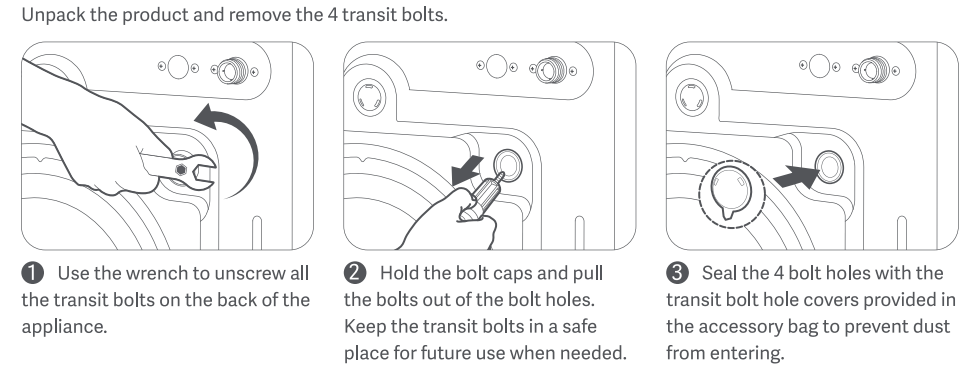
2. Check that the floor is level. The washing machine should be placed on a firm, flat, dry surface.
3. Check whether the washing machine is placed in a balanced manner. If the washing machine is not placed level, it will cause loud noises. You can adjust the balance of the washing machine by adjusting the feet.
To do this, follow these steps:
(1). Press down on each diagonal point on the top of the washing machine with both hands to check for any wobbling. This will determine which foot needs adjustment.
(2). Use a wrench to loosen the foot bolts by turning them counterclockwise.
(3). Rotate the horizontal foot to the desired height (turning counterclockwise raises the foot, turning counterclockwise lowers it).
(4). After adjustment, press down on each diagonal point on the top of the washing machine with both hands again to check for any wobbling.
(5). Use a wrench to tighten the foot bolts to secure the feet.
Note:
Do not place wood pieces or any other objects under the feet. This may cause abnormal vibration or noise.
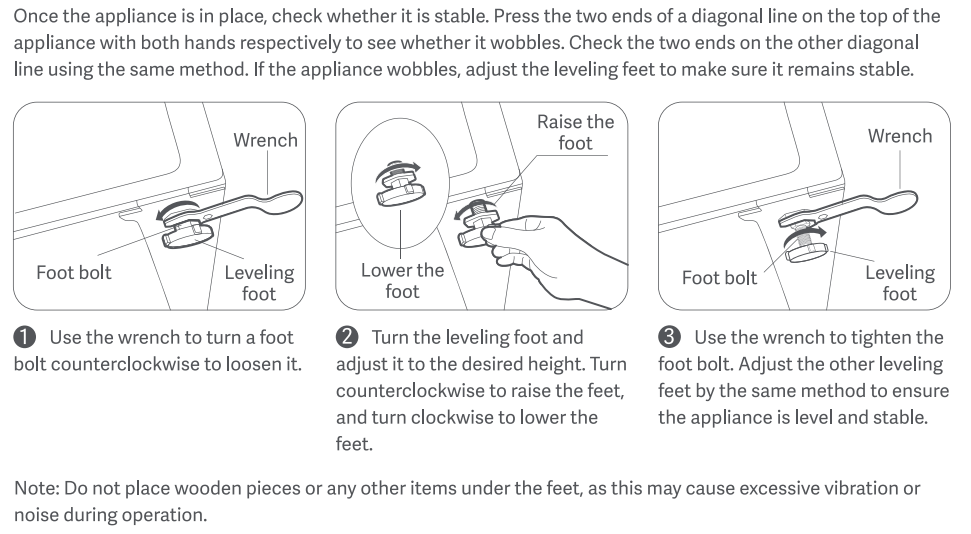
4. Check to see if there are too many clothes in the washing machine. Excessive clothing can cause vibration and displacement. Always load the washing machine according to the maximum capacity of each cycle.
5. Check to see if the clothes are severely entangled. Pause the machine, remove the clothes, and unwind them before re-adding them to the machine.
If the above methods still do not solve the problem, please apply for local after-sales service center inspection.
Q37: How to deal with the displacement of the Mijia Front Load Washer Dryer Pro 9kg during operation?
A: When the Mijia Front Load Washer Dryer Pro 9kg displaces, please refer to the following methods to troubleshoot:
1. For new, uninstalled machines, please check that the transit bolts are removed.
(1). Use the wrench to unscrew all the transit bolts on the back of the appliance.
(2). Hold the bolt caps and pull the bolts out of the bolt holes. Keep the transit bolts in a safe place for future use when needed.
(3). Seal the 4 bolt holes with the transit bolt hole covers provided in the accessory bag to prevent dust from entering.
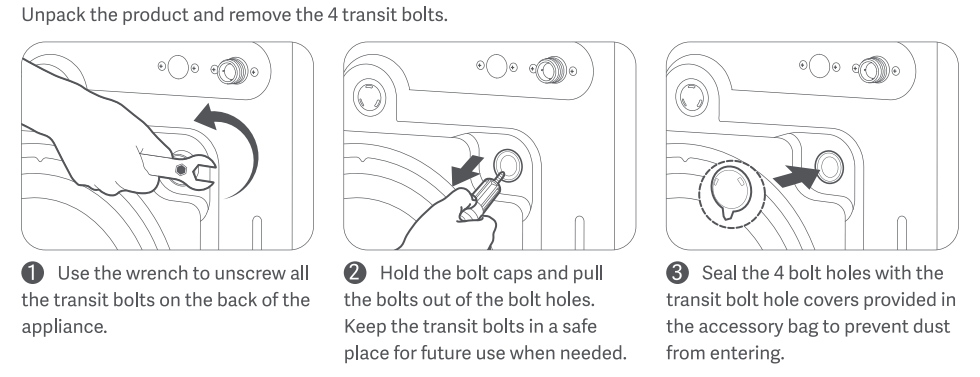
2. Check that the floor is level. The washing machine should be placed on a firm, flat, dry surface.
3. Check whether the washing machine is placed in a balanced manner. If the washing machine is not placed level, it will cause loud noises. You can adjust the balance of the washing machine by adjusting the feet.
To do this, follow these steps:
(1). Press down on each diagonal point on the top of the washing machine with both hands to check for any wobbling. This will determine which foot needs adjustment.
(2). Use a wrench to loosen the foot bolts by turning them counterclockwise.
(3). Rotate the horizontal foot to the desired height (turning counterclockwise raises the foot, turning counterclockwise lowers it).
(4). After adjustment, press down on each diagonal point on the top of the washing machine with both hands again to check for any wobbling.
(5). Use a wrench to tighten the foot bolts to secure the feet.
Note:
Do not place wood pieces or any other objects under the feet. This may cause abnormal vibration or noise.
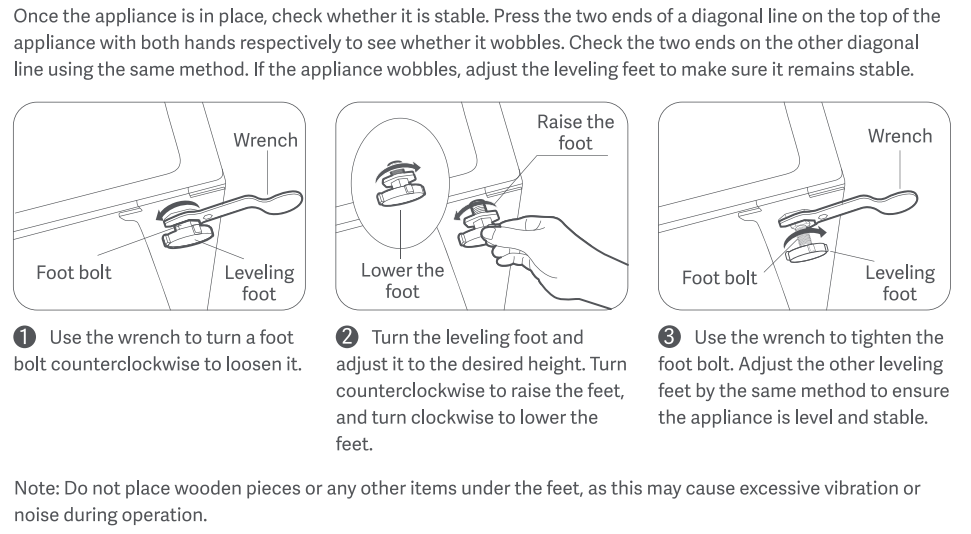
4. Check to see if there are too many clothes in the washing machine. Excessive clothing can cause vibration and displacement. Always load the washing machine according to the maximum capacity of each cycle.
5. Check to see if the clothes are severely entangled. Pause the machine, remove the clothes, and unwind them before re-adding them to the machine.
If the above methods still do not solve the problem, please apply for local after-sales service center inspection.
Q38: What to do if the Mijia Front Load Washer Dryer Pro 9kg does not heat up during operation?
A: If the Mijia Front Load Washer Dryer Pro 9kg does not heat up during operation, please refer to the following methods to troubleshoot:
1. Check if the selected program has a heating function. If not, switch to a program that does.
2. The washing machine only heats up during the washing process. There is no heating process during the rinsing process. Therefore, it is normal for the water in the rinse drain to be cold.
If the above methods still do not solve the problem, please apply for local after-sales service center inspection.
Q39: How to deal with the foam on the door after the Mijia Front Load Washer Dryer Pro 9kg is finished?
A: If foam is left on the door after a program completes, please check as follows:
1. Confirm the amount of detergent added. Please set the amount in the settings according to the washing machine's instructions.
To set the amount:
With laundry pod mode inactive, select a program and access the detergent option. Press [>] repeatedly to adjust the dispense ratio (0.7x, 1.0x, 1.2x, or 1.3x), and the machine will automatically adjust the detergent dispensing amount based on your selection (unavailable for programs that do not support automatic detergent dispensing).
Note:
This feature has a memory function, and the setting applies to all programs that support automatic detergent dispensing.
2. Slight foam on the door after a program completes is normal. Please increase the number of rinses in the program selection to ensure a more thorough rinse.
If the above methods still do not solve the problem, please apply for local after-sales service center inspection.
Q40: What to do if the door seal of the Mijia Front Load Washer Dryer Pro 9kg is dirty?
A: If the door seal of the Mijia Front Load Washer Dryer Pro 9kg is dirty, please check as follows:
1. Dirty Washing Machine Door Seal:
Every time a washing machine is used, the door seal accumulates impurities. Prolonged cleaning can cause mold and odors. Therefore, it is recommended to regularly clean the door seal with a towel.
2. Whitening of the Washing Machine Door Seal:
Whitening of the door seal is caused by the high temperature and humidity experienced during transportation. This is normal and does not affect the performance of the washing machine. To treat: Apply petroleum jelly (or other oil-based detergent) to the door seal to dissolve the white material, then wipe it clean with a damp towel.
3. Lint After Drying:
During the drying process, clothing fibers (especially natural fibers like cotton, linen, and wool) can form lint due to friction and high temperatures. Some lint may adhere to the door seal. This is a common drying phenomenon and does not indicate a malfunction. After drying, wipe the door seal with a dry cloth or paper towel to prevent lint from accumulating.
Q41: What to do if the Mijia Front Load Washer Dryer Pro 9kg has an odor?
A: If the Mijia Front Load Washer Dryer Pro 9kg has an odor, please check as follows:
New Machines:
1. A burnt plastic smell: This is primarily due to the rubber door seal emitting an odor at high temperatures. This is normal and will not affect human health. This odor will decrease with repeated high-temperature washes, so please rest assured.
2. Odor: Washing machines are tested with water during production. Due to shipping and other factors, some odor may occur. This is normal. When using a new machine, please run an empty cycle first.
Old Machines:
1. Do not insert the drain hose too deeply into the drain. This can cause siphoning, backflow, and odor. Place the drain hose near the drain.
2. Check the door seal for mold. Each time the washing machine is used, impurities accumulate in the seal. Prolonged cleaning can cause mold or odors. Therefore, it is recommended to clean the door seal regularly with a towel.
3. Check the drum cleaning function for a long period of time. Impurities may accumulate inside the drum, which can cause odors. It is recommended to use the Tub Clean function every three months. Frequent use of the washing machine can reduce the use of the drum cleaning function.
If the above methods still do not solve the problem, please apply for local after-sales service center inspection.
Q42: What to do if the door seal of the Mijia Front Load Washer Dryer Pro 9kg has an odor?
A: If the door seal of the Mijia Front Load Washer Dryer Pro 9kg has an odor, please check as follows:
1. The new door seal has an odor:
If a new washing machine door seal emits a rubbery odor, this is normal. Before first use, run the Tub Clean and allow the door to open to allow the odor to dissipate. This odor should subside after a while.
2. The old door seal has an odor:
Washing machines have a drainage groove in the door seal, which may contain impurities. If left uncleaned for a long time, it may cause mold and produce odors. Simply clean the door seal drainage groove with a rag.
Q43: What to do if the Mijia Front Load Washer Dryer Pro 9kg has a burning smell?
A: A newly purchased washing machine may have a burning odor (similar to the smell of baking plastic). This is primarily due to the rubber door seal emitting odors at high temperatures. This is normal and does not affect human health. This odor will decrease with repeated high-temperature washes. Please use it with confidence.
If a burning odor develops after a period of use, immediately unplug the washing machine, stop using it, and contact the local after-sales service center for inspection.
Q44: What to do if there's a water leakage of the Water Inlet Hose of the Mijia Front Load Washer Dryer Pro 9kg?
A: If the Water Inlet Hose of the Mijia Front Load Washer Dryer Pro 9kg is leaking, please refer to the following methods to troubleshoot:
1. Check the faucet connection for looseness. Reconnect it using a reliable faucet.
The connection instructions are as follows:
(1). Attach the provided water inlet hose directly to a 6-point (3/4 inch) external thread faucet, ensuring a tight seal.
(2). Connect the other end of the water inlet hose to the washer dryer's water inlet valve (located at the back), and tighten it clockwise to secure.
(3). Turn on the faucet and check all connections for leaks. If leaks are found, tighten the affected fitting following prior steps. If the faucet itself leaks, replace it promptly.
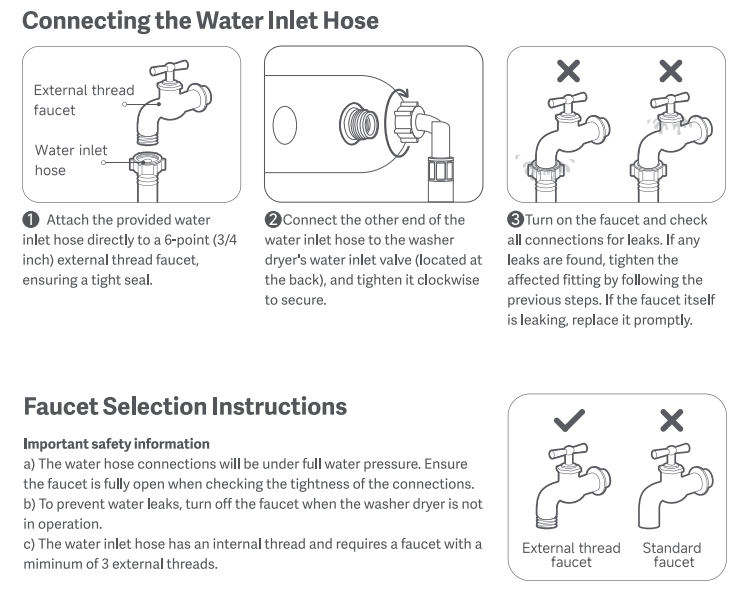
2. If the water inlet hose connector is leaking, contact after-sales service for a new hose.
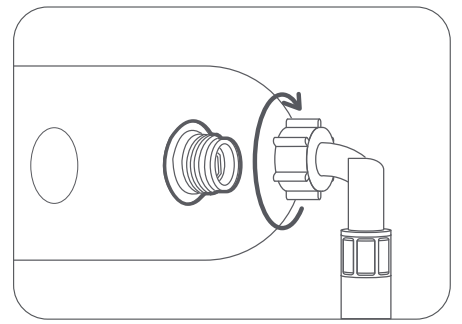
Q45: What to do if there's a water leakage of the Drain Hose of the Mijia Front Load Washer Dryer Pro 9kg?
A: When the Drain Hose of the Mijia Front Load Washer Dryer Pro 9kg leaks water, please check the placement of the Drain Hose. It needs to be connected to the sewer or drainage pool. Do not insert the floor drain too deeply into the sewer, which will cause backflow.
If the Drain Hose is broken, please contact after-sales service.
Q46: What to do if there's water leakage from the bottom of the Mijia Front Load Washer Dryer Pro 9kg?
A: If the Mijia Front Load Washer Dryer Pro 9kg is leaking water from the bottom, please refer to the following methods to troubleshoot:
1. Check whether the Drain Hose of the washing machine is broken. If so, please contact after-sales service.
2. Check if the drain filter is loose or misaligned. Unscrew the drain filter cover and tighten it again.
3. Check if there are any clothing or foreign objects stuck in the door. Please remove the clothing and clean the door seal (especially if something like hair is stuck, it will cause water leakage).
If the problem is still not solved, please contact after-sales service.
Q47: What to do if there's water leakage from the door of the Mijia Front Load Washer Dryer Pro 9kg?
A: If the door of the Mijia Front Load Washer Dryer Pro 9kg is leaking, please check if there are clothes or foreign objects stuck in the door. Please remove the clothes and clean the door seal (especially if something like hair is stuck, it will cause water leakage).
If the problem cannot be solved, please contact after-sales service.
Q48: What to do if there's water leakage from the Detergent Dispenser Drawer of the Mijia Front Load Washer Dryer Pro 9kg?
A: If the Detergent Dispenser Drawer of the Mijia Front Load Washer Dryer Pro 9kg is leaking, please refer to the following methods to troubleshoot:
1. Check if too much detergent is added. Use low-foam detergent and add it in proportion to the clothes according to the detergent instructions.
2. Check if the Detergent Dispenser Drawer is not installed properly, take it out, and reinstall it.
If the above methods still do not solve the problem, please apply for local after-sales service center inspection.
Q49: What to do if there's a water leakage of the Drain Pump Filter of the Mijia Front Load Washer Dryer Pro 9kg?
A: The water leakage of the Drain Pump Filter of the Mijia Front Load Washer Dryer Pro 9kg is caused by the filter cover not being installed properly. Please remove the Drain Pump Filter and reinstall it, and tighten it.
If it still does not solve the problem, please contact after-sales service.
Q50: What to do if the Mijia Front Load Washer Dryer Pro 9kg does not automatically dispense reagents?
A: If the Mijia Front Load Washer Dryer Pro 9kg does not automatically dispense reagents, please refer to the following methods to troubleshoot:
1. Check the automatic dispensing tray for sufficient detergent and softener. If insufficient, refill before use.
2. Check the program settings and enable the automatic dispensing function.
If the above methods still do not solve the problem, please apply for local after-sales service center inspection.
Q51: What to do if the Mijia Front Load Washer Dryer Pro 9kg has a poor sterilization effect?
A: If the Mijia Front Load Washer Dryer Pro 9kg has a poor sterilization effect, please make sure you have selected the correct program. You can also increase the temperature to enhance the sterilization effect.
Q52: What to do if there's freezing of the Mijia Front Load Washer Dryer Pro 9kg?
A: It is not recommended to use the Mijia Front Load Washer Dryer Pro 9kg below 0 °C. If it freezes, please cut off the water and electricity, stop using it, and wait until the ice melts before using it again.
Q53: What to do if the Mijia Front Load Washer Dryer Pro 9kg is spinning idle without water input?
A: The Mijia Front Load Washer Dryer Pro 9kg will run idle to measure the weight of the clothes before operation to determine the amount of water intake. This is normal, so please feel free to use it.
Q54: What to do if the panel of the Mijia Front Load Washer Dryer Pro 9kg does not display?
A: If the panel of the Mijia Front Load Washer Dryer Pro 9kg does not display, please check whether the power supply at home is normal. Use other household appliances to plug into the socket of the washing machine to confirm whether it can be used normally. If it still cannot be used, please check the circuit at home. If other household appliances can be used, please contact after-sales service.
Q55: What to do if the panel of the Mijia Front Load Washer Dryer Pro 9kg does not show complete information?
A: If the panel of the Mijia Front Load Washer Dryer Pro 9kg does not show complete information, please turn off the washing machine and restart it. If the problem is still not solved, please contact after-sales service.
Q56: What to do if the Mijia Front Load Washer Dryer Pro 9kg has no power?
A: When the Mijia Front Load Washer Dryer Pro 9kg has no power, please check whether the power supply at home is normal. Use other household appliances to plug into the socket of the washing machine to confirm whether it can be used normally. If it still cannot be used, please check the circuit at home. If other household appliances can be used, please contact after-sales service.
Q57: What to do if the Mijia Front Load Washer Dryer Pro 9kg trips when it is powered on?
A: If the Mijia Front Load Washer Dryer Pro 9kg trips when it is powered on, please refer to the following methods to troubleshoot:
1. Ensure the washing machine is in a dry place, and avoid water splashing on the socket or the body.
2. Ensure the power cord is fully plugged in and not loose.
3. Check if there are any other high-power appliances on the washing machine circuit. It is recommended that the washing machine be placed on a separate circuit. Also, confirm that the power cord has a ground wire. If not, contact an electrician to install one.
If the above methods still do not solve the problem, please apply for local after-sales service center inspection.
Q58: What to do if there's an electricity leakage in the Mijia Front Load Washer Dryer Pro 9kg?
A: If the Mijia Front Load Washer Dryer Pro 9kg has an electricity leakage, please check whether there is a ground wire in your home. If not, please contact an electrician to add a ground wire. If the ground wire is normal, please contact after-sales service.
Q59: What to do if the buttons of the Mijia Front Load Washer Dryer Pro 9kg fail to work?
A: If the buttons of the Mijia Front Load Washer Dryer Pro 9kg fail to work, please refer to the following methods to troubleshoot:
1. Check if there is any water on your hands or buttons, wipe them dry, and try again.
2. Check whether the Child Lock is turned on. If the Child Lock is turned on, the buttons cannot be operated. Please remove the Child Lock before operating.
3. Check if there are any high-power appliances (such as microwave ovens or steam ovens) near the washing machine. If there are, please stop them and then try operating the washing machine again.
Q60: What to do if the Wi-Fi indicator on the Mijia Front Load Washer Dryer Pro 9kg is abnormal/off?
A: The Wi-Fi indicator on the Mijia Front Load Washer Dryer Pro 9kg is turned on by default. If the Wi-Fi indicator is not on, please reset the Wi-Fi and reconnect.
Q61: What to do if the Mijia Front Load Washer Dryer Pro 9kg cannot connect with the Xiaomi Home App?
A: If the Mijia Front Load Washer Dryer Pro 9kg cannot connect with the Xiaomi Home App, please refer to the following methods to troubleshoot:
1. The device is connected to a 2.4 GHz network, not a 5 GHz network or a 2.4 GHz/5 GHz network.
2. Ensure the router is functioning properly and ensures a smooth network connection.
3. Verify whether the name or password of the working Wi-Fi network has been changed. You can try "Reset Device" to reset the device's working Wi-Fi network. It is recommended to use common English letters and numbers for the Wi-Fi name to avoid special characters that may cause it to be unrecognizable.
4. Verify whether the "Hub Gateway" function is enabled in the Xiaomi Home App (Xiaomi Home App >> [Profile] in the lower right corner >> [Hub & Gateway]. This option should be disabled).
5. Check if too many devices are connected to the router and the washing machine's signal is weak (signal check: [Xiaomi Home App] >> [Mijia Front Load Washer Dryer Pro 9kg] >> "..." in the upper right corner >> [Device Network] >> [RSSI]. If it is below 60, it is weak).
6. Check if the device has been reset and reconnected by someone else.
7. To reset Wi-Fi, press and hold on the power button for one second to turn on the device. Select [Settings], tap [>], select [Wireless network], tap [>]. When prompted to [Connect], press the arrow key to confirm. When prompted to "Restart to connect to wireless network?", select [Restart] and press the arrow key to reset Wi-Fi.
If the above methods still do not solve the problem, please apply for local after-sales service center inspection.
Q62: What to do if the Mijia Front Load Washer Dryer Pro 9kg cannot upgrade the firmware?
A: If the Mijia Front Load Washer Dryer Pro 9kg cannot upgrade firmware, please check whether the network is normal and whether the router can work normally to ensure that the network is unobstructed.
Q63: What to do if the Mijia Front Load Washer Dryer Pro 9kg cannot switch the washing mode in the Xiaomi Home App?
A: If the Mijia Front Load Washer Dryer Pro 9kg cannot switch the washing mode in the Xiaomi Home App, please refer to the following methods to troubleshoot:
1. Verify that the remote control is active. You can set [Remote Control] to On/Off on the program selection page, or press [^] to turn [Remote Control] on/off during a program.
2. Turn off the washing machine, then switch the mode and restart it.
Q64: What to do if the Mijia Front Load Washer Dryer Pro 9kg cannot switch the washing mode?
A: If the Mijia Front Load Washer Dryer Pro 9kg cannot switch to the washing mode, please turn off the washing machine and then switch the mode and restart it.
Q65: What to do if the Mijia Front Load Washer Dryer Pro 9kg does not automatically power off after the program is completed?
A: The Mijia Front Load Washer Dryer Pro 9kg will automatically power off after the program is completed. If it does not automatically shut down, please observe whether there is a fault code on the display screen. Please follow the fault code prompts in the manual. If there is no fault code and the power does not automatically shut down for a long time, please unplug the washing machine and contact after-sales service.
Q66: What are the meanings of the sounds of the Mijia Front Load Washer Dryer Pro 9kg?
A: Here are the meanings of the sounds of the Mijia Front Load Washer Dryer Pro 9kg when it is running:
1. When water is filling: As the washing machine fills with water, the water inlet valve operates and produces a "buzzing" sound, which is normal.
2. During operation: The motor of the washing machine will make a "buzzing" sound during operation, which is normal.
3. When draining: When the washing machine is draining, the drain pump works and makes a "gulp gulp" sound.
4. When starting: When the washing machine starts, the door lock closes and makes a "click" sound.
Q67: What to do if the Mijia Front Load Washer Dryer Pro 9kg keeps returning cash?
A: If the Mijia Front Load Washer Dryer Pro 9kg keeps returning cash, please refer to the following methods to troubleshoot:
1. Check if the floor drain is blocked.
2. Check whether the drain hose is inserted too deeply into the sewer. If the drain hose is inserted too deeply into the sewer and causes siphoning, please remove the drain hose from the sewer.
Q68: What to do if the Mijia Front Load Washer Dryer Pro 9kg cannot be turned on or off?
A: If the Mijia Front Load Washer Dryer Pro 9kg cannot be turned on or off, please check the power supply first. Use other household appliances to plug into the socket of the washing machine to confirm whether the power supply is powered. If other household appliances cannot be used, please check the power supply. If the power supply is normal, please make sure that there is no water on your hands during operation and that they are in a dry state. If the problem is still not solved, please contact after-sales service.
Q69: What to do if the Mijia Front Load Washer Dryer Pro 9kg auto dispenser drawer cannot be opened?
A: If the Mijia Front Load Washer Dryer Pro 9kg auto dispenser drawer cannot be opened, please contact after-sales service.
Q70: What to do if the Mijia Front Load Washer Dryer Pro 9kg automatically dispenses too little/too much?
A: With laundry pod mode inactive, select a program and access the detergent option. Press [>] repeatedly to adjust the dispense ratio (0.7x, 1.0x, 1.2x, or 1.3x), and the machine will automatically adjust the detergent dispensing amount based on your selection (unavailable for programs that do not support automatic detergent dispensing).
Note:
This feature has a memory function, and the setting will apply to all programs that support automatic detergent dispensing.
Q71: What to do if there is always water in the auto dispenser drawer of the Mijia Front Load Washer Dryer Pro 9kg?
A: If there is water in the Mijia Front Load Washer Dryer Pro 9kg auto dispenser drawer, please check whether the auto dispenser drawer is blocked and clean it before use.
Q72: What to do if there's the appearance damage of the Mijia Front Load Washer Dryer Pro 9kg?
A: If there's the appearance damage of the Mijia Front Load Washer Dryer Pro 9kg, please refer to the following methods to troubleshoot:
1. If the exterior is dirty, please wipe it with a damp cloth.
2. If there are scratches on the surface, please check whether it is a scratch on the protective film. Please tear off the protective film and observe it again.
If the problem persists or there is any deformation, please contact after-sales service.
Note:
Turn off the power to the washing machine before cleaning.
Q73: What to do if there's panel damage on the Mijia Front Load Washer Dryer Pro 9kg?
A: If the panel of the Mijia Front Load Washer Dryer Pro 9kg is damaged, please unplug the power plug and do not use it to prevent danger, and contact after-sales service.
Q74: What to do if there's the door damage of the Mijia Front Load Washer Dryer Pro 9kg?
A: If the door of the Mijia Front Load Washer Dryer Pro 9kg door is damaged, please unplug the power plug and do not use it to prevent danger, and contact after-sales service.
Q75: What to do if there's the drum damage of the Mijia Front Load Washer Dryer Pro 9kg?
A: If the drum of the Mijia Front Load Washer Dryer Pro 9kg is damaged, please unplug the power plug and do not use it to prevent danger, and contact after-sales service.
Q76: What to do if the accessories of the Mijia Front Load Washer Dryer Pro 9kg are damaged?
A: If the accessories of the Mijia Front Load Washer Dryer Pro 9kg are damaged, please contact after-sales service.
Q77: What to do if there's the Drain Hose damage of the Mijia Front Load Washer Dryer Pro 9kg?
A: If the Drain Hose of the Mijia Front Load Washer Dryer Pro 9kg is damaged, please unplug the power plug and do not use it to prevent danger, and contact after-sales service.
Q78: What to do if there's the Water Inlet Hose damage of the Mijia Front Load Washer Dryer Pro 9kg?
A: If the Water Inlet Hose of the Mijia Front Load Washer Dryer Pro 9kg is damaged, please unplug the power plug and do not use it to prevent danger, and contact after-sales service.
Q79: What to do if the Mijia Front Load Washer Dryer Pro 9kg is missing accessories?
A: The accessories of the Mijia Front Load Washer Dryer Pro 9kg include a User Manual, a Water Inlet Hose, Transit Bolt Hole Cover x 4, Base Plate, Screw x 8, Feet Adjusting Wrench, and Drain Hose Fixing Bracket.
If accessories are missing, please contact after-sales service.
Q80: What to do if there's feet damage of the Mijia Front Load Washer Dryer Pro 9kg?
A: If the feet of the Mijia Front Load Washer Dryer Pro 9kg are damaged, please unplug the power plug and do not use it to prevent danger, and contact after-sales service.
Q81: What to do if the door of the Mijia Front Load Washer Dryer Pro 9kg debris filter won't close?
A: If the door of the washing machine's debris filter cannot be closed, please check whether it is caused by the emergency drain hose plug blocking the door. Please turn the emergency drain hose plug to a vertical position to solve the problem.
If the problem is still not solved, please request repair.
Correct placement:
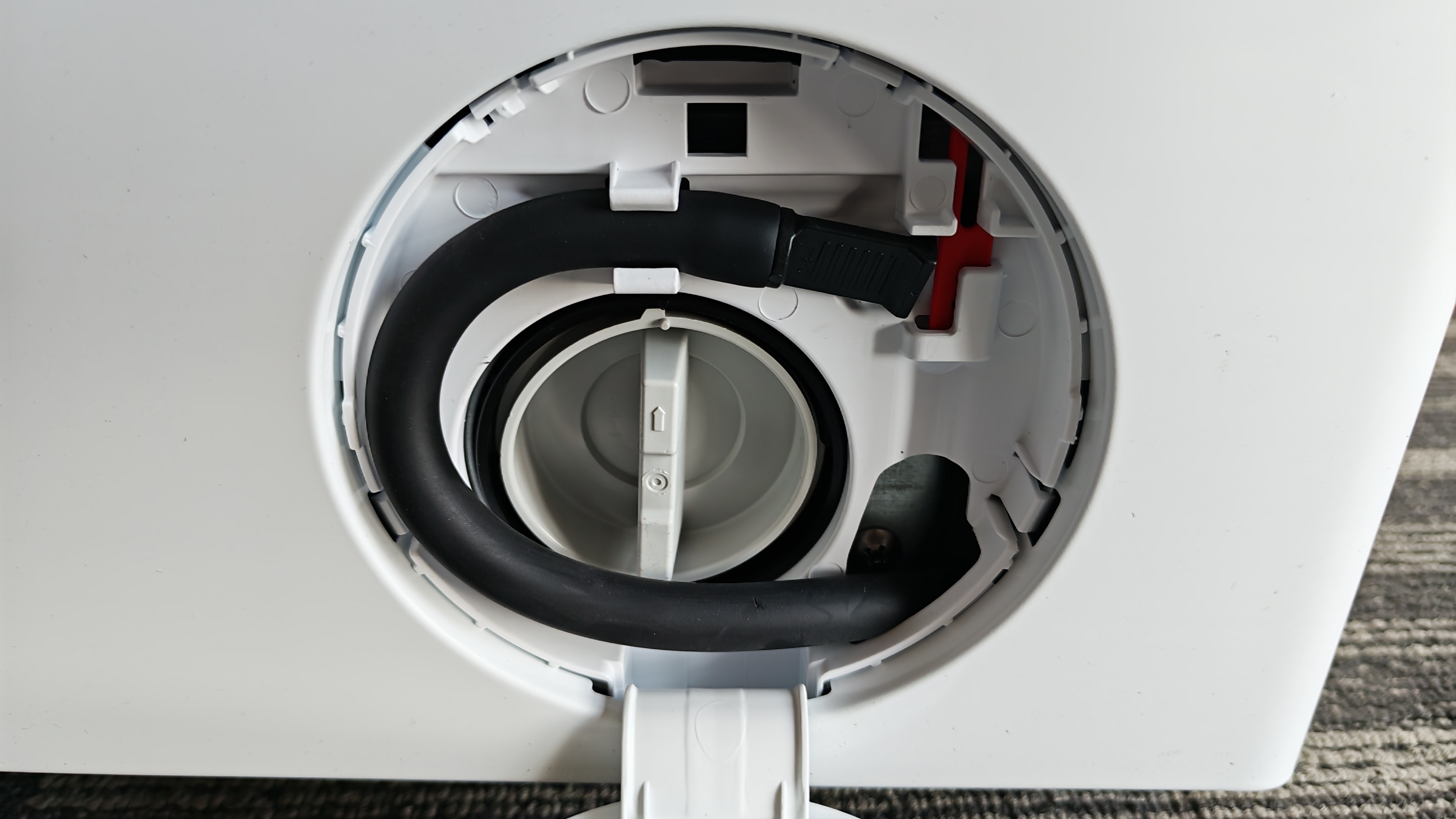
Incorrect placement:
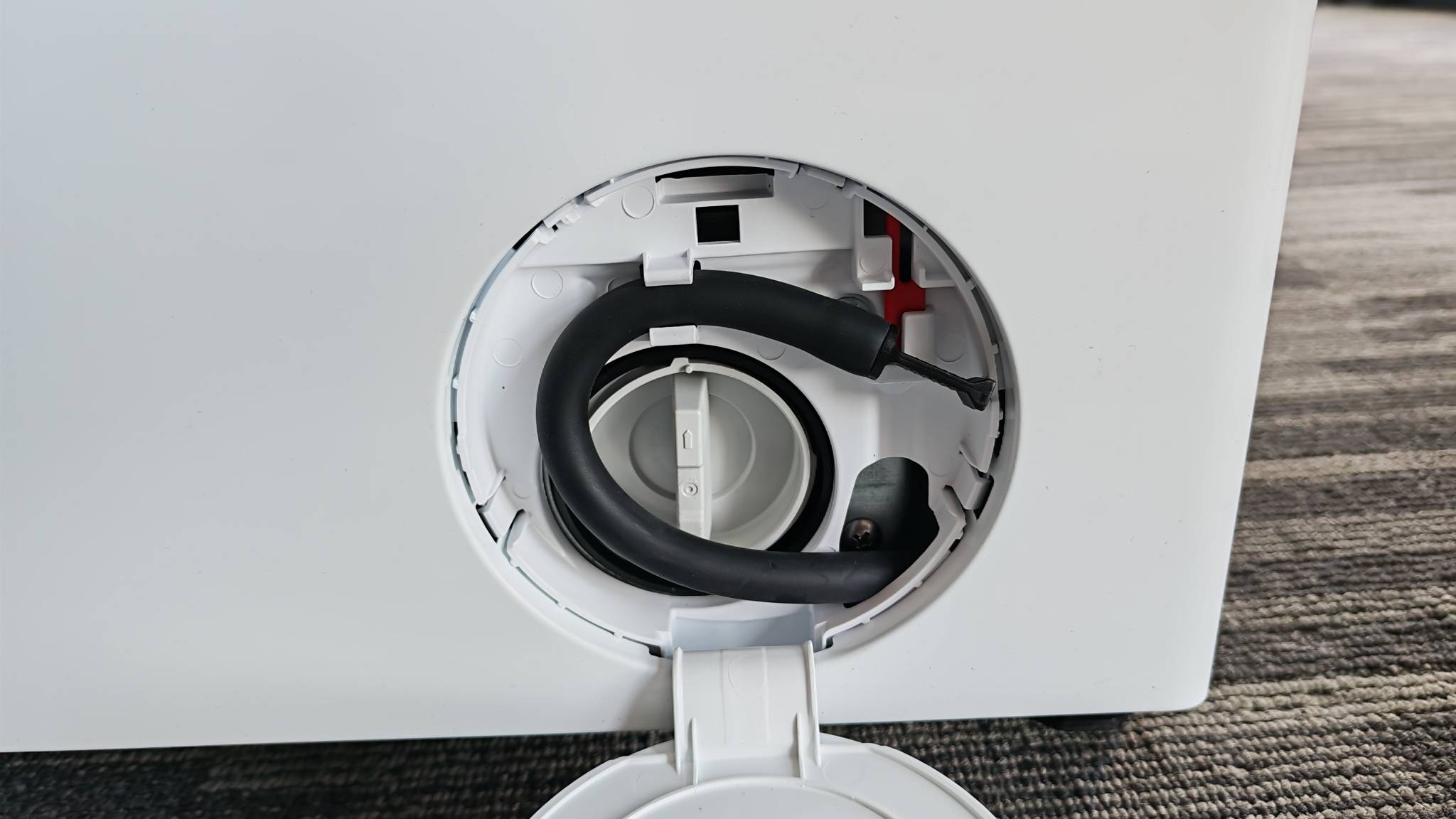
Q82: What are the meanings of the error codes of the Mijia Front Load Washer Dryer Pro 9kg? How to troubleshoot for them?
A: Here are the meanings of the error codes of the Mijia Front Load Washer Dryer Pro 9kg for your reference:
1. The error code [E1] means drainage timeout.
To solve the error code [E1], please refer to the following steps:
(1). Check whether the drain hose is blocked.
(2). Clean the drain pump filter cover.
(3). Check whether the drain hose is installed correctly.
(4). Contact the after-sales service team.
2. The error code [E2] means the door is not closed.
To solve the error code [E2], please refer to the following steps:
(1). Check whether the washing machine door is not closed. Make sure it is closed properly.
(2). Contact the after-sales service team.
3. The error code [E3] means unbalanced load.
To solve the error code [E3], please refer to the following steps:
(1). The laundry is heavily unbalanced or tangled. Rearrange the laundry and try again.
(2). If the load is one heavy item, it is recommended to add more items and wash again.
4. The error code [E4] means water fill timeout.
To solve the error code [E4], please refer to the following steps:
(1). Check whether the water tap is turned on.
(2). Clean the water inlet valve filter cover.
(3). Check whether the water pressure is too low, or use the machine outside of peak water usage hours.
(4). Check whether the drain hose holder is removed or whether the drain hose is positioned incorrectly, causing siphoning.
(5). Contact the after-sales service team.
5. The error code [E6] means the water level is too high.
To solve the error code [E6], please refer to the following step:
Close the tap, and contact the after-sales service team.
6. The error code [E8] means water temperature error.
To solve the error code [E8], please refer to the following step:
Contact the after-sales service team.
7. The error code [F1] means water level error.
To solve the error code [F1], please refer to the following steps:
(1). Wait for the interference to disappear, turn off the machine, and restart it. Wait a few minutes, then plug it back in and unplug the machine.
(2). Contact the after-sales service team.
8. The error code [F2] means dryer heating element error.
To solve the error code [F2], please refer to the following step:
Contact the after-sales service team.
9. The error code [F3] means Dryer fan error.
To solve the error code [F3], please refer to the following step:
Contact the after-sales service team.
10. The error code [F4] means Dryer air inlet temperature error.
To solve the error code [F4], please refer to the following step:
Contact the after-sales service team.
11. The error code [F5] means Dryer air outlet temperature error.
To solve the error code [F5], please refer to the following step:
Contact the after-sales service team.
12. The error code [FC1] means Communication error.
To solve the error code [FC1], please refer to the following step:
Contact the after-sales service team.
13. The error code [FC2] means Computer board communication error.
To solve the error code [FC2], please refer to the following steps:
(1). Wait for the interference to disappear, turn off the machine, and restart it. Wait a few minutes, then plug it back in and unplug the machine.
(2). Contact the after-sales service team.
14. The error code [ C * * ] means Motor stall error.
To solve the error code [ C * * ], please refer to the following step:
Remove the power plug and restart the machine. If the issue persists, contact the after-sales service team.
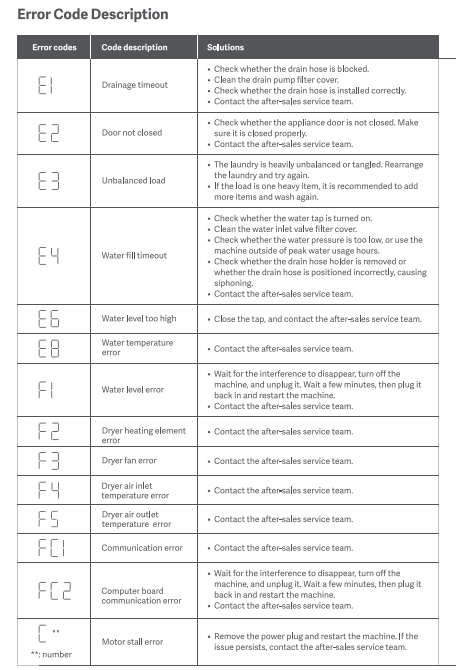
Cleaning and Maintenance
Q1: How to clean the outer shell of the Mijia Front Load Washer Dryer Pro 9kg?
A: To clean the outer shell of the Mijia Front Load Washer Dryer Pro 9kg, please refer to the following steps:
1. Before cleaning the washing machine, unplug it from the power supply.
2. Wipe the washing machine's exterior and control panel with a soft cloth and a household cleaner that is not abrasive or corrosive.
Note:
Do not rinse the washing machine housing to avoid damage.
Q2: How to clean the drum of the Mijia Front Load Washer Dryer Pro 9kg?
A: Please use a soft cloth or brush to clean the drum of the Mijia Front Load Washer Dryer Pro 9kg, and then complete the Tub Clean program.
Q3: How to clean the Water Inlet Valve Filter of the Mijia Front Load Washer Dryer Pro 9kg?
A: To clean the Water Inlet Valve Filter of the Mijia Front Load Washer Dryer Pro 9kg, please refer to the following steps:
1. Turn off the water tap and unplug the power cord. Loosen and remove the water inlet hose from the back of the washer dryer. Cover the port with a cloth to prevent water from spraying out.
2. Pull out the filter cover from the water inlet valve hole with nipper pliers and clean it thoroughly.
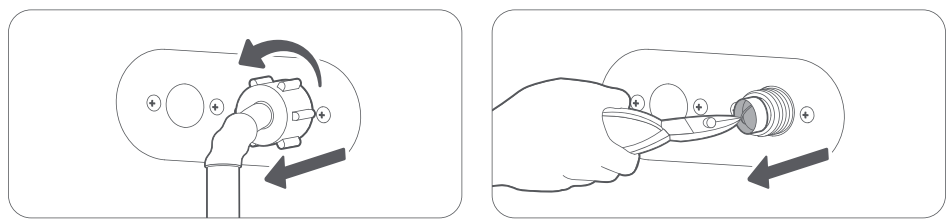
3. Use a brush to clean the inside and the outside of the threaded connector.
4. Reinstall the Water Inlet Valve Filter cover. Turn on the water tap and make sure there is no water leakage at the connection.
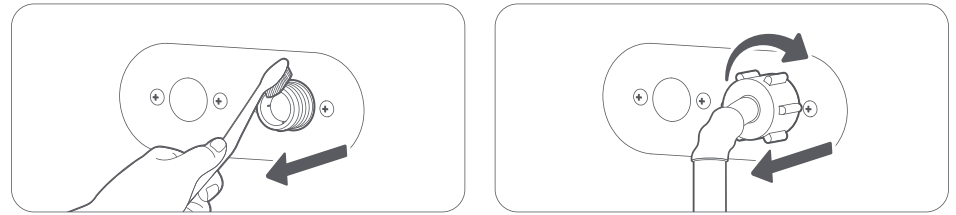
Note:
This washing machine needs to be used in environments with an ambient temperature above 0 °C.
Q4: How to clean the Drain Pump Filter Cover of the Mijia Front Load Washer Dryer Pro 9kg?
A: To clean the Drain Pump Filter Cover of the Mijia Front Load Washer Dryer Pro 9kg, please refer to the following steps:
1. Open the filter cover at the bottom of the washing machine, pull out the emergency drain hose, and remove the plug to let water drain.
2. After all the water is drained, reinstall the plug and put the emergency drain hose back to its original position. Turn the drain filter counterclockwise to open it.
3. Check and make sure the inside of the drain pump is not blocked.
4. Clean any residues and stains from the drain pump filter cover.
5. Put the drain pump filter cover back to its original position.
6. Turn the drain pump filter cover clockwise to secure it and reinstall the drain cover.
Q5: How to maintain the Mijia Front Load Washer Dryer Pro 9kg?
A: The Mijia Front Load Washer Dryer Pro 9kg needs timely maintenance after long-term use. Keeping the washing machine clean can improve performance and avoid unnecessary repairs.
The cleaning and maintenance methods for the Mijia Front Load Washer Dryer Pro 9kg are as follows:
1. To clean the exterior of the Mijia Front Load Washer Dryer Pro 9kg, please refer to the following steps:
(1). Before cleaning the washing machine, unplug it from the power supply.
(2). Wipe the washing machine’s exterior and control panel with a soft cloth and a household cleaner that is not abrasive or corrosive.
2. To clean the Water Inlet Valve Filter of the Mijia Front Load Washer Dryer Pro 9kg, please refer to the following steps:
(1). Turn off the water tap and unplug the power cord. Loosen and remove the water inlet hose from the back of the washer dryer. Cover the port with a cloth to prevent water from spraying out.
(2). Pull out the filter cover from the water inlet valve hole with nipper pliers and clean it thoroughly.
(3). Use a brush to clean the inside and the outside of the threaded connector.
(4). Reinstall the Water Inlet Valve Filter cover. Turn on the water tap and make sure there is no water leakage at the connection.
3. To clean the Drain Pump Filter Cover of the Mijia Front Load Washer Dryer Pro 9kg, please refer to the following steps:
(1). Open the filter cover at the bottom of the washing machine, pull out the emergency drain hose, and remove the plug to let water drain.
(2). After all the water is drained, reinstall the plug and put the emergency drain hose back to its original position. Turn the drain filter counterclockwise to open it.
(3). Check and make sure the inside of the drain pump is not blocked.
(4). Clean any residues and stains from the drain pump filter cover.
(5). Put the drain pump filter cover back to its original position.
(6). Turn the drain pump filter cover clockwise to secure it and reinstall the drain cover.
4. To clean the drum of the washing machine of the Mijia Front Load Washer Dryer Pro 9kg, please refer to the following steps:
(1). Please use a soft cloth or brush to clean the drum of the washing machine.
(2). Clean the drum by the Tub Clean program per 3 months.
Q6: How to clean the Dispenser drawer of the Mijia Front Load Washer Dryer Pro 9kg?
A: When cleaning the Dispenser drawer of the Mijia Front Load Washer Dryer Pro 9kg, pull the compartment out to the outermost end, press the left side with your fingers, and then pull out the box. When taking it out, pay attention to whether there is liquid such as detergent/softener in the compartment to prevent the liquid from spilling. After taking it out, rinse it with water
Q7: How to clean the door seal of the Mijia Front Load Washer Dryer Pro 9kg?
A: Please use a soft cloth or brush to clean the white lint that is attached to the inside of the Mijia Front Load Washer Dryer Pro 9kg door. Do not remove the door seal when cleaning. Please clean the door seal regularly. After washing, please open the door for ventilation to prevent odor.
Q8: What to do if the Mijia Front Load Washer Dryer Pro 9kg is not used for a long time?
A: If the Mijia Front Load Washer Dryer Pro 9kg is not used for a long time, please refer to the following steps:
1. Run a Spin Only program to drain any residual water from the appliance.
2. Turn off the tap and disconnect the water inlet hose.
3. Unplug the washing machine and leave its door open to allow for air circulation and prevent mildew.
Q9: Can the drum of the Mijia Front Load Washer Dryer Pro 9kg be cleaned with the drum cleaner?
A: When using the Tub Clean program on the Mijia Front Load Washer Dryer Pro 9kg, adding detergent is not recommended.
Q10: How often should the Tub Clean program of the Mijia Front Load Washer Dryer Pro 9kg be used?
A: It is recommended to use the Tub Clean program of the Mijia Front Load Washer Dryer Pro 9kg once every three months, or adjust the frequency based on the washer dryer’s usage.
Does it help?
Yes
No