

What to do if the Bluetooth of the Xiaomi Smart Band 10 disconnects from Xiaomi/REDMI phones?
If the Bluetooth of the Xiaomi Smart Band 10 disconnects with Xiaomi/REDMI phones, please refer to the following steps to troubleshoot:
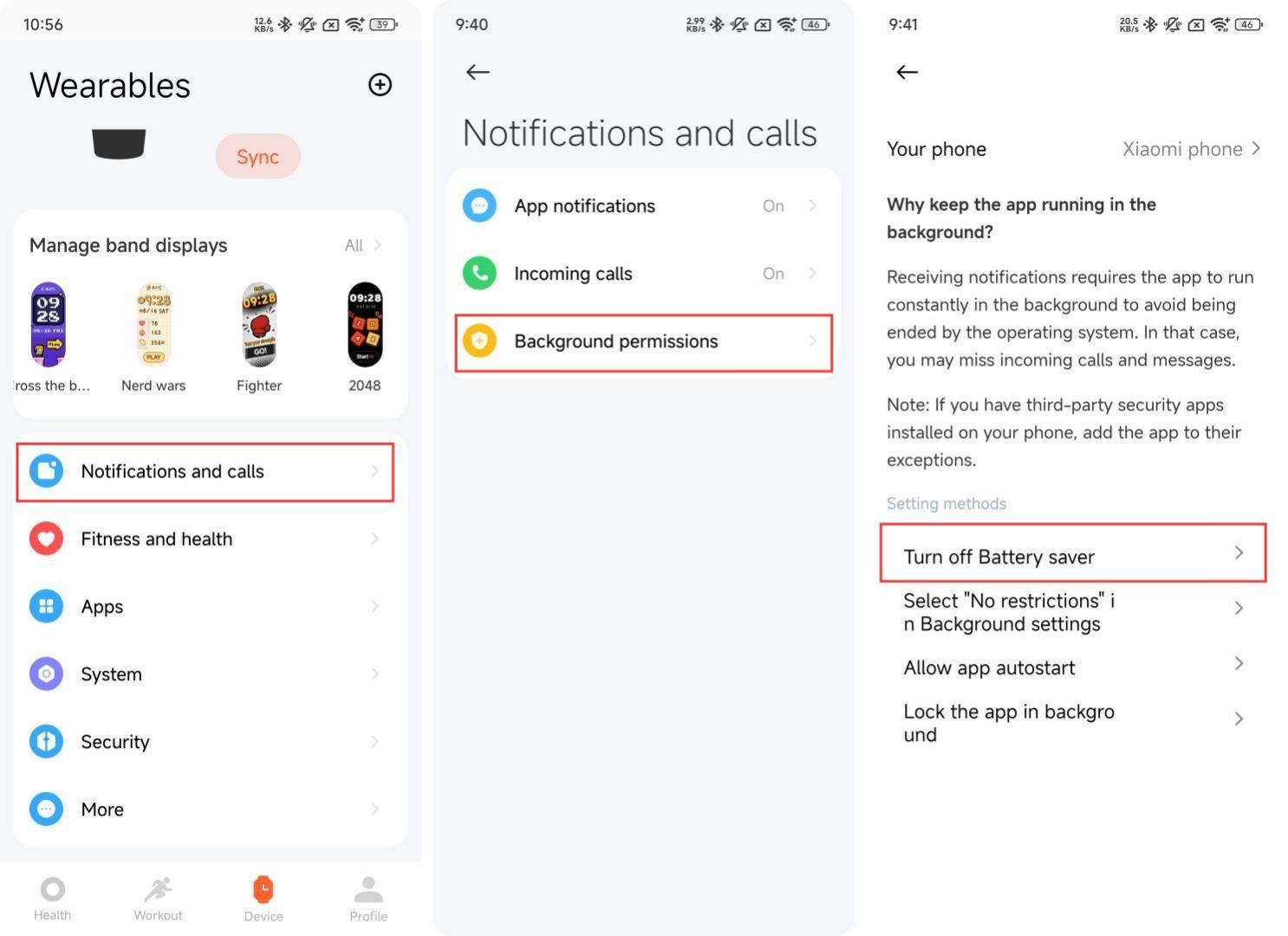
1. The device Bluetooth connection, message synchronization, data synchronization, etc. rely on the Mi Fitness APP to run continuously in the background. Please do not clean up and close the Mi Fitness APP. Open the Mi Fitness APP and go to [Device] >> [Notifications and calls] >> [Background permissions], follow the prompts to set the background unlimited, background locked, and turn off the power saving mode;
2. If the Mi Fitness APP is removed, you need to reopen it and tap [Connect] on the device page to restore;
3. Check whether the device or mobile phone has turned on [Battery saver]. Turning it on will cause Bluetooth to disconnect. On the Mi Fitness APP device page, go to [Notifications and calls] >> [Background permissions], and turn off [Battery saver] according to the prompts.
Note:
If the band is added to the Bluetooth blacklist of the Xiaomi HyperOS phone, Bluetooth pairing and binding operations can no longer be performed. You need to manually delete this device from the blacklist before you can perform Bluetooth pairing and pairing operations.
1. The device Bluetooth connection, message synchronization, data synchronization, etc. rely on the Mi Fitness APP to run continuously in the background. Please do not clean up and close the Mi Fitness APP. Open the Mi Fitness APP and go to [Device] >> [Notifications and calls] >> [Background permissions], follow the prompts to set the background unlimited, background locked, and turn off the power saving mode;
2. If the Mi Fitness APP is removed, you need to reopen it and tap [Connect] on the device page to restore;
3. Check whether the device or mobile phone has turned on [Battery saver]. Turning it on will cause Bluetooth to disconnect. On the Mi Fitness APP device page, go to [Notifications and calls] >> [Background permissions], and turn off [Battery saver] according to the prompts.
Note:
If the band is added to the Bluetooth blacklist of the Xiaomi HyperOS phone, Bluetooth pairing and binding operations can no longer be performed. You need to manually delete this device from the blacklist before you can perform Bluetooth pairing and pairing operations.
Does it help?
Yes
No