

Xiaomi Zoom Floor Selfie Stick Tripod 62'' FAQ
Overview
1. Q: What are the selling points of the Xiaomi Zoom Floor Selfie Stick Tripod 62''?
A: The selling points of the Xiaomi Zoom Floor Selfie Stick Tripod 62'' are as follows:
1. 62 inches floor-standing tripod simulates eye-level height for more natural angles during live streaming and photography;
2. Magnetic Bluetooth remote control with low-power Bluetooth BT4.2, detachable magnetic design makes it easy to attach and remove;
3. 5-button full-function remote control;
4. One-click spring-open tripod with patented design, enabling one-handed operation and improving experience;
5. Auxiliary peg hole design for better adaptation to various outdoor surfaces;
6. External cold shoe mount for expansion;
7. Reflective strip on the tripod help locate the product easily in low-light outdoor environments;
8. Integrated foldable design for easy storage and portability;
9. Aluminum alloy pole for a lighter build and smooth extension.
2. Q: What are the usage scenarios of the Xiaomi Zoom Floor Selfie Stick Tripod 62''?
A: The usage scenarios of the Xiaomi Zoom Floor Selfie Stick Tripod 62'' are as follows:
1. It can be used for handheld mobile phone shooting, especially when a wider and larger frame is needed;
2. It is suitable for solo travel, allowing you to take selfies without assistance and easily control the shooting angle and composition;
3. It can be used indoors as a tripod for video live streaming or fixed-position video shooting, with adjustable height for better framing;
4. It is also ideal for outdoor use as a tripod for live streaming or fixed shooting, with features designed for easy stabilization and quick location in low-light environments.
3. Q: What materials are used in the Xiaomi Zoom Floor Selfie Stick Tripod 62''?
A: The Xiaomi Zoom Floor Selfie Stick Tripod 62'' is made of PC+ABS plastic, silicone, and an anodized aluminum alloy extension rod.
4. Q: What is included in the standard package of the Xiaomi Zoom Floor Selfie Stick Tripod 62''?
A: The standard package of the Xiaomi Zoom Floor Selfie Stick Tripod 62'' includes one selfie stick, one storage bag, and one user manual.
5. Q: What is the appearance of the Xiaomi Zoom Floor Selfie Stick Tripod 62''?
A. The appearance of the Xiaomi Zoom Floor Selfie Stick Tripod 62'' is as follows:
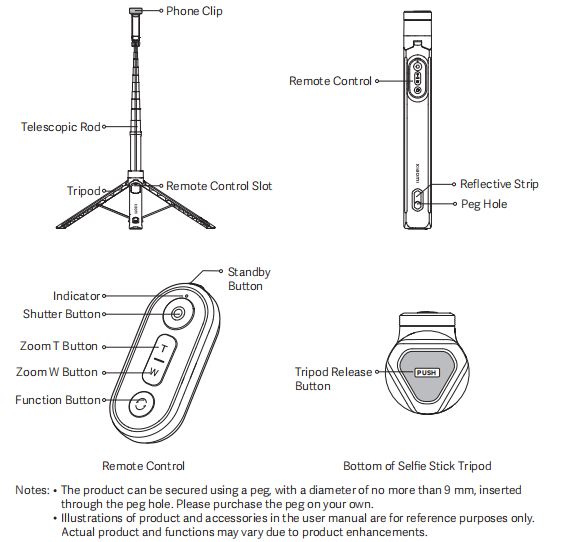
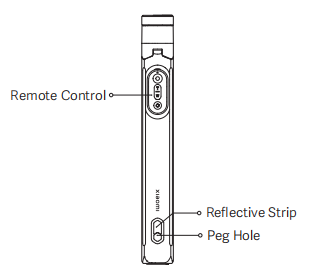
The Xiaomi Zoom Floor Selfie Stick Tripod 62'' is a versatile accessory designed to provide stable and convenient smartphone photography and videography. It features a telescopic rod integrated with a tripod for secure placement, along with a dedicated slot for the remote control, a standby button, an indicator, shutter and zoom controls (T/W buttons), a function button for switching modes and a phone clip.
The product is equipped with a reflective strip for enhanced visibility, a peg hole for stable outdoor mounting, and a tripod release button for detaching the tripod base.
Note:
1. The product can be secured using a peg, with a diameter of no more than 9 mm, inserted through the peg hole. Please purchase the peg on your own;
2. Illustrations of product and accessories are for reference purposes only. Actual product and functions vary due to product enhancements.
Frequently Asked Questions
1. Q: What smartphones are compatible with the Xiaomi Zoom Floor Selfie Stick Tripod 62''?
A: The smartphones are compatible with the Xiaomi Zoom Floor Selfie Stick Tripod 62'' are as follows:
1. For Android 6.0 and above / iOS systems, the default function is photo-taking only;
2. Currently, only rear camera zoom is supported, and this requires a Xiaomi or REDMI phone running Android 10, MIUI 12 or above, and using the default Camera APP;
3. Certain functions such as zoom, camera flipping, and mode switching are not supported on iOS systems.
2. Q: How to connect the Xiaomi Zoom Floor Selfie Stick Tripod 62'' to a phone?
A: To connect the Xiaomi Zoom Floor Selfie Stick Tripod 62'' to a phone, please refer to the following steps:
First-time connection:
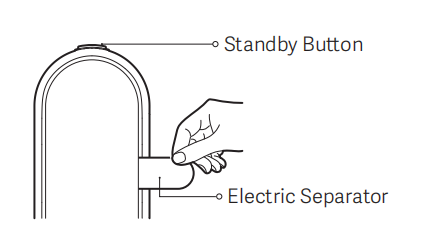
Remove the remote control from the stick and pull out the electric separator from the battery compartment. Press and hold the standby button on the remote for 3 seconds to power it on. The indicator will start flashing in blue, indicating that it is in Bluetooth pairing mode. On your phone, go to the Bluetooth settings interface, find the device named "XMZPG-Z", and tap to connect.
Bluetooth reconnection:
After the remote control restarts, it will automatically attempt to reconnect to the last successfully paired phone. If reconnection fails, it will re-enter Bluetooth search mode and can be manually paired again.
3. Q: What are the functions of the buttons on the Xiaomi Zoom Floor Selfie Stick Tripod 62''?
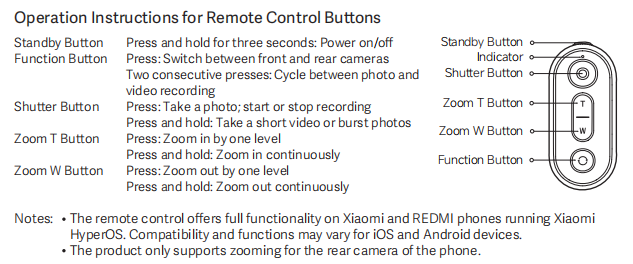
A: The functions of the buttons on the Xiaomi Zoom Floor Selfie Stick Tripod 62'' are as follows:
1. Standby Button:
Press and hold for three seconds: Power on/off.
2. Function Button:
Press: Switch between front and rear cameras and;
Two consecutive presses: Cycle between photo and video recording.
3. Shutter Button:
Press: Take a photo; start or stop recording;
Press and hold: Take a short video or burst photos.
4. Zoom T Button:
Press: Zoom in by one level;
Press and hold: Zoom in continuously.
5. Zoom W Button:
Press: Zoom out by one level;
Press and hold: Zoom out continuously.
Note:
1. The remote control offers full functionality on Xiaomi and REDMI phones running Xiaomi HyperOS. Compatibility and functions vary for iOS and Android devices;
2. The product only supports zooming for the rear camera of the phone.
4. Q: What do the indicator statuses on the Xiaomi Zoom Floor Selfie Stick Tripod 62'' mean?
A: The indicator on the Xiaomi Zoom Floor Selfie Stick Tripod 62'' shows the following statuses:
1. Blinking in blue: Bluetooth waiting for connection;
2. Breathing in blue: Automatic Bluetooth reconnection in progress;
3. Keeping in white for 5 seconds: Bluetooth connected;
4. Keeping in white for 1 second: Button function triggered;
5. Blinking in white 3 times: Powering off;
6. Blinking in red: Low battery.
5. Q: How to connect the Xiaomi Zoom Floor Selfie Stick Tripod 62'' to a new phone?
A: On the previously paired phone, delete or unpair the Bluetooth device named “XMZPG-Z” from the Bluetooth settings. The selfie stick will then automatically enter Bluetooth pairing mode. At this point, open the Bluetooth settings on the new phone, find “XMZPG-Z” in the available devices list, and tap to connect.
6. Q: How to activate sleep mode and power off the Xiaomi Zoom Floor Selfie Stick Tripod 62''?
A: To activate sleep mode and power off the Xiaomi Zoom Floor Selfie Stick Tripod 62'', please refer to the following steps:
Sleep Mode:
1. When the remote control is turned on and connected to the Bluetooth of the phone, it will automatically enter the sleep mode after 5 minutes of inactivity;
2. When the remote control is disconnected from the Bluetooth of the phone, it will enter the sleep mode directly;
3. When the remote control is turned on and not connected to the Bluetooth of the phone, it will automatically enter the sleep mode after 3 minutes in the Bluetooth waiting for connection status;
4. Press any button to wake the remote control from the sleep mode.
Power Off:
1. Press and hold the standby button for 3 seconds, and the indicator will blink in white 3 times and go out, after which the remote control will power off;
2. After 15 minutes in the sleep mode, the remote control will turn off automatically.
7. Q: What is the battery life of the Xiaomi Zoom Floor Selfie Stick Tripod 62''?
A: The remote control of the Xiaomi Zoom Floor Selfie Stick Tripod 62'' is powered by a button cell battery and uses low-power Bluetooth technology. With a fully charged button cell battery, it can support approximately 30,000 photo captures.
8. Q: What type of button battery does the Xiaomi Zoom Floor Selfie Stick Tripod 62'' use and how to replace it?
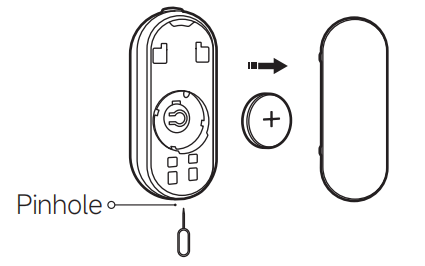
A: When the battery of the remote control for the Xiaomi Zoom Floor Selfie Stick Tripod 62'' is running low, the indicator will blink in red, please replace the battery promptly to avoid malfunction. The battery type is CR1632. Insert a retrieval pin or an appropriate tool into the pinhole on the bottom of the remote control, remove the battery cover, replace the battery, and then put the battery cover back.
Note:
1. When installing the battery, please ensure that the positive pole is oriented outward;
2. The battery model is CR1632, please purchase the compatible batteries from a qualified brand yourself.
9. Q: What phone sizes are compatible with the Xiaomi Zoom Floor Selfie Stick Tripod 62'' phone clip?
A: The phone clip of the Xiaomi Zoom Floor Selfie Stick Tripod 62'' supports devices with widths ranging from 70mm to 85mm, accommodating the vast majority of mainstream smartphones on the market.
10. Q: What is the extension length range of the Xiaomi Zoom Floor Selfie Stick Tripod 62'' telescopic rod?
A: The telescopic rod of the Xiaomi Zoom Floor Selfie Stick Tripod 62'' can be extended from 300mm up to 1600mm.
11. Q: What are the weight and dimensions of the Xiaomi Zoom Floor Selfie Stick Tripod 62''?
A: The Xiaomi Zoom Floor Selfie Stick Tripod 62'' has a net weight of approximately 404 grams. Its dimensions when the rod is collapsed are approximately 300 × 38 × 46mm.
12. Q: Can the remote control of the Xiaomi Zoom Floor Selfie Stick Tripod 62'' be detached, and how is it reinstalled?
A: Xiaomi Zoom Floor Selfie Stick Tripod 62'' can be detached and also reinstalled. To install it, first align the indentation on the top of the remote control with the protrusion inside the remote control slot on the selfie stick and insert it. Then, place the tail end of the remote into the rear part of the slot. The magnetic force will pull the remote securely into the slot, completing the installation.
13. Q: What is the remote control range of the Xiaomi Zoom Floor Selfie Stick Tripod 62''?
A: In an open, unobstructed environment, the remote control of the Xiaomi Zoom Floor Selfie Stick Tripod 62'' can transmit up to a maximum distance of 10 meters.
14. Q: Does the remote control of the Xiaomi Zoom Floor Selfie Stick Tripod 62'' have a reset function?
A: The remote control of the Xiaomi Zoom Floor Selfie Stick Tripod 62'' has a reset function. While the remote control is powered on, press and hold both the shutter button and the function button simultaneously for 3 seconds. This will clear the Bluetooth pairing list and reset the remote control to Bluetooth pairing mode.
15. Q: How to unfold the tripod and phone clip of the Xiaomi Zoom Floor Selfie Stick Tripod 62''?
A: To unfold the tripod and phone clip of the Xiaomi Zoom Floor Selfie Stick Tripod 62'', please refer to the following steps:
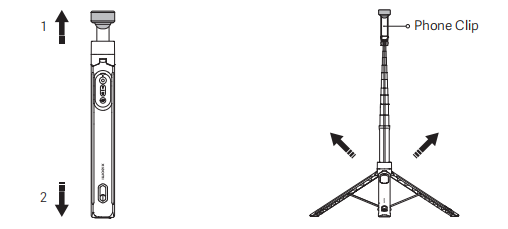
1. Pull out the phone clip: Pull out the phone clip along with the telescopic rod from the top of the selfie stick tripod;
2. Unfold the tripod: After pulling out the phone clip, grasp the telescopic rod and position the selfie stick tripod vertically downward so that the tripod release button of the tripod touches the ground with moderate force, thereby triggering the tripod to unfold;
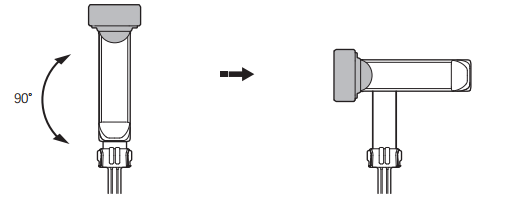
3. Rotate the phone clip: As shown in the figure, the phone clip can be rotated 90° to the left or right.
Note:
The tripod has a spring-loaded unfolding structure. Ensure the area within the tripod's range is clear of obstructions when opening it. When using the product, please exercise caution during operation to prevent accidental injuries. Ensure that children are not permitted to operate the product.
16. Q: How to retract the tripod and phone clip of the Xiaomi Zoom Floor Selfie Stick Tripod 62''?
A: To retract the tripod and phone clip of the Xiaomi Zoom Floor Selfie Stick Tripod 62'', please refer to the following steps:
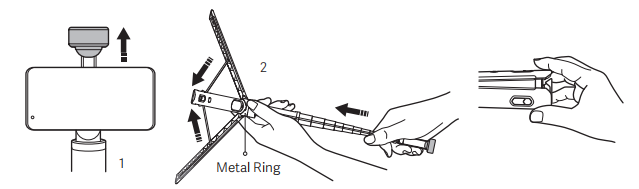
1. Detach the phone from the phone clip;
2. Grasp the section adjacent to the metal ring and push the top of the phone clip to retract the tripod, then squeeze the tripod until you hear a “click” sound to ensure that the tripod and the telescopic rod are fully retracted.
Note:
When retracting the tripod, please proceed with caution and be careful not to get your hands pinched.
17. Q: Is the Xiaomi Zoom Floor Selfie Stick Tripod 62'' waterproof?
A: The Xiaomi Zoom Floor Selfie Stick Tripod 62'' is not designed to be waterproof and does not offer any water resistance.
18. Q: What is the hole on the bottom tripod of the Xiaomi Zoom Floor Selfie Stick Tripod 62'' used for?
A: The hole on the bottom of the tripod is a peg hole. It allows you to secure the Xiaomi Zoom Floor Selfie Stick Tripod 62'' using a peg with a diameter of no more than 9mm. Pegs are not included and need to be purchased separately.
19. Q: What to do if the Xiaomi Zoom Floor Selfie Stick Tripod 62'' fails to power on?
A: If the Xiaomi Zoom Floor Selfie Stick Tripod 62'' fails to power on, please refer to the following steps:
1. Make sure the electric separator has been removed before first use;
2. Check whether the battery cover of the remote control is properly tightened;
3. Ensure you are pressing and holding the power button for at least 3 seconds;
4. If the issue persists, please contact after-sales service for further inspection.
20. Q: What to do if the Xiaomi Zoom Floor Selfie Stick Tripod 62'' cannot connect to phone via Bluetooth?
A: If the Xiaomi Zoom Floor Selfie Stick Tripod 62'' cannot connect to phone via Bluetooth, please refer to the following steps:
1. Check the connection method: Ensure you are connecting to the correct Bluetooth name, which is “XMZPG-Z”, and that the connection distance is within the maximum Bluetooth range of about 10 meters;
2. Check battery status: If the red indicator light is flashing, the battery is low. Replace the button battery (CR1632) with a new one;
3. Check for previous device pairing: If the selfie stick is already paired with another device, delete “XMZPG-Z” from the Bluetooth list on the previously paired phone. The remote control will then re-enter pairing mode, and you can connect it to the new phone;
4. Try another phone or mobile device to see if the issue is device-specific;
5. Check the surrounding environment: If there are too many Bluetooth devices nearby, interference can occur. Try connecting in a different environment;
6. Contact after-sales service for further inspection if the problem persists.
21. Q: What to do if the Xiaomi Zoom Floor Selfie Stick Tripod 62'' cannot take photos?
A: If the Xiaomi Zoom Floor Selfie Stick Tripod 62'' cannot take photos, please refer to the following steps:
1. Check whether the product is powered on properly;
2. Confirm that the selfie stick is successfully connected to the phone and that the connection distance is within range (within 10 meters);
3. Restart your phone;
4. Try using a different phone or mobile device;
5. If the issue persists, contact after-sales service for further assistance.
22. Q: What to do if the Xiaomi Zoom Floor Selfie Stick Tripod 62'' cannot perform zooming?
A: If the Xiaomi Zoom Floor Selfie Stick Tripod 62'' cannot perform zooming, please refer to the following steps:
1. Ensure the product is powered on properly;
2. Check whether the selfie stick is connected to the phone and within the effective Bluetooth range (up to 10 meters);
3. Verify if you're trying to zoom while using the front camera, and this product only supports zooming with the rear camera;
4. Restart your phone;
5. Try connecting to a different phone or mobile device;
6. If the issue persists, please contact after-sales service for inspection.
23. Q: How to use the cold shoe mount on the Xiaomi Zoom Floor Selfie Stick Tripod 62''?
A: To use the cold shoe mount on the Xiaomi Zoom Floor Selfie Stick Tripod 62'', rotate and open the top cover and attach the compatible fill light and other devices to the cold shoe mount.
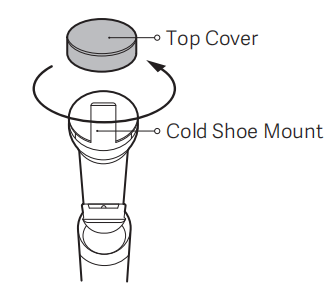
Note:
When rotating the top cover, grip the phone clip firmly to prevent damage from excessive rotation of the telescopic rod.
24. Q: What to do if the remote control, top cover, or storage bag of the Xiaomi Zoom Floor Selfie Stick Tripod 62'' is lost or damaged?
A: These accessories of the Xiaomi Zoom Floor Selfie Stick Tripod 62'' are not available for sale on the official website. Please contact the after-sales service center for assistance.
1. Q: What are the selling points of the Xiaomi Zoom Floor Selfie Stick Tripod 62''?
A: The selling points of the Xiaomi Zoom Floor Selfie Stick Tripod 62'' are as follows:
1. 62 inches floor-standing tripod simulates eye-level height for more natural angles during live streaming and photography;
2. Magnetic Bluetooth remote control with low-power Bluetooth BT4.2, detachable magnetic design makes it easy to attach and remove;
3. 5-button full-function remote control;
4. One-click spring-open tripod with patented design, enabling one-handed operation and improving experience;
5. Auxiliary peg hole design for better adaptation to various outdoor surfaces;
6. External cold shoe mount for expansion;
7. Reflective strip on the tripod help locate the product easily in low-light outdoor environments;
8. Integrated foldable design for easy storage and portability;
9. Aluminum alloy pole for a lighter build and smooth extension.
2. Q: What are the usage scenarios of the Xiaomi Zoom Floor Selfie Stick Tripod 62''?
A: The usage scenarios of the Xiaomi Zoom Floor Selfie Stick Tripod 62'' are as follows:
1. It can be used for handheld mobile phone shooting, especially when a wider and larger frame is needed;
2. It is suitable for solo travel, allowing you to take selfies without assistance and easily control the shooting angle and composition;
3. It can be used indoors as a tripod for video live streaming or fixed-position video shooting, with adjustable height for better framing;
4. It is also ideal for outdoor use as a tripod for live streaming or fixed shooting, with features designed for easy stabilization and quick location in low-light environments.
3. Q: What materials are used in the Xiaomi Zoom Floor Selfie Stick Tripod 62''?
A: The Xiaomi Zoom Floor Selfie Stick Tripod 62'' is made of PC+ABS plastic, silicone, and an anodized aluminum alloy extension rod.
4. Q: What is included in the standard package of the Xiaomi Zoom Floor Selfie Stick Tripod 62''?
A: The standard package of the Xiaomi Zoom Floor Selfie Stick Tripod 62'' includes one selfie stick, one storage bag, and one user manual.
5. Q: What is the appearance of the Xiaomi Zoom Floor Selfie Stick Tripod 62''?
A. The appearance of the Xiaomi Zoom Floor Selfie Stick Tripod 62'' is as follows:
The Xiaomi Zoom Floor Selfie Stick Tripod 62'' is a versatile accessory designed to provide stable and convenient smartphone photography and videography. It features a telescopic rod integrated with a tripod for secure placement, along with a dedicated slot for the remote control, a standby button, an indicator, shutter and zoom controls (T/W buttons), a function button for switching modes and a phone clip.
The product is equipped with a reflective strip for enhanced visibility, a peg hole for stable outdoor mounting, and a tripod release button for detaching the tripod base.
Note:
1. The product can be secured using a peg, with a diameter of no more than 9 mm, inserted through the peg hole. Please purchase the peg on your own;
2. Illustrations of product and accessories are for reference purposes only. Actual product and functions vary due to product enhancements.
Frequently Asked Questions
1. Q: What smartphones are compatible with the Xiaomi Zoom Floor Selfie Stick Tripod 62''?
A: The smartphones are compatible with the Xiaomi Zoom Floor Selfie Stick Tripod 62'' are as follows:
1. For Android 6.0 and above / iOS systems, the default function is photo-taking only;
2. Currently, only rear camera zoom is supported, and this requires a Xiaomi or REDMI phone running Android 10, MIUI 12 or above, and using the default Camera APP;
3. Certain functions such as zoom, camera flipping, and mode switching are not supported on iOS systems.
2. Q: How to connect the Xiaomi Zoom Floor Selfie Stick Tripod 62'' to a phone?
A: To connect the Xiaomi Zoom Floor Selfie Stick Tripod 62'' to a phone, please refer to the following steps:
First-time connection:
Remove the remote control from the stick and pull out the electric separator from the battery compartment. Press and hold the standby button on the remote for 3 seconds to power it on. The indicator will start flashing in blue, indicating that it is in Bluetooth pairing mode. On your phone, go to the Bluetooth settings interface, find the device named "XMZPG-Z", and tap to connect.
Bluetooth reconnection:
After the remote control restarts, it will automatically attempt to reconnect to the last successfully paired phone. If reconnection fails, it will re-enter Bluetooth search mode and can be manually paired again.
3. Q: What are the functions of the buttons on the Xiaomi Zoom Floor Selfie Stick Tripod 62''?
A: The functions of the buttons on the Xiaomi Zoom Floor Selfie Stick Tripod 62'' are as follows:
1. Standby Button:
Press and hold for three seconds: Power on/off.
2. Function Button:
Press: Switch between front and rear cameras and;
Two consecutive presses: Cycle between photo and video recording.
3. Shutter Button:
Press: Take a photo; start or stop recording;
Press and hold: Take a short video or burst photos.
4. Zoom T Button:
Press: Zoom in by one level;
Press and hold: Zoom in continuously.
5. Zoom W Button:
Press: Zoom out by one level;
Press and hold: Zoom out continuously.
Note:
1. The remote control offers full functionality on Xiaomi and REDMI phones running Xiaomi HyperOS. Compatibility and functions vary for iOS and Android devices;
2. The product only supports zooming for the rear camera of the phone.
4. Q: What do the indicator statuses on the Xiaomi Zoom Floor Selfie Stick Tripod 62'' mean?
A: The indicator on the Xiaomi Zoom Floor Selfie Stick Tripod 62'' shows the following statuses:
1. Blinking in blue: Bluetooth waiting for connection;
2. Breathing in blue: Automatic Bluetooth reconnection in progress;
3. Keeping in white for 5 seconds: Bluetooth connected;
4. Keeping in white for 1 second: Button function triggered;
5. Blinking in white 3 times: Powering off;
6. Blinking in red: Low battery.
5. Q: How to connect the Xiaomi Zoom Floor Selfie Stick Tripod 62'' to a new phone?
A: On the previously paired phone, delete or unpair the Bluetooth device named “XMZPG-Z” from the Bluetooth settings. The selfie stick will then automatically enter Bluetooth pairing mode. At this point, open the Bluetooth settings on the new phone, find “XMZPG-Z” in the available devices list, and tap to connect.
6. Q: How to activate sleep mode and power off the Xiaomi Zoom Floor Selfie Stick Tripod 62''?
A: To activate sleep mode and power off the Xiaomi Zoom Floor Selfie Stick Tripod 62'', please refer to the following steps:
Sleep Mode:
1. When the remote control is turned on and connected to the Bluetooth of the phone, it will automatically enter the sleep mode after 5 minutes of inactivity;
2. When the remote control is disconnected from the Bluetooth of the phone, it will enter the sleep mode directly;
3. When the remote control is turned on and not connected to the Bluetooth of the phone, it will automatically enter the sleep mode after 3 minutes in the Bluetooth waiting for connection status;
4. Press any button to wake the remote control from the sleep mode.
Power Off:
1. Press and hold the standby button for 3 seconds, and the indicator will blink in white 3 times and go out, after which the remote control will power off;
2. After 15 minutes in the sleep mode, the remote control will turn off automatically.
7. Q: What is the battery life of the Xiaomi Zoom Floor Selfie Stick Tripod 62''?
A: The remote control of the Xiaomi Zoom Floor Selfie Stick Tripod 62'' is powered by a button cell battery and uses low-power Bluetooth technology. With a fully charged button cell battery, it can support approximately 30,000 photo captures.
8. Q: What type of button battery does the Xiaomi Zoom Floor Selfie Stick Tripod 62'' use and how to replace it?
A: When the battery of the remote control for the Xiaomi Zoom Floor Selfie Stick Tripod 62'' is running low, the indicator will blink in red, please replace the battery promptly to avoid malfunction. The battery type is CR1632. Insert a retrieval pin or an appropriate tool into the pinhole on the bottom of the remote control, remove the battery cover, replace the battery, and then put the battery cover back.
Note:
1. When installing the battery, please ensure that the positive pole is oriented outward;
2. The battery model is CR1632, please purchase the compatible batteries from a qualified brand yourself.
9. Q: What phone sizes are compatible with the Xiaomi Zoom Floor Selfie Stick Tripod 62'' phone clip?
A: The phone clip of the Xiaomi Zoom Floor Selfie Stick Tripod 62'' supports devices with widths ranging from 70mm to 85mm, accommodating the vast majority of mainstream smartphones on the market.
10. Q: What is the extension length range of the Xiaomi Zoom Floor Selfie Stick Tripod 62'' telescopic rod?
A: The telescopic rod of the Xiaomi Zoom Floor Selfie Stick Tripod 62'' can be extended from 300mm up to 1600mm.
11. Q: What are the weight and dimensions of the Xiaomi Zoom Floor Selfie Stick Tripod 62''?
A: The Xiaomi Zoom Floor Selfie Stick Tripod 62'' has a net weight of approximately 404 grams. Its dimensions when the rod is collapsed are approximately 300 × 38 × 46mm.
12. Q: Can the remote control of the Xiaomi Zoom Floor Selfie Stick Tripod 62'' be detached, and how is it reinstalled?
A: Xiaomi Zoom Floor Selfie Stick Tripod 62'' can be detached and also reinstalled. To install it, first align the indentation on the top of the remote control with the protrusion inside the remote control slot on the selfie stick and insert it. Then, place the tail end of the remote into the rear part of the slot. The magnetic force will pull the remote securely into the slot, completing the installation.
13. Q: What is the remote control range of the Xiaomi Zoom Floor Selfie Stick Tripod 62''?
A: In an open, unobstructed environment, the remote control of the Xiaomi Zoom Floor Selfie Stick Tripod 62'' can transmit up to a maximum distance of 10 meters.
14. Q: Does the remote control of the Xiaomi Zoom Floor Selfie Stick Tripod 62'' have a reset function?
A: The remote control of the Xiaomi Zoom Floor Selfie Stick Tripod 62'' has a reset function. While the remote control is powered on, press and hold both the shutter button and the function button simultaneously for 3 seconds. This will clear the Bluetooth pairing list and reset the remote control to Bluetooth pairing mode.
15. Q: How to unfold the tripod and phone clip of the Xiaomi Zoom Floor Selfie Stick Tripod 62''?
A: To unfold the tripod and phone clip of the Xiaomi Zoom Floor Selfie Stick Tripod 62'', please refer to the following steps:
1. Pull out the phone clip: Pull out the phone clip along with the telescopic rod from the top of the selfie stick tripod;
2. Unfold the tripod: After pulling out the phone clip, grasp the telescopic rod and position the selfie stick tripod vertically downward so that the tripod release button of the tripod touches the ground with moderate force, thereby triggering the tripod to unfold;
3. Rotate the phone clip: As shown in the figure, the phone clip can be rotated 90° to the left or right.
Note:
The tripod has a spring-loaded unfolding structure. Ensure the area within the tripod's range is clear of obstructions when opening it. When using the product, please exercise caution during operation to prevent accidental injuries. Ensure that children are not permitted to operate the product.
16. Q: How to retract the tripod and phone clip of the Xiaomi Zoom Floor Selfie Stick Tripod 62''?
A: To retract the tripod and phone clip of the Xiaomi Zoom Floor Selfie Stick Tripod 62'', please refer to the following steps:
1. Detach the phone from the phone clip;
2. Grasp the section adjacent to the metal ring and push the top of the phone clip to retract the tripod, then squeeze the tripod until you hear a “click” sound to ensure that the tripod and the telescopic rod are fully retracted.
Note:
When retracting the tripod, please proceed with caution and be careful not to get your hands pinched.
17. Q: Is the Xiaomi Zoom Floor Selfie Stick Tripod 62'' waterproof?
A: The Xiaomi Zoom Floor Selfie Stick Tripod 62'' is not designed to be waterproof and does not offer any water resistance.
18. Q: What is the hole on the bottom tripod of the Xiaomi Zoom Floor Selfie Stick Tripod 62'' used for?
A: The hole on the bottom of the tripod is a peg hole. It allows you to secure the Xiaomi Zoom Floor Selfie Stick Tripod 62'' using a peg with a diameter of no more than 9mm. Pegs are not included and need to be purchased separately.
19. Q: What to do if the Xiaomi Zoom Floor Selfie Stick Tripod 62'' fails to power on?
A: If the Xiaomi Zoom Floor Selfie Stick Tripod 62'' fails to power on, please refer to the following steps:
1. Make sure the electric separator has been removed before first use;
2. Check whether the battery cover of the remote control is properly tightened;
3. Ensure you are pressing and holding the power button for at least 3 seconds;
4. If the issue persists, please contact after-sales service for further inspection.
20. Q: What to do if the Xiaomi Zoom Floor Selfie Stick Tripod 62'' cannot connect to phone via Bluetooth?
A: If the Xiaomi Zoom Floor Selfie Stick Tripod 62'' cannot connect to phone via Bluetooth, please refer to the following steps:
1. Check the connection method: Ensure you are connecting to the correct Bluetooth name, which is “XMZPG-Z”, and that the connection distance is within the maximum Bluetooth range of about 10 meters;
2. Check battery status: If the red indicator light is flashing, the battery is low. Replace the button battery (CR1632) with a new one;
3. Check for previous device pairing: If the selfie stick is already paired with another device, delete “XMZPG-Z” from the Bluetooth list on the previously paired phone. The remote control will then re-enter pairing mode, and you can connect it to the new phone;
4. Try another phone or mobile device to see if the issue is device-specific;
5. Check the surrounding environment: If there are too many Bluetooth devices nearby, interference can occur. Try connecting in a different environment;
6. Contact after-sales service for further inspection if the problem persists.
21. Q: What to do if the Xiaomi Zoom Floor Selfie Stick Tripod 62'' cannot take photos?
A: If the Xiaomi Zoom Floor Selfie Stick Tripod 62'' cannot take photos, please refer to the following steps:
1. Check whether the product is powered on properly;
2. Confirm that the selfie stick is successfully connected to the phone and that the connection distance is within range (within 10 meters);
3. Restart your phone;
4. Try using a different phone or mobile device;
5. If the issue persists, contact after-sales service for further assistance.
22. Q: What to do if the Xiaomi Zoom Floor Selfie Stick Tripod 62'' cannot perform zooming?
A: If the Xiaomi Zoom Floor Selfie Stick Tripod 62'' cannot perform zooming, please refer to the following steps:
1. Ensure the product is powered on properly;
2. Check whether the selfie stick is connected to the phone and within the effective Bluetooth range (up to 10 meters);
3. Verify if you're trying to zoom while using the front camera, and this product only supports zooming with the rear camera;
4. Restart your phone;
5. Try connecting to a different phone or mobile device;
6. If the issue persists, please contact after-sales service for inspection.
23. Q: How to use the cold shoe mount on the Xiaomi Zoom Floor Selfie Stick Tripod 62''?
A: To use the cold shoe mount on the Xiaomi Zoom Floor Selfie Stick Tripod 62'', rotate and open the top cover and attach the compatible fill light and other devices to the cold shoe mount.
Note:
When rotating the top cover, grip the phone clip firmly to prevent damage from excessive rotation of the telescopic rod.
24. Q: What to do if the remote control, top cover, or storage bag of the Xiaomi Zoom Floor Selfie Stick Tripod 62'' is lost or damaged?
A: These accessories of the Xiaomi Zoom Floor Selfie Stick Tripod 62'' are not available for sale on the official website. Please contact the after-sales service center for assistance.
Does it help?
Yes
No