

Xiaomi Home Secure 3.0 FAQ
Overview
Q1: What is the Xiaomi Home Secure?
A: Xiaomi Home Secure is a cloud storage service provided by Xiaomi for Xiaomi smart cameras connected to the Xiaomi Home App. It is a security monitoring and cloud storage feature developed based on motion detection, human detection, and other technologies.
Q2: What can Xiaomi Home Secure be used for?
A: 1. Security monitoring and important evidence preservation: Xiaomi Home Secure is not only used for home security but is also widely adopted in stores, factory workshops, training rooms, offices, and other locations requiring security monitoring;
2. Capturing precious moments: Whether it's your parents, children, or pets, if you are unable to be present or view the live stream in real-time, Xiaomi Home Secure helps record and preserve important moments of life.
3. Cloud storage with unlimited space: Even if the device is lost, you can still access stored videos anytime from the cloud. The service also supports downloading videos to the Xiaomi Home App.
Q3: Will my camera start recording when it detects movement of a person or an object?
A: Yes. Xiaomi Home Secure features 24-hour real-time smart monitoring technology. When the slightest movement of a person, pet, or object is detected in your camera's field of view (FoV), the camera will automatically start recording and upload the encrypted video to Xiaomi Cloud. Please note that the video will not be recorded unless motion is detected in the FoV.
Q4: What is the difference between 7-day rolling storage and 30-day rolling storage?
A: The number of days (7 or 30) refers to how long the videos are stored in the cloud.
For example, if you purchase a 7-day event video history plan on January 1, 2019, the system will store videos from January 1 to January 7. On January 8, the January 1 video will be automatically deleted, and footage from January 2 to January 8 will be stored.
Each storage plan works the same way, giving you the freedom to choose whichever plan suits you best. If a video is important, you can download it to the Xiaomi Home App for safekeeping.
Q5: Are purchases of Xiaomi Home Secure refundable?
A: As Xiaomi Home Secure is a virtual product, please understand that we do not offer any refund after you have purchased it successfully.
Purchasing Guide
Q1: How to purchase Xiaomi Home Secure?
A: If you haven’t purchased Xiaomi Home Secure before, go to the camera’s home interface, tap the three-dot icon in the upper right corner, then select [Xiaomi Home Secure] to enter the purchase interface.
Q2: When does the Xiaomi Home Secure service become effective after purchase? How is the service duration calculated?
A: The service becomes effective immediately after a successful purchase. Once activated, any detected motion events will be uploaded to the cloud for storage.
The subscription duration is displayed at the time of purchase. If you do not have an active Xiaomi Home Secure subscription, the service starts from the time of purchase. For example, if you purchase a 7-day monthly plan on June 5, 2018, at 11:31 AM, the service will be valid until July 5, 2018, at 11:31 AM.
Q3: What happens if I purchase a new Xiaomi Home Secure plan before my current plan expires?
A: The newly purchased plan takes effect immediately, but will only start after the current plan expires.
For example, if your existing plan expires on June 5, 2019, at 11:31 AM, and you purchase a 7-day plan before then, the new plan will start on June 5, 2019, at 11:31 AM and will be valid until July 5, 2019, at 11:31 AM.
Q4: Is it possible to have different cloud storage durations for the current and newly purchased Xiaomi Home Secure service?
A: Yes. When your current subscription expires, cloud videos will be deleted in accordance with the rules of your previous plan. The new subscription will store videos based on the newly chosen plan.
For example, if you are currently using a 30-day rolling storage service and purchase a new 7-day rolling storage service, when the 30-day rolling storage service expires, videos from 30 days ago will start being deleted the next day. This process will continue until all videos from the expired service are deleted after 30 days. Once the 7-day rolling storage service takes effect, it will begin storing videos on a rolling basis for the most recent 7 days.
Q5: Why can't iPhone enable auto-renewal after changing the Xiaomi account?
A: Changing your Xiaomi account breaks the link between the camera and the original account. It is recommended not to change your Xiaomi account after enabling Xiaomi Home Secure. If you must switch accounts, first cancel the auto-renewal on the old account, then enable it again with the new account.
Q6: How to disable automatic renewal for Xiaomi Home Secure?
A: Android devices: Open Google Play Store >> tap the profile icon >> [Payments & subscriptions] >> [Subscriptions] >> find Xiaomi Home Secure and cancel it.
iOS devices: Open [Settings] >> [Apple ID] >> [Subscriptions] >> find Xiaomi Home Secure and cancel it.
iOS devices: Open [Settings] >> [Apple ID] >> [Subscriptions] >> find Xiaomi Home Secure and cancel it.
Using Guide
Q1: Can I still view cloud videos in Xiaomi Home Secure after my subscription expires?
A: No new videos will be uploaded after the subscription expires. Previously stored videos will be deleted according to the rolling storage rules.
Q2: How to download or delete cloud videos in Xiaomi Home Secure?
A: Videos can be deleted or downloaded in Xiaomi Home Secure. Go to the Xiaomi Home App >> select [Device card] >> tap [Storage management] >> select [Cloud] >> you can tap [Delete] or [Download] on the Xiaomi Home Secure interface to delete or download the video. Downloaded videos can only be accessed within the Xiaomi Home App.
Q3: If the device is unbound and bound to another account, will the videos be viewed in the cloud?
A: No. Xiaomi Home Secure links the device to the original Xiaomi account. If the device is unbound and re-linked to another account, the new account cannot access the previous account's videos.
Q4: What to do if the videos fail to upload to the Xiaomi Home Secure?
A: The process of uploading videos to the cloud is greatly affected by your network connection.
It will upload a 1080P-resolution video (if your device's highest resolution is 720P, we will upload 720P) to the cloud when network conditions are good. With a poor connection, take temporary measures to reduce resolution based on the network situation and try to ensure the integrity of the uploaded video. If the video still cannot be uploaded adequately after the resolution is reduced, it will be lost.
It is recommended to ensure an upload speed of at least 4 Mbps and to avoid connecting too many devices to the network at the same time.
Q5: What is the difference between Xiaomi Home Secure and Home Surveillance?
A: Xiaomi Home Secure and Home Surveillance both provide motion detection and video recording functionality. The difference is that Xiaomi Home Secure provides continuous 24-hour video recording from the moment motion is detected until it stops, whereas Home Surveillance records 9-second video clips for alarm notifications.
Q6: Do I still need Xiaomi Home Secure if I have an SD card?
A: Yes. SD cards store videos locally, which can be lost or damaged. Xiaomi Home Secure is safer, offering unlimited storage and remote access. Videos uploaded and stored in the cloud are not at risk of being lost due to SD card damage and, like the SD card, support playback.
Q7: Why is there no Alarm interval option after purchasing the Xiaomi Home Secure on the Xiaomi Smart Camera?
A: After enabling the Xiaomi Home Secure for the camera, it is normal that there will not be the Alarm interval option when you set the Home Surveillance.
Since Xiaomi Home Secure is enabled, any motion detected within the camera's surveillance range will trigger a record without waiting for a cool-down period, so there is no need to set an alarm interval.
Note:
Low-power devices will not increase the recording time, but only the number of recording days, such as the Mi Wireless Outdoor Security Camera 1080p.
Since Xiaomi Home Secure is enabled, any motion detected within the camera's surveillance range will trigger a record without waiting for a cool-down period, so there is no need to set an alarm interval.
Note:
Low-power devices will not increase the recording time, but only the number of recording days, such as the Mi Wireless Outdoor Security Camera 1080p.
Q8: How to share the video in the Xiaomi Home Secure on the Xiaomi Smart Camera?
A: To share the videos in Xiaomi Home Secure, please refer to the following steps:
Open the Xiaomi Home App >> select [Device Card] >> tap [Storage management], select the video you want to share and download it >> select [Local] >> tap [Share].
Q9: How to check the video in the Xiaomi Home Secure of the Xiaomi Smart Camera?
A: To check the video in Xiaomi Home Secure, please refer to the following steps:
Go to the Xiaomi Home App >> select [Device Card] >> tap [Storage management] >> select [Cloud].
To set Xiaomi Home Secure, you can refer to the steps below:
Go to the Xiaomi Home App, select [Device Card], and tap the three-dot icon at the upper right corner of the interface.
Q10: Is there a limit on recording videos after activating Xiaomi Home Secure on the Xiaomi Smart Camera?
A: After subscribing to the Xiaomi Home Secure, you can record videos ranging from a minimum of 30 seconds to a maximum of 30 minutes per segment. If additional motion events occur, a new video segment will start recording.
Note:
Low-power devices will not increase the recording time, but only the number of recording days, such as the Mi Wireless Outdoor Security Camera 1080p.
Note:
Low-power devices will not increase the recording time, but only the number of recording days, such as the Mi Wireless Outdoor Security Camera 1080p.
Transfer and Share
Q1: Can Xiaomi Home Secure be transferred to another Xiaomi account?
A: No. To protect your privacy, the Xiaomi Home Secure plan is bound to the original Xiaomi account and cannot be transferred.
Q2: Can Xiaomi Home Secure be transferred to another device under the same account?
A: Not currently, but this feature is under development.
Q3: Can the shared Xiaomi account purchase Xiaomi Home Secure?
A: Devices shared from other accounts to the current account do not support purchasing Xiaomi Home Secure under the current account. If needed, please operate under the original account.
Subscription
Q1: Will the Xiaomi Home Secure subscription be automatically canceled after unbinding the device?
A: According to the service rules, if a device with an active auto-renewing subscription is unbound, the subscription will continue, and the corresponding fees will still be charged according to the billing cycle. If you no longer intend to use the service, please manually cancel the auto-renewal subscription before unbinding the device.
Q2: What is the auto-renewal billing time of Xiaomi Home Secure?
A: After subscribing to the Xiaomi Home Secure auto-renewal service:
1. iOS App Store: A payment request is initiated 24 hours before the subscription period expires. The exact completion time depends on the App Store's billing process.
2. Google Play Store: Within 24 hours before the renewal date, you can see a payment authorization in your Google Play payment method, but the system will only charge you on the actual renewal date.
1. iOS App Store: A payment request is initiated 24 hours before the subscription period expires. The exact completion time depends on the App Store's billing process.
2. Google Play Store: Within 24 hours before the renewal date, you can see a payment authorization in your Google Play payment method, but the system will only charge you on the actual renewal date.
Q3: What is the auto-renewal activation time of Xiaomi Home Secure?
A: After the first successful purchase, the plan takes effect immediately. For subsequent months, the next billing cycle will activate on the same date as the initial purchase.
There are some special cases:
1. If auto-renewal is activated at the end of the month (e.g., August 31), the renewal for September and subsequent months will occur on the 30th.
2. If an active Xiaomi Home Secure order is in place when auto-renewal is activated, the billing schedule remains unchanged. The next payment will still be deducted one day earlier in the following month (and so on). The plan's activation time follows the order of purchase.
For example, if a Xiaomi Home Secure plan is active and set to expire on August 31, and you subscribe to auto-renewal on June 1 via the iOS App Store, the next automatic payment will be deducted on June 30. However, the auto-renewal plan will only take effect on September 1. The expiration date will be pushed back accordingly based on the number of successful renewals.
There are some special cases:
1. If auto-renewal is activated at the end of the month (e.g., August 31), the renewal for September and subsequent months will occur on the 30th.
2. If an active Xiaomi Home Secure order is in place when auto-renewal is activated, the billing schedule remains unchanged. The next payment will still be deducted one day earlier in the following month (and so on). The plan's activation time follows the order of purchase.
For example, if a Xiaomi Home Secure plan is active and set to expire on August 31, and you subscribe to auto-renewal on June 1 via the iOS App Store, the next automatic payment will be deducted on June 30. However, the auto-renewal plan will only take effect on September 1. The expiration date will be pushed back accordingly based on the number of successful renewals.
Q4: What to do if the auto-renewal payment of Xiaomi Home Secure fails?
A: iOS App Store: If the system's first attempt at automatic payment fails, it will retry daily for 16 consecutive days using the payment method linked to the App Store. If all 16 attempts fail, the system will automatically cancel the Xiaomi Home Secure auto-renewal subscription.
Google Play Store: If the payment issue is not resolved within 30 days, the system will automatically cancel the subscription.
Q5: Why did the auto-renewal subscription of Xiaomi Home Secure fail?
A: If you encounter an error while trying to subscribe to auto-renewal during the Apple/Google payment process, it is due to the following reasons:
1. If you changed to a different Xiaomi account to try to activate auto-renewal, it is recommended to continue using the original account that first activated the auto-renewal subscription to subscribe to Xiaomi Home Secure.
2. If you have subscribed to more than 29 devices, there will be a subscription limit. It is recommended to use the same Xiaomi account to enable auto-renewal for one or multiple devices. If the issue persists, you can contact the after-sales service center for assistance.
1. If you changed to a different Xiaomi account to try to activate auto-renewal, it is recommended to continue using the original account that first activated the auto-renewal subscription to subscribe to Xiaomi Home Secure.
2. If you have subscribed to more than 29 devices, there will be a subscription limit. It is recommended to use the same Xiaomi account to enable auto-renewal for one or multiple devices. If the issue persists, you can contact the after-sales service center for assistance.
Q6: Why doesn’t the auto-renewal subscription of the Xiaomi Home Secure take effect immediately?
A: If you receive a message during the iOS App Store payment process indicating that the auto-renewal service has been subscribed to, but there is no payment record generated, and the Xiaomi Home Secure order does not take effect for the device in the Xiaomi Home App.
Please refer to the following reasons:
You canceled the auto-renewal subscription for this device or other devices earlier in the month, or you switched to a different Xiaomi account. Due to iOS App Store’s payment rules, although your subscription was successful, the payment will not be charged immediately, and the plan will not be activated. The service will start in the next month from the last cancellation date.
It is recommended to use the same Xiaomi account for auto-renewal subscriptions on one or more devices. If the issue persists, please contact the after-sales service center for assistance.
Please refer to the following reasons:
You canceled the auto-renewal subscription for this device or other devices earlier in the month, or you switched to a different Xiaomi account. Due to iOS App Store’s payment rules, although your subscription was successful, the payment will not be charged immediately, and the plan will not be activated. The service will start in the next month from the last cancellation date.
It is recommended to use the same Xiaomi account for auto-renewal subscriptions on one or more devices. If the issue persists, please contact the after-sales service center for assistance.
Q7: How to resubscribe to Xiaomi Home Secure after canceling?
A: If the current device has already activated the Xiaomi Home Secure plan and you cancel the auto-renewal at a certain point, reconfirming the subscription in the same month (either by reactivating it in the subscription list or purchasing it again on the Xiaomi Home Secure purchase interface) will only reactivate the iOS auto-renewal subscription. It does not mean that payment will be charged immediately.
If the auto-renewal cycle for the device has passed (more than one whole month since the last payment), re-subscribing will charge the fee directly and will automatically renew for the next cycle.
Purchasing and Using Issues
Q1: What to do if Xiaomi Home Secure doesn't take effect after successful payment?
A: If you have successfully made a payment for the Xiaomi Home Secure service through the iOS App Store, and there is a payment record but no corresponding Xiaomi Home Secure order is active in the camera, it is due to communication issues with the iOS App Store or other factors preventing the system from retrieving the activated plan.
Xiaomi Home App will actively work to protect your rights. You can contact the after-sales service center and provide payment-related screenshots and account logs. After the issue is investigated and verified, if it is confirmed that the order was lost, the appropriate Xiaomi Home Secure plan will be added to your device.
Note:
During this period, do not uninstall and reinstall the Xiaomi Home App, as it will affect the investigation.
Xiaomi Home App will actively work to protect your rights. You can contact the after-sales service center and provide payment-related screenshots and account logs. After the issue is investigated and verified, if it is confirmed that the order was lost, the appropriate Xiaomi Home Secure plan will be added to your device.
Note:
During this period, do not uninstall and reinstall the Xiaomi Home App, as it will affect the investigation.
Q2: Will Xiaomi Home Secure transfer to a different Xiaomi account if I change the account?
A: To protect your privacy, the Xiaomi Home Secure service is closely linked to the Xiaomi account used when the service was activated. If your device is unbound, Xiaomi Home Secure will not transfer to another account.
Q3: What to do if issues occur when using Xiaomi Home Secure?
A: If you encounter issues, check your network connection or update your firmware. Poor network conditions can result in incomplete or failed video uploads. If network issues have been ruled out, you can try updating the firmware.
If the issue persists, please go to the Xiaomi Home App >> [Profile] >> [Help & Feedback] >> select the device, then submit feedback.
If the issue persists, please go to the Xiaomi Home App >> [Profile] >> [Help & Feedback] >> select the device, then submit feedback.
Q4: Does the Xiaomi Home Secure support 24/7 recording?
A: Xiaomi Home Secure records only when motion is detected. If you need continuous 24/7 recording, please insert an SD card and go to the Xiaomi Home App >> select device >> tap the three-dot icon in the upper right corner >> tap [Manage storage] >> [SD card status] >> [Recording mode] >> enable [Always record].
Note:
The SD card has a storage limit and needs to be cleaned regularly.
Note:
The SD card has a storage limit and needs to be cleaned regularly.
Q5: How to view expired Xiaomi Home Secure subscriptions' videos before they are deleted?
A: Please navigate to the Xiaomi Home App >> select device >> [Storage management] >> [Cloud] to view available videos.
Q6: How to request an invoice for Xiaomi Home Secure purchases?
A: Invoice is currently not available within the Xiaomi Home App. If you need the related invoice service, please check the email associated with your subscription account.
For purchases via the Google Play Store in the EEA region, VAT invoices can be requested.
Q7: What information is required to issue an invoice for Xiaomi Home Secure on the Xiaomi Smart Camera?
A: 1. User information:
Mi ID, Product model, Payment amount, Shipping address, Name, Phone number and Order number;
2. Invoice information:
2. Invoice information:
Invoice title and Tax number.
Q8: Why are the charging standards of Xiaomi Home Secure different between Android and iOS systems?
A: Due to Apple's payment system on iOS being an international payment method, Apple Pay will charge a 30% channel fee for virtual services. To ensure the standard provision of Xiaomi Home Secure Services, pricing will be adjusted accordingly based on actual circumstances.
If you have an Android phone, it is recommended that you purchase the service on that phone. Ensure that the Xiaomi account, Xiaomi Home Secure, and the camera are all correctly linked.
Q9: Why can't the Home surveillance of the Xiaomi smart camera function normally after the free records end?
A: When you purchase a new Xiaomi smart camera and add it to the Xiaomi Home App for the first time, you are eligible for a 3-month free trial of the Home surveillance feature. However, it’s essential to understand that this feature is closely integrated with the Xiaomi Home Secure. If the free trial ends and Home surveillance stops working, you will need to subscribe to Xiaomi Home Secure to continue using it.
For your reference, here are more details about the Home surveillance feature:
1. Subscribing to Xiaomi Home Secure offers many benefits when using the Home surveillance, such as sending real-time alerts to your phone. You can configure Detection push notifications, Push interval, Sensitivity settings, and more within the feature.
2. If you choose not to subscribe to the Xiaomi Home Secure, you can still store footage by inserting an SD card. However, the Home surveillance will not record properly, and you won't be able to receive the Push notifications it provides.
3. Some earlier models can still use Home surveillance for free due to earlier product strategies. The current Xiaomi Home Secure 3.0 allows you to bind multiple devices to a single Xiaomi account and supports higher-resolution video recording, so we recommend subscribing to Xiaomi Home Secure for a better experience.
For your reference, here are more details about the Home surveillance feature:
1. Subscribing to Xiaomi Home Secure offers many benefits when using the Home surveillance, such as sending real-time alerts to your phone. You can configure Detection push notifications, Push interval, Sensitivity settings, and more within the feature.
2. If you choose not to subscribe to the Xiaomi Home Secure, you can still store footage by inserting an SD card. However, the Home surveillance will not record properly, and you won't be able to receive the Push notifications it provides.
3. Some earlier models can still use Home surveillance for free due to earlier product strategies. The current Xiaomi Home Secure 3.0 allows you to bind multiple devices to a single Xiaomi account and supports higher-resolution video recording, so we recommend subscribing to Xiaomi Home Secure for a better experience.
Note:
The Home surveillance system records only a 9-second video when motion is detected, and there is a 5-minute interval between recordings. To continuously record footage, you need to subscribe to the Xiaomi Home Secure or use an SD card for local storage.
The Home surveillance system records only a 9-second video when motion is detected, and there is a 5-minute interval between recordings. To continuously record footage, you need to subscribe to the Xiaomi Home Secure or use an SD card for local storage.
Q10: How many Xiaomi Home Secure services can I buy?
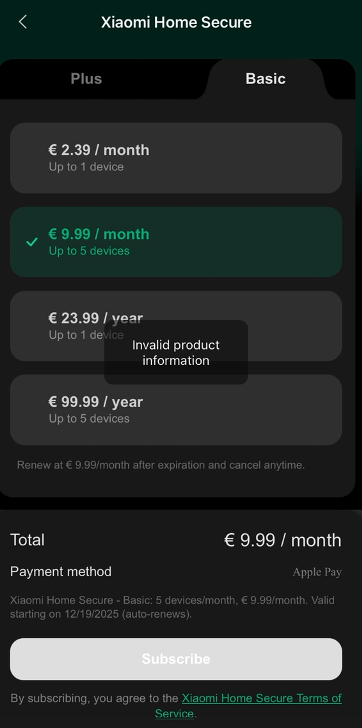
A: Each Xiaomi account can buy up to four Xiaomi Home Secure services. If you try to buy more after reaching this limit, a message saying "Invalid product information" will appear.
Updates of 3.0 Version
Q1: What are the improvements to Xiaomi Home Secure 3.0?
A: Due to the introduction of the new products of Xiaomi smart cameras, such as the dual cameras, the Xiaomi Home Secure 3.0 also updates accordingly to integrate and unify the cloud storage functions, providing a broader device coverage.
Additionally, since subscription prices vary across different countries and regions, the Xiaomi Home Secure 3.0 consolidates the subscription prices into three regional clusters.
Q2: What are the regions supported by the Xiaomi Home Secure 3.0?
A: The Xiaomi Home Secure 3.0 is supported in the following regions:
1. Singapore server cluster:
Basic (7-day rolling cloud storage):
Consecutive monthly (1 device / 5 devices);
Consecutive annually (1 device / 5 devices);
Plus (30-day rolling cloud storage):
Consecutive monthly (1 device / 4 devices / 10 devices);
Consecutive annually (1 device / 4 devices / 10 devices);
2. Europe server cluster:
Basic (7-day rolling cloud storage):
Consecutive monthly (1 device / 5 devices);
Consecutive annually (1 device / 5 devices);
Plus (30-day rolling cloud storage):
Consecutive monthly (1 device / 4 devices / 10 devices);
Consecutive annually (1 device / 4 devices / 10 devices);
3. US-West server cluster:
Basic (7-day rolling cloud storage):
Consecutive monthly (1 device / 5 devices);
Consecutive annually (1 device / 5 devices);
Plus (30-day rolling cloud storage):
Consecutive monthly (1 device / 5 devices);
Consecutive annually (1 device / 5 devices).
1. Singapore server cluster:
Basic (7-day rolling cloud storage):
Consecutive monthly (1 device / 5 devices);
Consecutive annually (1 device / 5 devices);
Plus (30-day rolling cloud storage):
Consecutive monthly (1 device / 4 devices / 10 devices);
Consecutive annually (1 device / 4 devices / 10 devices);
2. Europe server cluster:
Basic (7-day rolling cloud storage):
Consecutive monthly (1 device / 5 devices);
Consecutive annually (1 device / 5 devices);
Plus (30-day rolling cloud storage):
Consecutive monthly (1 device / 4 devices / 10 devices);
Consecutive annually (1 device / 4 devices / 10 devices);
3. US-West server cluster:
Basic (7-day rolling cloud storage):
Consecutive monthly (1 device / 5 devices);
Consecutive annually (1 device / 5 devices);
Plus (30-day rolling cloud storage):
Consecutive monthly (1 device / 5 devices);
Consecutive annually (1 device / 5 devices).
Q3: What are the devices supported by Xiaomi Home Secure 3.0?
A: The following devices will be upgraded:
Xiaomi Outdoor Camera AW200;
Mi Camera 2K Magnetic Mount;
Xiaomi Outdoor Camera AW300;
Xiaomi Smart Camera C301;
Xiaomi Smart Camera C200;
Xiaomi Smart Camera C300;
Xiaomi Smart Camera C400;
Xiaomi Smart Camera C500 Pro;
Mi Home Security Camera 360° 1080p;
Mi 360° Home Security Camera 2K;
Mi 360° Home Security Camera 2K Pro;
Xiaomi Outdoor Camera CW400;
Xiaomi Outdoor Camera CW700S;
Xiaomi Outdoor Camera CW300;
Xiaomi Outdoor Camera BW500;
Xiaomi Solar Outdoor Camera BW400 Pro Set.
Xiaomi Outdoor Camera AW200;
Mi Camera 2K Magnetic Mount;
Xiaomi Outdoor Camera AW300;
Xiaomi Smart Camera C301;
Xiaomi Smart Camera C200;
Xiaomi Smart Camera C300;
Xiaomi Smart Camera C400;
Xiaomi Smart Camera C500 Pro;
Mi Home Security Camera 360° 1080p;
Mi 360° Home Security Camera 2K;
Mi 360° Home Security Camera 2K Pro;
Xiaomi Outdoor Camera CW400;
Xiaomi Outdoor Camera CW700S;
Xiaomi Outdoor Camera CW300;
Xiaomi Outdoor Camera BW500;
Xiaomi Solar Outdoor Camera BW400 Pro Set.
Q4: What are the new features of Xiaomi Home Secure 3.0?
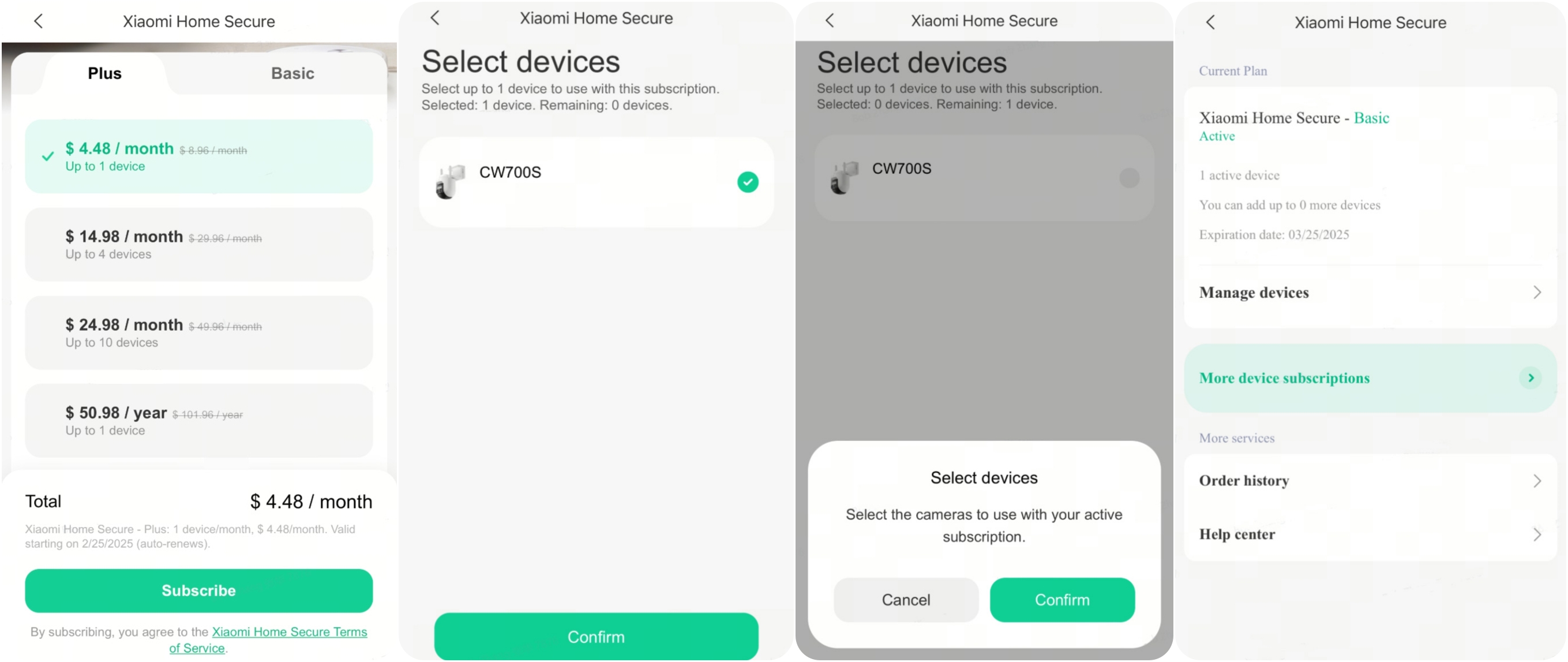
A: 1. Support multi-device subscription:
You can purchase a plan covering multiple devices based on your device pairing quantity. After purchasing, you can select which cameras to activate under the subscription.
Additionally, different membership types support different numbers of devices. Please refer to the document details in question 3 above.
2. Support consecutive annual subscription option:
In addition to consecutive monthly subscriptions, a consecutive yearly subscription option is now available, providing a more cost-effective alternative compared to monthly payments.
You can purchase a plan covering multiple devices based on your device pairing quantity. After purchasing, you can select which cameras to activate under the subscription.
Additionally, different membership types support different numbers of devices. Please refer to the document details in question 3 above.
2. Support consecutive annual subscription option:
In addition to consecutive monthly subscriptions, a consecutive yearly subscription option is now available, providing a more cost-effective alternative compared to monthly payments.
Q5: What are the payment methods of Xiaomi Home Secure 3.0?
A: You can purchase via the App Store for iOS phones or the Google Play Store for Android phones.
Q6: How to switch to the Xiaomi Home Secure 3.0 from the current service?
A: If you have an active subscription currently, you have to cancel the consecutive subscription and wait until it expires before purchasing the new Xiaomi Home Secure 3.0.
You cannot purchase a new service while an existing subscription is active or still in effect.
Does it help?
Yes
No