

How to set the time format on the REDMI Pad SE 8.7?
The time format on the REDMI Pad SE 8.7 refers to how the time is displayed, in the 12-hour format, the 24-hour format, and the Auto format (based on the language of the system). These 3 formats serve the same purpose of indicating the time, but they differ in the way they represent hours. You can select the time format according to your cultural customs and personal preferences.
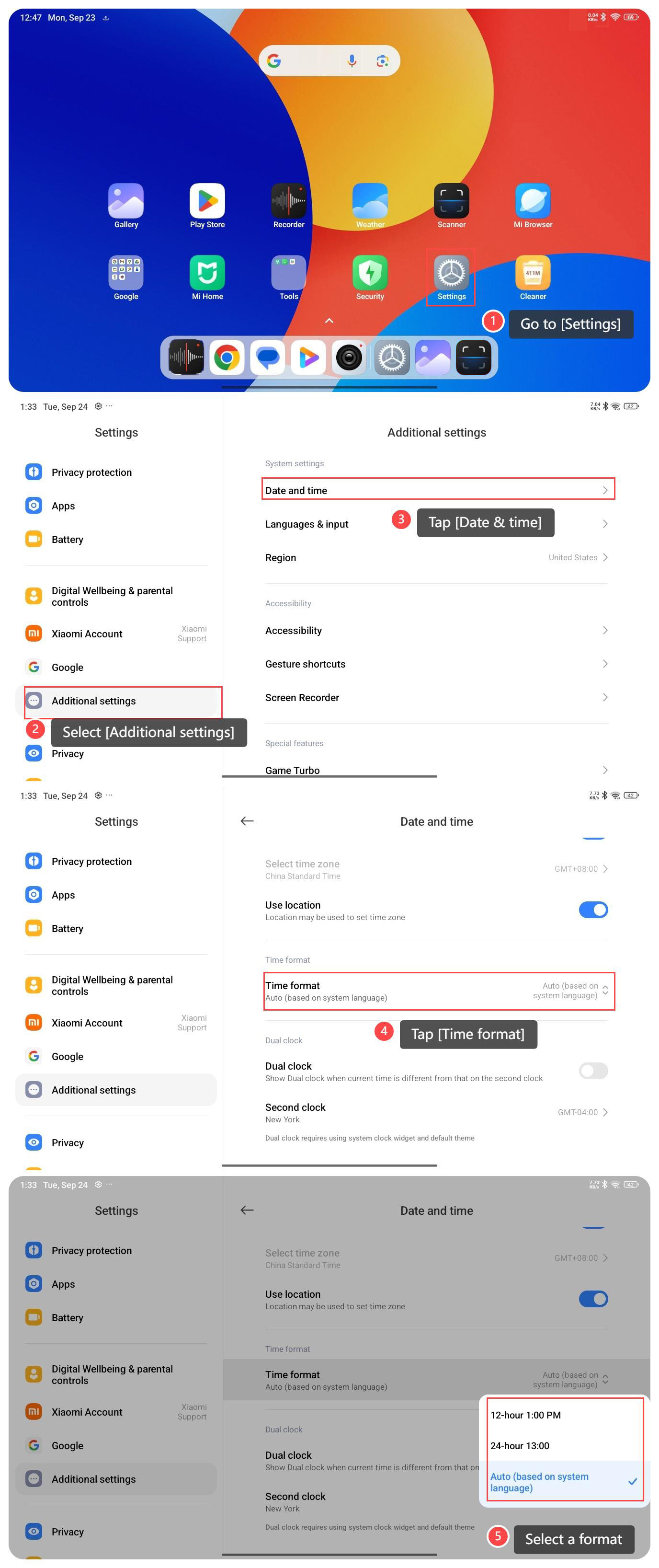
To set the time format on your tablet, please refer to the following steps:
1. Go to [Settings] on your tablet;
2. Select [Additional settings];
3. Tap [Date & time];
4. Tap [Time format], and then you can view three types of time formats;
5. Please select a format based on your personal preference.
To set the time format on your tablet, please refer to the following steps:
1. Go to [Settings] on your tablet;
2. Select [Additional settings];
3. Tap [Date & time];
4. Tap [Time format], and then you can view three types of time formats;
5. Please select a format based on your personal preference.
Does it help?
Yes
No