

How to connect the Xiaomi Outdoor Camera CW300 to the Mi Home/Xiaomi Home APP?
The Xiaomi Outdoor Camera CW300 can access the Mi Home/Xiaomi Home APP by using a wireless notwork or a network cable.
To connect the camera to the Mi Home/Xiaomi Home APP, please take the following steps:
Go to [Mi Home/Xiaomi Home] APP >> tap [+] at the upper right corner >> select [Scan] >> tap [Device reset] >> press and hold on the reset button for about 7 seconds and the reset will be successful when you hear the voice prompt >> tap [Select wireless connection] >> operate according to the prompts on the page >> wait for the binding to be successful.
Note:
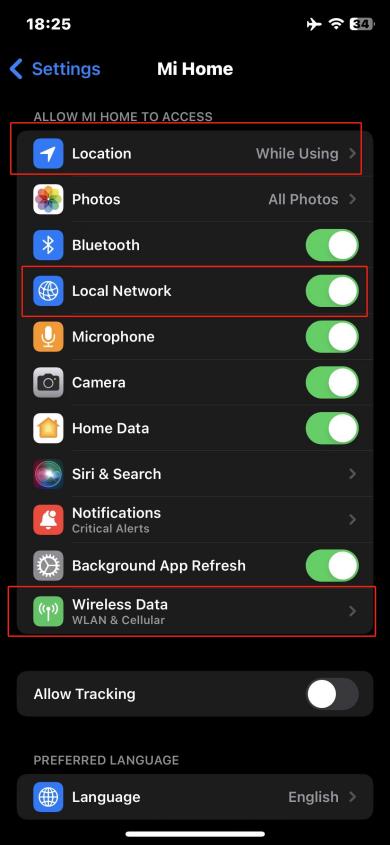
For the Mi Home/Xiaomi Home APP of the iOS system, please turn on the permissions of the Wi-Fi network and the data network. If the following interface pops up during the binding process, please turn on the options of [Location] and [Local Network] for the Mi Home/Xiaomi Home APP, and set the [Wireless Data] option to allow the use of WLAN and cellular data.
Please take the following step to configure the camera on the Mi Home/Xiaomi Home APP:
1. Go to the [Mi Home/Xiaomi Home] APP >> select [Device card] >> tap [...] at the upper right corner >> select [Camera settings] >> tap [Image settings];
2. You can choose to turn on or off the options such as [Timestamp], [Lens distortion correction], [Smart frame], and [Rotate image].
To connect the camera to the Mi Home/Xiaomi Home APP, please take the following steps:
Go to [Mi Home/Xiaomi Home] APP >> tap [+] at the upper right corner >> select [Scan] >> tap [Device reset] >> press and hold on the reset button for about 7 seconds and the reset will be successful when you hear the voice prompt >> tap [Select wireless connection] >> operate according to the prompts on the page >> wait for the binding to be successful.
Note:
For the Mi Home/Xiaomi Home APP of the iOS system, please turn on the permissions of the Wi-Fi network and the data network. If the following interface pops up during the binding process, please turn on the options of [Location] and [Local Network] for the Mi Home/Xiaomi Home APP, and set the [Wireless Data] option to allow the use of WLAN and cellular data.
Please take the following step to configure the camera on the Mi Home/Xiaomi Home APP:
1. Go to the [Mi Home/Xiaomi Home] APP >> select [Device card] >> tap [...] at the upper right corner >> select [Camera settings] >> tap [Image settings];
2. You can choose to turn on or off the options such as [Timestamp], [Lens distortion correction], [Smart frame], and [Rotate image].
Does it help?
Yes
No