

How to adjust the display color of the POCO F6?
Adjusting the display color of the POCO F6 helps the screen adapt to different brightness environments, enhances personalization, improves visual comfort and ensures color accuracy. Additionally, it will improve your using experience.
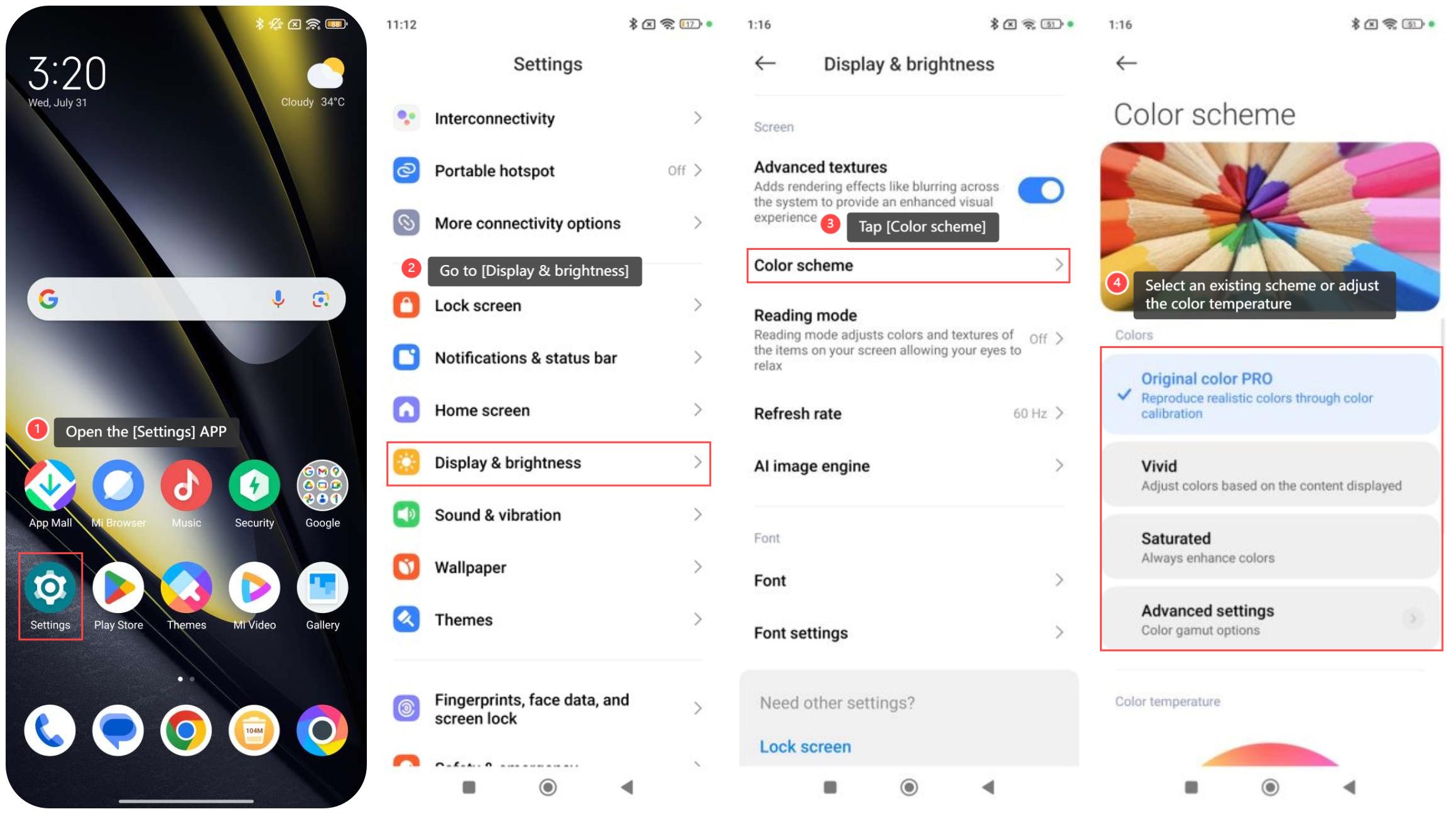
To adjust the display color of the POCO F6, please refer to the following steps:
1. Open the [Settings] APP;
2. Go to [Display & brightness];
3. Tap [Color scheme];
4. Select an existing scheme or adjust the appropriate color according to your preferences.
Note:
1. Reducing the screen's color temperature and brightness in dim environments can reduce eye fatigue while increasing contrast and brightness in bright environments will improve screen visibility;
2. You can optimize screen display effects according to actual needs and environmental conditions to improve your using experience.
To adjust the display color of the POCO F6, please refer to the following steps:
1. Open the [Settings] APP;
2. Go to [Display & brightness];
3. Tap [Color scheme];
4. Select an existing scheme or adjust the appropriate color according to your preferences.
Note:
1. Reducing the screen's color temperature and brightness in dim environments can reduce eye fatigue while increasing contrast and brightness in bright environments will improve screen visibility;
2. You can optimize screen display effects according to actual needs and environmental conditions to improve your using experience.
Does it help?
Yes
No