

How to show the icon labels on the Control center of the POCO F6?
Icon labels of the POCO F6 refer to the text that appears beneath icons on the Control center. These labels provide a brief name of the function represented by the icon. Enabling icon labels can help you quickly identify and understand the purpose of each icon or control in an interface.
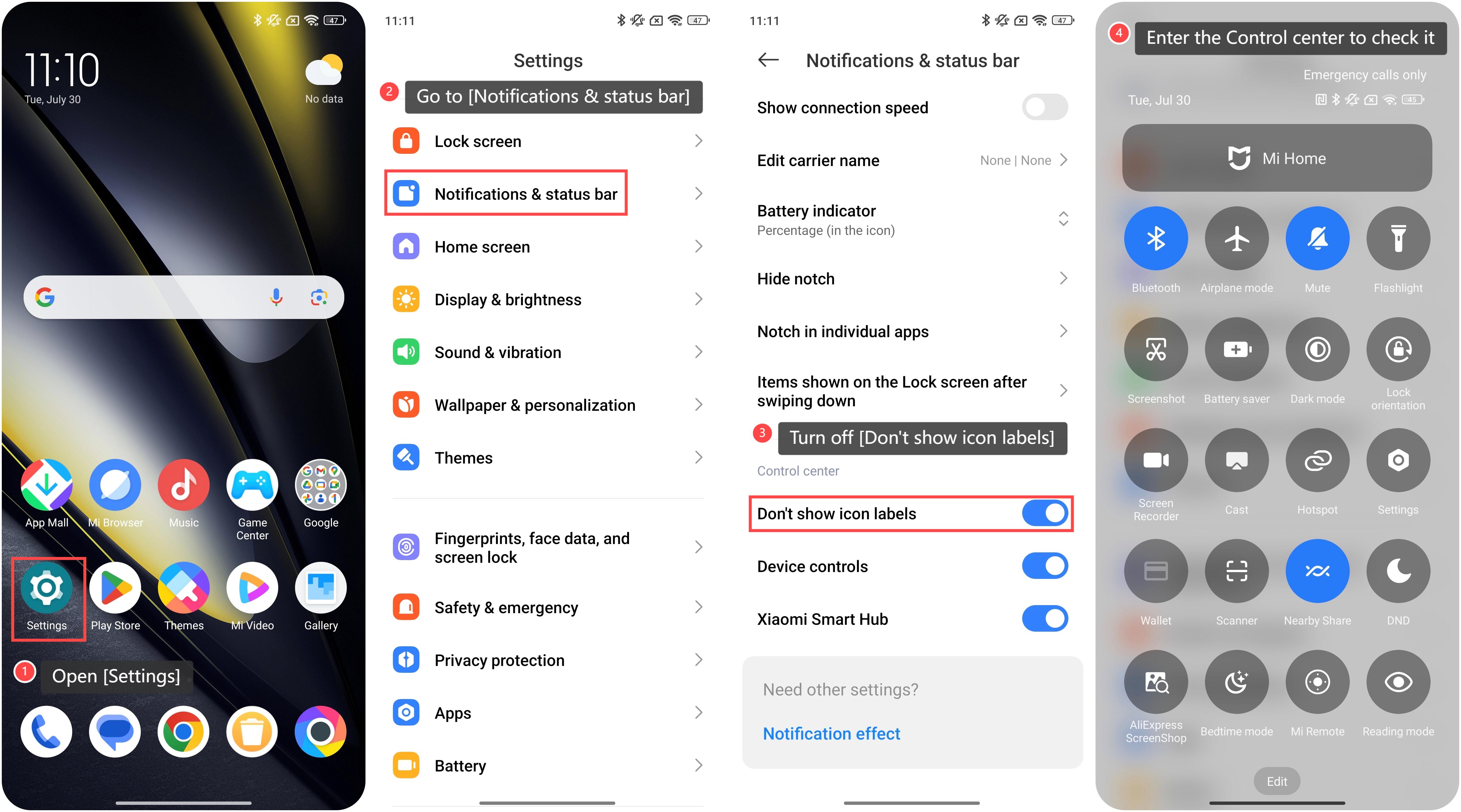
To show the icon labels on the Control center, please refer to the following steps:
1. Open [Settings];
2. Go to [Notifications & status bar];
3. Swipe down to look for the [Don’t show icon labels] option. Turn on this option, your Control center will not show the icon labels. So in order to show the icon labels on the Control center, please turn off this option;
4. Then the labels will be displayed beneath the icons in the Control center. You can swipe down from the top of the screen to enter the Control center to check it.
To show the icon labels on the Control center, please refer to the following steps:
1. Open [Settings];
2. Go to [Notifications & status bar];
3. Swipe down to look for the [Don’t show icon labels] option. Turn on this option, your Control center will not show the icon labels. So in order to show the icon labels on the Control center, please turn off this option;
4. Then the labels will be displayed beneath the icons in the Control center. You can swipe down from the top of the screen to enter the Control center to check it.
Does it help?
Yes
No