

How to clean the dust compartment and filter of the Xiaomi Robot Vacuum S20+?
The steps of cleaning the dust compartment and filter are shown below:
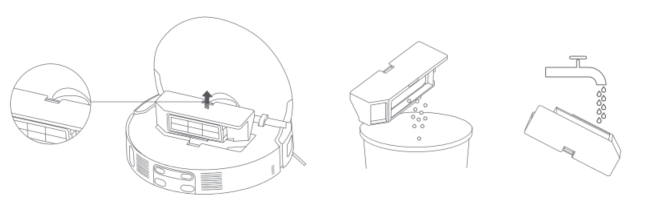
1. Press the release button of the dust compartment to take it out, remove the filter from the filter buckle, and pour out the garbage in the dust compartment. If necessary, you can wash it with water;
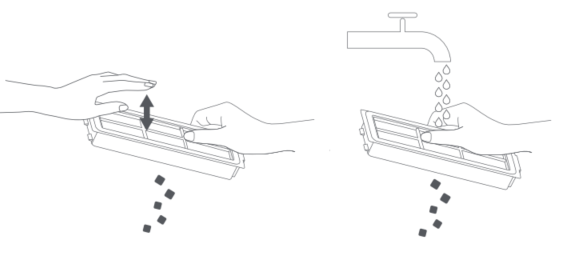
2. Gently tap the filter frame to knock out the dirt, or rinse it with tap water;
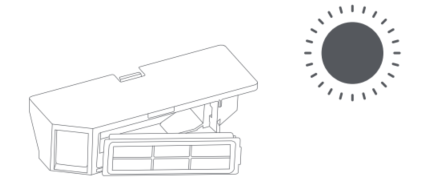
3. Be sure to thoroughly dry the dust compartment and filter before reinstalling them.
The detailed steps are shown in the following pictures:
Note:
1. Do not use a brush or fingers to clean the filter;
2. It is not recommended to wash the filter frequently to avoid damage;
3. Please use clean water to clean the dust compartment and filter, and do not add any detergent;
4. To ensure better dust collection sealing, you can find the dust compartment tight during installation or removal, which is normal. We value every feedback and continuously work to improve the experience.
1. Press the release button of the dust compartment to take it out, remove the filter from the filter buckle, and pour out the garbage in the dust compartment. If necessary, you can wash it with water;
2. Gently tap the filter frame to knock out the dirt, or rinse it with tap water;
3. Be sure to thoroughly dry the dust compartment and filter before reinstalling them.
The detailed steps are shown in the following pictures:
Note:
1. Do not use a brush or fingers to clean the filter;
2. It is not recommended to wash the filter frequently to avoid damage;
3. Please use clean water to clean the dust compartment and filter, and do not add any detergent;
4. To ensure better dust collection sealing, you can find the dust compartment tight during installation or removal, which is normal. We value every feedback and continuously work to improve the experience.
Does it help?
Yes
No