

How to update the firmware and reset the Xiaomi Smart Pet Food Feeder 2?
The Xiaomi Smart Pet Food Feeder 2 is a smart feeder, so you can update the firmware. Please refer to the following steps:
1. Go to [Mi Home/Xiaomi Home] APP;
2. Select [Xiaomi Smart Pet Food Feeder 2];
3. Tap [...];
4. Tap [Firmware update] if there is a new firmware version.
To reset the Xiaomi Smart Pet Food Feeder 2, please refer to the following steps:
Press and hold the reset button with a pin for 7 seconds to reset the Xiaomi Smart Pet Food Feeder 2.
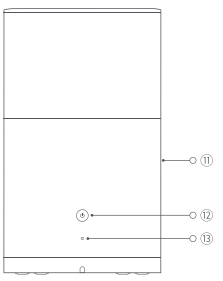
Note:
1. The button ⑬ represents reset button;
2. Too sharp objects to forcefully insert into the reset button will damage the reset button.
1. Go to [Mi Home/Xiaomi Home] APP;
2. Select [Xiaomi Smart Pet Food Feeder 2];
3. Tap [...];
4. Tap [Firmware update] if there is a new firmware version.
To reset the Xiaomi Smart Pet Food Feeder 2, please refer to the following steps:
Press and hold the reset button with a pin for 7 seconds to reset the Xiaomi Smart Pet Food Feeder 2.
Note:
1. The button ⑬ represents reset button;
2. Too sharp objects to forcefully insert into the reset button will damage the reset button.
Does it help?
Yes
No