

How to clean and maintain the cleaning tray of the Xiaomi Robot Vacuum X20+?
Washing the cleaning tray of the Xiaomi Robot Vacuum X20+ is important to prevent dust and debris buildup, ensuring optimal performance and hygiene.
Please refer to the following steps to wash the cleaning tray of the Xiaomi Robot Vacuum X20+:
1. Ensure the device is turned off;
2. In the APP, tap on [Self-cleaning station]. The robot vacuum will exit the Omni station, and the Omni station will start filling with water;
3. Remove the cleaning tray, clean any dirt or stains on the stand with a mop or brush, and then wipe it dry with a dry cloth;
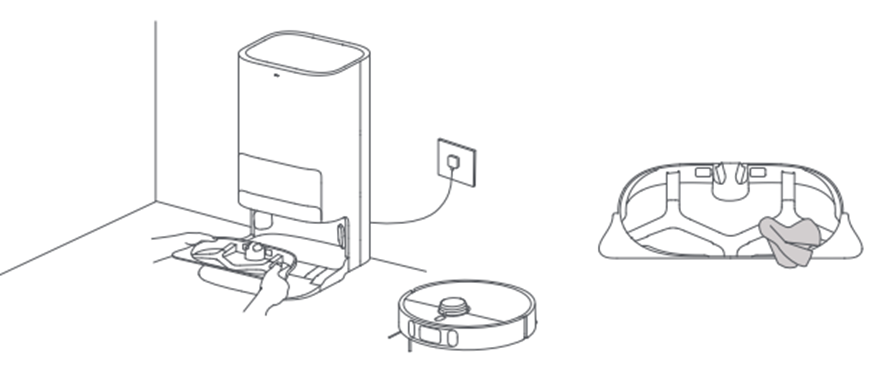
4. Wait for 3 minutes. The Omni station will automatically drain the dirty water. Use a dry cloth to wipe the bottom of the Omni station clean, and then reinstall the cleaning tray.
Please refer to the following steps to wash the cleaning tray of the Xiaomi Robot Vacuum X20+:
1. Ensure the device is turned off;
2. In the APP, tap on [Self-cleaning station]. The robot vacuum will exit the Omni station, and the Omni station will start filling with water;
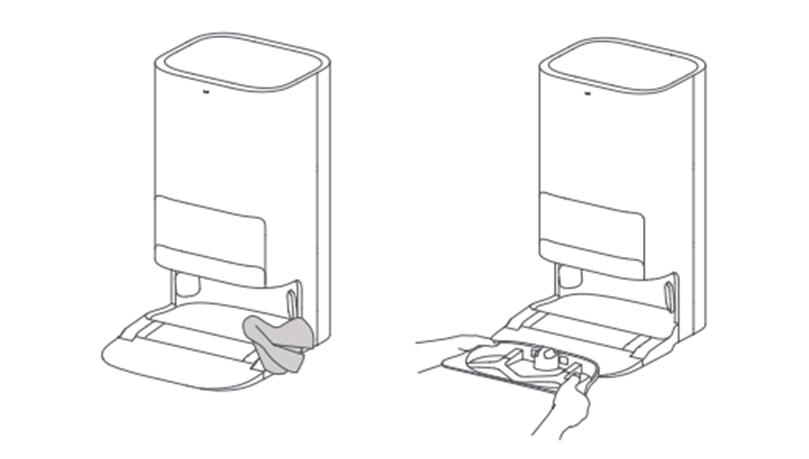
3. Remove the cleaning tray, clean any dirt or stains on the stand with a mop or brush, and then wipe it dry with a dry cloth;
4. Wait for 3 minutes. The Omni station will automatically drain the dirty water. Use a dry cloth to wipe the bottom of the Omni station clean, and then reinstall the cleaning tray.
Does it help?
Yes
No