

Xiaomi Outdoor Camera Solar Panel (BW Series) FAQ
Function Introduction
1. Q: What does the standard configuration of the Xiaomi Outdoor Camera Solar Panel (BW Series) include?
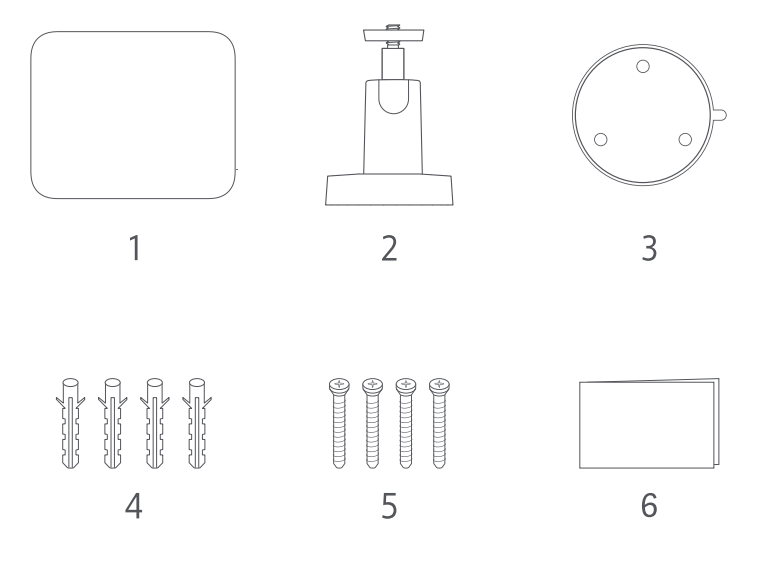
A: The standard configuration of the Xiaomi Outdoor Camera Solar Panel (BW Series) includes:
1: Solar Panel x 1;
2: Mount x1;
3: Mounting Template Sticker × 1;
4: Wall Plug × 4;
5: Screw × 4;
6: User Manual × 1.
2. Q: What is the introduction to the appearance of the Xiaomi Outdoor Camera Solar Panel (BW Series)?
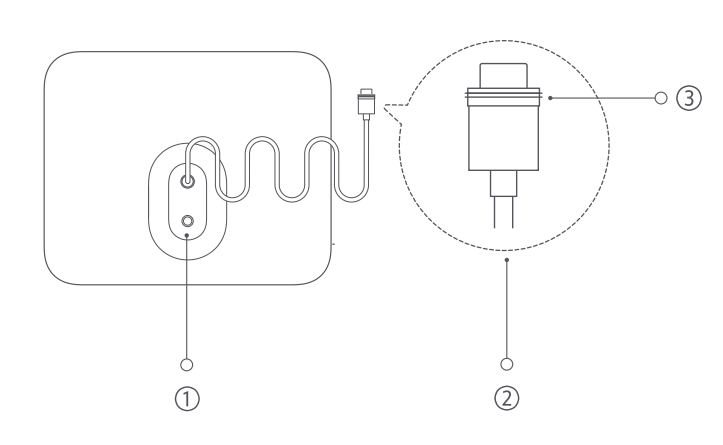
A: As shown in the following figure:
①Installation Hole for Mount
②Type-C Charging Connector
③Waterproof Gasket
3. Q: What are the steps for installing the Xiaomi Outdoor Camera Solar Panel (BW Series)?
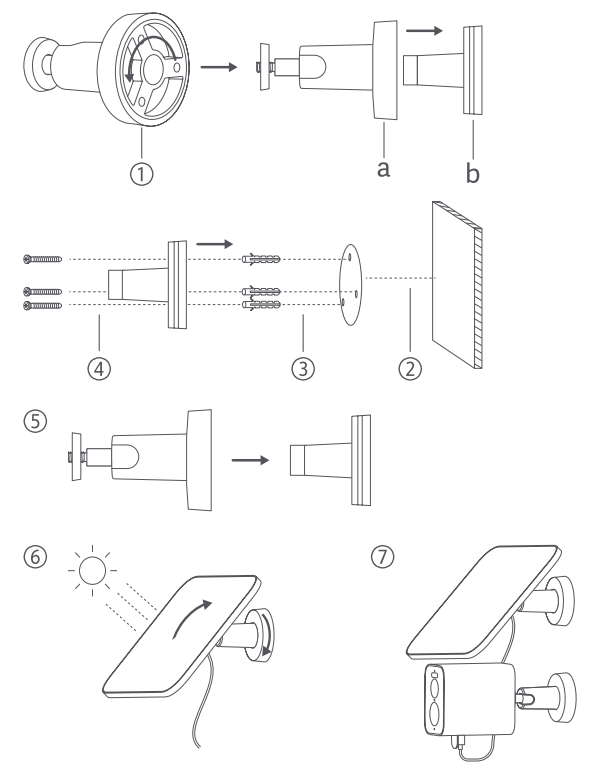
A: 1. Rotate counterclockwise and open the bracket;
2. Choose a suitable installation location (there are no buildings or trees around the installation wall), and stick positioning stickers on the flat surface of the wall;
3. Drill holes (hole diameter 6mm, hole depth 30mm) and install expansion bolts;
4. Fix the base with screws;
5. Fix the lock cover on the base;
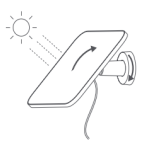
6. Fix the solar panel on the bracket and adjust the angle to maximize direct sunlight exposure. After adjustment, tighten the lock cover;
7. Insert the charging connector and waterproof ring completely into the Type-C power interface of the camera.
4. Q: Is the Xiaomi Outdoor Camera Solar Panel (BW Series) waterproof?
A: The Xiaomi Outdoor Camera Solar Panel (BW Series) is a precision electronic product with IP66 dust sealing and waterproof rating. To prevent malfunctions, do not install the solar panel in extremely humid environments or locations where water may enter. Additionally, when using the solar panel with the camera, please ensure that the Type-C plug is fully inserted into the camera's Type-C power interface to prevent it from loosening.
5. Q: How to check the charging status of the Xiaomi Outdoor Camera Solar Panel (BW Series)?
A: Go to the [Mi Home] app >> find the corresponding camera >> tap [Enter] in the upper right corner to switch to live streaming with the camera. The upper right corner of the screen displays the charging status and battery level of the solar panel.
Troubleshooting
1. Q: What to do if the Xiaomi Outdoor Camera Solar Panel (BW Series) cannot be charged?
A: Hello, please check if the angle of the solar panel can provide maximum exposure to direct sunlight and avoid the accumulation of dust, soil, or other debris on the panel. Regularly clean the solar panel, adjust and clean it, and then observe for another 2 days to check if the power of the devices in the Mi Home APP has increased.
Note:
If any wiring is loose or electronic components are exposed, please stop using the product immediately and contact the after-sales service for assistance
2. Q: Why the Xiaomi Outdoor Camera Solar Panel (BW Series) charging speed is slow?
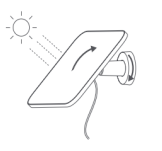
A: Hello, the charging speed of solar energy is strongly related to changes in lighting. Generally, the brightness of sunlight in the afternoon is relatively strong, so the charging speed of solar energy in the afternoon is faster than in situations such as evening or cloudy environments. You can check whether the angle of the solar panel can maximize the direct sunlight exposure of the panel and avoid the accumulation of dust, soil, or other debris on the panel. Regularly clean the solar panel.
1. Q: What does the standard configuration of the Xiaomi Outdoor Camera Solar Panel (BW Series) include?
A: The standard configuration of the Xiaomi Outdoor Camera Solar Panel (BW Series) includes:
1: Solar Panel x 1;
2: Mount x1;
3: Mounting Template Sticker × 1;
4: Wall Plug × 4;
5: Screw × 4;
6: User Manual × 1.
2. Q: What is the introduction to the appearance of the Xiaomi Outdoor Camera Solar Panel (BW Series)?
A: As shown in the following figure:
①Installation Hole for Mount
②Type-C Charging Connector
③Waterproof Gasket
3. Q: What are the steps for installing the Xiaomi Outdoor Camera Solar Panel (BW Series)?
A: 1. Rotate counterclockwise and open the bracket;
2. Choose a suitable installation location (there are no buildings or trees around the installation wall), and stick positioning stickers on the flat surface of the wall;
3. Drill holes (hole diameter 6mm, hole depth 30mm) and install expansion bolts;
4. Fix the base with screws;
5. Fix the lock cover on the base;
6. Fix the solar panel on the bracket and adjust the angle to maximize direct sunlight exposure. After adjustment, tighten the lock cover;
7. Insert the charging connector and waterproof ring completely into the Type-C power interface of the camera.
4. Q: Is the Xiaomi Outdoor Camera Solar Panel (BW Series) waterproof?
A: The Xiaomi Outdoor Camera Solar Panel (BW Series) is a precision electronic product with IP66 dust sealing and waterproof rating. To prevent malfunctions, do not install the solar panel in extremely humid environments or locations where water may enter. Additionally, when using the solar panel with the camera, please ensure that the Type-C plug is fully inserted into the camera's Type-C power interface to prevent it from loosening.
5. Q: How to check the charging status of the Xiaomi Outdoor Camera Solar Panel (BW Series)?
A: Go to the [Mi Home] app >> find the corresponding camera >> tap [Enter] in the upper right corner to switch to live streaming with the camera. The upper right corner of the screen displays the charging status and battery level of the solar panel.
Troubleshooting
1. Q: What to do if the Xiaomi Outdoor Camera Solar Panel (BW Series) cannot be charged?
A: Hello, please check if the angle of the solar panel can provide maximum exposure to direct sunlight and avoid the accumulation of dust, soil, or other debris on the panel. Regularly clean the solar panel, adjust and clean it, and then observe for another 2 days to check if the power of the devices in the Mi Home APP has increased.
Note:
If any wiring is loose or electronic components are exposed, please stop using the product immediately and contact the after-sales service for assistance
2. Q: Why the Xiaomi Outdoor Camera Solar Panel (BW Series) charging speed is slow?
A: Hello, the charging speed of solar energy is strongly related to changes in lighting. Generally, the brightness of sunlight in the afternoon is relatively strong, so the charging speed of solar energy in the afternoon is faster than in situations such as evening or cloudy environments. You can check whether the angle of the solar panel can maximize the direct sunlight exposure of the panel and avoid the accumulation of dust, soil, or other debris on the panel. Regularly clean the solar panel.
Does it help?
Yes
No