

How to connect a Xiaomi phone/REDMI phone to a computer to transfer data?
To connect a Xiaomi phone/REDMI phone to a computer to transfer data, please refer to the following steps:
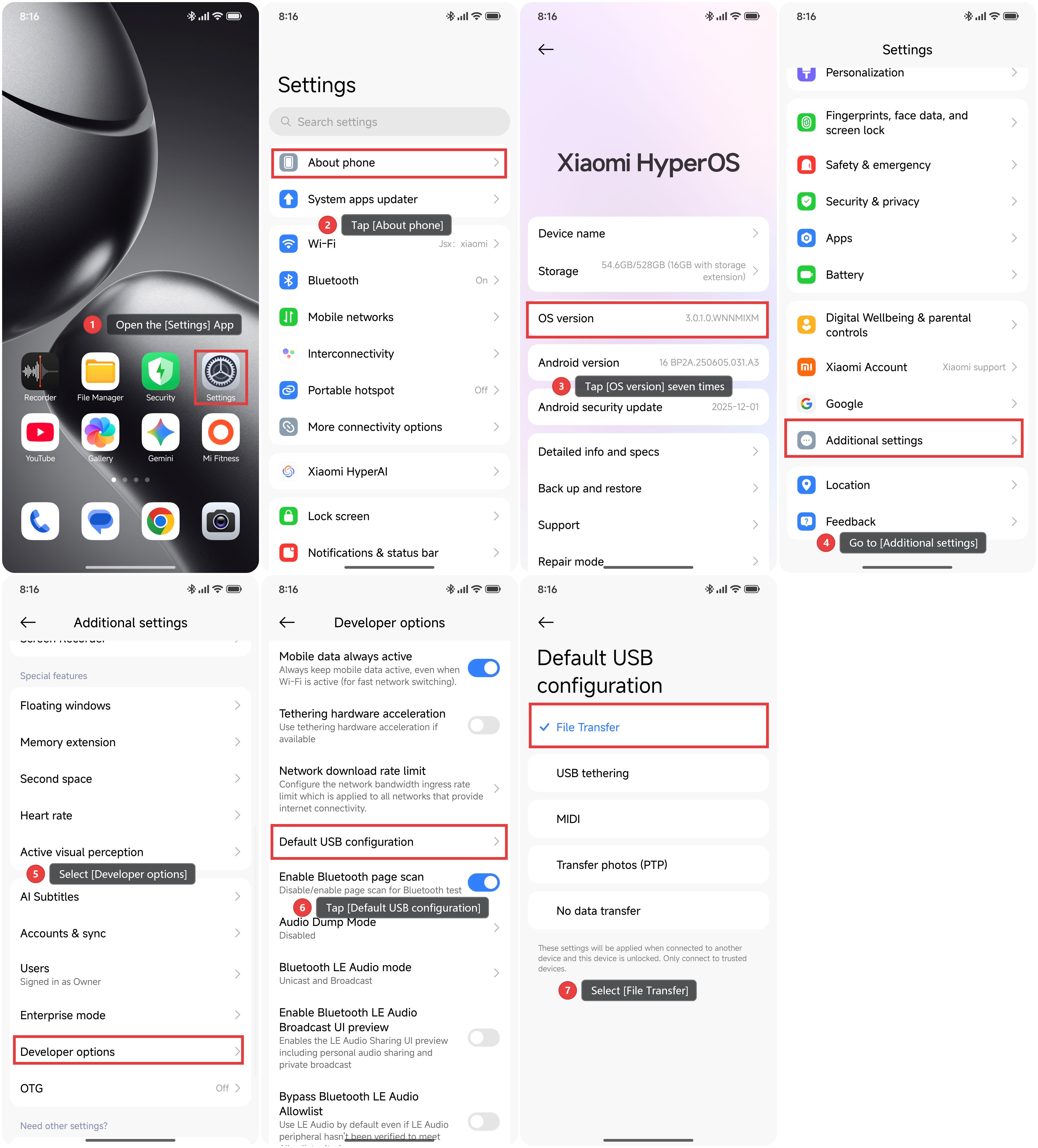
1. Open the [Settings] App.
2. Tap [About phone].
3. Tap [OS version] seven times to turn on Developer options.
4. Go to [Additional settings].
5. Select [Developer options].
6. Scroll down and tap [Default USB configuration].
7. Select [File Transfer].
8. Then connect the phone to your computer using a USB-A to Type-C data cable.
9. After the connection, there will be a prompt pop-up and you can select MIP (transfer all files) to transfer data.
Note:
MTP mode requires Windows 7 or higher versions and is compatible with most newer versions of macOS. For the operating system of the early computer, it may be necessary to install the relevant driver or software separately before it can be connected and used normally.
Does it help?
Yes
No