

Mi Electric Scooter Pro 2 Mercedes-AMG Petronas F1 Team Edition FAQ
Product Introduction
Q1: What features does the Mi Electric Scooter Pro 2 Mercedes-AMG Petronas F1 Team Edition have?
A: 1. Ride with the rest: Combining design elements from Mercedes-AMG Petronas F1 Team with Xiaomi's world leading scooter engineering, we turned your dream into reality.
2.25 km/h: Maximum speed
600W: Maximum power
3. The perfect combination of utility and design. The speed and precision from the racing track have been injected into the genes of the design and craftsmanship of the scooter.
4. Exceptional performance delivers the ultimate experience: Pursue the ultimate performance and speed. In addition to its luxurious visual appeal, it can also satisfy your daily travel needs.
45 km: Long-range battery
20%: Incline climb
Q2: What design does the Mi Electric Scooter Pro 2 Mercedes-AMG Petronas F1 Team Edition have?
A: 1. Manage via Smart App.
2. Multifunctional Control Panel.
3. Electric Brake & Disc Brake.
4. Shock-absorbing inflatable tires.
5. Aviation Aluminum Alloy Frame.

Q3: How many kinds of speed modes does the Mi Electric Scooter Pro 2 Mercedes-AMG Petronas F1 Team Edition have?
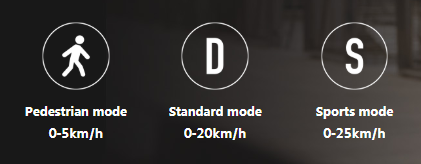
A: There are three speed modes, with an easy switch. When commuting to work, press S to go faster. When cruising around the park, press D, and in crowded areas, you can turn on the pedestrian mode to go slower. Simply double-press the power button to switch between modes and easily adjust the speed to your surroundings.
Q4: What type of battery does the Mi Electric Scooter Pro 2 Mercedes-AMG Petronas F1 Team Edition use?
A: High-safety lithium battery, 45 km super long-range battery. The battery is safe and durable with a capacity of 446 Wh. Acceleration is fast, reaching a maximum speed of 25 km/h. A full charge can take you 45 kilometers.
Q5: How about the kinetic energy recovery system (KERS)?
A: 1. New generation energy recovery system. Convert kinetic energy into electrical energy for longer battery life.
2. The kinetic energy recovery system (KERS) has been fully upgraded, and the energy conversion efficiency has been further improved. It can recover the kinetic energy of each braking and non-powered coasting and convert it into usable electrical energy to further improve the cruising range. The efficiency of energy recovery can be adjusted through the Xiaomi Home App to meet your individual riding needs.
Q6: How about the central controls?
A: Central controls designed for a better riding experience. Easy to control; try it, and you will know
1. Multifunctional dashboard: Real-time display of 8 kinds of data: speed, speed mode, power,
lock status and other driving information at a glance.
2. Comfortable extended grip: The handlebar is made of TPR material for a more comfortable grip that can effectively improve the driving experience.
3. Sensitive hand throttle: The hand throttle's moderate resistance and timely feedback make driving speed easier to control and the acceleration smoother.
4. One button, multiple functions: Intuitive controls, one button, multiple functions: Not only does the button turn the power on and off, but but it can also be used to switch between speed modes and to turn the headlights on and off.
Q7: What functions does the Xiaomi Home App achieve?
A: Xiaomi Home App, your smart driving assistant.
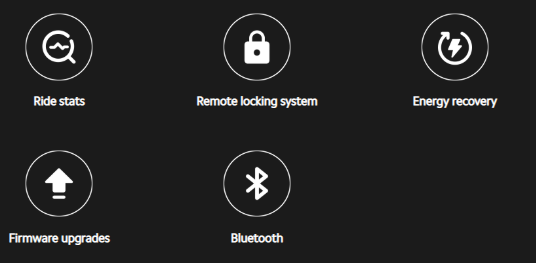
The Mi Electric Scooter Pro 2 can be connected to the Xiaomi Home App via Bluetooth to lock and unlock and to monitor riding data (e.g,. mileage, speed, remaining battery life, etc.). You can also enjoy new features and achieve a more comfortable riding experience through firmware upgrades.
Frequently asked questions
Q1: Braking fault
A: 1. Check the electronic brake:
Q1: What features does the Mi Electric Scooter Pro 2 Mercedes-AMG Petronas F1 Team Edition have?
A: 1. Ride with the rest: Combining design elements from Mercedes-AMG Petronas F1 Team with Xiaomi's world leading scooter engineering, we turned your dream into reality.
2.25 km/h: Maximum speed
600W: Maximum power
3. The perfect combination of utility and design. The speed and precision from the racing track have been injected into the genes of the design and craftsmanship of the scooter.
4. Exceptional performance delivers the ultimate experience: Pursue the ultimate performance and speed. In addition to its luxurious visual appeal, it can also satisfy your daily travel needs.
45 km: Long-range battery
20%: Incline climb
Q2: What design does the Mi Electric Scooter Pro 2 Mercedes-AMG Petronas F1 Team Edition have?
A: 1. Manage via Smart App.
2. Multifunctional Control Panel.
3. Electric Brake & Disc Brake.
4. Shock-absorbing inflatable tires.
5. Aviation Aluminum Alloy Frame.
Q3: How many kinds of speed modes does the Mi Electric Scooter Pro 2 Mercedes-AMG Petronas F1 Team Edition have?
A: There are three speed modes, with an easy switch. When commuting to work, press S to go faster. When cruising around the park, press D, and in crowded areas, you can turn on the pedestrian mode to go slower. Simply double-press the power button to switch between modes and easily adjust the speed to your surroundings.
Q4: What type of battery does the Mi Electric Scooter Pro 2 Mercedes-AMG Petronas F1 Team Edition use?
A: High-safety lithium battery, 45 km super long-range battery. The battery is safe and durable with a capacity of 446 Wh. Acceleration is fast, reaching a maximum speed of 25 km/h. A full charge can take you 45 kilometers.
Q5: How about the kinetic energy recovery system (KERS)?
A: 1. New generation energy recovery system. Convert kinetic energy into electrical energy for longer battery life.
2. The kinetic energy recovery system (KERS) has been fully upgraded, and the energy conversion efficiency has been further improved. It can recover the kinetic energy of each braking and non-powered coasting and convert it into usable electrical energy to further improve the cruising range. The efficiency of energy recovery can be adjusted through the Xiaomi Home App to meet your individual riding needs.
Q6: How about the central controls?
A: Central controls designed for a better riding experience. Easy to control; try it, and you will know
1. Multifunctional dashboard: Real-time display of 8 kinds of data: speed, speed mode, power,
lock status and other driving information at a glance.
2. Comfortable extended grip: The handlebar is made of TPR material for a more comfortable grip that can effectively improve the driving experience.
3. Sensitive hand throttle: The hand throttle's moderate resistance and timely feedback make driving speed easier to control and the acceleration smoother.
4. One button, multiple functions: Intuitive controls, one button, multiple functions: Not only does the button turn the power on and off, but but it can also be used to switch between speed modes and to turn the headlights on and off.
Q7: What functions does the Xiaomi Home App achieve?
A: Xiaomi Home App, your smart driving assistant.
The Mi Electric Scooter Pro 2 can be connected to the Xiaomi Home App via Bluetooth to lock and unlock and to monitor riding data (e.g,. mileage, speed, remaining battery life, etc.). You can also enjoy new features and achieve a more comfortable riding experience through firmware upgrades.
Frequently asked questions
Q1: Braking fault
A: 1. Check the electronic brake:
In the starting state, push the scooter and lift the front wheel (people do not stand on it), press the accelerator to accelerate, and then hold on to the brake. If the front wheel can brake, this shows that there is no problem with the electronic brake. If the electronic brake malfunctions, contact the after-sales service department for repair.
2. Check the disc brake:
2. Check the disc brake:
Hold on to the brake handle and push the scooter. If there is obvious resistance in the rear wheel, the mechanical brake is ok. If there is no resistance on the rear wheels, adjust the brake line and disc brake base.
Q2: Battery fails to charge
A: 1. Make sure your scooter is not over-discharged. Prolonged non-use may lead to complete battery drainage, causing permanent damage.
2. Please check whether the charger is plugged into the charging port/power outlet properly. And make sure the power cord is plugged into the charger or adapter properly.
3. Please check whether the charger is defective by disconnecting the charger from the scooter first. Then plug the charger into the wall power outlet. If the charger indicator turns green, the charger is not defective.
4. Please check whether the charging port of the scooter is damaged or blocked by some materials, which can also lead to a poor connection.
5. If you have another charger, please use the second. And if the second charger works well, it indicates that the first one is defective.
6. If you’ve just ridden your scooter in hot weather or the battery temperature rises too high during charging, the scooter may stop charging temporarily. Please let your scooter or the battery cool down for at least 30 minutes before you plug in the charger.
7. When the scooter's charging temperature falls below 2℃, a low-temperature protection mechanism will activate, preventing charging. This protection deactivates when the temperature rises to 5℃. You can check the adapter's indicator light during charging: a red light means the device is charging, and a green light means it is not charging. If the light is green, the scooter is not charging; please move it to a warmer environment and try charging again.
If the issue persists, please contact our local official service center or your seller for further assistance. They will help you in this regard.
Q3: How to recognize the alarm code?
A: According to the alarm sound, to judge the alarm code, one long “beep” is 10, one short “beep” is 1, and the combination of the two is the final alarm code.
Q4: The forehead panel displays a red temperature indicator
A: The red temperature indicator is on; that means the battery temperature is more than 50℃, triggering the high-temperature alarm.
Q2: Battery fails to charge
A: 1. Make sure your scooter is not over-discharged. Prolonged non-use may lead to complete battery drainage, causing permanent damage.
2. Please check whether the charger is plugged into the charging port/power outlet properly. And make sure the power cord is plugged into the charger or adapter properly.
3. Please check whether the charger is defective by disconnecting the charger from the scooter first. Then plug the charger into the wall power outlet. If the charger indicator turns green, the charger is not defective.
4. Please check whether the charging port of the scooter is damaged or blocked by some materials, which can also lead to a poor connection.
5. If you have another charger, please use the second. And if the second charger works well, it indicates that the first one is defective.
6. If you’ve just ridden your scooter in hot weather or the battery temperature rises too high during charging, the scooter may stop charging temporarily. Please let your scooter or the battery cool down for at least 30 minutes before you plug in the charger.
7. When the scooter's charging temperature falls below 2℃, a low-temperature protection mechanism will activate, preventing charging. This protection deactivates when the temperature rises to 5℃. You can check the adapter's indicator light during charging: a red light means the device is charging, and a green light means it is not charging. If the light is green, the scooter is not charging; please move it to a warmer environment and try charging again.
If the issue persists, please contact our local official service center or your seller for further assistance. They will help you in this regard.
Q3: How to recognize the alarm code?
A: According to the alarm sound, to judge the alarm code, one long “beep” is 10, one short “beep” is 1, and the combination of the two is the final alarm code.
Q4: The forehead panel displays a red temperature indicator
A: The red temperature indicator is on; that means the battery temperature is more than 50℃, triggering the high-temperature alarm.
Case one:
Hot weather/high-speed mode/long cycling causes alarm; you need to shut down the scooter to cool down before normal use. In the second case, a temperature sensor fault, you need to contact after-sales service to replace the battery components.
Q5: After the charger is connected, how to confirm whether it has been charged?
A: Observe the charger indicator light; red indicates the charging status, and green indicates the charger failure or that the charging head is not plugged in. If charging successfully, the stoplight will be flashing in a breathing state. After starting up, the panel will display the battery power and electric quantity sign increments.
Q6: The screw locking the handlebar does not lock properly
A: 1. Lock the screw into the forehead body. If the screw cannot be fully screwed in, the screw hole of the forehead body is defective, and the forehead body shall be replaced.
2. Before installing screws, the four holes of the standpipe are aligned with the four holes of the forehead body, then the four screws are pre-tightened into the threaded hole to prevent the hole dislocation. Next, tighten the screws in turn.
Please note that the scooter's battery life decreases in cold temperatures. The actual range depends on the ambient temperature, road conditions, and riding mode.
Q7: After the latest firmware update, after locking the scooter in the App, it unlocks automatically if not used for half an hour
A: Because if the scooter is not unlocked automatically, it will increase the power consumption (applies to all scooter models).
Q5: After the charger is connected, how to confirm whether it has been charged?
A: Observe the charger indicator light; red indicates the charging status, and green indicates the charger failure or that the charging head is not plugged in. If charging successfully, the stoplight will be flashing in a breathing state. After starting up, the panel will display the battery power and electric quantity sign increments.
Q6: The screw locking the handlebar does not lock properly
A: 1. Lock the screw into the forehead body. If the screw cannot be fully screwed in, the screw hole of the forehead body is defective, and the forehead body shall be replaced.
2. Before installing screws, the four holes of the standpipe are aligned with the four holes of the forehead body, then the four screws are pre-tightened into the threaded hole to prevent the hole dislocation. Next, tighten the screws in turn.
Please note that the scooter's battery life decreases in cold temperatures. The actual range depends on the ambient temperature, road conditions, and riding mode.
Q7: After the latest firmware update, after locking the scooter in the App, it unlocks automatically if not used for half an hour
A: Because if the scooter is not unlocked automatically, it will increase the power consumption (applies to all scooter models).
Does it help?
Yes
No