

The REDMI 9T comes with a Receive recommendations feature, which is a built-in feature of the security app.
For your reference, here's a general guide on how to enable/disable this feature on your smartphone:
1. Go to the [Security] app on your smartphone. You can usually find it on your home screen or in the app drawer;
2. Tap the [Settings] icon at the upper right corner;
3. Scroll down to find [Receive recommendations] and toggle it on/off to enable/disable it.
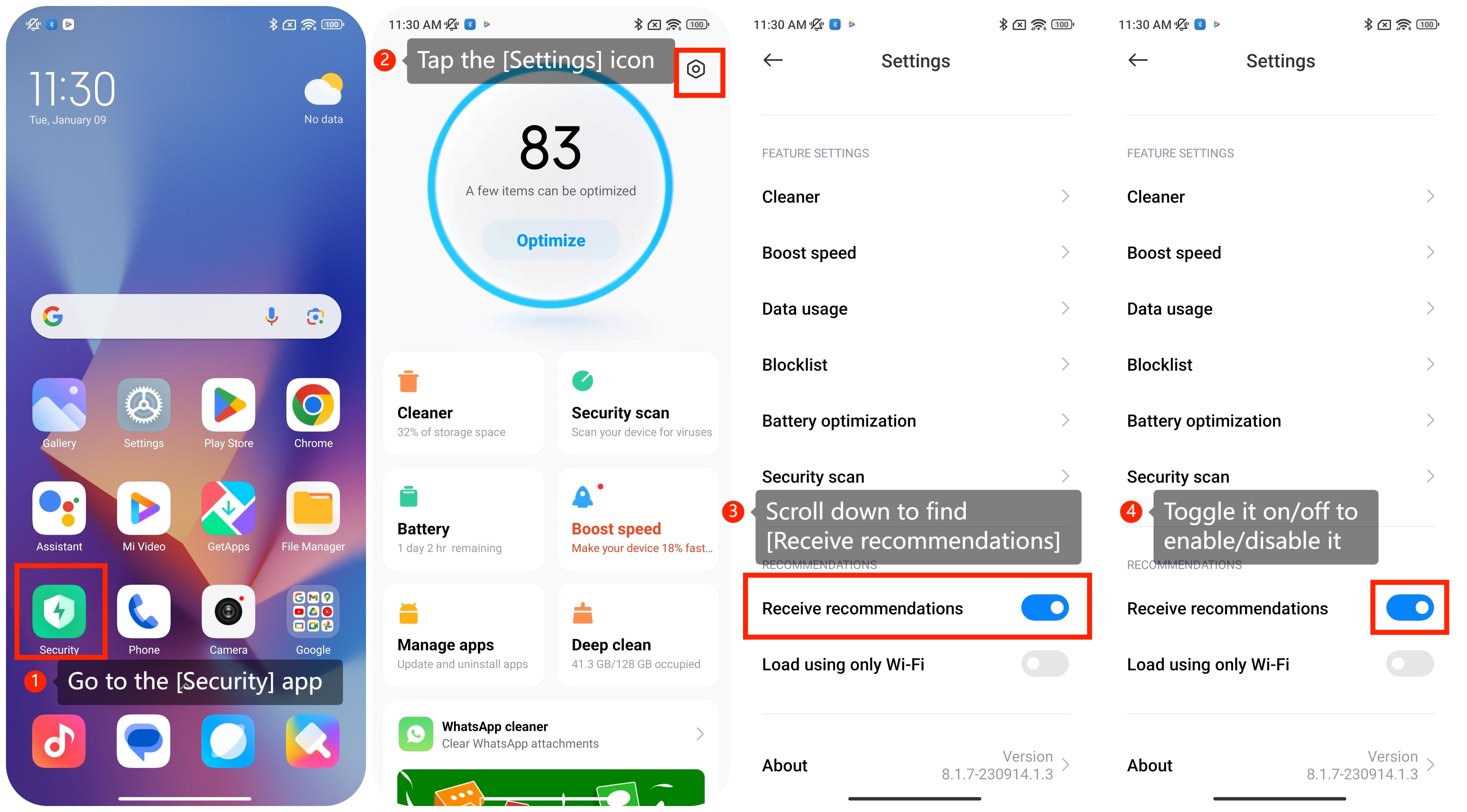
For your reference, here's a general guide on how to enable/disable this feature on your smartphone:
1. Go to the [Security] app on your smartphone. You can usually find it on your home screen or in the app drawer;
2. Tap the [Settings] icon at the upper right corner;
3. Scroll down to find [Receive recommendations] and toggle it on/off to enable/disable it.
If you have an interest in this feature, here are some detailed advantages you can refer to:
1. The Security app can scan for viruses and malware on the smartphone. Recommendations are provided based on the scan results, such as actions to take if a threat is detected;
2. The Security app offers features related to privacy protection, such as permission management, data usage monitoring, or app behavior analysis. Recommendations could include adjustments to app permissions or identifying potentially risky behaviors;
3. Recommendations would involve clearing unnecessary files, optimizing system settings, or addressing performance issues.
1. The Security app can scan for viruses and malware on the smartphone. Recommendations are provided based on the scan results, such as actions to take if a threat is detected;
2. The Security app offers features related to privacy protection, such as permission management, data usage monitoring, or app behavior analysis. Recommendations could include adjustments to app permissions or identifying potentially risky behaviors;
3. Recommendations would involve clearing unnecessary files, optimizing system settings, or addressing performance issues.