

The REDMI Note 11 Pro+ 5G features adaptive refresh rate technology. This means that the smartphone can dynamically adjust the refresh rate based on the content being displayed. For example, it can lower the refresh rate when viewing static images to save battery power.
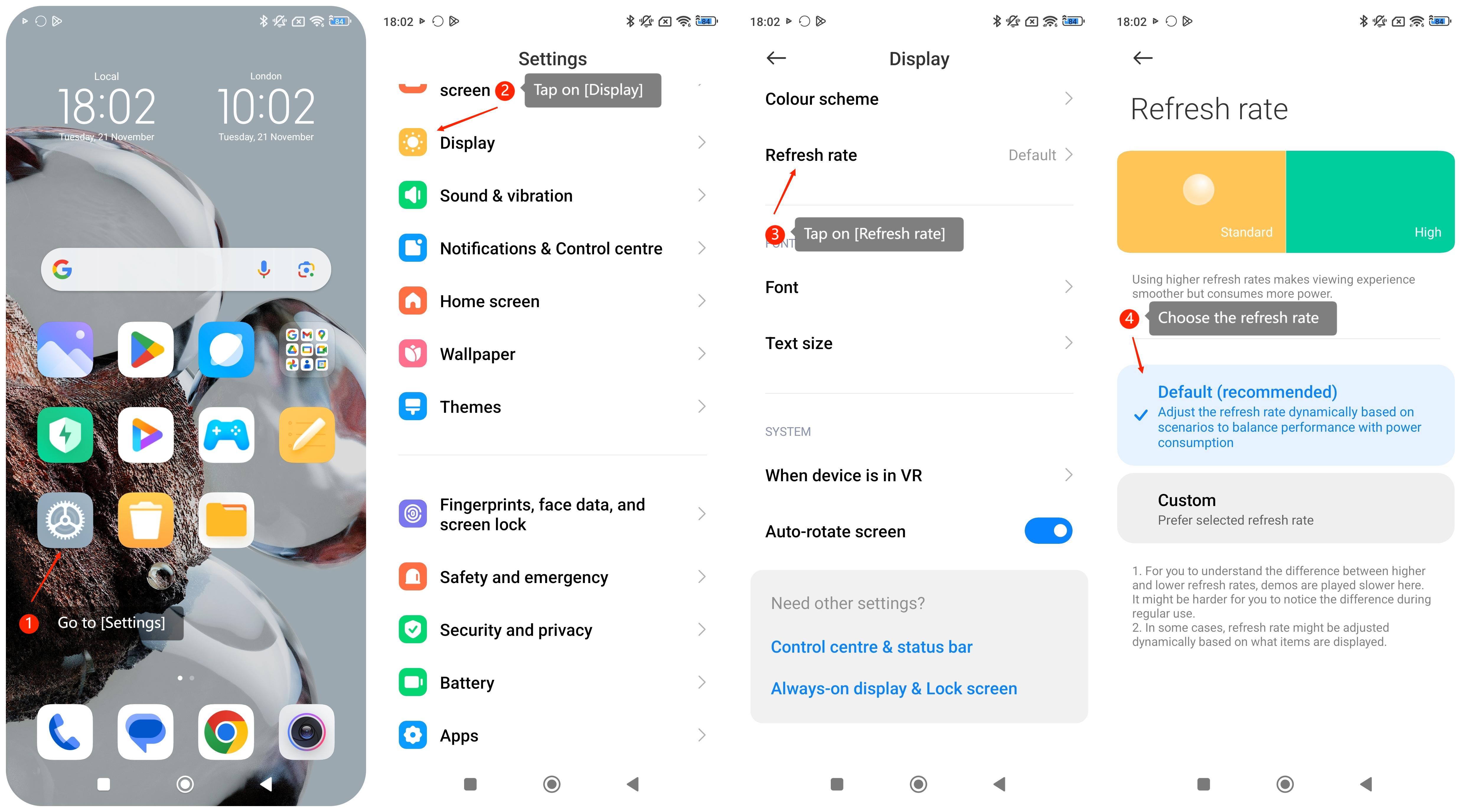
To adjust the refresh rate on the REDMI Note 11 Pro+ 5G, please refer to the following steps:
1. Go to [Settings];
2. Tap on [Display];
3. Tap on [Refresh rate];
4. Choose the refresh rate you prefer.
To adjust the refresh rate on the REDMI Note 11 Pro+ 5G, please refer to the following steps:
1. Go to [Settings];
2. Tap on [Display];
3. Tap on [Refresh rate];
4. Choose the refresh rate you prefer.
Note:
1. The default refresh rate is recommended and it can adjust the refresh rate dynamically based on scenarios to balance performance with power consumption;
2. In some cases, the refresh rate is adjusted dynamically based on what items are played. It may be hard for you to notice the difference during regular use.
1. The default refresh rate is recommended and it can adjust the refresh rate dynamically based on scenarios to balance performance with power consumption;
2. In some cases, the refresh rate is adjusted dynamically based on what items are played. It may be hard for you to notice the difference during regular use.