

The installation method is as follows:
Install stand:
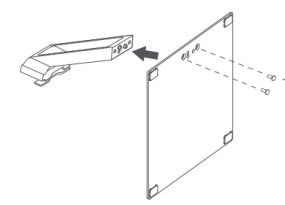
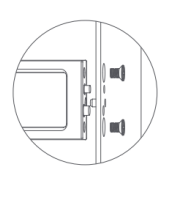
1. Lock the stand and the lower end of the bracket with stand screws;
Note: After the chassis and the column are fixed, hold it with your hands and then tighten the screws to avoid the problem of the chassis falling off.
Install the bracket:
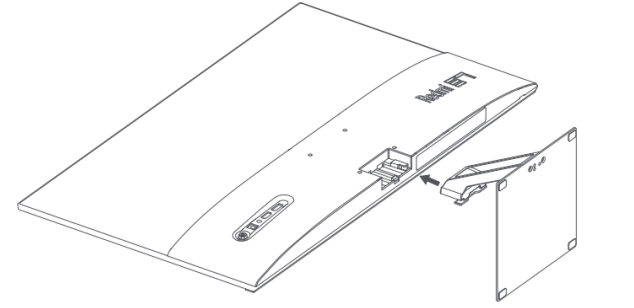
Install the bracket into the card slot until you hear a "click" and shake the bracket by hand to ensure it is in place.
Note: Please be sure to install it in place, otherwise there may be dangers such as the display falling.
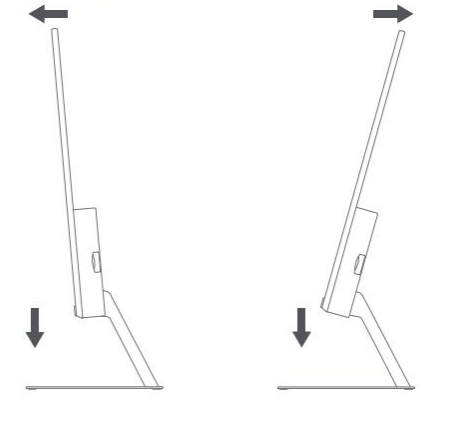
After the installation is complete, adjust the forward or backward angle of the monitor according to actual needs.
Note: When adjusting the angle, it is recommended to hold the stand with one hand and adjust the monitor with the other hand. The monitor can easily tip over if adjusted with one hand.
Wall mounting: 1. Lay the monitor back flat, press the button on the bracket, and remove the bracket.
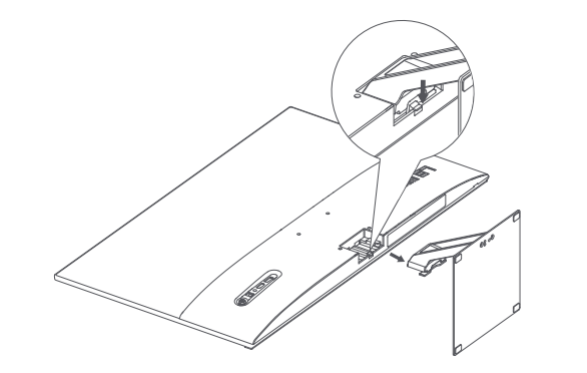
Wall mount bracket(needs to be purchased separately):Mounts to the recessed studs of the rear case.
Tip: The distance between the mounting holes of the Wall mount bracket that this product is adapted to is 75×75mm.
Hang the assembled Monitor on a hard wall. Do not press the screen directly with your hands during wall-mounting of the Monitor to prevent screen breakage.
Note:
During the Wall mountingMonitor process, do not press the screen directly with your hands to prevent screen breakage.
To prevent the monitor from falling when wall-mounted, please install it properly and take safety precautions.
Do not place or hang anything on the Wall mount bracket.
The wall-mounted height should be within 2 meters.
Install stand:
1. Lock the stand and the lower end of the bracket with stand screws;
Note: After the chassis and the column are fixed, hold it with your hands and then tighten the screws to avoid the problem of the chassis falling off.
Install the bracket:
Install the bracket into the card slot until you hear a "click" and shake the bracket by hand to ensure it is in place.
Note: Please be sure to install it in place, otherwise there may be dangers such as the display falling.
After the installation is complete, adjust the forward or backward angle of the monitor according to actual needs.
Note: When adjusting the angle, it is recommended to hold the stand with one hand and adjust the monitor with the other hand. The monitor can easily tip over if adjusted with one hand.
Wall mounting: 1. Lay the monitor back flat, press the button on the bracket, and remove the bracket.
Wall mount bracket(needs to be purchased separately):Mounts to the recessed studs of the rear case.
Tip: The distance between the mounting holes of the Wall mount bracket that this product is adapted to is 75×75mm.
Hang the assembled Monitor on a hard wall. Do not press the screen directly with your hands during wall-mounting of the Monitor to prevent screen breakage.
Note:
During the Wall mountingMonitor process, do not press the screen directly with your hands to prevent screen breakage.
To prevent the monitor from falling when wall-mounted, please install it properly and take safety precautions.
Do not place or hang anything on the Wall mount bracket.
The wall-mounted height should be within 2 meters.