

We provide a running posture recognition function for sports enthusiasts who are concerned about their running posture. Through specific wearing methods, you can obtain some specific running posture information from the wearable device to help you analyze your running posture and how to improve it.
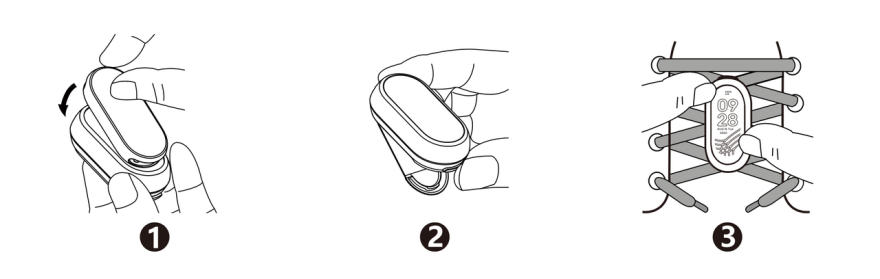
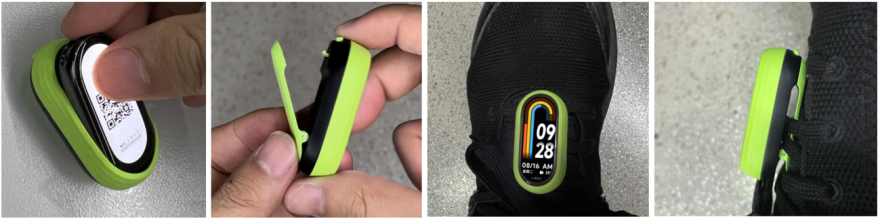
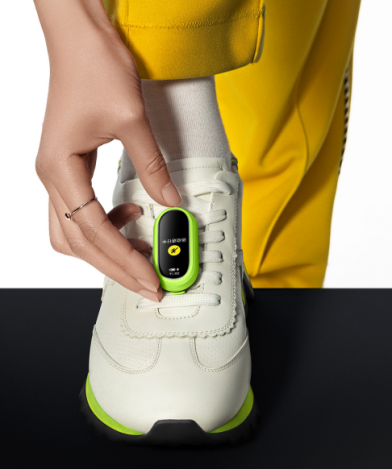
How to wear running bean mode:
Press and buckle the main body of the band into the running pod cavity in the correct direction.
Press the shoe clip button on the bottom of the running pod to release the spring clip.
Pass the shoe buckle clip under the shoelaces and press to fasten the spring clip.
Note: After wearing it, please check whether the content of the Band displays is facing you. If the direction is wrong, data recording will be incorrect.
Data items supported for monitoring:
Running
Cadence
Cadence is the frequency of footsteps, the number of times the two legs alternate per unit time during walking or running. It is one of the important factors that determine the speed of walking and running. Usually expressed in steps/second. The walking pace can reach 3.5-3.7 steps/second; the sprinting pace can reach 4.6-5.1 steps/second. Its speed is mainly determined by the flexibility of the human nerve process and the percentage of fast muscle (white muscle) fibers in the muscle, the coordination of motor organs, muscle strength and contraction speed, etc., which is a strong congenital factor. Through scientific training, stride frequency can be improved.
stride
Pace = stride frequency * stride length
Generally speaking, the running method with relatively high stride frequency is called "cadence running method", while the running method with relatively large stride length is called "stride running method". Among top runners, stride length is the most critical factor in determining performance.
Pace ratio
Cadence/pace
If the cadence is too small when the pace is fast, it means the stride length is long and you are prone to injury;
If the cadence is too high when the pace is slow, it means the stride length is too small and the running efficiency is low.
touchdown time
The time it takes for a single foot to leave the ground from the moment it touches the ground, and the time it takes for each foot to land on the ground during running (unit: milliseconds).
free time
The time that the soles of the feet are in the air at the same time during running (unit: milliseconds).
touchdown ratio
The touchdown time divided by the flight time is the ratio of the touchdown time to the flight time.
valgus range
The eversion amplitude reflects the angle of inward rotation of the foot from the initial landing to the beginning of pushing off the ground. The rotation angle is usually between 5° and 25°. Either larger or smaller will increase the risk of sports injuries.
Landing method
It is divided into full palm landing, front foot landing and heel landing.
Landing impact
Ground impact refers to the impact of the ground when the foot hits the ground, and it is also one of the potential factors causing sports injuries. The time it takes to touch the ground is 0.15 times your body weight, and the impact force after full support can reach 0.2 to 0.3 times your body weight. However, every 30 seconds the running speed is shortened, the force will increase by 0.5 to 0. Point six times your body weight.
Cycling
Cadence
Cadence is expressed in the number of times the pedals are turned per minute.
Note: You cannot switch the wearing mode from the App during exercise, pomodoro, or countdown.
How to use running beans:
Switch to the "Running Bean" mode on the App or the strip device, and initiate outdoor running, indoor running, walking or cycling on the App-Sports page according to the prompt.
Switch running bean mode path:
band: Settings->Wearing Mode->Enter Running Bean Mode->Enable;
App: Device page->Switch wearing mode->Running Bean mode.
Exit running bean mode path:
band: After the screen of the touch band lights up, tap the screen and slide up to exit. Press and hold the arrow and slide up to confirm the exit.
Initiate motion path:
APP sports page (outdoor running, outdoor walking, outdoor cycling, indoor running) -> select any sport -> select running bean -> select GO -> wear complete.
Notice:
1. This mode cannot record heart rate, blood oxygen and other data.
2. Make sure you have initiated exercise in the App, otherwise exercise data cannot be recorded.
Running bean disassembly method:
Press the shoe buckle clip button at the bottom of the running pod, pop up the spring clip, and remove the running pod from the shoelaces.
Use your fingertips or tabs to gently insert the top or bottom of the running pod, grab the groove of the band body and pull it up.
Separate the main body of the band from the running pod.