

When your phone's hotspot is on, but no devices are connected for a long time, you can set it to turn off automatically. Turning off the mobile hotspot automatically saves battery power and mobile data, extending battery life and reducing data usage. It also helps prevent overheating caused by staying on for too long at high loads and lowers the risk of unauthorized access from unknown devices, making your network more secure.
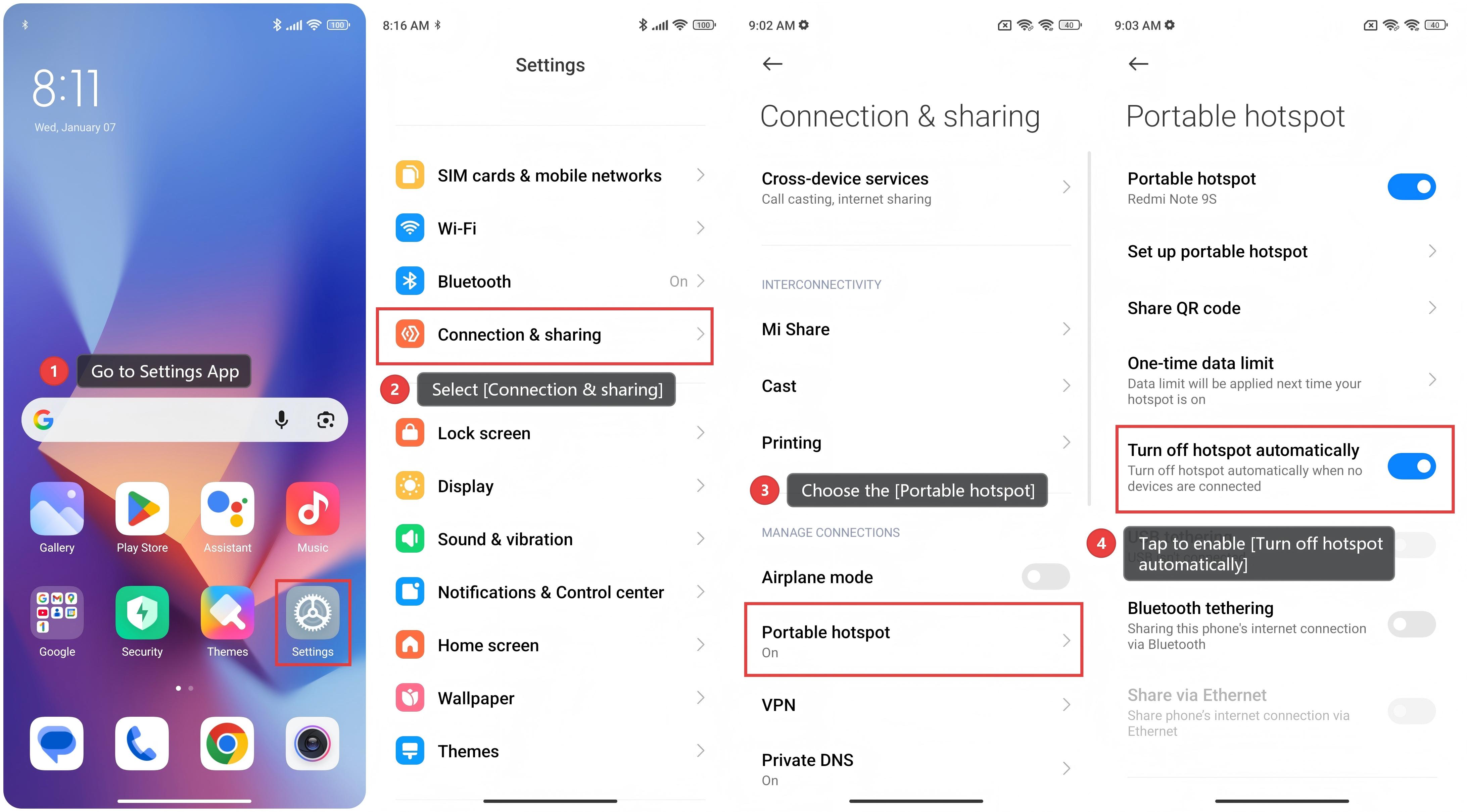
To turn off the hotspot automatically on the Xiaomi smartphone, please refer to the following steps:
The feature helps save mobile data.
1. Go to Settings App.
2. Select [Connection & sharing].
3. Choose the [Portable hotspot].
4. Tap to enable [Turn off hotspot automatically].
4. Tap to enable [Turn off hotspot automatically].
Note:
When the mobile hotspot is automatically turned off, you need to manually re-enable the function to provide a hotspot for other devices again.