

Recents windows enable you to view recently-used Apps and switch between Apps.
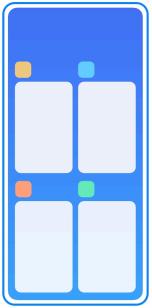
Open recently-opened Apps in Recents
1. Open Recents windows.
• Swipe up from the bottom of the screen when in full screen mode.
• Tap 0 when use system navigation buttons.
2. Tap an App window.
Remove recently-opened Apps in Recents
1. Open Recents windows.
• Swipe up from the bottom of the screen when in full screen mode.
• Tap 0 when use system navigation buttons.
2. Swipe an App window lel or right.
Note
You can tap to clear all recently-opened Apps.
Open recently-opened Apps in Recents
1. Open Recents windows.
• Swipe up from the bottom of the screen when in full screen mode.
• Tap 0 when use system navigation buttons.
2. Tap an App window.
Remove recently-opened Apps in Recents
1. Open Recents windows.
• Swipe up from the bottom of the screen when in full screen mode.
• Tap 0 when use system navigation buttons.
2. Swipe an App window lel or right.
Note
You can tap
to clear all recently-opened Apps.