

Solution:
Make sure the phone is connected to the internet(preferable via Wi-Fi) and connect the “ Mi Robot Builder ” App with controller. Go to “Settings” >>”System”>>”Firmware Update”. It takes about 20mins to finish. User can get more features, fix some bugs, and optimize the underlying programming through updating the firmware.
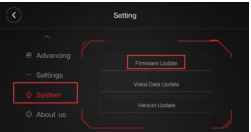
Here are the things needs attention:
1. Don’t move the phone far away from the controller for avoiding Bluetooth disconnection throughout the updating,
2. The controller should be fully charged;
3. The motor shouldn’t be working during updates.