

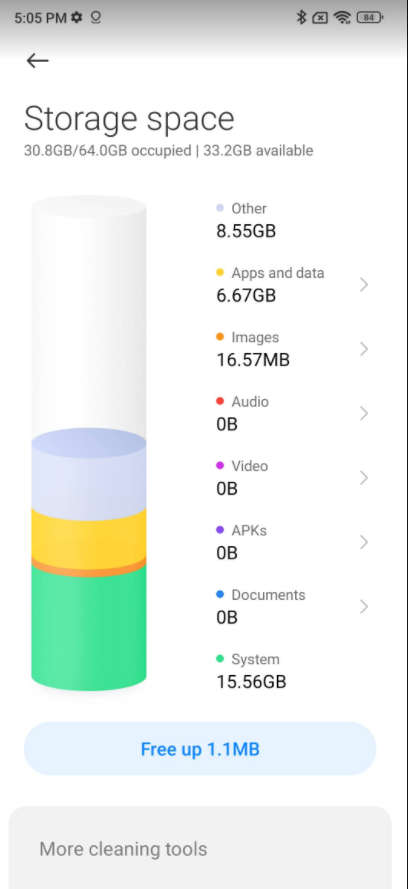
During the use of the phone, in addition to the files saved by the user himself, some software data will also be generated, some of these data have file formats that the system can recognise (e.g. .mp4, .mp3, .jpg and other file formats), but there will also be some file type formats that the system cannot recognise, these unrecognisable files will be categorised as "other files "However, most of the "other " is to ensure the normal operation of the software in the phone, so it is not recommended to delete unknown files in the file management.
The following options can be used to reduce the usage of "Other".
1. You can enter Security>>Cleaner to clean and save system space
2. It is recommended to clear the local data of some software. However, after clearing the data, the application will be restored to the state it was first downloaded, including the previous software settings, etc. (e.g. for single player breakout games, the breakout data will disappear after clearing). So only the unused software data needs to be cleared to avoid losing important data. (Path: Settings>>Apps>>Manage apps>>Apps that need to be cleaned>>Clear data).
3.Uninstall third-party apps that are not commonly used in the phone.
4. If, after the above options, "Other " still has a lot of files or no reduction, it is generally because the other files contain the necessary files for the software in the phone. If the user must clean up, it is recommended to restore the phone to factory settings, and make sure to backup important data to the cloud service or computer before operation.
5. After resetting the phone to use a period of time, other files will certainly still generate files, if the user consulting space is not enough for daily use, you can recommend that users replace the large storage capacity of Xiaomi phones.