

A firmware update for the Mi Temperature and Humidity Monitor 2 refers to the process of updating the embedded software within the device to a newer version. This update may include bug fixes, performance improvements, new features, or enhancements to existing functionality. By performing a firmware update, users can ensure that their monitor is running the latest software, thereby optimizing its performance and potentially addressing any issues or vulnerabilities that may exist in earlier firmware versions.
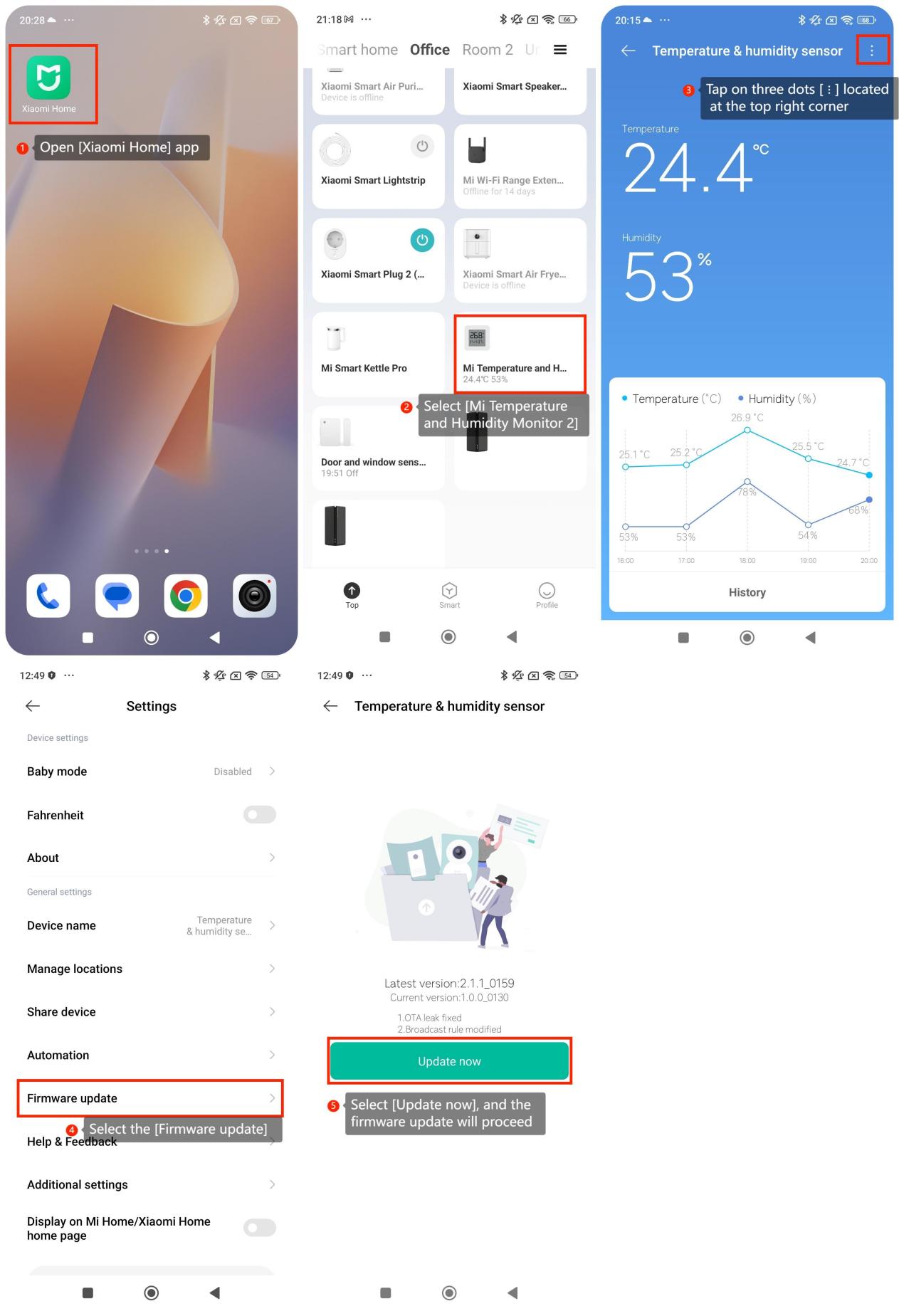
To update the firmware on Mi Temperature and Humidity Monitor 2, please refer to the following steps:
1. Open [Xiaomi Home] app;
2. Select [Mi Temperature and Humidity Monitor 2];
3. Tap on three dots [ ⋮] located at the top right corner;
4. Select the [Firmware update];
5. If there is a new version of firmware available for update, you will see the option to [Update now]. Select it, and the firmware update will proceed.
To update the firmware on Mi Temperature and Humidity Monitor 2, please refer to the following steps:
1. Open [Xiaomi Home] app;
2. Select [Mi Temperature and Humidity Monitor 2];
3. Tap on three dots [ ⋮] located at the top right corner;
4. Select the [Firmware update];
5. If there is a new version of firmware available for update, you will see the option to [Update now]. Select it, and the firmware update will proceed.