

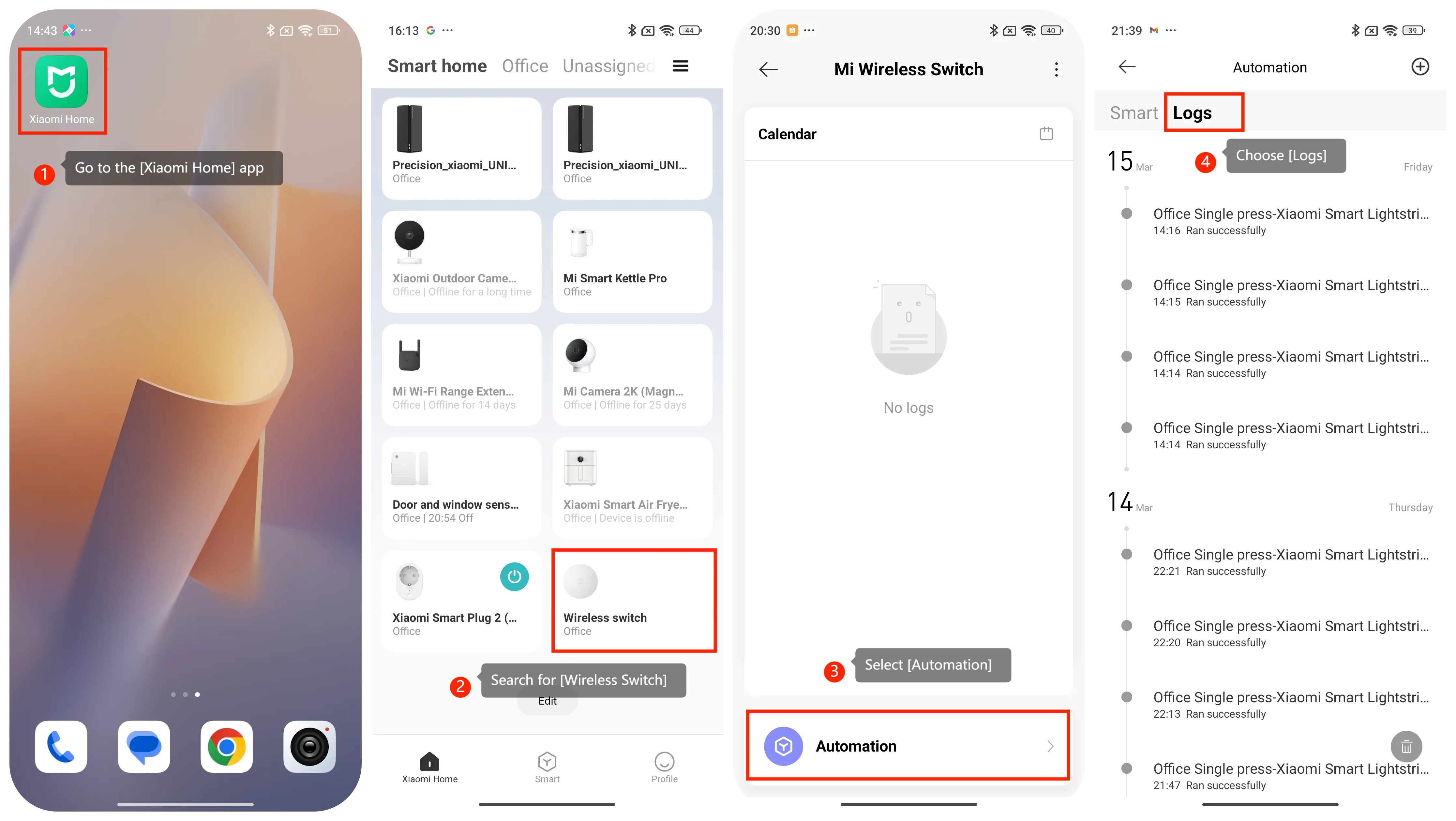
To check the device usage log for the Mi Wireless Switch, please refer to the following steps:
1. Go to the [Xiaomi Home] app. You can usually find it on your home screen or in the app drawer;
2. Search for [Wireless Switch];
3. Then select [Automation];
4. Choose [Logs];
5. You can see your Mi Wireless Switch activity log. It have a record of activities or events related to the usage of the Mi Wireless Switch. It also includes information such as when the device was activated, how frequently it was used, what actions were performed with it, and any associated data or outcomes.
Friendly reminder:
Kindly check device usage logs periodically for valuable insights to inform decision-making about Mi Wireless Switch operation.
1. Go to the [Xiaomi Home] app. You can usually find it on your home screen or in the app drawer;
2. Search for [Wireless Switch];
3. Then select [Automation];
4. Choose [Logs];
5. You can see your Mi Wireless Switch activity log. It have a record of activities or events related to the usage of the Mi Wireless Switch. It also includes information such as when the device was activated, how frequently it was used, what actions were performed with it, and any associated data or outcomes.
Friendly reminder:
Kindly check device usage logs periodically for valuable insights to inform decision-making about Mi Wireless Switch operation.