

How to use the Google Assistant to control the Mijia Air Conditioner?
You can control the Mijia Air Conditioner via Google Assistant, which allows you to use voice commands to operate the air conditioner more conveniently, such as turning it on or off, without manual interaction. This feature enhances hands-free control, improves daily convenience, and helps you manage the air conditioner more efficiently in smart home scenarios.
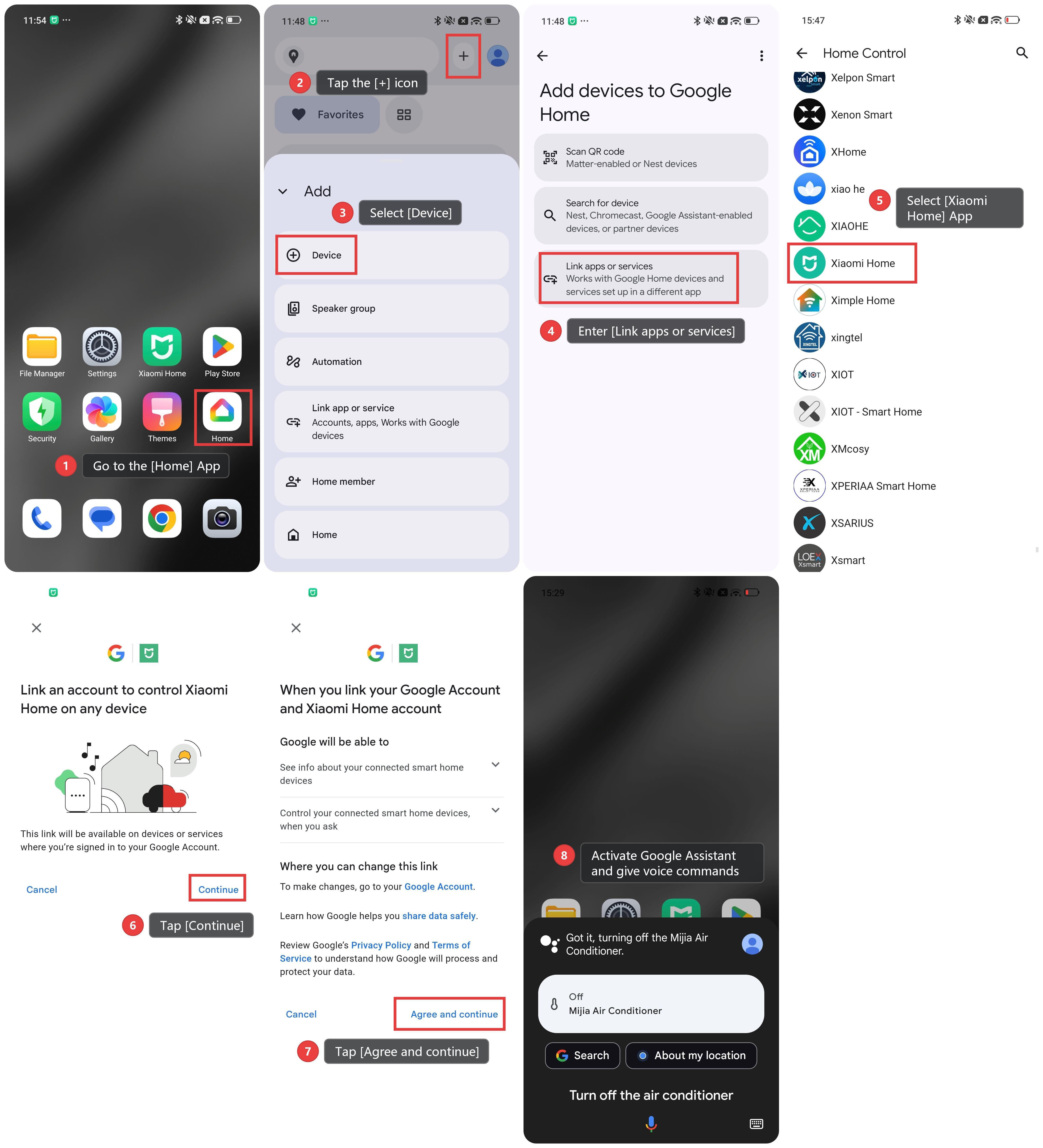
To use the Google Assistant to control the Mijia Air Conditioner, please refer to the following steps:
1. Go to the [Home] App.
2. Tap the [+] icon.
3. Select [Device].
4. Enter [Link apps or services].
5. Select [Xiaomi Home] App.
6. Tap [Continue].
7. Tap [Agree and continue]. The Xiaomi Home App will then be linked automatically.
8. Activate Google Assistant and give voice commands related to the air conditioner, such as turning the air conditioner on or off.
Does it help?
Yes
No